
Introduction
This manual provides essential information for the safe and effective use of your TrustCell CS-MCS188SL Ni-MH replacement battery. Please read these instructions carefully before installation and operation to ensure optimal performance and longevity of your battery.
Product Overview and Compatibility
The TrustCell CS-MCS188SL is a high-quality Ni-MH replacement battery designed for specific Moser ChroMini and Easy Style models. It is engineered to meet the original specifications for reliable performance.
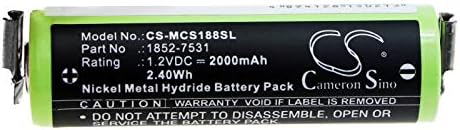
Image 1: Top view of the TrustCell CS-MCS188SL battery, showing model number CS-MCS188SL, part number 1852-7531, 1.2VDC, 2000mAh, and 2.40Wh rating.
Compatible Part Numbers:
- 1590-7291
- 1852-7531
Compatible Device Models:
- Moser ChroMini 1591
- Moser ChroMini 1591B
- Moser ChroMini 1591Q
- Moser Easy Style 1881
Important: Before purchase and installation, carefully check the model number of your device and the part number of your original battery to confirm compatibility.
Safety Precautions
Adhering to these safety guidelines is crucial for preventing damage to the battery, your device, and personal injury.
- Do Not Disassemble: Attempting to disassemble the battery can lead to short circuits, fire, or exposure to hazardous materials.
- Avoid Extreme Temperatures: Do not dispose of the battery in fire or water. Do not store the battery above 60 ℃ (140 ℉). High temperatures can cause the battery to overheat, leak, or explode.
- Proper Charging: Use only the original or a high-quality, compatible charger for your device. Using low-quality third-party chargers can shorten the battery's lifespan and pose safety risks.
- Protection Features: This battery includes built-in protection against overcharge, over-discharge, over-voltage, and short circuits to enhance safety and battery life.
Setup and Installation
Follow these steps for proper installation of your replacement battery:
- Power Off Device: Ensure your device is completely powered off and disconnected from any power source before beginning installation.
- Remove Old Battery: Carefully remove the old battery from your device according to your device's specific instructions.
- Insert New Battery: Align the TrustCell CS-MCS188SL battery correctly within the battery compartment.
- Secure Connection: When installing, ensure the connector is properly and securely connected to your device. A loose connection can prevent the battery from functioning or charging correctly.
- Close Compartment: Securely close the battery compartment of your device.
Operating and First Use
To achieve the best performance from your new battery, follow these recommendations:
- Initial Charge Cycles: A new battery will achieve its best performance after 2 or 3 complete cycles of charge and discharge. This means fully charging the battery, using it until it's nearly depleted, and then fully recharging it again, two to three times.
- Regular Use: For optimal battery health, avoid leaving the battery fully discharged for extended periods.
Maintenance
Proper maintenance helps extend the life of your battery:
- Storage: If storing the battery for an extended period, store it in a cool, dry place at approximately 50% charge. Avoid storing it fully charged or fully discharged.
- Cleaning: Keep battery contacts clean and free from dust or debris. Use a dry cloth to gently wipe the contacts if necessary.
Troubleshooting
If you encounter issues with your battery, consider the following:
- Battery Not Charging: Ensure the battery is correctly installed and the device's charging port is clean. Verify that the charger is functional and compatible.
- Shortened Run Time: If the battery's run time is significantly shorter than expected, ensure it has completed 2-3 full charge/discharge cycles. If the issue persists, contact support.
- Device Not Powering On: Check that the battery is securely connected. If the device still does not power on, the issue may be with the device itself rather than the battery.
Specifications

Image 2: TrustCell CS-MCS188SL battery showing its length dimension of 52.9mm.
| Specification | Detail |
|---|---|
| Battery Type | Ni-MH (Nickel-Metal Hydride) |
| Model Number | CS-MCS188SL |
| Part Numbers | 1590-7291, 1852-7531 |
| Voltage | 1.2V |
| Capacity | 2000mAh |
| Energy Rate | 2.40Wh |
| Dimensions (L x W x H) | 52.90 x 14.30 x 14.30 mm (approx. 2.08 x 0.56 x 0.56 inches) |
| Gross Weight | 53g |
| Certifications | ISO9001, RoHS, CE, UN38.3, MSDS |
Warranty and Support
Your TrustCell battery is backed by a commitment to quality and customer satisfaction.
- Warranty: We offer a refund or replacement for 1 year from the date of purchase.
- Customer Service: For any problems or questions, our 24/7 prompt after-sales service is available. Please feel free to contact us via email, and we will reply within 24 hours.