
Introduction
This manual provides essential instructions for the safe and effective use of your TrustCell CS-P403CL Ni-MH replacement battery. This battery is designed for compatibility with Audioline CDL200, CDL400, and FF893 devices. Please read this manual thoroughly before installation and operation.
Setup and Installation
Follow these steps for proper battery installation and initial preparation:
- Unpack the Battery: Carefully remove the battery from its packaging.
- Locate Battery Compartment: Refer to your device's original manual to locate and open the battery compartment.
- Connect the Battery: Insert the battery into the compartment, ensuring the connector is properly aligned and securely connected to your device's battery terminal.
- Close Compartment: Securely close the battery compartment.
- Initial Charging: A new battery will achieve its best performance after 2 or 3 complete charge and discharge cycles. Fully charge the battery before its first use.
Important Notice Before Purchase and Installation:
- Ensure the connector is properly connected to your device.
- Do not use low-quality third-party adapter chargers, as this may shorten the battery's life.

Image: Front view of the TrustCell CS-P403CL battery, displaying its model number and key specifications on the label.
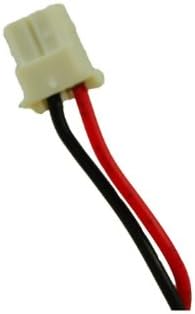
Image: Close-up of the battery's two-pin connector, showing the red and black wires for power connection.
Operating Instructions
Once installed and initially charged, the battery operates automatically with your compatible device. Ensure your device's charging cradle or adapter is functioning correctly to maintain optimal battery performance.
- Charging: Place your device in its charging cradle or connect it to its charger. The device's indicator should show that it is charging.
- Discharging: Use your device normally until the battery level is low, as indicated by your device.
- Cycle Optimization: For the first 2-3 uses, allow the battery to fully discharge before recharging to optimize its capacity.
Maintenance and Safety
Proper care and adherence to safety guidelines will extend the life of your battery and ensure safe operation.
Safety Cautions:
- Do not disassemble the battery pack.
- Do not dispose of the battery in fire or water.
- Do not store the battery above 60 ℃ (140 ℉).
- Do not crush, puncture, or short external contacts.
General Maintenance:
- Store the battery in a cool, dry place when not in use for extended periods.
- Avoid exposing the battery to extreme temperatures.
- Clean battery contacts periodically with a dry cloth to ensure good connection.
Troubleshooting
If you encounter issues with your replacement battery, consider the following:
- Device Not Powering On: Ensure the battery is correctly installed and fully charged. Verify that the connector is securely attached.
- Battery Not Charging: Check if the charging cradle or adapter is properly connected and functioning. Ensure the battery contacts are clean. Avoid using unapproved third-party chargers.
- Shortened Battery Life: Ensure the battery has completed 2-3 full charge/discharge cycles. Avoid storing the battery in high temperatures.
If problems persist after following these steps, please contact customer support for further assistance.
Specifications
| Feature | Specification |
|---|---|
| Battery Type | Ni-MH |
| Capacity | 600mAh |
| Voltage | 3.6V |
| Energy Rate | 2.16Wh |
| Model Number | CS-P403CL |
| Dimensions (Battery Pack) | 42.45 x 29.77 x 14.37 mm (1.67 x 1.17 x 0.57 inches) |
| Gross Weight | 87.7 g (3.09 ounces) |
| Battery Cell Composition | NiMH |
| Recommended Use | Replacement Battery for Audioline CDL200, CDL400, FF893 |
| Certifications | ISO9001, RoHS, CE, UN38.3, MSDS |
| Safety Features | Over charge, over discharge, over voltage, and short circuit protection |
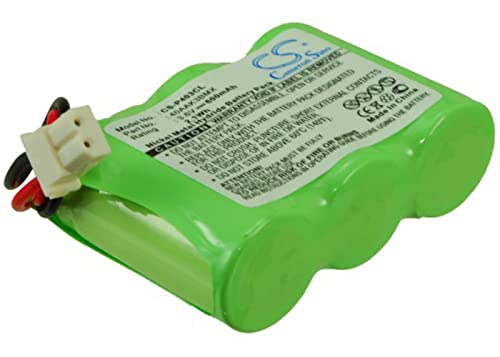
Image: General view of the TrustCell CS-P403CL replacement battery, showing its compact design.
Warranty and Support
TrustCell provides comprehensive support for its products:
- Warranty: Refund or replacement is available for 1 year from the date of purchase.
- Customer Service: 24/7 prompt after-sales service is available.
If you have any questions, problems, or require assistance, please contact us via email. We aim to reply within 24 hours.