
Introduction
This manual provides essential information for the safe and effective use of your TrustCell HBL9000S Lithium-ion replacement battery. Please read this manual thoroughly before installation and operation to ensure optimal performance and longevity of your battery.
Product Overview

Figure 1: TrustCell HBL9000S Replacement Battery, showing its compact design.
The TrustCell HBL9000S is a high-capacity Lithium-ion replacement battery designed for the Urovo i9000s device. It provides reliable power with a capacity of 5000mAh and a voltage of 3.8V, delivering 19Wh of energy.
Key Features:
- Direct replacement for Urovo i9000s (Part No: HBL9000S).
- High capacity: 5000mAh / 19.00Wh.
- Built-in protection against overcharge, over-discharge, over-voltage, and short circuit.
- Manufactured to original specifications for safe and durable use.
What's in the Box:
- 1 x TrustCell HBL9000S Replacement Battery
Setup and Installation
Before installing the new battery, ensure your device is powered off and disconnected from any power source.
- Compatibility Check: Carefully verify that the model number of your device (Urovo i9000s) and the part number of your original battery (HBL9000S) match the specifications of this replacement battery (Model No: CS-URV900BL, Part No: HBL9000S).
- Remove Old Battery: Follow your device's specific instructions to safely remove the existing battery.
- Insert New Battery: Align the new TrustCell HBL9000S battery with the battery compartment of your Urovo i9000s device. Gently push the battery into place, ensuring the connector is properly seated and connected. Do not force the battery.
- Secure Battery: Close the battery compartment cover, if applicable, ensuring it is securely latched.

Figure 2: The replacement battery shown alongside a compatible Urovo i9000s device, illustrating the intended fit.
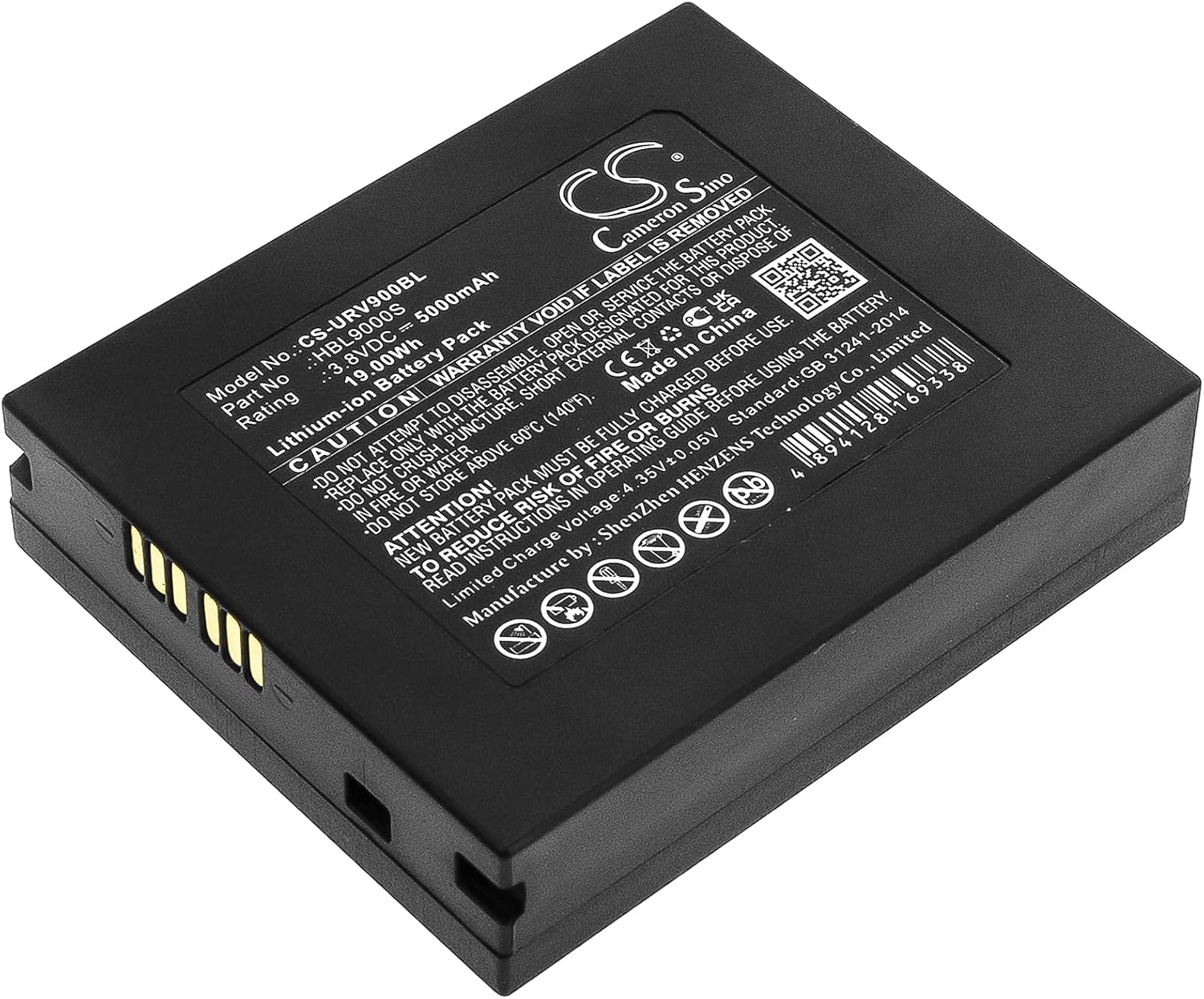
Figure 3: Underside view of the battery, highlighting the contact pins for proper device connection.
Operating Instructions
For optimal performance and battery life, follow these operating guidelines:
- Initial Charge: A new battery pack must be fully charged before its first use. Connect your device with the newly installed battery to a power source using a high-quality, compatible charger.
- Charge Cycles: A new battery will achieve its best performance after 2 or 3 complete cycles of charge and discharge. This means fully charging the battery, then using the device until the battery is nearly depleted, and repeating this process a few times.
- Charging Practices: Always use the original or a certified high-quality charger designed for your device. Avoid using low-quality third-party adapter chargers, as this can shorten the battery's life.
Maintenance and Storage
Proper maintenance and storage will extend the life of your battery:
- Temperature: Do not store the battery above 60°C (140°F). Extreme temperatures can degrade battery performance and safety. Store in a cool, dry place.
- Long-Term Storage: If storing the battery for an extended period, ensure it is charged to approximately 50-70% capacity. Recharge it every 3-6 months to prevent deep discharge.
- Cleaning: Keep the battery contacts clean and free from dust or debris. Use a dry, soft cloth to wipe them if necessary.
Safety Precautions and Warnings
Failure to follow these safety instructions can result in fire, injury, or damage to the battery and device. Read all instructions in the operating guide before using the battery.

Figure 4: Detailed view of the battery's warning label, showing critical safety information and certifications.
- ⚠ CAUTION: WARRANTY VOID IF LABEL IS REMOVED.
- ⚠ Do not attempt to disassemble, open, or service the battery pack.
- ⚠ Replace only with the battery pack designated for this product.
- ⚠ Do not crush, puncture, short external contacts, or dispose of in fire or water.
- ⚠ Do not store above 60°C (140°F).
- ⚠ TO REDUCE RISK OF FIRE OR BURNS, READ INSTRUCTIONS IN OPERATING GUIDE BEFORE USING THE BATTERY.
Troubleshooting
If you encounter issues with your battery, consider the following common solutions:
- Battery Not Charging:
- Ensure the battery is correctly seated in the device and the connector is properly connected.
- Verify that the charger and charging cable are functioning correctly and are compatible with your device.
- Try charging in a different power outlet.
- Short Battery Life:
- Ensure the battery has completed 2-3 full charge/discharge cycles to reach optimal performance.
- Check for excessive background applications or high power consumption settings on your device.
- Avoid extreme temperatures during use and storage.
- Device Not Powering On:
- Confirm the battery is fully charged.
- Re-install the battery to ensure proper connection.
- If the issue persists, contact customer support.
Specifications
| Attribute | Value |
|---|---|
| Model Number | CS-URV900BL |
| Part Number | HBL9000S |
| Battery Type | Lithium-ion |
| Capacity | 5000mAh |
| Voltage | 3.8V |
| Energy Rate | 19.00Wh |
| Limited Charge Voltage | 4.35V ± 0.05V |
| Dimensions (L x W x H) | 2.67 x 2.23 x 0.64 inches (67.80 x 56.60 x 16.20 mm) |
| Weight | 4.5 ounces (128.0g) |
| Manufacturer | TrustCell (Manufacture by: ShenZhen HENZENS Technology Co., Limited) |
| Certifications | ISO9001, RoHS, CE, UN38.3, MSDS |
Warranty and Support
Your TrustCell HBL9000S replacement battery comes with a commitment to quality and customer satisfaction.
- Warranty: We offer a refund or replacement for 1 year from the date of purchase.
- Customer Service: For any problems or questions, please contact our customer service team. We provide prompt after-sales service and aim to reply within 24 hours.
- Contact Information: Please contact us via email for support. For more information, you may also visit the manufacturer's website: www.cameronsino.com