
1. Introduction
This user manual provides essential information for the safe and effective use of your TollCor CS-MY890SL 900mAh/3.7V Lithium-ion replacement battery. Please read this manual thoroughly before installation and use, and retain it for future reference.
2. Safety Information
Lithium-ion batteries require careful handling. Failure to follow these safety instructions may result in fire, injury, or damage to property.
- Do not attempt to disassemble, open, or service the battery pack. This battery is a sealed unit.
- Replace only with the battery pack designated for this product. Ensure compatibility with your device.
- Do not crush, puncture, short external contacts, or dispose of in fire or water.
- Do not store above 60°C (140°F). High temperatures can degrade battery performance and pose a safety risk.
- Keep out of reach of children.
- Dispose of used batteries responsibly according to local regulations. Do not dispose of in household waste.
- If the battery appears damaged, swollen, or leaks, discontinue use immediately.

Image: Back of the battery with safety warnings. Note the "CAUTION" label and instructions not to disassemble, crush, or expose to high temperatures.
3. Compatibility
This TollCor CS-MY890SL battery is designed as a replacement for specific Myphone models. Please verify your device's original battery part number before installation.
Compatible Part Numbers:
- Myphone P/N: BS-41
- Myphone P/N: BS-45
- Myphone P/N: MP-U-2
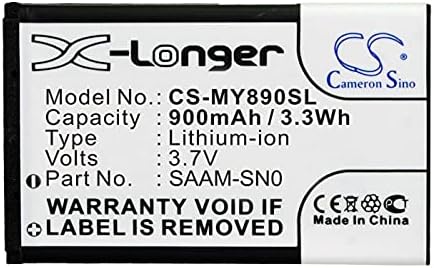
Image: Close-up of the battery's front label, displaying the model number CS-MY890SL, capacity, voltage, and type.
4. Setup (Battery Installation)
The following steps provide general guidance for replacing a mobile phone battery. Specific steps may vary depending on your Myphone model. Refer to your phone's original user manual for detailed instructions if available.
- Power Off Device: Ensure your Myphone is completely powered off before beginning the replacement process.
- Remove Back Cover: Carefully remove the back cover of your Myphone. This may involve prying it open or sliding it off, depending on the model.
- Locate Old Battery: Identify the existing battery within the phone.
- Remove Old Battery: Gently lift or slide out the old battery. Some models may have a small tab or notch to assist with removal. Avoid using excessive force or sharp objects that could damage the phone or battery.
- Insert New Battery: Align the TollCor CS-MY890SL battery with the battery compartment. Ensure the metal contacts on the battery align with the corresponding contacts in the phone. Gently press the battery into place until it is securely seated.
- Replace Back Cover: Reattach the back cover of your Myphone, ensuring it clicks securely into place.
- Initial Charge: It is recommended to fully charge the new battery before its first use.
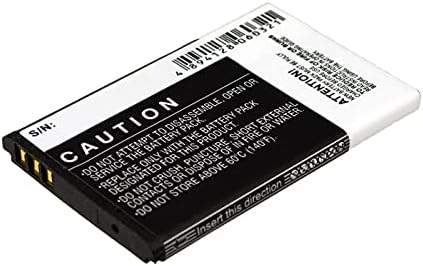
Image: Side view of the battery, highlighting the gold contact pins that connect to the device.
5. Operating (Battery Usage)
Once installed, the battery operates like your original device battery. Here are some general usage guidelines:
- First Use: For optimal performance, fully charge the battery before its first use.
- Charging: Use only the original or a certified compatible charger for your Myphone. Avoid using damaged chargers or cables.
- Temperature: Operate your device within its recommended temperature range. Extreme cold or heat can affect battery life and performance.
- Discharge: It is generally not necessary to fully discharge modern Lithium-ion batteries before recharging.
6. Maintenance
Proper maintenance can extend the lifespan of your battery:
- Avoid Extreme Temperatures: Do not expose the battery or device to very high or very low temperatures for extended periods.
- Regular Use: Use your device regularly. Long periods of inactivity can sometimes affect battery health.
- Storage: If storing the battery for an extended period, ensure it is charged to about 50% and stored in a cool, dry place.
- Clean Contacts: If necessary, gently clean the battery contacts with a dry, soft cloth to ensure good connection.
7. Troubleshooting
If you encounter issues with your new battery, consider the following:
| Problem | Possible Cause | Solution |
|---|---|---|
| Battery not charging | Loose connection, faulty charger/cable, software issue. |
|
| Battery drains quickly | High background app usage, screen brightness, network issues, battery calibration. |
|
| Phone does not power on | Battery not installed correctly, completely discharged battery, phone issue. |
|
If these steps do not resolve the issue, please contact customer support.
8. Specifications
Detailed technical specifications for the TollCor CS-MY890SL battery:
| Feature | Detail |
|---|---|
| Model Number | CS-MY890SL |
| Brand | TollCor |
| Battery Type | Lithium-ion (Li-ion) |
| Capacity | 900mAh |
| Voltage | 3.7V |
| Energy Rate | 3.33Wh |
| Dimensions (L x W x H) | 53.00 x 34.00 x 4.80 mm |
| Gross Weight | 42.0g |
9. Warranty & Support
TollCor provides the following support for this product:
- Warranty: 365-day warranty from the date of purchase.
- Money Back Guarantee: 30-day money back guarantee.
- Customer Support: 24-hour timely feedback for any questions or concerns. Please contact us through the platform where you purchased the product.