Introduction
This manual provides essential instructions for the safe and efficient operation, maintenance, and troubleshooting of your Bossdan Handheld Cordless Vacuum H9. Please read this manual thoroughly before first use and retain it for future reference.
Safety Information
Observe the following safety precautions to prevent injury or damage to the device:
- Do not use the vacuum cleaner to pick up water or other liquids.
- Do not vacuum burning or smoking materials such as cigarettes, matches, or hot ashes.
- Keep hair, loose clothing, fingers, and all parts of the body away from openings and moving parts.
- Do not use without the dust cup and filter in place.
- Store the vacuum in a dry, indoor location.
- Keep out of reach of children.
- Only use the provided USB-C charging cable. An adapter is not included.
- Power off the device before charging.
- Recharge monthly to maintain battery health, even if not in use.

Package Contents
Verify that all items are present in the package:
- Bossdan Handheld Cordless Vacuum H9
- Flexible Hose
- Crevice Nozzle
- Brush Tool
- USB-C Charging Cable (adapter not included)
- Storage Bag
- User Manual (this document)


Product Overview
Familiarize yourself with the components of your Bossdan H9 vacuum:

- Ergonomic Design Handle: For comfortable grip and ease of use.
- Power Switch: Controls the vacuum's operation.
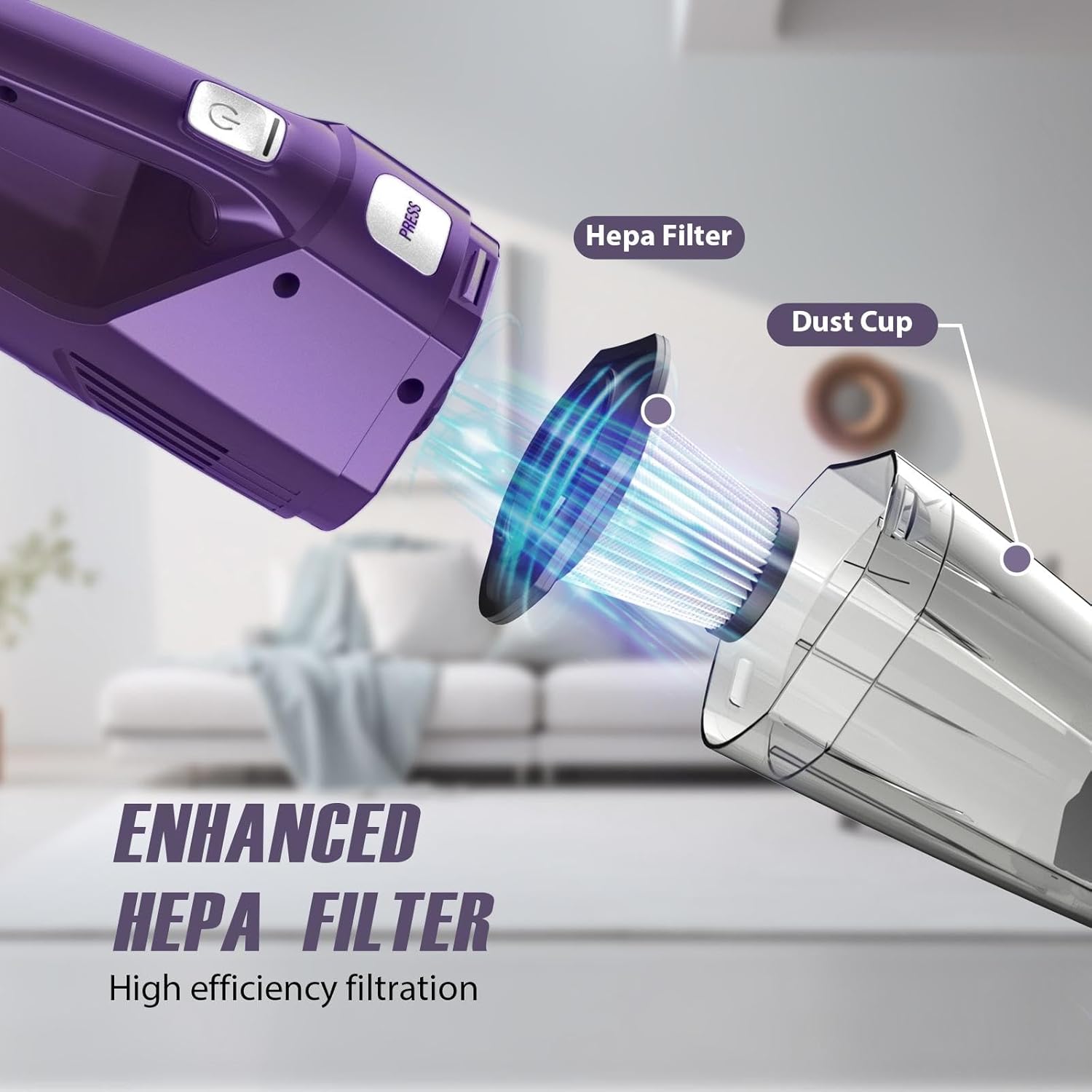
- Dust Cup (400ml): Transparent container for collecting debris.
- HEPA Filter: High-efficiency particulate air filter for trapping fine dust.
- Air Vent: Exhausts filtered air.
- Charging Port: USB-C port for recharging the battery.
- Battery Indicator Lights: Provide status of battery charge.
Setup
- Initial Charge: The battery may lose charge during shipping. Fully charge the vacuum before its first use. Connect the USB-C charging cable to the vacuum's charging port and to a USB power source (adapter not included). The battery indicator will blink blue when low and show a solid blue light when fully charged. Charging typically takes 3 hours.
- Attach Accessories: Select the appropriate accessory (crevice nozzle, brush tool, or flexible hose) for your cleaning task and firmly attach it to the vacuum's suction inlet. The flexible hose can be combined with the crevice nozzle for extended reach.


Operating Instructions
- Power On/Off: Press and hold the power button for 2 seconds to turn the vacuum on or off. This design prevents accidental activation.
- Vacuuming: Guide the vacuum over the area to be cleaned. The 8KPa suction power is effective for picking up crumbs, pet hair, dust, and other small debris.
- Using Accessories:
- Crevice Nozzle: Ideal for narrow gaps, corners, car seats, and sofa crevices.
- Brush Tool: Suitable for cleaning carpets, upholstery, keyboards, and pet hair on various surfaces.
- Flexible Hose: Use with the crevice nozzle or brush tool to reach difficult areas under furniture or deep within car interiors.
- Battery Life: The vacuum provides up to 25 minutes of runtime on a full charge. Monitor the battery indicator lights.


Maintenance
Regular maintenance ensures optimal performance and extends the lifespan of your vacuum.
- Emptying the Dust Cup:
- Press the "PRESS" button to detach the dust cup from the main body.
- Empty the collected debris into a waste bin.
- Cleaning the HEPA Filter:
- Remove the HEPA filter from the dust cup.
- Rinse the HEPA filter and dust cup under running water until clean.
- Allow the filter and dust cup to air dry completely before reassembling. Do not use the vacuum with a wet filter.
- Battery Maintenance: Recharge the vacuum monthly to maintain battery health, even if it has not been used.

Troubleshooting
Refer to this section for common issues and their solutions.
| Problem | Possible Cause | Solution |
|---|---|---|
| Vacuum does not turn on. | Battery is depleted. Power button not held long enough. | Charge the vacuum fully. Press and hold the power button for 2 seconds. |
| Weak suction. | Dust cup is full. Filter is clogged. Battery is low. | Empty the dust cup. Clean and dry the HEPA filter. Recharge the vacuum. |
| Short operating time. | Battery not fully charged. Battery degradation over time. | Ensure the vacuum is fully charged before use. Ensure monthly recharging for battery health. |
| Charging indicator not working. | Charging cable or power source issue. | Check USB-C cable connection. Try a different USB power source. |
Specifications
| Feature | Detail |
|---|---|
| Model Name | H9 |
| Brand | Bossdan |
| Suction Power | 8000 Pa (8KPa) |
| Rated Power | 120W |
| Dust Cup Capacity | 400 ml |
| Battery Type | 12V Lithium Battery (included) |
| Battery Capacity | 2000 mAh |
| Battery Life (Runtime) | Up to 25 minutes |
| Charging Time | Approximately 3 hours |
| Charging Interface | USB-C |
| Filter Type | HEPA Filter (washable) |
| Noise Level | ≤75 dB |
| Product Dimensions | 14.52"L x 4.05"W x 3.66"H |
| Item Weight | 1.68 lbs |
| Color | Iris Purple |
| Recommended Use | Car, Home, Office, RV |


Customer Support
If you encounter any issues or have questions regarding your Bossdan Handheld Cordless Vacuum H9, please contact our customer support team. We aim to respond to all inquiries within 24 hours.
For support, please refer to the contact information provided with your purchase or visit the official Bossdan website.