
Introduction
This manual provides detailed instructions for the ECHOMUSSY YA-01 Wireless Microphone System. Please read this manual carefully before use to ensure proper operation and to maximize the product's lifespan. This system is designed for clear and stable audio transmission in various settings.
Package Contents
Upon unpacking, please verify that all items listed below are present:
- 2 x Wireless Microphones
- 1 x Receiver
- 1 x USB-C Charging Cable
- 1 x User Manual (this document)
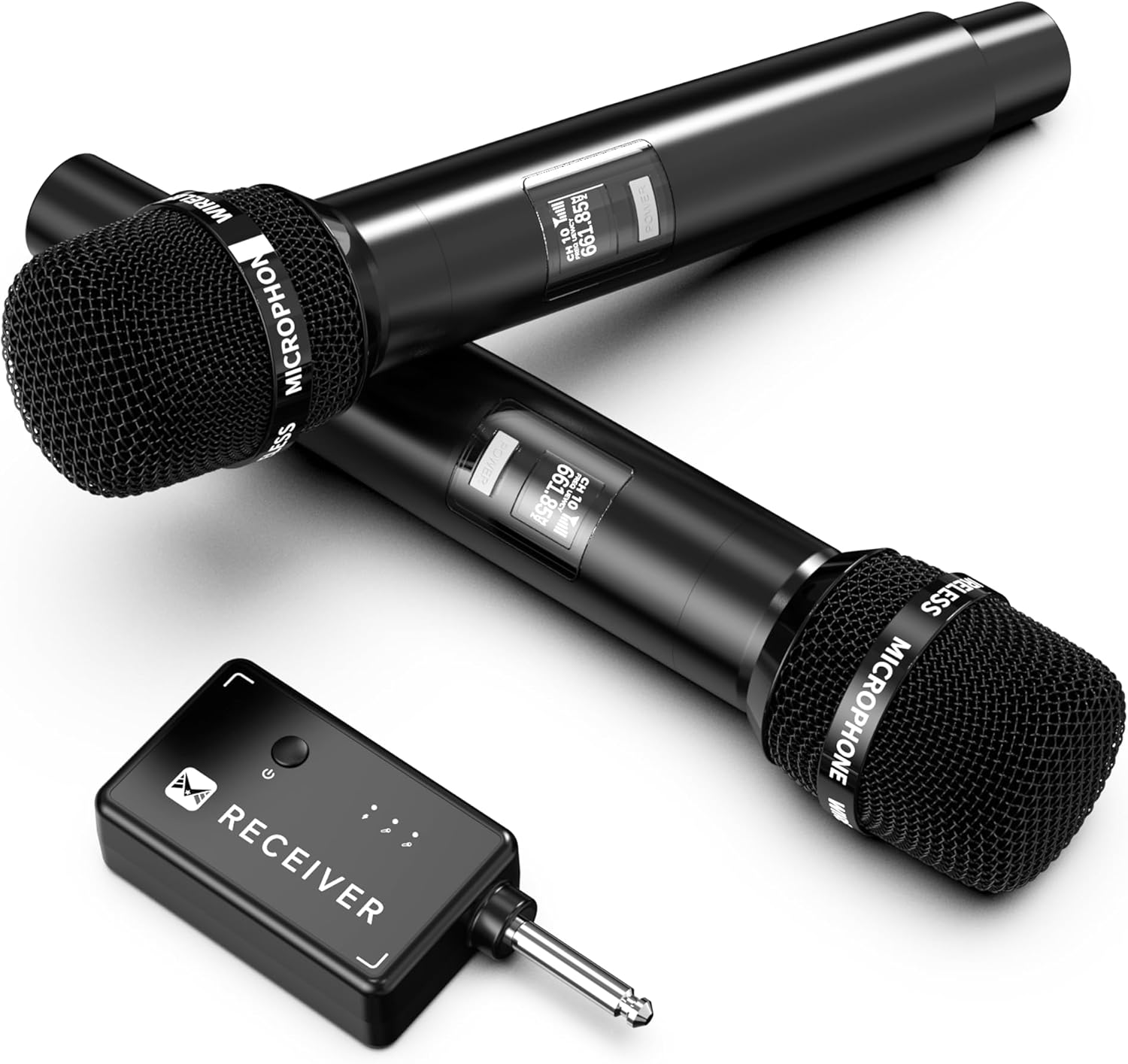
An overview of the ECHOMUSSY wireless microphone system, showing two handheld microphones and the compact receiver unit.
Setup Instructions
1. Initial Charging
Before first use, ensure both microphones and the receiver are fully charged. Use the provided USB-C cable to connect the devices to a suitable power source. The built-in 1200mAh battery in each microphone provides up to 40 hours of continuous use when fully charged.

An image highlighting the impressive 40-hour battery life of the wireless microphone, indicating extended usage time.
2. Connecting the Receiver
The ECHOMUSSY YA-01 system features plug-and-play operation. Simply connect the receiver to a karaoke machine, powered speaker, or amplifier. The receiver includes a 6.35mm jack and comes with a 3.5mm adapter for broad compatibility with microphone input jacks.
Important Note: The wireless microphone system is not compatible with AUX input jacks. It must be connected to a 6.35mm or 3.5mm microphone input jack on your speaker or audio device. The included 6.35mm to 3.5mm adapter is for microphone jacks only, not AUX jacks.
3. Powering On Microphones
After connecting the receiver, power on each microphone. The system will automatically establish a connection using advanced one-to-one chip connection technology, ensuring low-latency and stable audio transmission.

A simple two-step guide demonstrating the plug-and-play setup process: first, connect the receiver to an audio device, then power on the microphone.
Operating Instructions
General Use
Once connected and powered on, the microphones are ready for use. Speak or sing into the microphone. The system's high-fidelity sound quality and anti-howling function ensure clear and pure audio reproduction, accurately capturing vocal details.

A detailed internal view of the microphone head, showcasing its durable metal construction and the integrated DSP audio processor for noise suppression.
Wireless Range
The ECHOMUSSY YA-01 offers a wireless connection range of up to 200 feet (approximately 60 meters). This provides flexibility for movement during performances, speeches, or parties without compromising audio quality.

A visual representation of the microphone's wireless range, illustrating its capability to transmit audio up to 200 feet from the receiver.
Ergonomic Design
The microphones feature an ergonomic design for comfortable handling during extended periods of use.

A view of the two wireless microphones, emphasizing their ergonomic and sophisticated design for comfortable handling.
Low Latency and Stability
The advanced one-to-one chip connection technology ensures ultra-low latency and high stability in audio transmission. This means your voice is quickly synchronized, maintaining clarity and stability even in complex environments.

Illustration highlighting the advanced one-to-one connection chip technology within the receiver, responsible for ultra-low latency and high stability.
Maintenance
Cleaning
To clean the microphones and receiver, use a soft, dry cloth. Do not use liquid cleaners, aerosols, or solvents, as these may damage the device. Avoid getting moisture into any openings.
Storage
Store the microphone system in a cool, dry place away from direct sunlight and extreme temperatures. When not in use for extended periods, ensure the batteries are partially charged (around 50%) to prolong their lifespan.
Battery Care
To maintain optimal battery performance, avoid completely draining the batteries frequently. Recharge the devices regularly, even if not in constant use. Use only the provided USB-C cable for charging.
Troubleshooting
- No Sound Output:
- Ensure the receiver is securely plugged into the correct microphone input jack (6.35mm or 3.5mm, not AUX).
- Verify that both microphones and the receiver are powered on and fully charged.
- Check the volume settings on your connected speaker, karaoke machine, or amplifier.
- Interference or Poor Sound Quality:
- Ensure the microphones are within the 200-foot operating range of the receiver.
- Minimize obstructions between the microphones and the receiver.
- Move away from other 2.4GHz wireless devices (e.g., Wi-Fi routers, cordless phones) that might cause interference.
- The integrated DSP technology helps suppress noise; ensure no external factors are overwhelming this feature.
- Microphone Not Pairing:
- Power off both the microphones and the receiver, then power them back on in sequence (receiver first, then microphones).
- Ensure no other wireless microphones are operating on the same frequency nearby.
- Battery Not Charging:
- Check that the USB-C cable is securely connected to both the device and the power source.
- Try a different USB port or power adapter.
- Ensure the charging cable is not damaged.
Specifications
| Model Name | YA-01 |
| Brand | ECHOMUSSY |
| Microphone Form Factor | Handheld |
| Connectivity Technology | 2.4GHz Wireless |
| Connector Type | 3.5 mm Jack, 6.35 mm Jack |
| Special Feature | Noise Reduction (DSP) |
| Compatible Devices | Audio Interface, Audio Mixer, DVD Player, Karaoke Machine, PA System |
| Power Source | Battery Powered (1200mAh Lithium Polymer) |
| Number of Batteries | 3 AAA batteries required (included) |
| Number of Channels | 1 |
| Polar Pattern | Hyper Cardioid |
| Item Weight | 0.63 Kilograms (1.39 pounds) |
| Package Dimensions | 11.42 x 6.14 x 2.24 inches |
| Color | Black |
Warranty and Support
ECHOMUSSY provides an extended 36-month return and exchange service for this product. We are committed to ensuring customer satisfaction.
For any inquiries, technical assistance, or support needs, please utilize our 24-hour after-sales service. Contact information can typically be found on the product packaging or through your purchase platform.