
1. Introduction
This manual provides essential instructions for the safe and effective use of your TollCor CS-NK7631MD Ni-MH replacement battery. This battery is designed to be compatible with various Nihon Kohden medical devices. Please read this manual thoroughly before installation and operation to ensure proper function and safety.

Figure 1: TollCor CS-NK7631MD Ni-MH Replacement Battery. This image displays the blue battery pack with its label showing model number CS-NK7631MD, part numbers NKB-301V, MD-BY01, X065, and specifications of 12.0VDC, 2800mAh/33.6Wh. The attached connector with red, black, and white wires is visible.
2. Compatibility
The TollCor CS-NK7631MD replacement battery is compatible with the following Nihon Kohden medical device models and original battery part numbers:
- Compatible Nihon Kohden Device Models:
- TEC-7631K
- TEC-7641
- TEC-7651
- TEC-7700
- TEC-7721
- TEC-7721C
- TEC-7721E
- TEC-7721K
- Compatible Original Battery Part Numbers:
- MD-BY01
- NKB-301V
- SB-551V
- X065
Always verify the part number of your existing battery or device manual to ensure compatibility before installation.
3. Safety Instructions
Adherence to these safety guidelines is crucial to prevent injury, damage to the battery, or damage to the medical device.
- Do Not Disassemble: Do not attempt to disassemble, open, or service the battery pack. This can lead to electric shock, fire, or explosion.
- Proper Replacement: Replace only with the battery pack designated for this product. Using an incompatible battery may cause damage or safety hazards.
- Physical Integrity: Do not crush, puncture, or short external contacts of the battery. Avoid dropping the battery.
- Environmental Conditions: Do not dispose of the battery in fire or water. Do not store the battery above 60°C (140°F). High temperatures can degrade battery performance and pose a safety risk.
- Initial Charge: A new battery pack must be fully charged before its first use. Refer to the charging instructions in your device's operating guide.
- Handling: Handle the battery with care. If the battery casing is damaged, discontinue use immediately.
- Disposal: Dispose of used batteries according to local regulations. Do not dispose of with general household waste.
4. Installation (Setup)
Before installing the new battery, ensure the medical device is powered off and disconnected from any external power source. Refer to your specific Nihon Kohden device's service manual for detailed battery replacement procedures.
- Power Off Device: Completely power down the Nihon Kohden medical device.
- Disconnect Power: Unplug the device from the AC power outlet.
- Locate Battery Compartment: Identify and open the battery compartment on your medical device. This usually involves unscrewing a cover or releasing a latch.
- Remove Old Battery: Carefully disconnect the old battery's connector from the device's port. Remove the old battery pack.
- Insert New Battery: Place the new TollCor CS-NK7631MD battery into the compartment, ensuring it fits securely.
- Connect Battery: Connect the battery's plug to the corresponding port within the device. Ensure the connection is firm and correctly oriented.
- Close Compartment: Securely close the battery compartment cover.
- Initial Charge: After installation, connect the device to its AC power adapter and fully charge the new battery before its first use.

Figure 2: Close-up view of the battery's connector. This image shows the black plastic connector with three pins and attached red, black, and white wires, which must be correctly aligned with the device's port.
5. Operation and Charging
This battery functions as a direct replacement for the original Ni-MH battery in compatible Nihon Kohden devices. Operation and charging procedures are dictated by the medical device itself.
- First Use: As stated in the safety instructions, fully charge the battery before using the device for the first time with the new battery.
- Charging: Charge the battery using the original charger and power adapter supplied with your Nihon Kohden medical device. The device's charging indicator will typically show the charging status.
- Discharging: For optimal battery life, it is recommended to allow the battery to discharge significantly before recharging, especially during the initial cycles.
- Operating Temperature: Operate the device with the battery within the temperature range specified in your medical device's user manual.
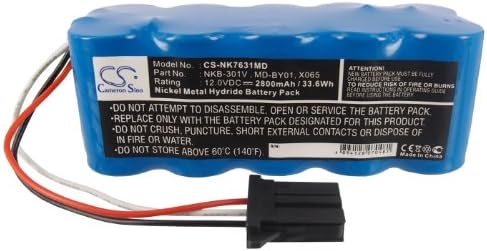
Figure 3: Angled view of the TollCor replacement battery, highlighting the attached wiring and connector. This perspective helps visualize the battery's overall shape and the connection point for installation.
6. Maintenance
Proper maintenance extends the life and performance of your battery.
- Storage: If storing the battery for an extended period, store it in a cool, dry place, ideally at a partial charge (around 50%). Avoid extreme temperatures.
- Cleaning: Keep the battery contacts clean. Use a dry, soft cloth to wipe away any dust or debris. Do not use liquid cleaners.
- Regular Use: For Ni-MH batteries, occasional full discharge and recharge cycles can help maintain battery capacity and prevent memory effect.
- Inspection: Periodically inspect the battery for any signs of physical damage, swelling, or leakage. If any issues are observed, discontinue use and replace the battery.

Figure 4: Side profile of the TollCor replacement battery. This view shows the cylindrical cells encased in blue shrink wrap, providing a sense of the battery's dimensions and construction.
7. Troubleshooting
If you encounter issues with your battery, consider the following:
- Device Not Powering On:
- Ensure the battery is correctly installed and the connector is firmly seated.
- Verify the battery is charged. Connect the device to AC power and check the charging indicator.
- Confirm the battery is compatible with your device model and part number.
- Battery Not Charging:
- Check the connection between the device and the AC power adapter.
- Ensure the AC power adapter is functioning correctly.
- Verify that the battery is properly connected inside the device.
- If the issue persists, the battery or the device's charging circuit may require professional inspection.
- Shortened Battery Life:
- Ensure the battery has undergone several full charge/discharge cycles to reach its optimal capacity.
- Review device usage patterns; high power consumption applications will deplete the battery faster.
- Check for extreme operating temperatures, which can affect battery performance.
For persistent issues, consult the user manual of your Nihon Kohden medical device or contact customer support.
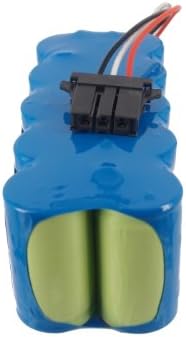
Figure 5: End view of the TollCor replacement battery, showing the arrangement of the cylindrical cells from a vertical perspective. This view helps confirm the battery's physical configuration.
8. Specifications
| Feature | Specification |
|---|---|
| Model Number | CS-NK7631MD |
| Battery Type | Ni-MH (Nickel-Metal Hydride) |
| Voltage | 12.0V |
| Capacity | 2800mAh / 33.6Wh |
| Dimensions (L x W x H) | 112.20 x 45.00 x 44.80 mm (approx. 4.42 x 1.77 x 1.76 inches) |
| Gross Weight | 749.9g (approx. 1.65 pounds) |
| Manufacturer | TollCor |
9. Warranty and Support
This TollCor replacement battery comes with the following support and warranty:
- Money-Back Guarantee: 30-day money back policy.
- Warranty: 365-day warranty.
- Customer Support: 24-hour timely feedback for inquiries.
For any questions or support needs, please contact the seller through the platform where the purchase was made.