
1. Introduction
Thank you for choosing the Gamalta YG-1200 Smart Bluetooth App-Controlled Aquarium Light. This manual provides detailed instructions for the proper installation, operation, and maintenance of your new aquarium light. Please read this manual thoroughly before use to ensure optimal performance and longevity of the product.
2. Package Contents
Verify that all items are present in your package:
- 1 x Gamalta YG-1200 Aquarium Light
- 1 x Power Adapter with Integrated Controller
- 2 x Extendable Mounting Brackets
3. Key Features
- Smart Bluetooth App Control: Manage lighting settings directly from your smartphone without external controllers or Wi-Fi.
- Manual Button Control: Four physical buttons (ON/OFF, MODEL, Brightness +/-) for convenient operation.
- Customizable Light Colors & Brightness: Adjust color and intensity to create ideal conditions for your aquatic environment.
- 24/7 User-Defined Cycle: Program daily lighting cycles including sunrise, daylight, and moonlight simulations.
- Tropical Lighting Mode: Simulates natural thunderstorms, potentially encouraging breeding behavior in some fish species.
- Pre-set Scenes: Four default scenes (CoralReef, FishBlue, Sunrise, Waterweed) for quick setup.
- High-Quality LED Beads: Utilizes 5730+5050 type lamp beads for stable, flicker-free illumination with 85% color rendering index.
- Enhanced Durability: Glue-filled technology and an acrylic baffle provide strong waterproof performance and extend service life.
- Efficient Heat Dissipation: Designed with an aluminum casing for effective heat management.
- Power-Off Memory Function: Retains settings after power interruptions.
4. Setup Instructions
4.1 Physical Installation
- Attach Brackets: Insert the extendable mounting brackets into the designated slots on both ends of the light fixture.
- Position Light: Place the light fixture on top of your aquarium. Adjust the telescopic brackets to fit the width of your tank (suitable for 36-42 inch tanks). Ensure the light is securely seated.
- Connect Power: Plug the power adapter into a suitable electrical outlet.
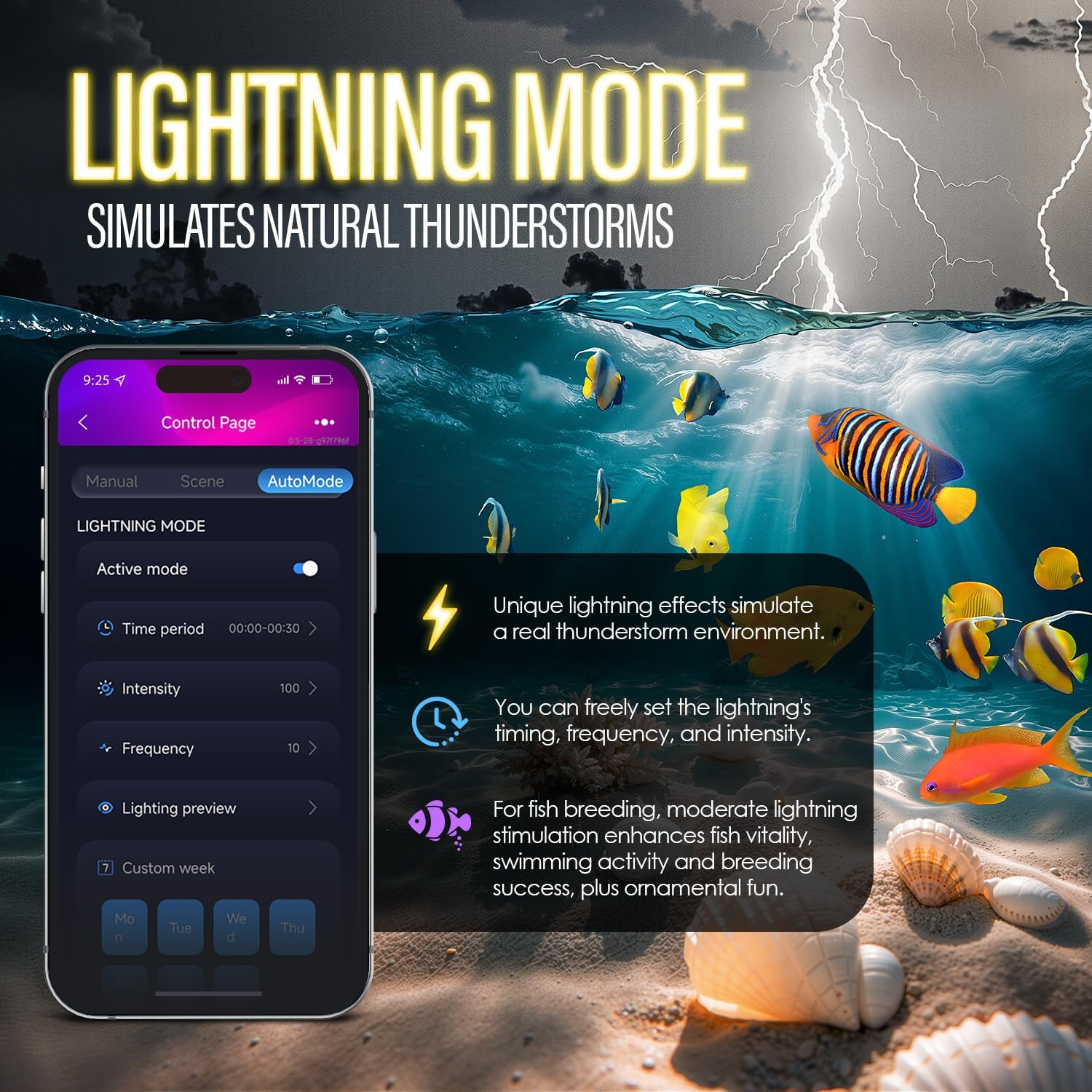
Image: The telescopic metal brackets can be freely extended and retracted to fit various tank sizes.
4.2 App Installation
- Download App: Scan the QR code on the product packaging or controller, or visit https://leap-code.space/download/com.hd.gamalta to download the Gamalta app.
- Enable Bluetooth: Ensure Bluetooth is enabled on your smartphone.
- Connect Device: Open the Gamalta app. The app should automatically detect your aquarium light. Follow the on-screen prompts to connect.

Image: The Gamalta aquarium light, its physical controller, and the smartphone app interface.
5. Operating Instructions
5.1 Manual Control (Physical Buttons)
The integrated controller on the power cord features four buttons:
- ON/OFF: Press to turn the light on or off.
- MODEL: Cycles through different color modes (e.g., white, blue, red, green, purple, etc.).
- Brightness +: Increases light brightness.
- Brightness -: Decreases light brightness.
5.2 App Control
The Gamalta app provides comprehensive control over your aquarium light:
- Customizable Colors & Brightness: Navigate to the 'Manual' tab in the app. Use the color picker and individual sliders for Red (R), Green (G), Blue (B), White (W), and Cyan (C) channels to achieve desired light colors and brightness levels. You can save custom modes.
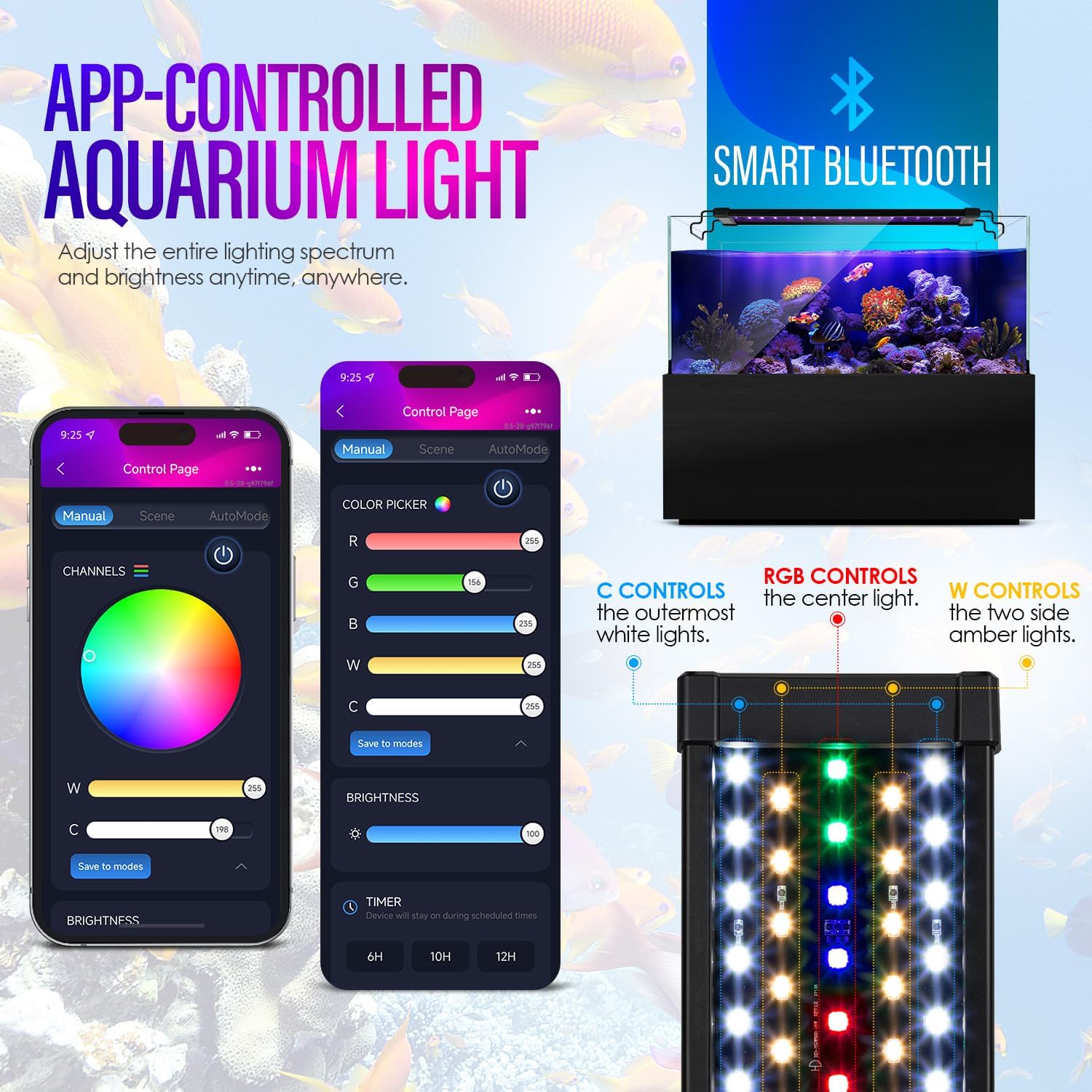
Image: The app's control page with a color picker and sliders for Red, Green, Blue, White, and Cyan light channels.
- 24/7 User-Defined Cycle: In the app, access the 'AutoMode' or 'Custom Lighting Scenes' section. You can set specific times for activation, RGBWC colors, and brightness levels throughout a 24-hour period. The light will automatically follow this cycle daily.

Image: The app's interface for setting custom 24/7 lighting cycles, including sunrise and sunset simulations with adjustable time points.
- Pre-set Intelligent Lighting Scenes: The app offers four default scenes: 'CoralReef', 'FishBlue', 'Intelligent SunSync', and 'Waterweed'. Select these for a quick and optimized lighting environment.

Image: The app's intelligent lighting scene selection, offering optimized modes for different aquatic needs.
- Tropical Lighting Mode (Lightning): Activate the 'Lightning Mode' in the app to simulate natural thunderstorms. You can adjust the intensity and frequency of the lightning effects.

Image: The app's lightning mode interface, allowing users to customize the intensity and frequency of thunderstorm simulations.
6. Maintenance
- Regular Cleaning: Periodically wipe the light fixture with a soft, damp cloth to remove dust and water spots. Ensure the light is unplugged before cleaning.
- Waterproof Design: The light is designed with glue-filled technology and an acrylic baffle for strong waterproof performance. However, avoid submerging the light fixture or its power adapter.
- Check Connections: Ensure all power connections are secure and free from damage.
- Heat Dissipation: Ensure the aluminum casing is not obstructed to allow for proper heat dissipation.
7. Troubleshooting
- Light Not Turning On: Check if the power adapter is securely plugged into the outlet and the light fixture. Ensure the ON/OFF button on the controller or in the app is activated.
- App Connectivity Issues: Ensure your phone's Bluetooth is on and within range of the light. Restart the app or your phone if connection persists.
- Timer/Cycle Malfunction: If the 24/7 cycle is disrupted (e.g., after a power outage), reset the cycle in the app or by using the 24H AUTO button on the physical controller. Refer to the app's instructions for precise timing adjustments.
- Inconsistent Brightness/Color: Verify settings in the app. If using manual control, ensure the desired mode and brightness are selected.
If you encounter any issues not covered here, please contact our service team for timely assistance.
8. Specifications
| Feature | Specification |
|---|---|
| Brand | Gamalta |
| Model Name | YG-1200 |
| Color | Black-Bluetooth App control |
| Light Source Type | LED |
| Material | Aluminum |
| Power Source | Corded Electric |
| Product Dimensions | 4.33 x 35 x 2.05 inches |
| Item Weight | 2.87 pounds |
| Suitable Tank Size | 36-42 inch |
| Included Components | Aquarium Light |
9. Warranty and Support
Gamalta is committed to providing high-quality products and customer satisfaction. While specific warranty details are not provided in this manual, if you encounter any issues or require assistance with your Gamalta YG-1200 Aquarium Light, please do not hesitate to contact our dedicated service team. We are ready to provide timely support and solutions.