
1. Product Overview
The Gamalta 22W Smart Bluetooth App-Controlled Aquarium Light (Model YG-700) is designed to provide customizable and automated lighting for 24-30 inch fish tanks. It features Bluetooth app control, a 24/7 user-defined lighting cycle, and various preset and customizable lighting modes, including a tropical thunderstorm simulation.

Image 1.1: Gamalta Aquarium Light, showing the light unit, wired controller, and a smartphone displaying the control app interface.
2. Setup Instructions
2.1 Package Contents
- 1 x Gamalta Aquarium Light Unit
- Adjustable Metal Brackets
- Wired Controller (integrated with power cord)
- User Manual (this document)
2.2 Physical Installation
- Attach Brackets: Insert the adjustable metal brackets into the designated slots on both ends of the light unit. Ensure they are securely fitted.
- Position Light: Place the light unit on top of your aquarium, extending the brackets as needed to fit the tank's width (suitable for 24-30 inch tanks). Ensure the light is stable and centered over the tank.
- Connect Power: Plug the power adapter into a suitable electrical outlet.

Image 2.1: The telescopic metal bracket can be extended or retracted to fit various tank sizes.
2.3 App Download and Connection
- Download App: Scan the QR code on the wired controller or visit leap-code.space/download/com.hd.gamalta to download the Gamalta control app.
- Enable Bluetooth: Ensure Bluetooth is enabled on your smartphone.
- Open App: Launch the Gamalta app. The app will automatically search for and connect to your aquarium light via Bluetooth. No Wi-Fi network is required.
3. Operating Instructions
3.1 Manual Control (Wired Controller)
The wired controller, integrated into the power cord, allows basic operation without the app. It features four physical buttons:
- ON/OFF: Powers the light on or off.
- MODEL: Cycles through different preset lighting colors or modes.
- +/-: Adjusts the brightness level.
- 24H AUTO: Activates the 24-hour automatic cycle.
3.2 Bluetooth App Control
The Gamalta app provides comprehensive control over the light's features:
- Color Customization: Use the color picker to select any desired light color and adjust its brightness (0-100%). The light features RGB, White, and Cyan channels for precise control.
- 24/7 User-Defined Settings: Create custom lighting schedules that execute daily. Set specific times for sunrise, daylight, sunset, and moonlight phases. The light will automatically transition between these phases.
- Preset Scenes: Select from four default scenes: Coral Reef, Fish Blue, Sunrise, and Waterweed. These scenes are optimized for different aquatic environments and can be activated with a single tap.
- Tropical Lighting Mode (Thunderstorm Simulation): Activate this mode to simulate natural thunderstorms, which can reduce stress in fish and potentially encourage breeding behavior. You can adjust the intensity and frequency of the lightning effects.
- Power-Off Memory: The light unit retains its last settings even after a power interruption.
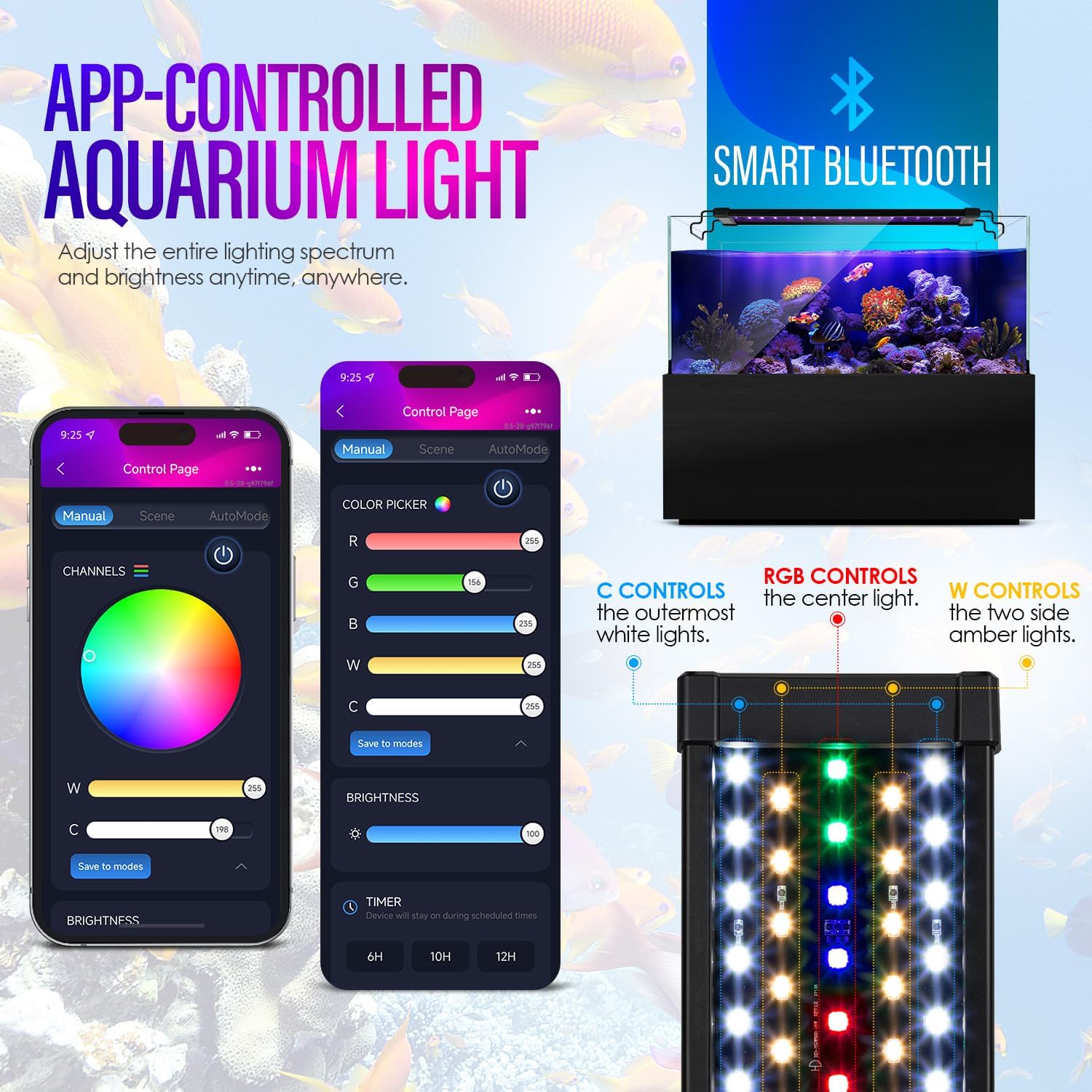
Image 3.1: The app interface allows for detailed color and brightness adjustments.

Image 3.2: Custom lighting scenes can be configured with multiple time points for precise control.

Image 3.3: Pre-programmed intelligent lighting scenes offer quick setup for various tank types.
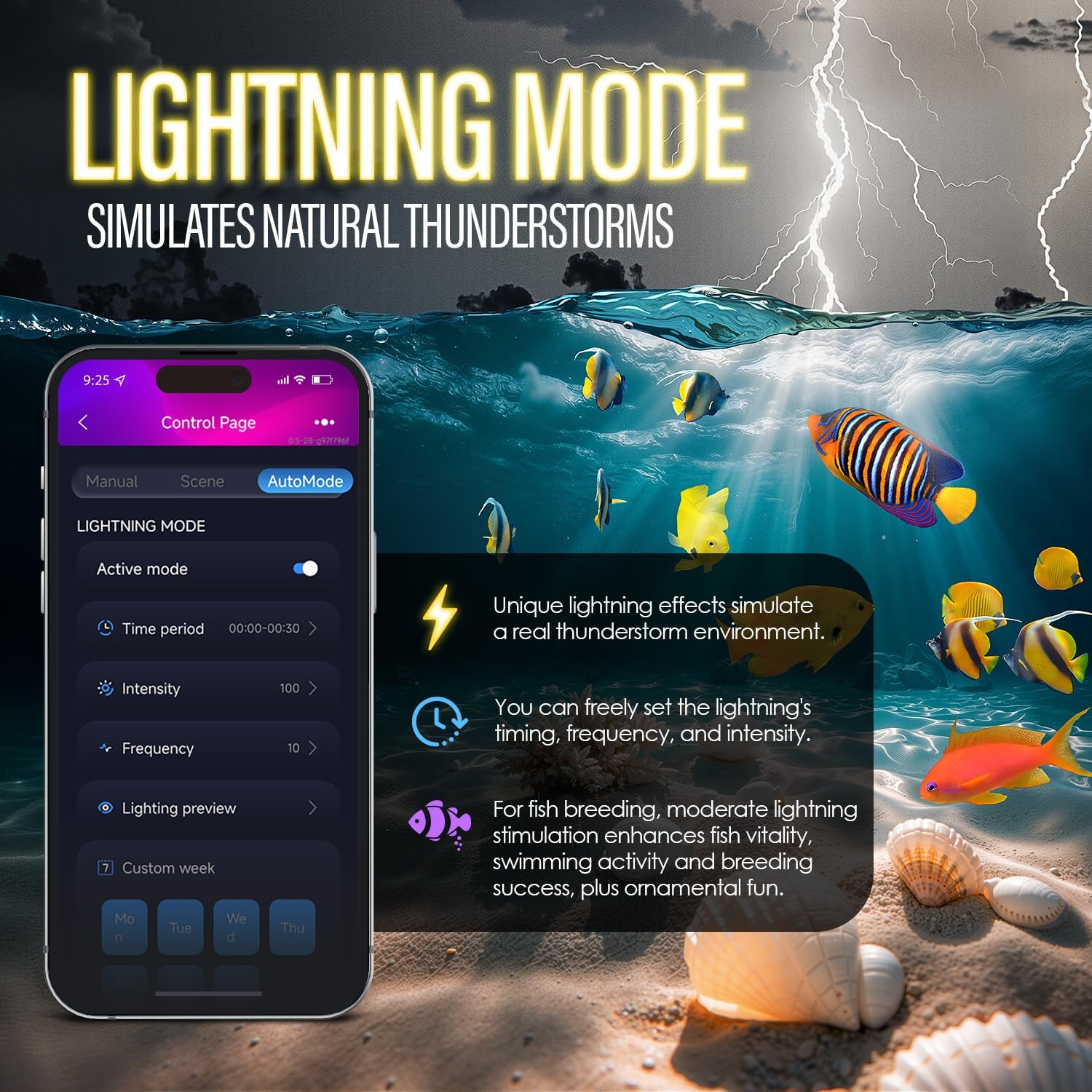
Image 3.4: The app allows customization of the thunderstorm simulation mode.
4. Maintenance
4.1 Cleaning
Regularly clean the light unit to ensure optimal performance and light output. Use a soft, damp cloth to wipe the surface. Avoid abrasive cleaners or solvents that could damage the unit.
4.2 Waterproofing
The light unit is designed with glue-filled technology and an acrylic baffle to prevent water vapor from entering, enhancing its waterproof performance and extending its lifespan. While designed to be water-resistant, avoid submerging the unit or exposing it to direct water jets.

Image 4.1: The light unit features strong waterproofing for durability in an aquatic environment.
5. Troubleshooting
- Light not turning on: Check if the power adapter is securely plugged into both the light unit and the electrical outlet. Ensure the ON/OFF button on the wired controller or in the app is activated.
- App not connecting: Ensure Bluetooth is enabled on your smartphone and the app has permission to use Bluetooth. Try restarting the app or your phone. If issues persist, try unplugging and replugging the light unit to reset its Bluetooth connection.
- Timer not working correctly: Verify that the 24/7 user-defined settings in the app are configured correctly with the desired times and modes. Ensure the light's internal clock is synchronized (usually happens automatically upon app connection).
- Inconsistent light output: Check for any debris or water spots on the light's surface that might be obstructing the light. Ensure the light is not overheating (though it has a good heat dissipation design).
6. Specifications
| Feature | Specification |
|---|---|
| Brand | Gamalta |
| Model Name | aquariu light (YG-700) |
| Power | 22W |
| Light Source Type | LED (5730+5050 type lamp beads) |
| Control Method | Bluetooth App, Wired Controller |
| Material | Aluminum |
| Power Source | Corded Electric |
| Tank Size Compatibility | For 24~30 inch Fish Tank |
| Product Dimensions | 4.33 x 23 x 2.05 inches |
| Item Weight | 2 pounds |
| Color Rendering Index (CRI) | 85% (close to natural light) |
7. Warranty and Support
This product is designed for durability and reliable performance. For any issues or assistance, please contact the Gamalta service team. They are committed to providing timely support and solutions.
Specific warranty details may vary. Please refer to your purchase documentation or contact Gamalta customer service for precise warranty information.