
1. Introduction
Thank you for choosing the Depusheng R7 UHF Wireless Microphone System. This system is designed to provide high-fidelity audio transmission with stable reception, suitable for various applications such as karaoke, stage performances, concerts, and public speaking. Featuring dual handheld dynamic microphones and a robust receiver, the R7 system ensures clear sound and reliable operation.

Image 1.1: The Depusheng R7 Wireless Microphone System, highlighting its 80-meter stable signal range.
2. Product Components
The Depusheng R7 system includes the following components:
- Wireless Receiver (x1): The central unit for receiving audio signals from the microphones.
- Wireless Handheld Transmitters (Microphones) (x2): Dynamic microphones for vocal input.
- Power Cord (x1): For powering the wireless receiver.
- Audio Cable (x1): Typically a 6.35mm to 6.35mm cable for connecting the receiver to an audio device.
- Corner Codes (x2): Plastic accessories for the receiver to prevent static interference.
- Anti-skid Rings (x2): For the microphones to prevent rolling and provide grip.
- User Manual (x1): This instruction guide.
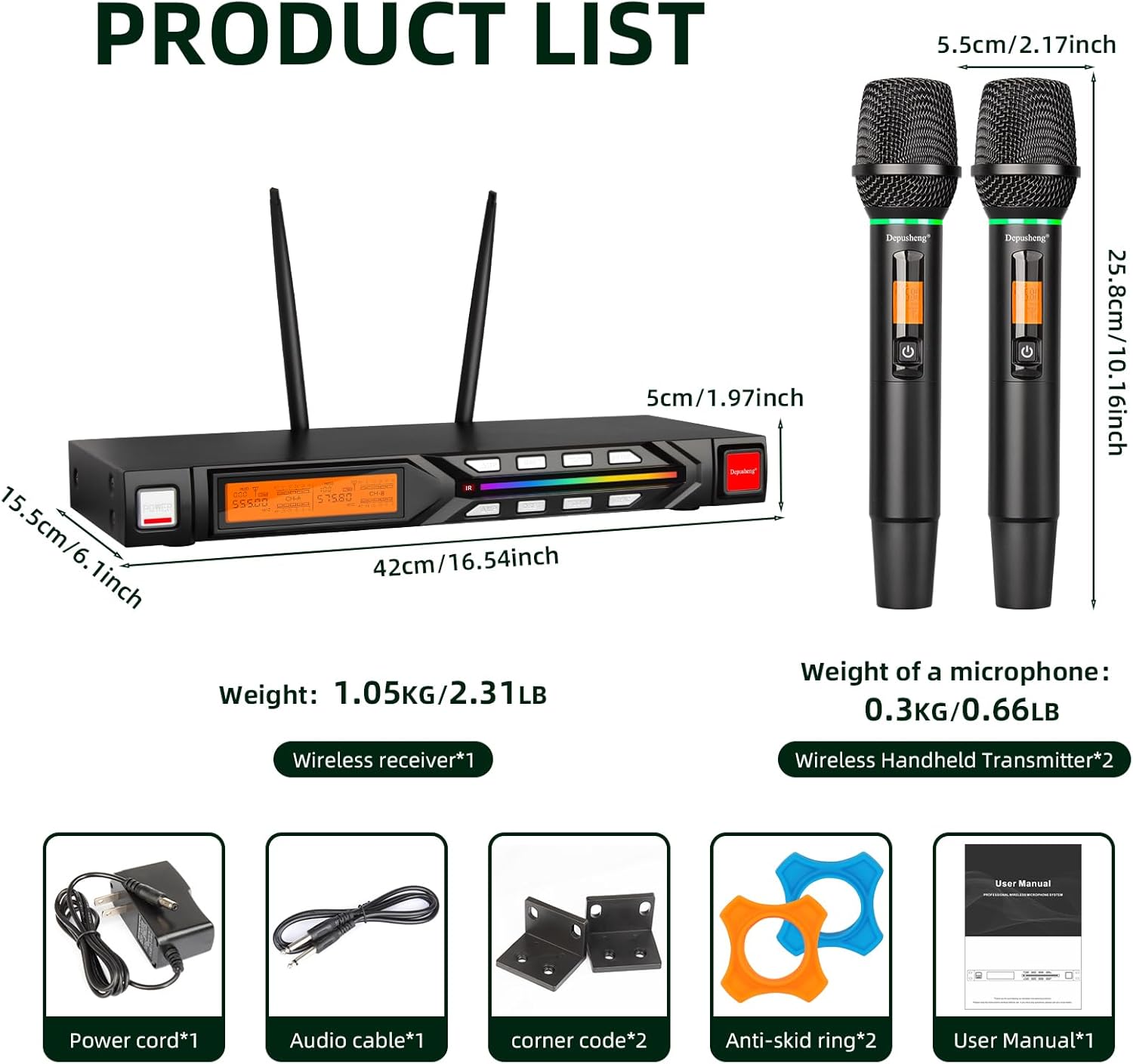
Image 2.1: Overview of all included components with their respective quantities and dimensions.
3. Setup Instructions
- Receiver Placement: Place the wireless receiver on a stable, flat surface, away from potential sources of interference such as large metal objects, digital devices, or other wireless equipment. Ensure the antennas are fully extended and positioned vertically for optimal signal reception.
- Power Connection: Connect the provided power cord to the receiver's power input and then to a suitable power outlet. Press the power button on the receiver to turn it on. The display should illuminate.
- Microphone Battery Installation: Unscrew the bottom part of each handheld microphone. Insert two AA batteries (not included) into each microphone, ensuring correct polarity (+/-). Screw the bottom part back on securely.
- Audio Output Connection:
- Unbalanced Output: Use the provided 6.35mm audio cable to connect the receiver's 6.35mm MIX OUT port to the audio input of your mixer, amplifier, active speaker, or computer.
- Balanced Output: For professional setups, use XLR to XLR audio cables (not included) to connect the receiver's BALANCED XLR OUTPUTS (A and B) to the corresponding balanced inputs on your mixer. This provides independent control over each microphone channel.
- Antenna Installation: Screw the two antennas onto the corresponding connectors on the rear panel of the receiver.
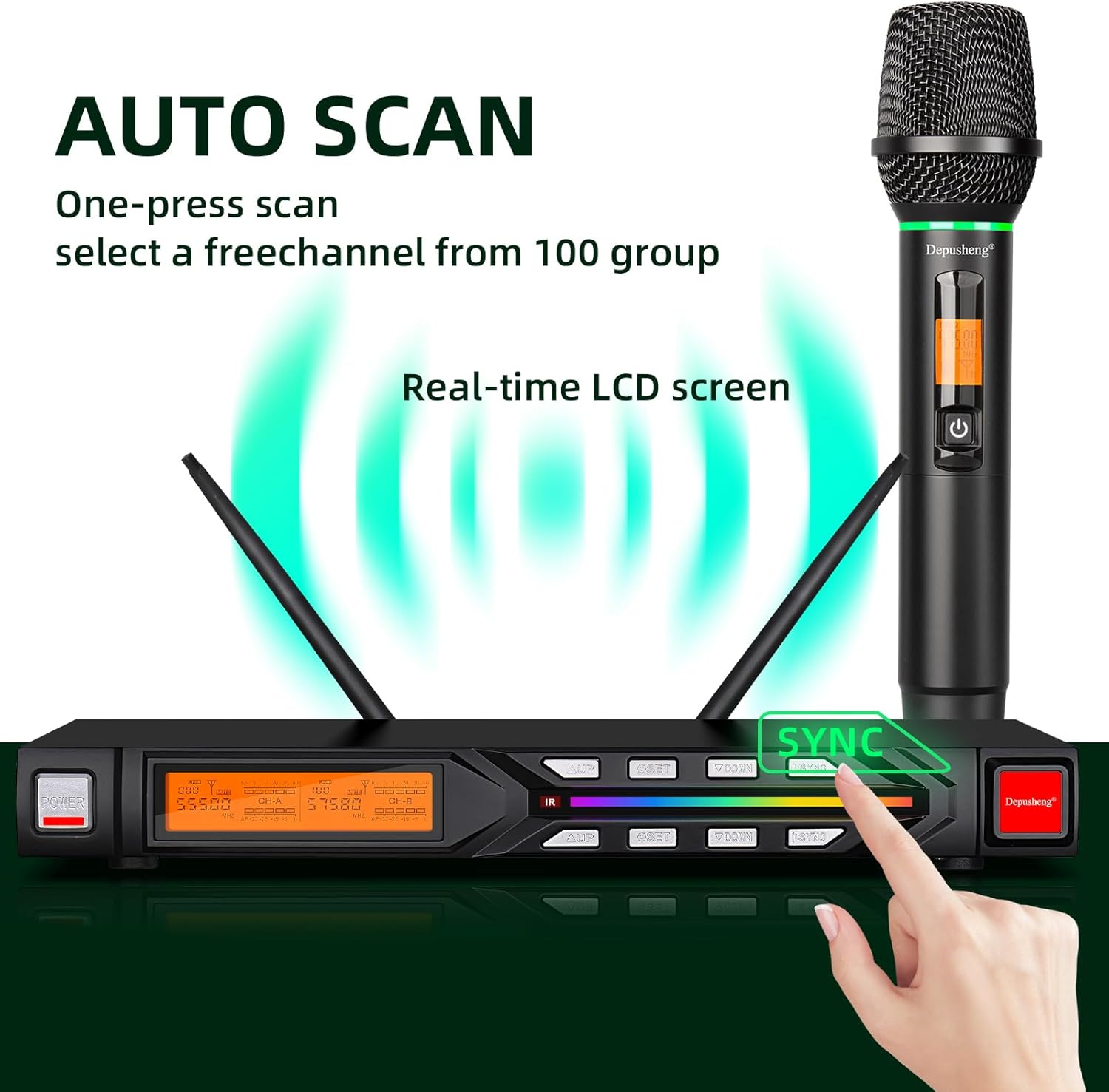
Image 3.1: Diagram illustrating the receiver's front and rear panels with labeled controls and various audio output connection options.

Image 3.2: The receiver's 6.35mm output interface is compatible with various audio equipment like mixers, power amplifiers, and active speakers.
4. Operating Instructions
- Powering On Microphones: Press and hold the power button on each handheld microphone until its display illuminates.
- Automatic Frequency Scan (Auto Scan):
- On the receiver, press the 'SCAN' button. The system will automatically scan for available, interference-free frequencies.
- Once a frequency is found, the receiver's display will show the selected frequency.
- Synchronizing Microphones (SYNC):
- After the receiver has found a frequency, align the infrared (IR) window of the microphone with the IR sensor on the receiver (usually labeled 'IR' or 'SYNC').
- Press the 'SYNC' button on the receiver. The receiver will transmit the selected frequency to the microphone. The microphone's display should update to match the receiver's frequency.
- Repeat this process for the second microphone, ensuring each microphone is synchronized to a different channel (A or B) on the receiver.
- Volume Adjustment: Use the volume control knobs on the receiver (usually labeled 'VOL A' and 'VOL B') to adjust the output level of each microphone independently. Adjust the volume on your connected audio device (mixer, amplifier) as needed.
- Frequency Selection (Manual): If automatic scanning is not desired or if you need to manually select a frequency, use the 'UP' and 'DOWN' buttons on the receiver to cycle through available frequencies for each channel. Remember to re-sync the microphone after changing frequencies manually.
- Monitoring Display: The receiver and microphone displays show important information such as frequency, channel, and battery status. The receiver also features a 7-color gradient display for visual feedback.
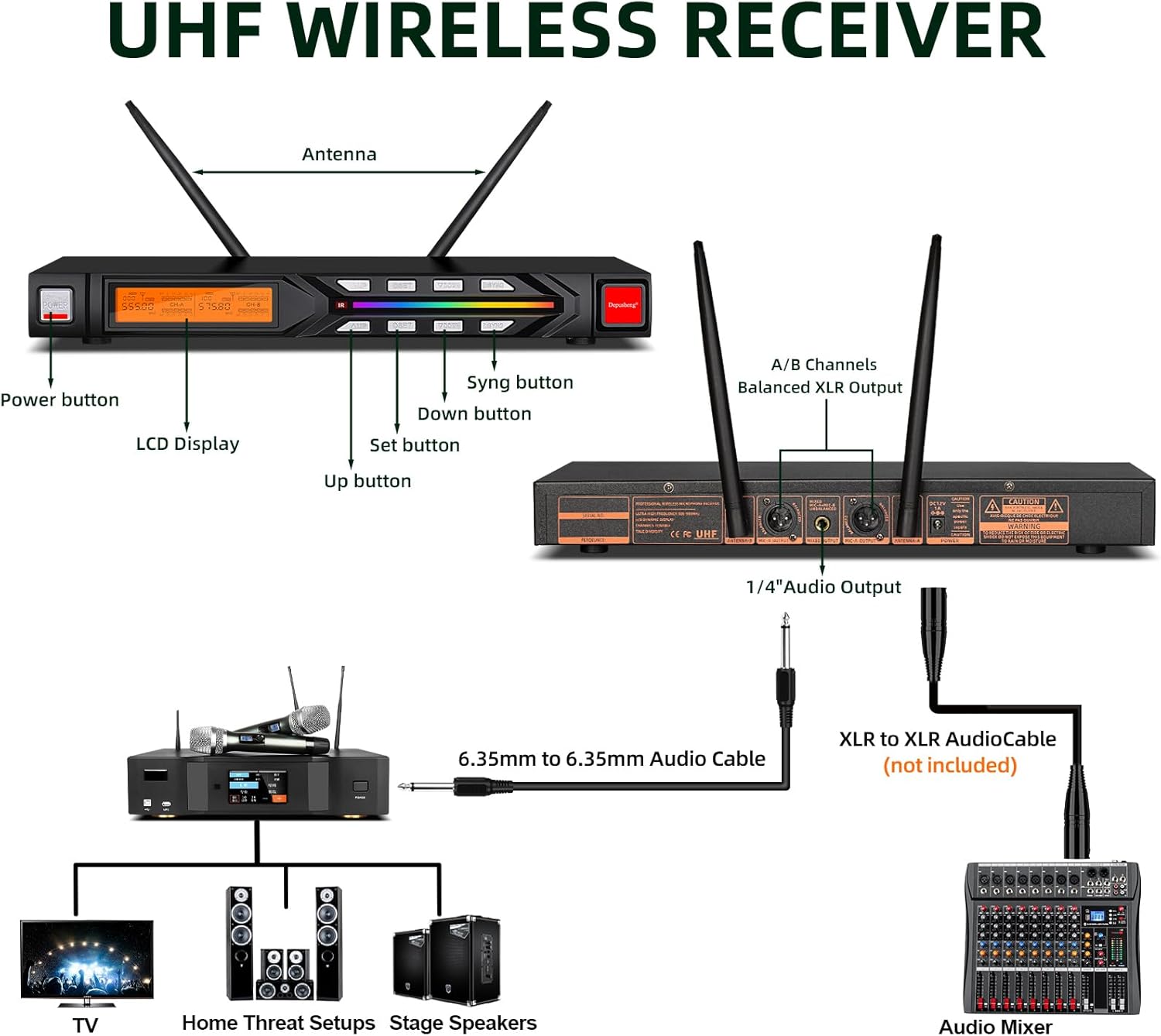
Image 4.1: The auto-scan feature allows for one-press selection of a free channel from 100 available groups, displayed on the real-time LCD screen.

Image 4.2: Details of the handheld transmitter, including the steel mesh head, LED light ring, LCD screen with switch, and battery compartment.
5. Maintenance
- Cleaning: Use a soft, dry cloth to clean the exterior of the receiver and microphones. Do not use liquid cleaners or solvents, as they may damage the finish or internal components.
- Battery Care: Remove batteries from the microphones if they will not be used for an extended period to prevent leakage and damage. Dispose of used batteries responsibly.
- Storage: Store the system in a cool, dry place, away from direct sunlight, extreme temperatures, and high humidity. Keep the original packaging for safe storage and transport.
- Antenna Care: Handle the receiver antennas with care to avoid bending or breaking.
6. Troubleshooting
| Problem | Possible Cause | Solution |
|---|---|---|
| No sound from microphones |
|
|
| Interference or static noise |
|
|
| Short reception range |
|
|
7. Specifications
| Feature | Specification |
|---|---|
| Brand | Depusheng |
| Model Name | UK-R7 |
| Connectivity Technology | UHF (Ultra High Frequency) |
| Special Features | Volume Control, Battery Indicator Light, 7-color gradient display |
| Polar Pattern | Unidirectional (Cardioid) |
| Item Weight | Receiver: 1.05 kg (2.31 lbs), Microphone: 0.3 kg (0.66 lbs) each |
| Receiver Dimensions (L x W x H) | 42 x 36 x 7 cm (16.54 x 14.17 x 2.76 inches) - Note: Product image shows 42 x 15.5 x 5 cm (16.54 x 6.1 x 1.97 inches) for receiver. Using image data for accuracy. |
| Microphone Dimensions (L) | 25.8 cm (10.16 inches) |
| Power Source | Electric Cable (Receiver), AA Batteries (Microphones) |
| Material | Metal |
| Number of Channels | 2 (with 100 optional frequencies per channel) |
| Reception Range | Up to 80 meters (262 feet) in open space |
Note: Specifications are subject to change without prior notice.
8. Safety Information
- Do not expose the system to rain or moisture.
- Do not open the casing of the receiver or microphones; there are no user-serviceable parts inside. Refer all servicing to qualified personnel.
- Avoid placing the system near heat sources or in direct sunlight.
- Ensure proper ventilation for the receiver to prevent overheating.
- Use only the power adapter supplied with the unit.
- Keep out of reach of children.
9. Warranty and Support
For warranty information, technical support, or service inquiries, please refer to the warranty card included with your product or contact Depusheng customer support through the retailer where the product was purchased. Please have your model number (UK-R7) and purchase date available when contacting support.