1. Introduction
This manual provides essential information for the installation, operation, and maintenance of your Generic Core i3-4150 Desktop Processor. The Core i3-4150 is a 4th Generation Intel processor designed for desktop computing, featuring 2 cores and 4 threads, operating at a base clock speed of 3.5 GHz. It utilizes the LGA 1150 socket and includes 3 MB of Smart Cache, making it suitable for everyday computing tasks and light multitasking.
Please read this manual thoroughly before attempting installation or operation to ensure proper functionality and to prevent damage to the processor or other components.
2. Safety Information
Always observe the following safety precautions when handling and installing your processor:
- Electrostatic Discharge (ESD) Prevention: Processors are highly sensitive to static electricity. Always wear an anti-static wrist strap or frequently touch a grounded metal object (like an unpainted part of your computer case) before handling the processor.
- Power Disconnection: Ensure your computer system is completely powered off and unplugged from the wall outlet before opening the case or installing any components.
- Handle with Care: Avoid touching the gold contacts (pins/pads) on the bottom of the processor. Hold the processor by its edges.
- Proper Ventilation: Ensure adequate airflow within your computer case to prevent overheating.
- Thermal Solution: A CPU cooler (heatsink and fan) is mandatory for operation. This processor does not include a fan, so a compatible LGA 1150 cooler must be purchased separately.
3. Package Contents
Your package should contain the following item:
- 1 x Generic Core i3-4150 Desktop Processor
Note: This processor is supplied without a CPU cooler (heatsink and fan). A compatible LGA 1150 cooler must be acquired separately for proper operation.
4. Setup and Installation
Follow these steps carefully to install your Core i3-4150 processor into a compatible motherboard.
4.1. Pre-installation Checklist
- Compatible Motherboard: Ensure your motherboard supports the LGA 1150 socket and 4th Generation Intel Core processors. Supported motherboards include:
- ZEB-H81M2
- H81/1150 DDR3 LGA1150
- H81MAD3-N LGA1150 Intel 4th Generation Gaming mATX
- CMB-H81
- CTMBH81001
- MXH81
- H81M-H
- Gigabyte GA H81M-S
- GX-81
- H81 FT-0471
- Powerx PMB - H81
- CPU Cooler: Have a compatible LGA 1150 CPU cooler (heatsink and fan) and thermal paste ready.
- Tools: Phillips head screwdriver.
- Work Area: A clean, well-lit, and static-free workspace.
4.2. Processor Installation Steps
- Prepare Motherboard: With the motherboard removed from the PC case (or accessible within it), locate the CPU socket.
- Open CPU Socket: Gently push down on the small lever next to the CPU socket and swing it outwards to release the retention frame. Lift the metal load plate.
- Orient the Processor: Carefully remove the processor from its packaging. Observe the two notches on the sides of the processor and the corresponding keys on the socket. Also, look for a small golden triangle or arrow on one corner of the processor and align it with the matching triangle/arrow on the CPU socket.
- Seat the Processor: Gently place the processor straight down into the socket. Do not force it. If it doesn't drop in easily, re-check the alignment.
- Close CPU Socket: Lower the metal load plate back over the processor. Push the lever back into its original position until it clicks securely under the small tab.
- Apply Thermal Paste: Apply a small amount (pea-sized dot) of thermal paste to the center of the processor's integrated heat spreader (IHS).
- Install CPU Cooler: Mount your LGA 1150 compatible CPU cooler according to its manufacturer's instructions. Ensure it makes firm, even contact with the processor's IHS. Connect the CPU fan cable to the "CPU_FAN" header on your motherboard.
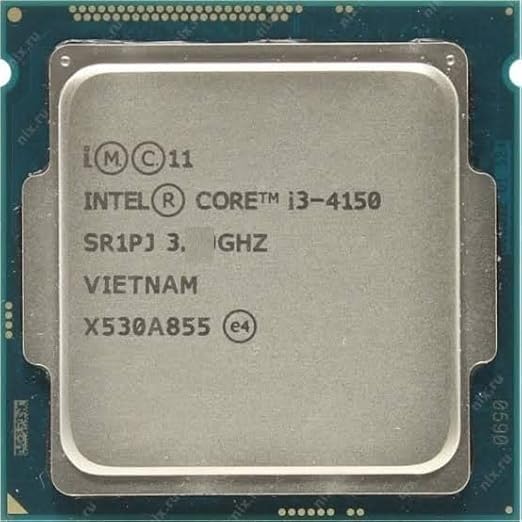
Figure 1: Top view of the Generic Core i3-4150 processor, showing the Intel branding and model number. This image illustrates the physical appearance of the processor before installation.
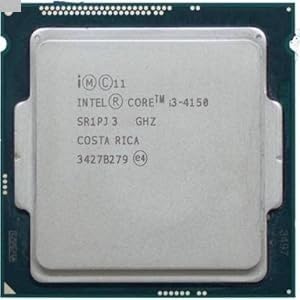
Figure 2: Another perspective of the Generic Core i3-4150 processor, highlighting its compact square form factor and the metallic heat spreader. This view provides additional detail on the processor's surface markings.
5. Operating Principles
Once installed, the Core i3-4150 processor functions as the central processing unit (CPU) of your computer system. It executes instructions, performs calculations, and manages the flow of information between all other hardware components. Its 2 cores and 4 threads allow it to handle multiple tasks concurrently, providing a responsive user experience for general computing, web browsing, office applications, and multimedia consumption.
The processor's performance is influenced by factors such as the operating system, installed software, and other hardware components (e.g., RAM, storage, graphics card).
6. Maintenance
The Core i3-4150 processor itself requires minimal maintenance. However, proper care of your computer system is crucial for its longevity and optimal performance:
- Dust Management: Regularly clean dust from inside your computer case, especially from the CPU cooler's heatsink fins and fan blades. Dust accumulation can impede airflow and lead to overheating. Use compressed air or a soft brush.
- Thermal Paste: The thermal paste between the CPU and its cooler may degrade over several years. If you notice increased CPU temperatures or reduced performance, consider reapplying fresh thermal paste. This typically involves removing the cooler, cleaning off old paste, and applying new paste.
- Software Updates: Keep your operating system and motherboard drivers updated to ensure compatibility and optimal performance with your processor.
7. Troubleshooting
If you encounter issues after installing your processor, consider the following common troubleshooting steps:
| Problem | Possible Cause | Solution |
|---|---|---|
| System does not power on or display anything. |
|
|
| System powers on but shuts down quickly or overheats. |
|
|
| System is slow or unstable after installation. |
|
|
8. Specifications
Key technical specifications for the Generic Core i3-4150 Desktop Processor:
| Feature | Detail |
|---|---|
| Model | Core i3-4150 |
| Processor Brand | Intel (Generic branded product) |
| Processor Generation | 4th Generation |
| Processor Speed | 3.5 GHz (Base Clock) |
| Processor Cores | 2 Cores |
| Processor Threads | 4 Threads |
| Smart Cache | 3 MB |
| Processor Socket | LGA 1150 |
| Integrated Graphics | Intel HD Graphics 4400 (typically) |
| Product Dimensions | 5 x 5 x 0.1 cm |
| Item Weight | 0.25 g |
| Country of Origin | India |
9. Warranty and Support
This Generic Core i3-4150 Desktop Processor comes with a 1 Year Warranty from the date of purchase. Please retain your proof of purchase for warranty claims.
For technical support or warranty inquiries, please contact the seller, PC CARE SOLUTIONS, or refer to the contact information provided with your purchase documentation.
For general information regarding Intel processors, you may visit the official Intel website. However, specific support for this Generic branded product should be directed to the seller.