Introduction
This manual provides detailed instructions for the installation, operation, and maintenance of your LIAN LI Strimer Plus V2 Wireless ARGB 12+4-Pin Wide GPU Extension Cable. This product is designed to enhance the aesthetic appeal of your PC build with customizable RGB lighting while providing reliable power delivery to your graphics card. Please read this manual thoroughly before installation to ensure proper usage and to prevent damage.
Safety Information
- Always disconnect power from your computer before installing or removing any components.
- Handle the cable and connectors with care to avoid bending pins or damaging the wiring.
- Ensure all connections are secure and fully seated to prevent electrical issues.
- Do not expose the product to moisture or extreme temperatures.
- This product is designed for indoor use only.
Package Contents
Please verify that all components are present in your package:
- LIAN LI Strimer Plus V2 Wireless ARGB 12+4-Pin Wide GPU Extension Cable
- Removable 90-degree connector (pre-installed or separate)
- Mounting clips/accessories (if applicable)
- User Manual
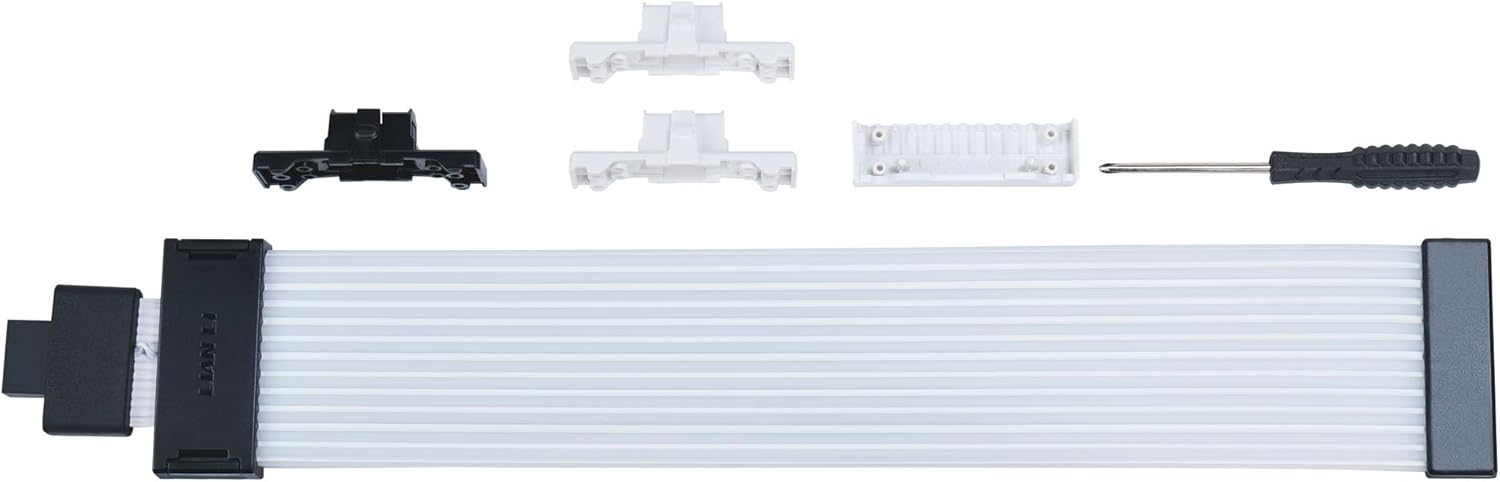
Image: The LIAN LI Strimer Plus V2 cable laid out with its detachable 90-degree connector and other small accessories, including a screwdriver and white clips, indicating the modular nature of the product.
Setup and Installation
Follow these steps to properly install your Strimer Plus V2 cable:
- Prepare Your System: Power off your computer and unplug it from the wall outlet. Open your PC case to access the graphics card and power supply connections.
- Identify Connectors: Locate the 12+4 Pin (12VHPWR) power connector on your graphics card. This cable is compatible with NVIDIA GeForce RTX 50 Series and RTX 40 Series GPUs.
- Connect to GPU: Carefully plug the 12+4 Pin male connector of the Strimer Plus V2 cable into the corresponding port on your graphics card. Ensure it is fully seated and secure. The cable is designed to be powered directly via the GPU header, simplifying installation.
- Connect to Power Supply: Connect the other end of the Strimer Plus V2 cable to your power supply's 12+4 Pin (12VHPWR) output. If your power supply does not have a native 12+4 Pin connector, you may need an adapter (not included).
- Optional 90-Degree Connector: The Strimer Plus V2 features a removable 90-degree connector. If your case or GPU orientation requires it, you can detach the straight connector and attach the 90-degree connector for a cleaner, more compact installation.
- Cable Management: Route the cable neatly within your PC case. The streamlined layout and UV-resistant coating contribute to both aesthetics and durability.
- Wireless ARGB Control Setup: For wireless lighting control, an optional L-Wireless controller (sold separately) and L-Connect 3 software are required. Refer to the L-Wireless controller manual for its specific installation and pairing instructions.
- Power On: Once all connections are secure, close your PC case, plug in the power cable, and power on your computer.

Image: The LIAN LI Strimer Plus V2 cable installed in a computer system, curving gracefully from the graphics card. The RGB lighting is active, displaying a vibrant yellow and pink gradient, highlighting its aesthetic integration.

Image: A close-up view of the LIAN LI Strimer Plus V2's 90-degree connector, showing the blue 12+4 pin interface and the black housing. This component allows for flexible cable routing in tight spaces.
Operating Instructions
The LIAN LI Strimer Plus V2 cable's ARGB lighting is controlled via the L-Connect 3 software, in conjunction with an optional L-Wireless controller.
- Software Installation: Download and install the latest version of LIAN LI L-Connect 3 software from the official LIAN LI website.
- Controller Connection: Ensure your L-Wireless controller is properly installed and connected to your system, and paired with the Strimer Plus V2 cable.
- Lighting Customization: Launch L-Connect 3. Within the software interface, you can select from various lighting effects, colors, and brightness levels for the eight RGB light guides on your Strimer Plus V2 cable.
- Wireless Connectivity: The 2.4GHz wireless connectivity allows for flexible control of the ARGB lighting without additional physical connections to your motherboard's ARGB headers, provided the L-Wireless controller is used.

Image: The LIAN LI Strimer Plus V2 cable showcasing its full RGB lighting capabilities, displaying a spectrum of colors from blue to pink. The cable is curved, emphasizing its flexibility and visual impact.
Maintenance
To ensure the longevity and optimal performance of your Strimer Plus V2 cable:
- Cleaning: Gently wipe the cable with a dry, soft, anti-static cloth to remove dust. Do not use liquid cleaners or abrasive materials.
- Inspection: Periodically check the connectors for any signs of wear, corrosion, or loose connections.
- Cable Integrity: Avoid sharp bends or excessive pulling on the cable to prevent damage to the internal wiring or light guides.
Troubleshooting
If you encounter issues with your Strimer Plus V2 cable, consider the following:
- No Power/No Lighting:
- Ensure both ends of the cable are securely connected to the GPU and power supply.
- Verify that your power supply is providing adequate power to the GPU.
- Check if the L-Wireless controller (if used) is properly installed, powered, and paired.
- Incorrect Lighting/Effects:
- Confirm that the L-Connect 3 software is running and updated to the latest version.
- Ensure the correct device is selected within the L-Connect 3 software for customization.
- Restart the L-Connect 3 software or your computer.
- Cable Not Fitting:
- Utilize the removable 90-degree connector if space is limited or for better cable routing.
- Ensure your GPU has a 12+4 Pin (12VHPWR) connector.
Specifications
| Feature | Specification |
|---|---|
| Model Name | Strimer Cable (STRIMER WLS 16PIN-12) |
| Connector Type | 12+4 Pin PCIe |
| Cable Type | Power Supply Cable |
| Compatible Devices | NVIDIA GeForce RTX 50 Series, NVIDIA GeForce RTX 40 Series |
| Special Features | High Speed, RGB Customization, Specialized Connector Design |
| Recommended Uses | Extending GPU connection in a computer setup for enhanced visual aesthetics with customizable RGB lighting |
| Color | Black (Cable housing), White (Individual wires) |
| Connector Gender | Male-to-Female |
| Number of Pins | 28 (Total, including signal pins) |
| Frequency (Wireless) | 2.4 GHz (for optional L-Wireless controller) |
| Item Weight | 45 Grams (1.59 ounces) |
| Product Dimensions | 12.4 x 7.2 x 2.36 inches |
| Operating System Compatibility | Windows, macOS, Linux (for L-Connect 3 software) |
| Compliance | RoHS |
| Usage Environment | Indoor |
Warranty and Support
LIAN LI products are manufactured to high-quality standards. For warranty information and technical support, please refer to the official LIAN LI website or contact their customer service directly. Keep your proof of purchase for warranty claims.
For further assistance, visit the Lian Li Store on Amazon.