
1. Introduction
This user manual provides essential information for the safe and effective operation of your LYAYYDS FM-280 10.1-inch HD Touch Bioimpedance Body Composition Analyzer. Please read this manual thoroughly before use and retain it for future reference. This device is designed to provide comprehensive body composition analysis, including weight, body fat, muscle mass, and other key health metrics.
2. Product Features
- Facial Recognition: Supports facial recognition for user login and information comparison, eliminating manual data entry.
- 10.1-inch HD Capacitive Touchscreen: Features a high-definition display for clear interaction and data visualization.
- Comprehensive Reporting: Generates detailed reports for Android console, PC, mobile app (H5), and A4 paper format.
- Live Voice Prompts: Provides full live voice prompts for guidance during operation.
- Cloud Data Storage: Supports cloud data storage (requires internet connection) and is compatible with PC terminals and FitMao smart reception.
- Gym Membership Card (IC Card) Integration: Built-in IC card reader module allows users to link gym membership cards for identity verification, and physical test data will be permanently stored in the cloud.
- Segmented Bioelectrical Impedance Analysis (BIA): Utilizes direct multi-frequency BIA, treating the human body as five distinct segments (left arm, right arm, left leg, right leg, and torso) for precise analysis.
- Multi-frequency Measurement: Employs both high and low frequencies for direct current measurement to accurately analyze intracellular and extracellular fluids, enhancing total body water analysis and overall measurement precision.
3. Product Specifications
| Feature | Detail |
|---|---|
| Brand | LYAYYDS |
| Model | FM-280 |
| Model Number (Internal SKU) | 74399298 |
| Display Screen | 10.1-inch HD Capacitive Touchscreen |
| Reporting Types | Android Console, PC, Mobile App (H5), A4 Paper |
| Voice Transmission | Full Live Voice Prompts |
| Data Storage | Cloud Storage (Internet required), PC Terminal, FitMao Smart Reception |
| Measurement Method | Multi-frequency Bioelectrical Impedance Analysis (BIA) |
| Electrodes | 8 Electrodes (4 foot, 4 hand) |
| Product Weight | 28.5 kg |
| Package Dimensions | 10 x 10 x 10 cm |
4. Setup
Before using your LYAYYDS FM-280, ensure it is properly set up:
- Unpacking: Carefully remove all components from the packaging. Verify that all parts are present according to the packing list.
- Placement: Place the analyzer on a hard, flat, and stable surface to ensure accurate measurements. Avoid soft surfaces like carpets.
- Power Connection: Connect the device to a suitable power source using the provided adapter.
- Initial Power On: Power on the device. The 10.1-inch HD touchscreen should illuminate.
- Network Connection: Connect the device to a stable Wi-Fi network to enable cloud data storage and mobile app synchronization. Follow the on-screen prompts for network setup.
- User Profile Setup: Create individual user profiles on the device. This typically involves entering basic information such as age, gender, height, and activity level. The device supports facial recognition for quick user identification.
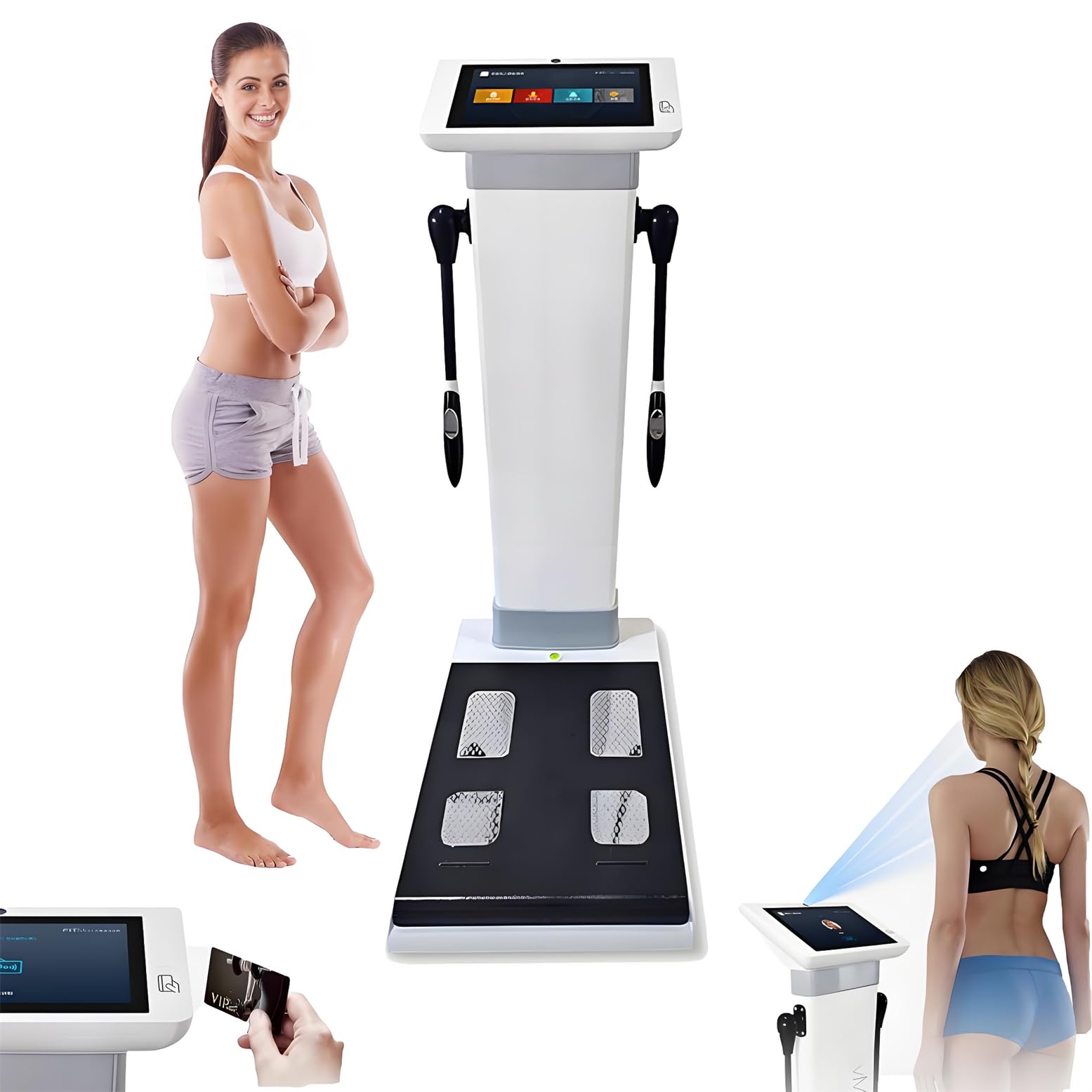
Image: The LYAYYDS FM-280 Bioimpedance Body Composition Analyzer, highlighting its eight-electrode technology for comprehensive body analysis.
5. Operating Instructions
Follow these steps for accurate body composition measurements:
- Step onto the Scale: Stand barefoot on the foot electrodes of the analyzer. Ensure your feet are evenly placed and cover both sides of the scale surface.
- Grip the Handle: Hold the handheld electrodes firmly. Ensure your thumbs completely cover and press the thumb electrodes, and your other fingers completely cover and press the remaining electrodes. Do not release or move your fingers during the measurement.
- Maintain Posture: Extend your arms to form approximately a 45-degree angle with your body. Keep your arms straight and ensure they do not touch your torso during the measurement. Maintain this correct posture until the measurement result is displayed.
- User Identification: The device will identify you, possibly using facial recognition or your linked IC card. Confirm your user profile on the screen.
- Measurement Process: The analyzer will begin the multi-frequency bioelectrical impedance analysis. Follow any voice prompts provided by the device.
- View Results: Once the measurement is complete, your body composition data will be displayed on the 10.1-inch HD touchscreen. This includes weight, body fat percentage, muscle mass, body water, bone mass, and more.
- Reporting and Data Access: Access detailed reports via the Android console, PC software, or the mobile H5 application. You can also print A4 format reports or access data stored in the cloud.
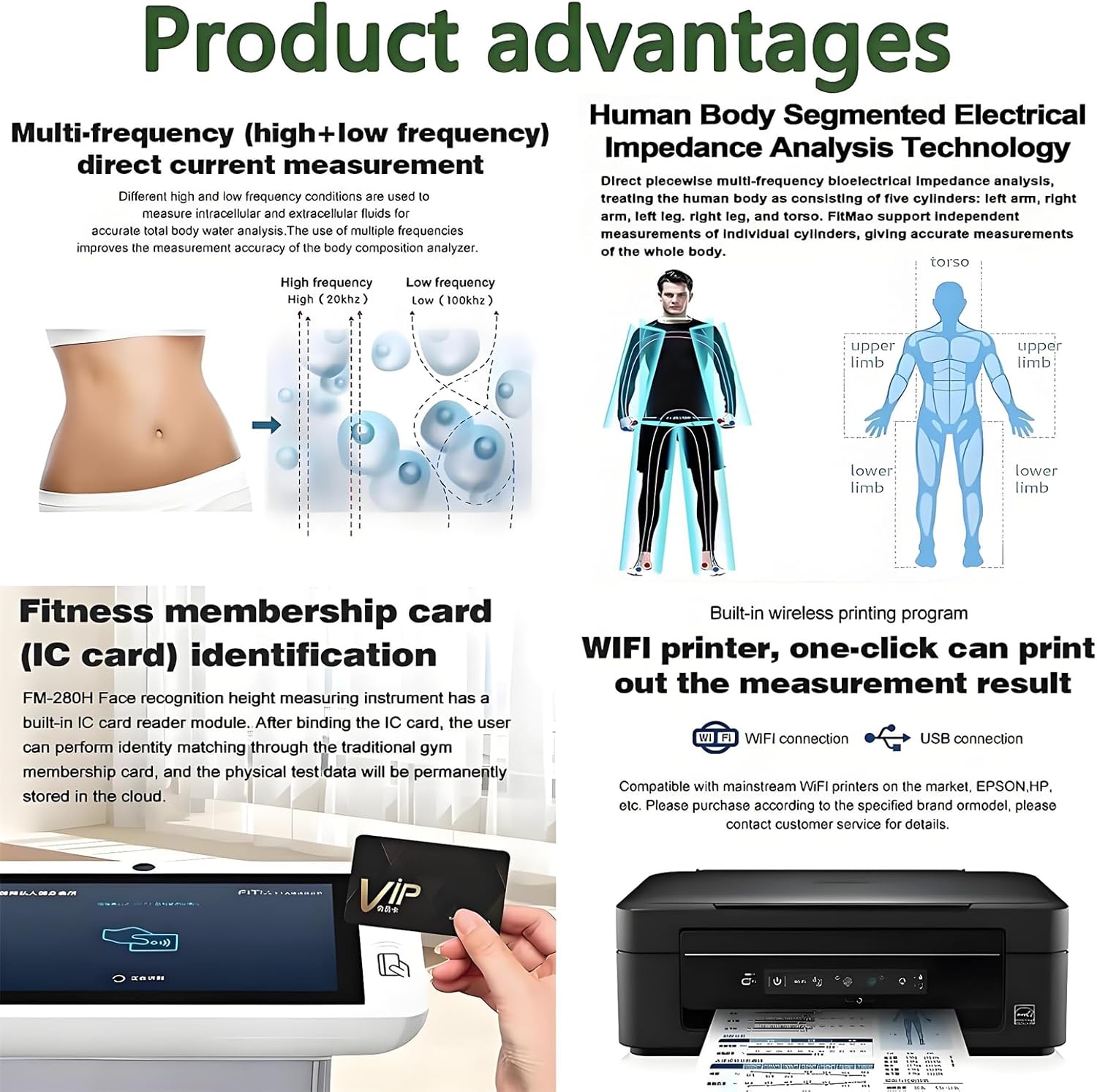
Image: Diagram illustrating the components of the analyzer, including the color display screen, handheld electrodes, and foot electrodes, along with their approximate dimensions.

Image: A close-up view of the 10.1-inch IPS HD touch capacitive screen, showing its user-friendly interface for body composition analysis.

Image: Infographic highlighting the nine key characteristics of the analyzer, such as Bioelectrical Impedance Analysis (BIA), eight electrodes, multi-frequency segment testing, and cloud data services.

Image: Infographic illustrating the product's advantages, including multi-frequency direct current measurement and segmented electrical impedance analysis for accurate body composition.

Image: Table detailing the FitMao Product Parameters, including bioresistance measurement items, methods, display screen specifications, and data storage capabilities.
Instructional Videos
Video: Introduction to Body Scan. This video demonstrates the general use and features of a body composition scale, including body composition analysis and health management via a connected app. Note: This video is from a different brand (Withings SAS) but illustrates similar functionality.
Video: GeniaScreen Smart Bathroom Scale with Wi-Fi Bluetooth Screen. This video showcases the features of another smart scale, including its ability to provide a comprehensive view of body health and segmental parameters. Note: This video is from a different brand (Eurocali) but illustrates similar functionality.
Video: Lepulse P1 Body Fat Scale Operation Video. This video demonstrates the operation of a body fat scale, including stepping on the scale, holding the handle, and maintaining correct posture for measurement. Note: This video is from a different brand (Welluefit-EU) but illustrates similar functionality and proper measurement technique.
6. Maintenance
Proper maintenance ensures the longevity and accuracy of your device:
- Cleaning: Wipe the device surface with a soft, damp cloth. Do not use abrasive cleaners or immerse the device in water.
- Storage: Store the analyzer in a cool, dry place away from direct sunlight and extreme temperatures.
- Avoid Impact: Handle the device with care to prevent damage from drops or impacts.
- Electrode Care: Keep the electrodes clean and dry. Ensure there is no residue that could interfere with measurements.
7. Troubleshooting
If you encounter issues, refer to the following common troubleshooting tips:
- Inaccurate Readings: Ensure the device is on a hard, flat surface. Make sure your feet and hands are clean and properly positioned on the electrodes. Avoid moving during measurement.
- No Power: Check the power connection and ensure the adapter is securely plugged into both the device and a working power outlet.
- Wi-Fi Connection Issues: Verify your Wi-Fi network is active and the password is correct. Try restarting the device and your router.
- User Identification Failure: Ensure your face is clearly visible for facial recognition or that your IC card is correctly scanned. Re-enter user profile details if necessary.
- App Synchronization Problems: Ensure the mobile app is updated to the latest version and that the device is connected to the internet.
If problems persist, please contact customer support.
8. Warranty and Support
For warranty information and customer support, please refer to the documentation included with your product or visit the official LYAYYDS website. Keep your purchase receipt as proof of purchase for warranty claims. Our customer service team is available to assist with any questions or issues you may have regarding the LYAYYDS FM-280 Bioimpedance Body Composition Analyzer.