
1. Important Safety Instructions
Please read and understand all safety instructions before operating this appliance. Failure to follow these instructions may result in electric shock, fire, and/or serious injury.
- Always wear appropriate personal protective equipment, including safety glasses, hearing protection, and sturdy footwear, when operating the snow shovel.
- Keep children and bystanders away from the operating area.
- Ensure the battery is fully charged before first use for optimal performance.
- Remove the battery from the machine before performing any cleaning, maintenance, or when storing the unit.
- Do not operate the snow shovel in wet conditions or rain.
- Inspect the work area for objects that could be thrown by the snow shovel, such as rocks, ice chunks, or debris. Remove them before starting.
- Never direct discharge towards people or windows.
- Store the appliance indoors in a dry, secure place, out of reach of children.
2. Package Contents
Verify that all items are present upon unpacking:
- 1x Cordless Snow Shovel Unit
- 1x 4.0Ah Lithium Battery
- 1x Battery Charger
- 1x Auxiliary Handle
- 1x English Manual
- All necessary accessories for assembly
3. Product Overview and Components
The FFanhia SN-01 is a 10-inch cordless snow shovel designed for efficient snow removal from various surfaces. It features a powerful 1200W motor and a 20V 4.0Ah lithium battery for cordless operation.

Figure 3.1: Full view of the FFanhia Cordless Snow Shovel, highlighting its compact and ergonomic design.

Figure 3.2: Diagram illustrating the dimensions of the snow shovel, including its length, width, and height for storage and operational reference.
4. Setup and Assembly
4.1 Battery Charging
Before initial use, fully charge the 4.0Ah lithium battery. The charging process typically takes approximately 2 hours. For optimal battery life, regularly fully charge the battery, even when not in use.
- Connect the charger to a standard power outlet.
- Insert the battery into the charger.
- Monitor the charging indicator lights on the battery or charger.
- Once fully charged, disconnect the battery from the charger.

Figure 4.1: Visual representation of the battery type, charging time, and endurance, essential for preparing the device for use.
4.2 Assembly Steps
The snow shovel is designed for quick and straightforward assembly.
- Attach the auxiliary handle to the main shaft. Adjust its height and angle for comfortable operation using the quick-release mechanism.
- Ensure all connections are secure before inserting the battery.
- Insert the charged battery into the battery compartment until it clicks into place.

Figure 4.2: Close-up views detailing the main handle, battery indicator lights, and the adjustable auxiliary handle, crucial for assembly and operation.
5. Operating Instructions
5.1 Before Operation
- Ensure the battery is fully charged and securely installed.
- Clear the area of any obstacles or debris that could interfere with operation or be thrown by the shovel.
- Adjust the auxiliary handle to a comfortable position.
5.2 Starting the Snow Shovel
The snow shovel features a simple push-button activation with a safety lock to prevent accidental starts.
- Engage the safety lock button.
- Press the power trigger to start the motor. Release the safety lock once the motor is running.
- To stop, release the power trigger.
5.3 Snow Removal Technique
For effective snow removal, push the snow shovel forward at a steady pace. The 10-inch sweeping width and 5.9-inch sweeping depth allow for efficient clearing of light to moderate snow.

Figure 5.1: The cordless snow shovel actively clearing snow from a paved surface, demonstrating its operational use.
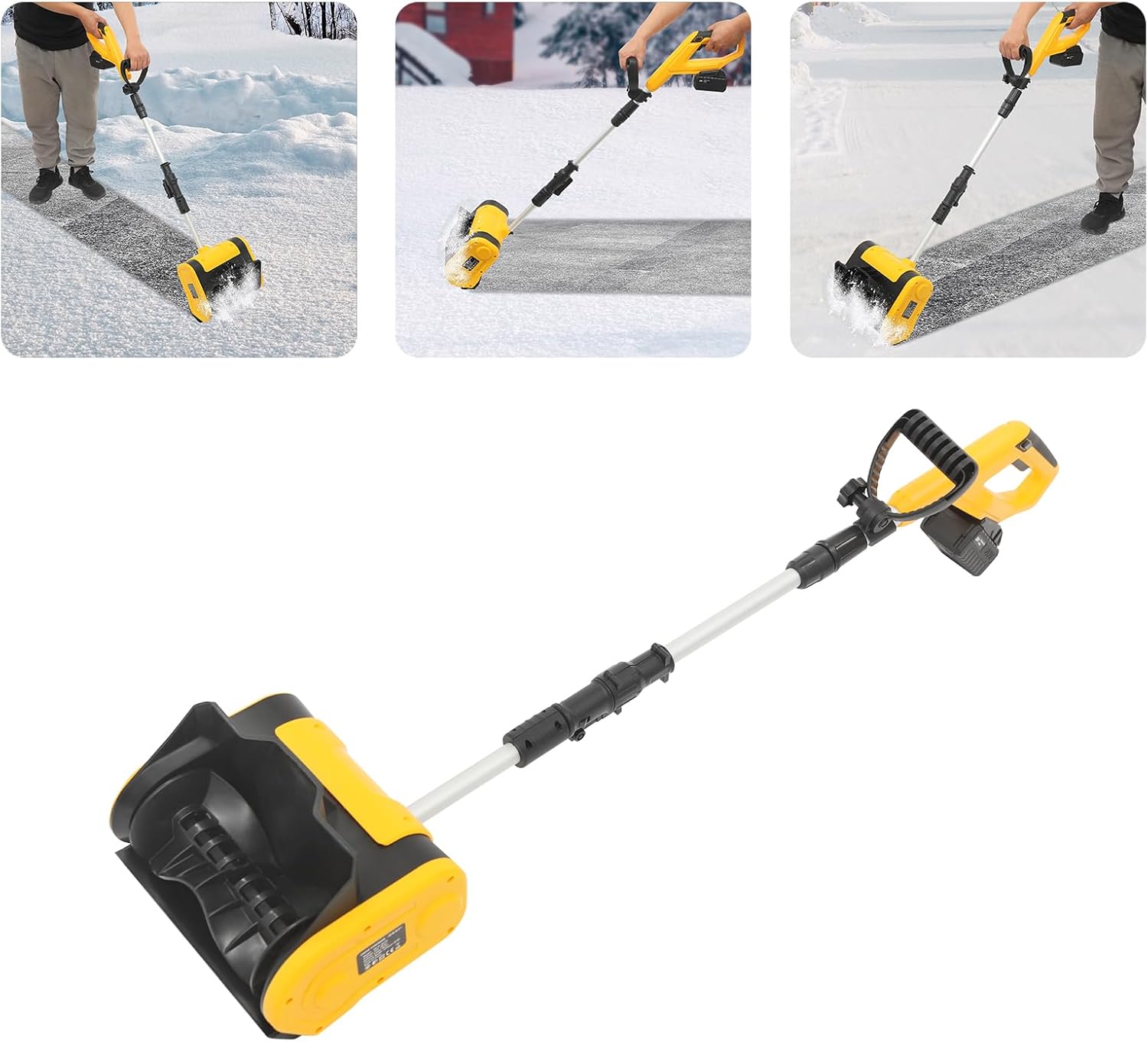
Figure 5.2: A collage showing the snow shovel being used in various scenarios, including clearing driveways, sidewalks, and patios, highlighting its versatility.
6. Maintenance and Storage
6.1 Cleaning
Always remove the battery before cleaning.
- After each use, clean any snow or debris from the auger and housing using a brush or cloth.
- Do not use water directly on electrical components.
- Wipe down the exterior with a damp cloth.
6.2 Battery Care
- Store the battery in a cool, dry place, away from direct sunlight and extreme temperatures.
- For optimal battery life, charge the battery fully before long-term storage and periodically recharge it every few months, even if not in use.
6.3 Storage
- Store the snow shovel in a dry, protected area.
- Ensure the battery is removed from the unit before storage.
- Keep out of reach of children.
7. Troubleshooting
Refer to this section for common issues and their solutions.
| Problem | Possible Cause | Solution |
|---|---|---|
| Snow shovel does not start | Battery not charged or improperly inserted. Safety lock not engaged. | Ensure battery is fully charged and correctly inserted. Engage safety lock then press trigger. |
| Reduced snow throwing distance | Low battery charge. Wet, heavy snow. Obstruction in auger. | Recharge battery. Clear snow in smaller passes. Remove battery and clear any obstructions. |
| Motor stops during operation | Overload protection activated. Battery depleted. | Reduce load on the shovel. Recharge or replace battery. |
8. Specifications
| Feature | Specification |
|---|---|
| Brand | FFanhia |
| Model | SN-01 |
| Power Source | Battery Powered |
| Voltage | 20V |
| Power | 1200W |
| Current | 10A |
| Battery Type | 1x 4.0Ah Lithium Battery |
| Speed | 3500rpm |
| Sweeping Width | 25.4cm / 10 inches |
| Sweeping Depth | 15cm / 5.9 inches |
| Throwing Distance | 8m / 26.25 feet |
| Charging Time | Approximately 2 Hours |
| Endurance | Approximately 60 minutes |
| Product Dimensions (L x W x H) | 36 x 20 x 68 cm / 14.17 x 7.87 x 26.77 inches |
| Net Weight | Approx. 4.5 kg / 9.9 lbs (calculated from gross weight 5.4kg - battery/charger) |