
Introduction
This manual provides essential instructions for the safe and efficient operation, installation, and maintenance of your JSCC 200W AC Speed Motor, model 100YB200GV22. Please read this manual thoroughly before using the product and retain it for future reference. Proper understanding and adherence to these instructions will ensure optimal performance and longevity of your motor.
Safety Instructions
Always observe the following safety precautions to prevent injury or damage to the motor:
- Ensure the power supply matches the motor's voltage requirements.
- Disconnect power before performing any installation, maintenance, or troubleshooting.
- Do not operate the motor in wet or damp conditions.
- Keep hands, clothing, and tools clear of moving parts during operation.
- Mount the motor securely to prevent vibration and movement.
- Consult a qualified electrician for wiring if you are unsure.
Package Contents
Verify that all items are present in the package:
- JSCC 200W AC Speed Motor (Model 100YB200GV22)
- Instruction Manual (this document)
- Mounting hardware (if included with specific models)
Setup
1. Mounting the Motor
Securely mount the motor to a stable, flat surface using appropriate bolts and washers. Ensure there is adequate ventilation around the motor for heat dissipation. Avoid mounting in areas with excessive dust or moisture.
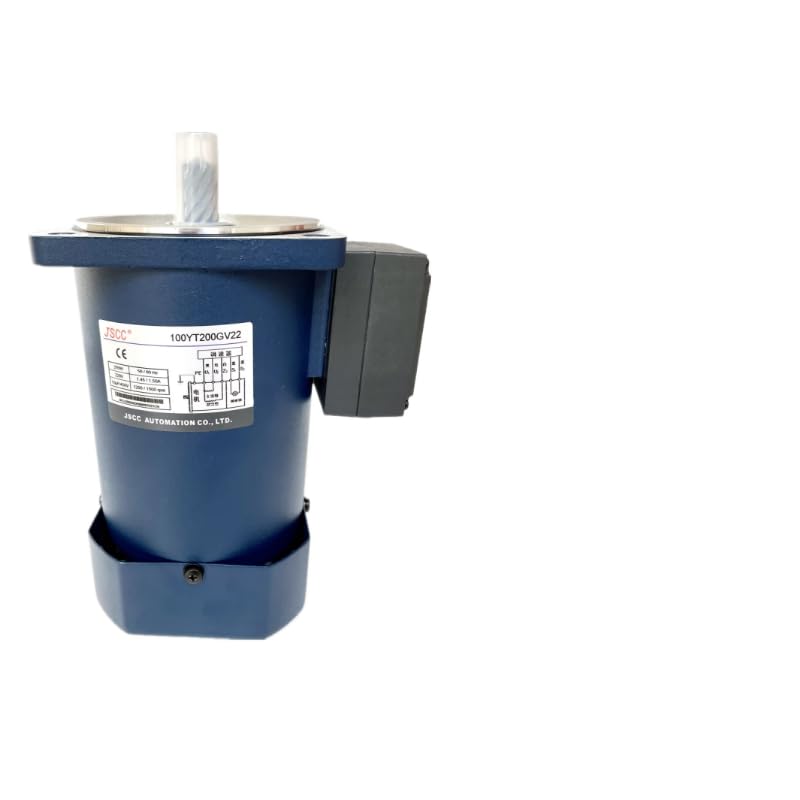
Figure 1: JSCC 200W AC Speed Motor 100YB200GV22. This image shows the compact design of the motor, highlighting its main body and output shaft, ready for installation.
2. Electrical Wiring
Connect the motor to the power supply according to the wiring diagram provided on the motor's nameplate or in specific model documentation. Ensure all connections are tight and insulated. Incorrect wiring can lead to motor damage or electrical hazards. For 200W AC motors, typically a single-phase or three-phase AC supply is required, depending on the specific model variant.
Note: If a speed controller is used, connect it between the power supply and the motor as per the controller's instructions.
Operating
1. Initial Start-up
Before applying power, double-check all connections and ensure the motor is free from obstructions. Apply power gradually if using a variable speed controller. Observe the motor for any unusual noises or vibrations.
2. Speed Control
If your model includes or is connected to a speed controller, adjust the speed knob or setting to achieve the desired rotational speed. Refer to your speed controller's manual for specific adjustment procedures. The motor is designed for stable operation across its specified speed range.
3. Stopping the Motor
To stop the motor, reduce the speed to zero using the controller (if applicable) or disconnect the power supply. Allow the motor to come to a complete stop before performing any adjustments or maintenance.
Maintenance
1. Cleaning
Regularly clean the exterior of the motor to prevent dust and debris buildup, which can impede cooling. Use a soft, dry cloth. Do not use solvents or abrasive cleaners.
2. Inspection
Periodically inspect the motor for signs of wear, loose connections, or damage to the casing or wiring. Check mounting bolts for tightness. Address any issues promptly to prevent further damage.
3. Lubrication
This motor is typically designed with sealed bearings that do not require periodic lubrication. Refer to the motor's specific technical data sheet for any lubrication requirements if applicable.
Troubleshooting
| Problem | Possible Cause | Solution |
|---|---|---|
| Motor does not start | No power supply; incorrect wiring; motor overload; faulty switch/controller. | Check power connections; verify wiring against diagram; reduce load; inspect switch/controller. |
| Motor runs but speed is inconsistent | Fluctuating power supply; faulty speed controller; excessive load. | Ensure stable power; check/replace speed controller; reduce load. |
| Unusual noise or vibration | Loose mounting; worn bearings; foreign object; motor imbalance. | Tighten mounting bolts; inspect bearings (professional service recommended); remove obstructions; check for imbalance. |
| Motor overheats | Insufficient ventilation; continuous overload; high ambient temperature. | Ensure proper airflow; reduce load or operating time; operate in cooler environment. |
Specifications
- Model: 100YB200GV22
- Power: 200W AC
- Brand: Generic (JSCC)
- Manufacturer: CHIKIMIKI
- ASIN: B0DRJV4DM7
- Manufacturer Part Number: MPMI6C76BC7FD7D1DEC78A4B4BA91877B9B9
- Unit Count: 1.0 Count
Warranty Information
This product is covered by a standard manufacturer's warranty against defects in materials and workmanship. The specific terms and duration of the warranty may vary. Please retain your proof of purchase for warranty claims. For detailed warranty information, contact your retailer or the manufacturer directly.
Customer Support
If you encounter any issues or have questions not covered in this manual, please contact your point of purchase or the manufacturer's customer support. Provide your model number (100YB200GV22) and a detailed description of the problem for efficient assistance.
Online resources and FAQs may also be available on the manufacturer's website.