
Introduction
Thank you for choosing the FCJZX SD28 Solar Charger Power Bank. This device is designed to provide reliable portable power for your electronic devices, featuring a high-capacity battery, multiple charging options, and robust construction for outdoor use. Please read this manual carefully to ensure proper operation and maintenance.

Image: The FCJZX SD28 Solar Charger Power Bank, showcasing its solar panel and integrated cables.
Package Contents
Please verify that all items are present in the package:
- FCJZX SD28 Solar Power Bank (49800mAh) x 1
- USB to USB-C cable x 1
- Drawstring Bag x 1
- User Manual x 1

Image: Diagram illustrating the power bank's features and the included accessories: the power bank, a USB to USB-C cable, a drawstring bag, and the user manual.
Setup and Initial Charging
Initial Full Charge
Before first use, it is recommended to fully charge the power bank using a wall adapter. This ensures the internal battery is properly calibrated and ready for optimal performance.
- Connect the provided USB to USB-C cable to the power bank's Type-C input/output port or Micro USB input port.
- Connect the other end of the cable to a compatible USB wall adapter (not included).
- The LED indicators will illuminate to show the charging progress. Once all indicators are solid, the power bank is fully charged.
Solar Charging (Emergency Use)
The solar panel is designed for emergency charging and maintaining battery life, not as a primary charging method. For best results, place the power bank in direct sunlight. The solar indicator light will illuminate when solar charging is active.
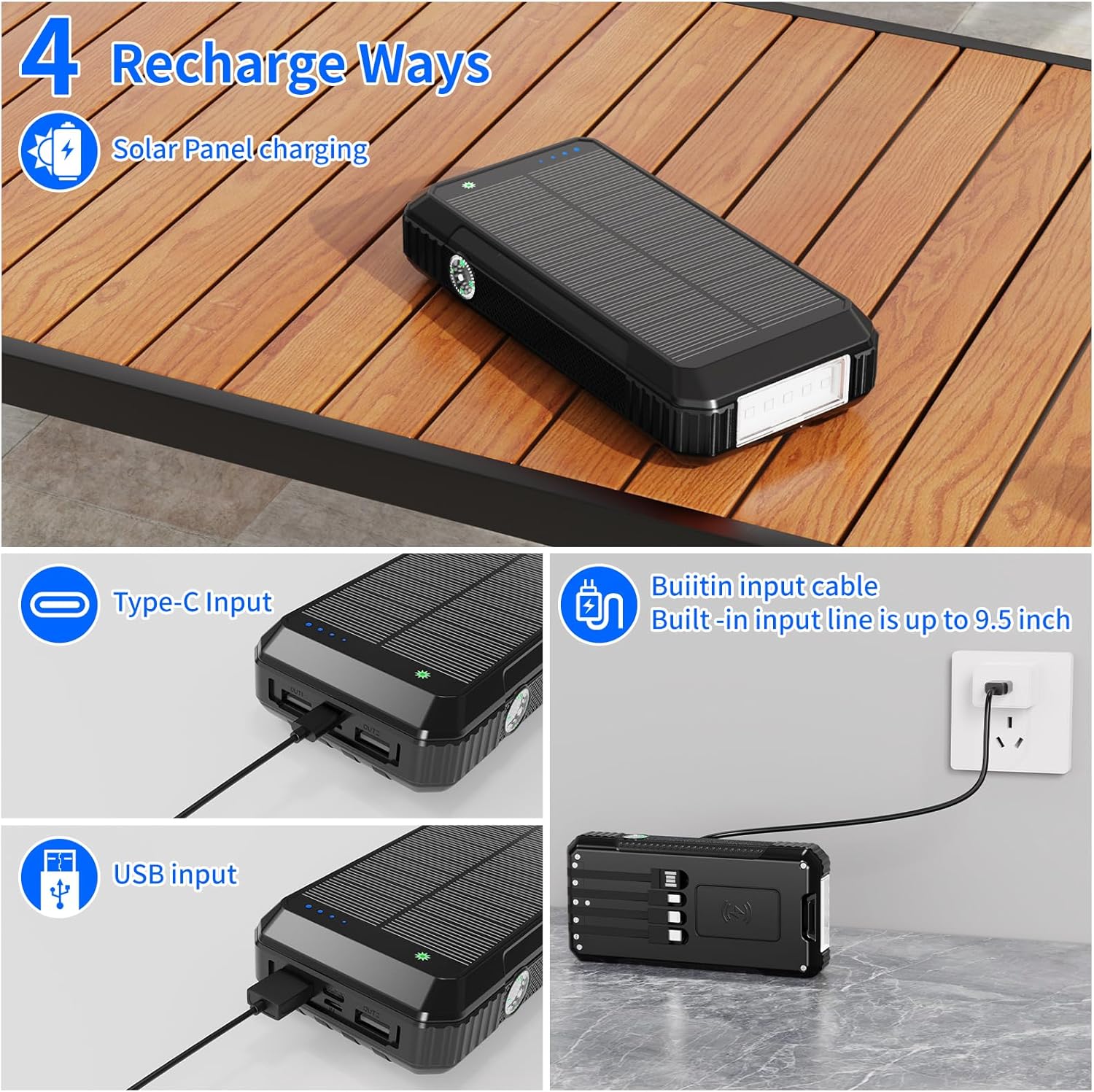
Image: Illustration showing the four ways to recharge the power bank: solar panel, Type-C input, USB input, and the built-in input cable connected to a wall adapter.
Operating Instructions
Charging Devices (Wired)
The power bank features built-in cables and additional output ports for versatile wired charging.
- Using Built-in Cables: The power bank includes built-in Micro USB, Lightning, and Type-C cables. Simply pull out the appropriate cable and connect it to your device.
- Using USB Output Ports: Connect your device's charging cable to one of the USB A1 or USB A2 output ports.
- Using Type-C Output Port: For devices compatible with Type-C charging, use the Type-C input/output port with a suitable cable.
The power bank supports 22.5W fast charging for compatible devices. The LED indicators will show the remaining battery level.

Image: Detailed view of the power bank's ports (Micro input, USB A1/A2 output, USB C input/output) and the built-in charging cables (USB, Lightning, Type-C, Micro USB).

Image: A comparison illustrating the rapid charging capability (SCP22.5W) of the power bank versus ordinary 5V/2A charging, showing a significant speed increase.
Wireless Charging
The power bank supports advanced wireless charging for compatible devices.
- Place your wireless-enabled device (e.g., smartphone, earbuds) on the designated wireless charging area of the power bank.
- Ensure the device is centered on the charging area for optimal connection.
- The indicator light on the power bank will illuminate to confirm wireless charging is active.

Image: A visual guide demonstrating the wireless charging feature and listing compatible devices and their respective charging wattages (e.g., 7.5W for iPhone, 10W for Samsung, 15W for LG, 5W for all Qi-devices).
Flashlight and Compass
The power bank is equipped with a powerful LED flashlight and a built-in compass for outdoor emergencies.
- Flashlight Operation:
- Press the power switch twice quickly to turn on the flashlight.
- Press again for SOS light mode.
- Press again for flashing light mode.
- Press again to turn off the flashlight.
- Compass: The integrated compass is located on the side of the power bank. Use it as a basic directional aid during outdoor activities.
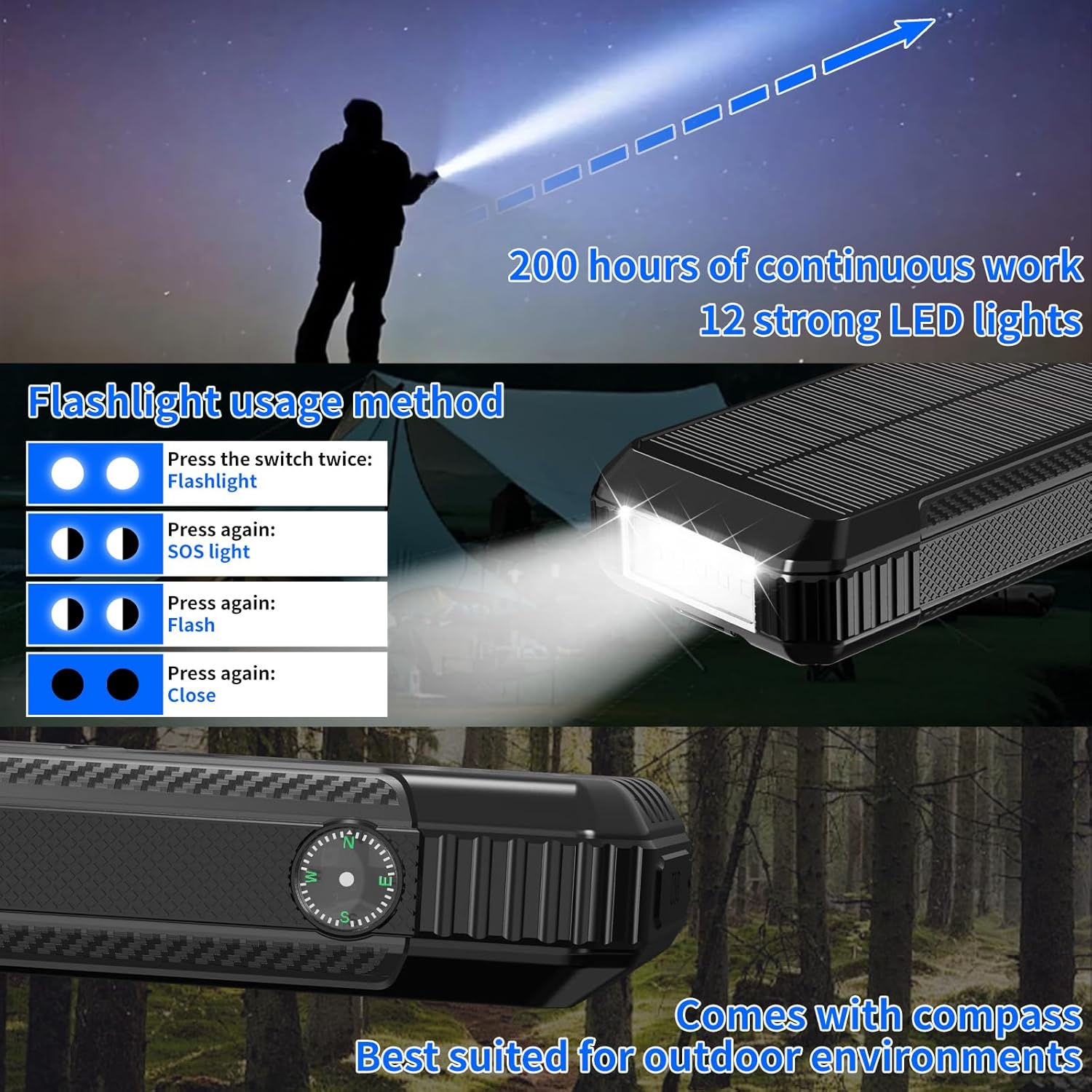
Image: Instructions for operating the 12-LED flashlight (on, SOS, flash, off) and a close-up of the integrated compass, highlighting its utility for outdoor environments.
Maintenance
- Regular Charging: If the power bank is not used frequently, charge and discharge it once a month to prolong its service life. Maintain at least 50% charge if storing for extended periods.
- Cleaning: Wipe the power bank with a dry, soft cloth. Avoid using harsh chemicals or abrasive materials.
- Storage: Store the power bank in a cool, dry place away from direct sunlight and extreme temperatures.
- Durability: The power bank features an anti-fall, dustproof, and waterproof design. While robust, avoid intentional submersion or severe impacts to prevent damage.

Image: Visual representation of the power bank's durability features, including fall prevention, waterproof capabilities, and dustproof design, suitable for outdoor use.
Troubleshooting
| Problem | Possible Cause | Solution |
|---|---|---|
| Power bank not charging | Cable not connected properly; faulty cable/adapter; power bank fully discharged. | Ensure cables are securely connected. Try a different cable or wall adapter. Allow sufficient time for charging, especially if fully depleted. |
| Device not charging from power bank | Power bank battery low; incorrect cable/port; device not compatible with wireless charging; power bank in standby mode. | Check power bank battery level. Ensure correct cable and port are used. For wireless charging, verify device compatibility and proper placement. Press the power button to activate output if needed. |
| Slow charging speed | Using a non-fast charging port/cable; device not supporting fast charging; multiple devices charging simultaneously. | Ensure you are using a fast-charging compatible port and cable. Some devices may not support 22.5W fast charging. Charging multiple devices can reduce individual charging speeds. |
| Solar charging is slow or not working | Insufficient direct sunlight; solar panel obstructed; solar charging is supplementary. | Place the power bank in direct, unobstructed sunlight. Remember solar charging is for emergency use and trickle charging, not primary power. |
| Flashlight not working | Incorrect operation; power bank battery low. | Press the power switch twice quickly to activate. Ensure the power bank has sufficient charge. |
Specifications
| Feature | Detail |
|---|---|
| Model Number | SD28 |
| Battery Capacity | 49800mAh (Li-polymer) |
| Input Ports | Micro USB, USB Type-C (also output), Built-in USB cable |
| Output Ports | USB A1, USB A2, USB Type-C (also input), Built-in Micro USB, Lightning, Type-C cables |
| Fast Charging | 22.5W (SCP), 18W (PD) |
| Wireless Charging | Yes, 5-15W automatic matching recognition |
| Special Features | Solar Panel, Dual LED Flashlights (12 beads), Compass, Anti-fall, Dustproof, Waterproof |
| Product Dimensions | 6.6 x 3 x 1.3 inches |
| Item Weight | 1 pound |
| Certifications | UN38.3, UL 2056, MSDS |
Safety Information
This solar panel charger has passed UN38.3, UL 2056, and MSDS safety certifications, ensuring safe usage. Please observe the following safety guidelines:
- Do not disassemble, modify, or repair the device.
- Keep away from fire, water, and corrosive liquids.
- Avoid extreme temperatures (hot or cold).
- Do not drop, puncture, or apply excessive force to the power bank.
- Keep out of reach of children.
- Dispose of the product responsibly according to local regulations.

Image: Icons representing various safety certifications including Overcharge protection, Overcurrent protection, Over-discharge protection, Overvoltage protection, Over power protection, Short circuit protection, CE Certification, FC Certification, and UL 2056 Standard test.
Warranty and Support
This product comes with a lifetime warranty. For any questions, concerns, or technical support, please do not hesitate to contact us. We are committed to providing professional pre-sales and after-sales service and will offer a satisfactory solution within 24 hours.
Please refer to your purchase documentation for contact details or visit the official FCJZX website for support information.