
Introduction
The NEEWER P15 is a versatile 3-in-1 accessory designed for mobile photography and videography. It functions as a selfie stick, a stable tripod, and a comfortable phone grip, making it ideal for vlogging, live streaming, video conferencing, and general photography. Its compact and lightweight design ensures portability for various shooting environments.
Package Contents
- 1 x Foldable Selfie Stick Tripod
- 1 x USB Charging Cable (for Bluetooth remote)
- 1 x User Manual
Please ensure all items are present upon unboxing. If any components are missing or damaged, contact customer support.
Product Features
The NEEWER P15 offers a range of features to enhance your mobile content creation:
- 3-in-1 Versatility: Functions as a selfie stick, travel tripod, and phone holder clamp.
- Compact & Lightweight: Folds to 4 inches (10cm) and weighs 4.2oz (119g) for easy portability.
- Detachable Bluetooth Remote Shutter: Wirelessly capture photos and videos from up to 33ft (10m) away.
- Flexible Height Adjustment: Four telescopic sections provide 9-15 inches (22-37cm) height range.
- 360° Universal Phone Holder: Compatible with most smartphones (2.4-3.3 inches / 60-85mm opening range) with 360° rotation for vertical/horizontal shooting and 225° tilt for variable angles.
- Cold Shoe Accessory Mounts: Two integrated cold shoe mounts for attaching external accessories like LED lights or microphones.
Setup and Operation
1. Unfolding the Tripod/Selfie Stick
- Gently pull the top phone holder upwards to extend the telescopic sections.
- To use as a tripod, spread the three legs at the base until they are stable on a flat surface.
- To use as a selfie stick, keep the legs folded and hold the handle firmly.

Image: The NEEWER P15 in various telescopic height configurations, demonstrating its adjustable range from 8.7 inches to 16.3 inches.

Image: The NEEWER P15 demonstrating its wide application as a desktop stand for recording, a selfie stick for capturing personal photos, and a handheld grip for stable video recording.
2. Attaching Your Smartphone
- Open the phone clamp by pulling the top jaw upwards.
- Carefully place your smartphone into the clamp, ensuring it is securely held by the silicone pads.
- Adjust the phone holder's angle using the 360° rotation and 225° tilt mechanisms for optimal shooting perspective.
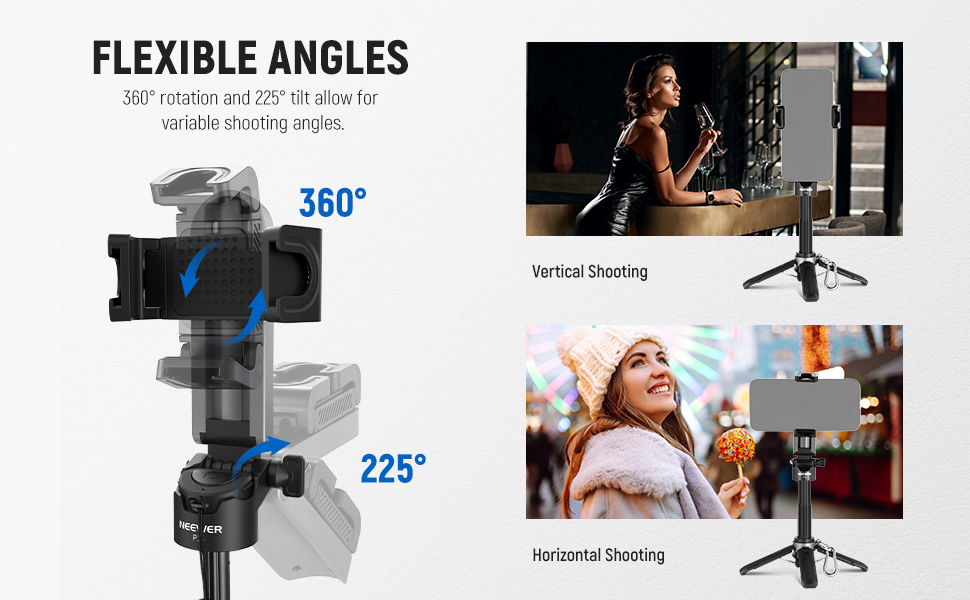
Image: The NEEWER P15's phone holder illustrating its 360-degree rotation for switching between vertical and horizontal shooting, and its 225-degree tilt capability for adjusting camera angles.

Image: A detailed view of the NEEWER P15's versatile phone holder, highlighting its cold shoe accessory mounts, the 2.4-3.3 inch (60-85mm) clamp opening, and the thick silicone pads designed to prevent scratches on your smartphone.
3. Pairing the Bluetooth Remote Shutter
- Remove the Bluetooth remote from its slot on the handle.
- Turn on the remote by pressing and holding the button until the indicator light flashes.
- On your smartphone, go to Bluetooth settings and search for "NEEWER-Shutter" or a similar device name.
- Select the device to pair. The indicator light on the remote will stop flashing once successfully paired.
- You can now use the remote to trigger your phone's camera shutter or start/stop video recording.
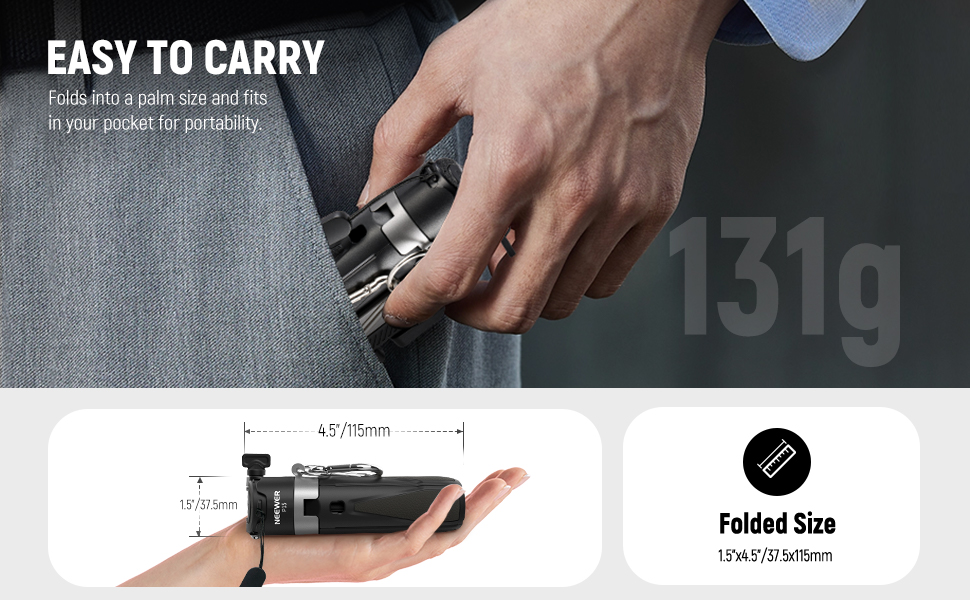
Image: A user demonstrating the wireless Bluetooth remote shutter of the NEEWER P15, showing how it can be used to wirelessly take pictures from up to 33 feet (10 meters) away, compatible with both iOS and Android devices.
Video: An official demonstration of the NEEWER Selfie Stick, showcasing its features and ease of use for various content creation scenarios.
4. Attaching Accessories
The NEEWER P15 features two cold shoe mounts on the phone holder. These allow you to attach additional accessories such as LED video lights (e.g., NEEWER PL81/RGB62) or mini microphones (e.g., NEEWER CM14 PRO/KM17) to enhance your setup for professional-quality content.
Maintenance
- Cleaning: Wipe the product with a soft, dry cloth. Avoid using harsh chemicals or abrasive materials.
- Storage: Store the selfie stick tripod in a cool, dry place away from direct sunlight and extreme temperatures.
- Battery Care (Bluetooth Remote): Recharge the remote regularly using the provided USB cable to maintain battery life. Avoid overcharging or completely draining the battery.
Troubleshooting
| Issue | Possible Cause | Solution |
|---|---|---|
| Bluetooth remote not pairing. | Remote battery low; not in pairing mode; interference. | Ensure remote is charged and in pairing mode (flashing light). Move closer to phone. Restart phone's Bluetooth. |
| Remote not triggering camera. | Not paired; phone camera app issues; remote battery low. | Re-pair the remote. Try a different camera app. Ensure remote is charged. |
| Tripod unstable. | Legs not fully extended; uneven surface; excessive weight. | Ensure tripod legs are fully spread and locked. Use on a flat, stable surface. Do not exceed recommended weight capacity. |
| Phone not fitting in clamp. | Phone size exceeds clamp's range. | Verify your phone's width is within the 2.4-3.3 inch (60-85mm) range. |
Specifications
| Feature | Detail |
|---|---|
| Model Name | P15 |
| Brand | NEEWER |
| Material | Metal |
| Color | Black |
| Minimum Height | 9 Inches (22cm) |
| Maximum Height | 15 Inches (37cm) |
| Folded Size | 4 Inches (10cm) |
| Weight | 4.2oz (119g) |
| Phone Clamp Opening | 2.4-3.3 Inches (60-85mm) |
| Bluetooth Remote Range | Up to 33ft (10m) |
| Special Features | Lightweight, Portable, Flexible, Cold Shoe Mounts |
Warranty Information
This NEEWER P15 Selfie Stick Tripod is covered by a 1 Year Manufacturer Warranty from the date of purchase. This warranty covers defects in materials and workmanship under normal use. It does not cover damage caused by misuse, accidents, unauthorized modifications, or normal wear and tear. Please retain your proof of purchase for warranty claims.
Customer Support
For further assistance, technical support, or warranty inquiries, please visit the official NEEWER website or contact their customer service team. Refer to the contact information provided on the product packaging or the NEEWER brand store on Amazon.
Online Resources: NEEWER Amazon Store