
KTS HD-Cure
KTS Handheld Laser Therapy Device User Manual
Model: HD-Cure
Introduction
Thank you for choosing the KTS Handheld Laser Therapy Device, Model HD-Cure. This device is designed to provide targeted infrared and red light therapy for muscle and joint pain relief. It features an upgraded design with increased laser diodes for enhanced efficiency and includes straps for hands-free application on various body parts. Please read this manual thoroughly before use to ensure safe and effective operation.

Image: The KTS Handheld Laser Therapy Device shown in use, strapped to an arm, highlighting its compact design and application versatility.
Package Contents
Before beginning, please verify that all items are present in your package:
- Main host device (1)
- USB Cable (1)
- Charger (1)
- Protective Goggles (1 pair)
- Wipe Cloth (1)
- Unit Holder (1)
- Straps (2)
- Instruction Manual (1)

Image: A visual representation of all items included in the KTS Handheld Laser Therapy Device package, such as the main unit, straps, charger, and goggles.
Safety Information and Precautions
Please read and understand all safety warnings before operating the device. Failure to do so may result in injury or device damage.
- Always wear the provided protective goggles during operation to protect your eyes from direct laser light.
- Do not look directly into the laser light source.
- Keep the device out of reach of children and pets.
- Do not use the device on open wounds, infected areas, or cancerous lesions.
- Consult a healthcare professional before use if you have any pre-existing medical conditions, are pregnant, or have implanted medical devices.
- This device is for personal use and is not intended to diagnose, treat, cure, or prevent any disease or health condition.
- Do not immerse the device in water or any other liquid.
- Use only the provided charger and USB cable.
Legal Disclaimer:
Statements regarding dietary supplements have not been evaluated by the FDA and are not intended to diagnose, treat, cure, or prevent any disease or health condition.
Product Features and Technology
The KTS Handheld Laser Therapy Device utilizes a combination of red light and near-infrared light therapy to promote healing and pain relief.
- Red Light Therapy (650nm): 12 pieces of 650nm red light diodes. This wavelength is absorbed by the skin, promoting blood circulation and cellular repair.
- Near-Infrared Light Therapy (808nm): 4 pieces of 808nm near-infrared light diodes. This wavelength penetrates deeper into tissues to relieve joint and muscle pain. Note: The 808nm light is invisible to the human eye but can be seen through a phone's camera.
- Adjustable Timer: Customize your therapy sessions with 5, 10, 15, or 20-minute timer options.
- Energy Levels: Select from L1, L2, or L3 energy levels to suit your needs.
- Wearable Design: Includes straps and a unit holder for hands-free application on various body parts.
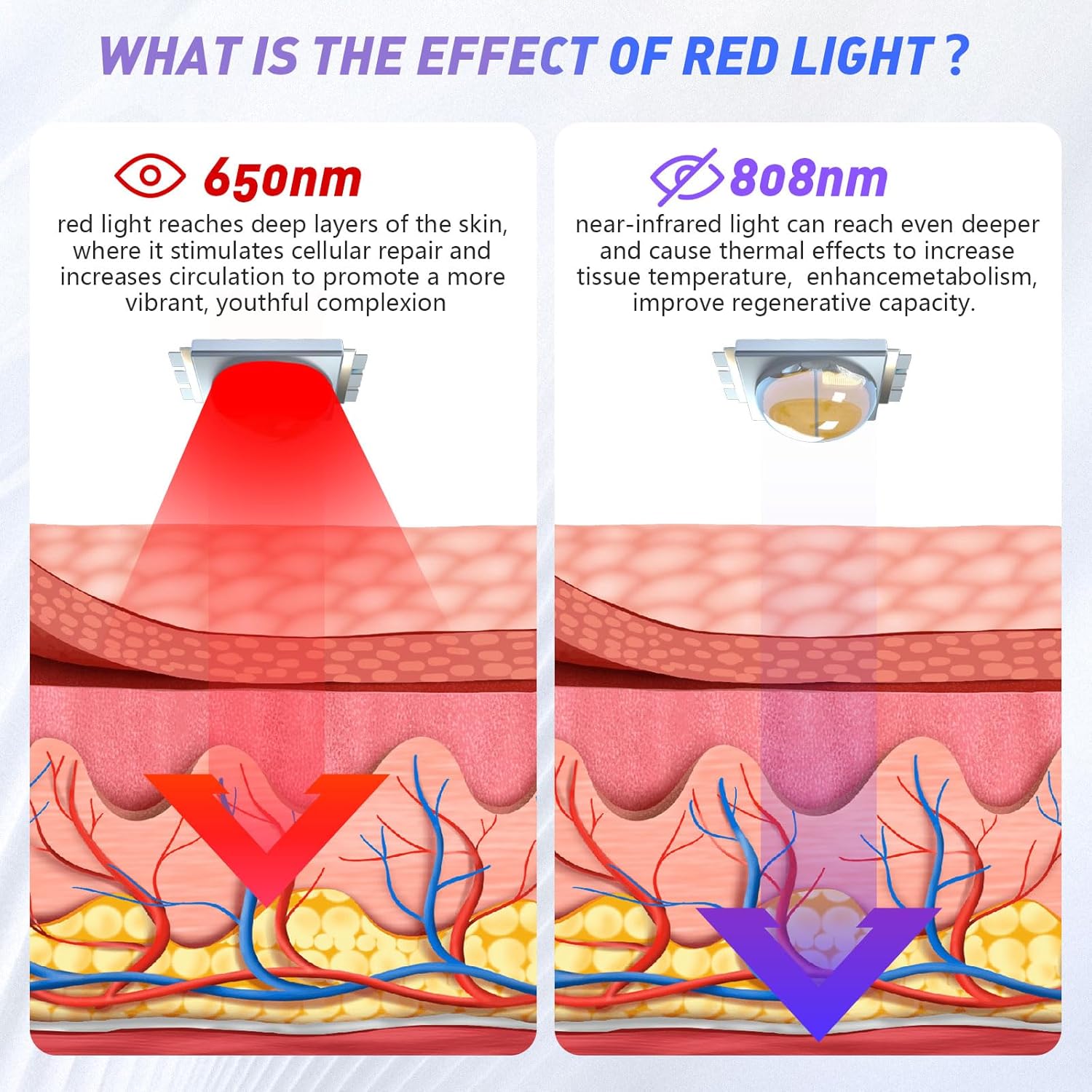
Image: An illustration demonstrating the different penetration depths of 650nm red light (skin absorption, circulation) and 808nm near-infrared light (deeper tissue, pain relief).

Image: A close-up view of the device highlighting its dual light therapy (650nm & 808nm) and low intensity electric pulse capabilities.
Setup and Charging
The device comes with a rechargeable battery. Before first use, ensure the device is fully charged.
- Connect the USB cable to the device's charging port and the other end to the provided charger.
- Plug the charger into a standard electrical outlet.
- The charging indicator light on the device will illuminate. Once fully charged, the indicator may change color or turn off (refer to device display for battery status).
Operating Instructions
Follow these steps for safe and effective use of your KTS Handheld Laser Therapy Device:
- Step 1: Wear Goggles. To protect your eyes, always wear the protective goggles provided in the package before turning on or using the device.
- Step 2: Power On and Set Mode. Press and hold the On/Off button to turn on the device. Use the control buttons to set your desired therapy time (5/10/15/20 minutes) and energy level (L1, L2, L3).
- Step 3: Begin Therapy. Short press the power button again to start your therapy session. Slowly move the device over the area you wish to treat. For hands-free use, proceed to Step 4.
- Step 4: Hands-Free Application (Optional). Insert the main host into the unit holder, then use the provided straps to secure the device to the desired body part (e.g., arm, leg, knee).

Image: A step-by-step visual guide demonstrating the operational process, from wearing goggles to applying the device with straps.
When the therapy session is finished, you will hear a beep sound, and the device will automatically turn off or pause.
Recommended Usage:
We recommend using the device twice a day for 20-30 minutes per session. A full course of treatment is typically 10 days. Significant changes may be observed after two courses of treatment.

Image: Examples of common application areas for the device on humans (neck, knee, back, elbows) and pets (dogs, horses).

Image: An illustrative guide indicating various body areas where the cold laser therapy device can be applied for pain relief, including knee, waist, shoulder, ankle, elbows, back, hand, and leg.

Image: The KTS device being used to provide therapy to a dog and a horse, demonstrating its applicability for pet care.
Maintenance and Care
- Cleaning: Use the provided wipe cloth or a soft, dry cloth to clean the device after each use. Do not use abrasive cleaners or immerse the device in water.
- Storage: Store the device in a cool, dry place, away from direct sunlight and extreme temperatures.
- Battery Care: To prolong battery life, avoid fully discharging the battery frequently. Charge the device regularly, even if not in use for extended periods.
Troubleshooting
| Problem | Possible Cause | Solution |
|---|---|---|
| Device does not turn on. | Battery is low or depleted. | Charge the device fully using the provided charger. |
| Device not charging. | Charger or cable is faulty; connection is loose. | Ensure cable is securely connected. Try a different outlet. If problem persists, contact customer service. |
| No visible red light. | Device is off; 808nm light is invisible. | Ensure device is on. Note that 808nm light is not visible to the naked eye but can be seen with a phone camera. |
| Device beeps and turns off prematurely. | Therapy timer has completed. | This is normal operation. Restart for another session if desired. |
Specifications
| Feature | Detail |
|---|---|
| Model | HD-Cure |
| Red Light Wavelength | 650nm (12 diodes) |
| Near-Infrared Wavelength | 808nm (4 diodes) |
| Timer Settings | 5, 10, 15, 20 minutes |
| Energy Levels | L1, L2, L3 |
| Battery Type | 1 A battery (included) |
| Package Dimensions | 9.53 x 7.24 x 2.48 inches |
| Weight | 1 Pound |
| Manufacturer | YJT |
Warranty and Customer Support
KTS provides a one-year after-sales guarantee for this device. If you encounter any problems or have questions regarding your KTS Handheld Laser Therapy Device, please do not hesitate to contact our customer service team. We are committed to resolving any issues as soon as possible.
Contact Information:
Please refer to the contact details provided on the product packaging or the official KTS website for the most up-to-date customer support information.
Ask a question about this manual
Ask about setup, troubleshooting, compatibility, parts, safety, or missing instructions. Manuals+ will review the question and use this page’s manual context to help answer it.