
1. Introduction
This user manual provides detailed instructions for the BWOO BW580 Over-Ear Headphones and the accompanying BW98 True Wireless Stereo (TWS) Earbuds. Please read this manual thoroughly before using the product to ensure proper operation and to maximize your audio experience. Keep this manual for future reference.
2. Product Overview
2.1 Package Contents
- BWOO BW580 Over-Ear Headphones
- BWOO BW98 TWS Earbuds with Charging Case
- USB-A to USB-C Charging Cable
- 3.5mm Audio Cable
- User Manual (this document)
2.2 Key Features
BWOO BW580 Over-Ear Headphones:
- Immersive Stereo Sound: Equipped with 40mm speakers for deep bass and clear treble.
- Bluetooth 5.0 Connectivity: Ensures seamless pairing and stable wireless connections.
- Extended Battery Life: Up to 9 hours of continuous play and 120 hours of standby time.
- Premium Comfort Fit: Soft memory foam ear cushions and an adjustable headband for prolonged wear.
- Travel-Friendly Design: Foldable structure for easy portability.
- Built-In HD Microphone: For clear hands-free calls and voice assistant interaction.
- Active Noise Cancellation: Effectively shields environmental noise for clearer listening.
BWOO BW98 TWS Earbuds:
- Enhanced Noise Reduction (ENC): Up to 80% increase in noise reduction.
- Deep Bass Stereo Sound: Delivers rich audio quality.
- Bluetooth 5.3: For quick and stable wireless connection.
- Earphone Case Battery Life: Provides 12 hours of additional battery life for the earbuds.
2.3 Component Identification

This image displays the BWOO BW580 over-ear headphones in black, featuring soft earcups and an adjustable headband. In the background, the charging case for the BWOO BW98 TWS earbuds is visible, indicating a combo product.
BWOO BW580 Over-Ear Headphones:
- Earcups: Padded for comfort, housing the speakers and controls.
- Headband: Adjustable for fit.
- Control Buttons: Located on the earcup for power, volume, track control, and call management.
- Microphone: Integrated for hands-free communication.
- Charging Port: Micro USB port.
- 3.5mm Audio Jack: For wired connection.

A user wearing the BWOO BW580 headphones, with an overlay showing the button controls on the earcup for adjusting volume, skipping tracks, and answering calls, emphasizing comfortable and precise operation.
BWOO BW98 TWS Earbuds:
- Earbuds: Left and Right earbuds with touch controls.
- Charging Case: Stores and charges the earbuds.
- Charging Port: USB-C port on the case.
- LED Indicators: On earbuds and case for battery status and pairing.

An infographic detailing key features of the BWOO BW98 TWS earbuds, including 80% noise reduction (ENC), deep bass stereo sound, Bluetooth 5.3 for quick connection, and a 12-hour battery life for the earphone charging case.
3. Setup
3.1 Charging
BWOO BW580 Over-Ear Headphones:
- Connect the micro USB charging cable to the charging port on the headphones.
- Connect the other end of the cable to a USB power source (e.g., computer USB port, wall adapter).
- The LED indicator will show charging status. A full charge takes approximately 2 hours.
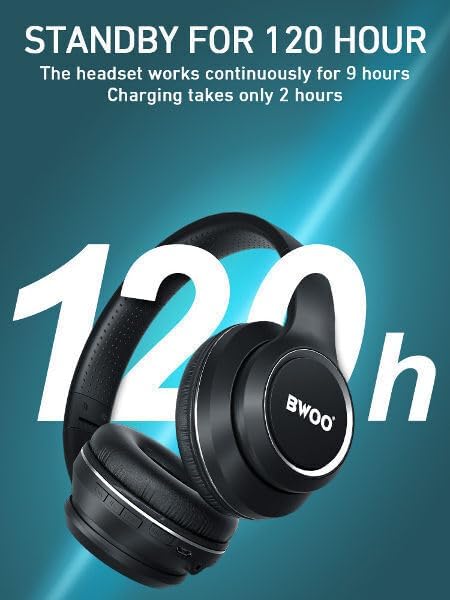
An image illustrating the battery performance of the BWOO BW580 headphones, indicating 120 hours of standby time, 9 hours of continuous playback, and a 2-hour charging time.
BWOO BW98 TWS Earbuds:
- Place the earbuds into their charging case.
- Connect the USB-C charging cable to the port on the charging case.
- Connect the other end of the cable to a USB power source.
- The LED indicators on the case and earbuds will show charging status.
3.2 Bluetooth Pairing
BWOO BW580 Over-Ear Headphones:
- Ensure the headphones are charged.
- Press and hold the Power button for approximately 3-5 seconds until the LED indicator flashes blue and red, indicating pairing mode.
- On your device (smartphone, tablet, laptop), enable Bluetooth and search for available devices.
- Select "BW-580" from the list of devices.
- Once connected, the LED indicator will flash blue slowly or remain solid blue.

A close-up image highlighting the internal Bluetooth 5.0 chip within the BWOO BW580 over-ear headphones, emphasizing low power consumption, strong signal, and stable transmission speed.
BWOO BW98 TWS Earbuds:
- Open the charging case. The earbuds will automatically enter pairing mode (LED indicators will flash).
- On your device, enable Bluetooth and search for available devices.
- Select "BW98" (or similar name) from the list of devices.
- Once connected, the earbuds will indicate successful pairing (e.g., voice prompt, LED change).

The BWOO BW580 headphones are shown connected to various devices, including a smartphone, tablet, and laptop, demonstrating their compatibility with multiple models via both wireless and wired connections.
4. Operating Instructions
4.1 Power On/Off
- BW580 Over-Ear: Press and hold the Power button for 3 seconds to power on. Press and hold for 5 seconds to power off.
- BW98 TWS Earbuds: They power on automatically when removed from the case and power off when placed back in the case. Manual power on/off usually involves holding the touch sensor.
4.2 Music Playback (BW580 Over-Ear)
- Play/Pause: Press the Multi-function button once.
- Next Track: Press and hold the Volume Up button.
- Previous Track: Press and hold the Volume Down button.
- Volume Up: Short press the Volume Up button.
- Volume Down: Short press the Volume Down button.
4.3 Call Management (BW580 Over-Ear)
- Answer/End Call: Press the Multi-function button once.
- Reject Call: Press and hold the Multi-function button for 2 seconds.
- Activate Voice Assistant: Double-press the Multi-function button.
4.4 Wired Mode (BW580 Over-Ear)
Insert the 3.5mm audio cable into the headphone's audio jack and the other end into your audio device. The headphones will automatically switch to wired mode, and Bluetooth functionality will be disabled.
5. Maintenance
- Clean the headphones and earbuds regularly with a soft, dry cloth.
- Avoid exposing the devices to extreme temperatures, humidity, or corrosive substances.
- Do not attempt to disassemble or repair the devices yourself, as this will void the warranty.
- Store the headphones and earbuds in a cool, dry place when not in use, preferably in their original packaging or a protective case.
6. Troubleshooting
6.1 No Sound or Poor Sound Quality
- Ensure the headphones/earbuds are properly charged.
- Check that the volume on both the device and the headphones/earbuds is turned up.
- Verify that the device is correctly paired via Bluetooth. Try re-pairing if necessary.
- Move closer to your audio source to avoid interference.
- For BW580, try using the 3.5mm audio cable to rule out Bluetooth issues.
6.2 Cannot Pair with Device
- Ensure the headphones/earbuds are in pairing mode (LED flashing red/blue for BW580, or earbuds removed from case for BW98).
- Turn off Bluetooth on your device and turn it back on.
- Forget the device from your Bluetooth list and attempt to pair again.
- Ensure no other Bluetooth devices are interfering.
- Restart both your audio device and the headphones/earbuds.
6.3 Headphones/Earbuds Not Charging
- Check the charging cable and power adapter for damage.
- Ensure the charging cable is securely connected to both the device and the power source.
- Try a different charging cable or power source.
- For BW98 TWS, ensure the earbuds are correctly seated in the charging case.
7. Specifications
7.1 BWOO BW580 Over-Ear Headphones
| Model Name | BW-580 |
| Connectivity Technology | Wireless (Bluetooth 5.0) |
| Headphones Jack | 3.5 mm Jack |
| Battery Life (Play) | Up to 9 Hours |
| Battery Life (Standby) | Up to 120 Hours |
| Charging Time | Approximately 2 Hours |
| Control Type | Button Control |
| Material | Plastic, Fabric, Leather, Foam |
| Item Weight | 250 Grams (converted from 250 Kilograms in source, which is likely an error) |
| Water Resistance Level | Water Resistant |
| Noise Control | Active Noise Cancellation |

A cutaway diagram showing the internal components of the BWOO BW580 headphone earcup, highlighting the high-fidelity 40mm 32Ω speakers and a highly sensitive microphone for clear audio.

An infographic displaying graphs related to active noise reduction (ANC) in the BWOO BW580 headphones, illustrating how external noise is shielded and sound clarity is enhanced across different frequencies.
7.2 BWOO BW98 TWS Earbuds
| Connectivity Technology | Wireless (Bluetooth 5.3) |
| Noise Reduction | ENC (Environmental Noise Cancellation) |
| Earphone Case Battery Life | 12 Hours |
8. Warranty and Support
For warranty information and support, please refer to the documentation included with your purchase or contact BWOO SYNC customer service. The manufacturer's contact information is provided as: admin@dollarduck.ca.