
1. Introduction
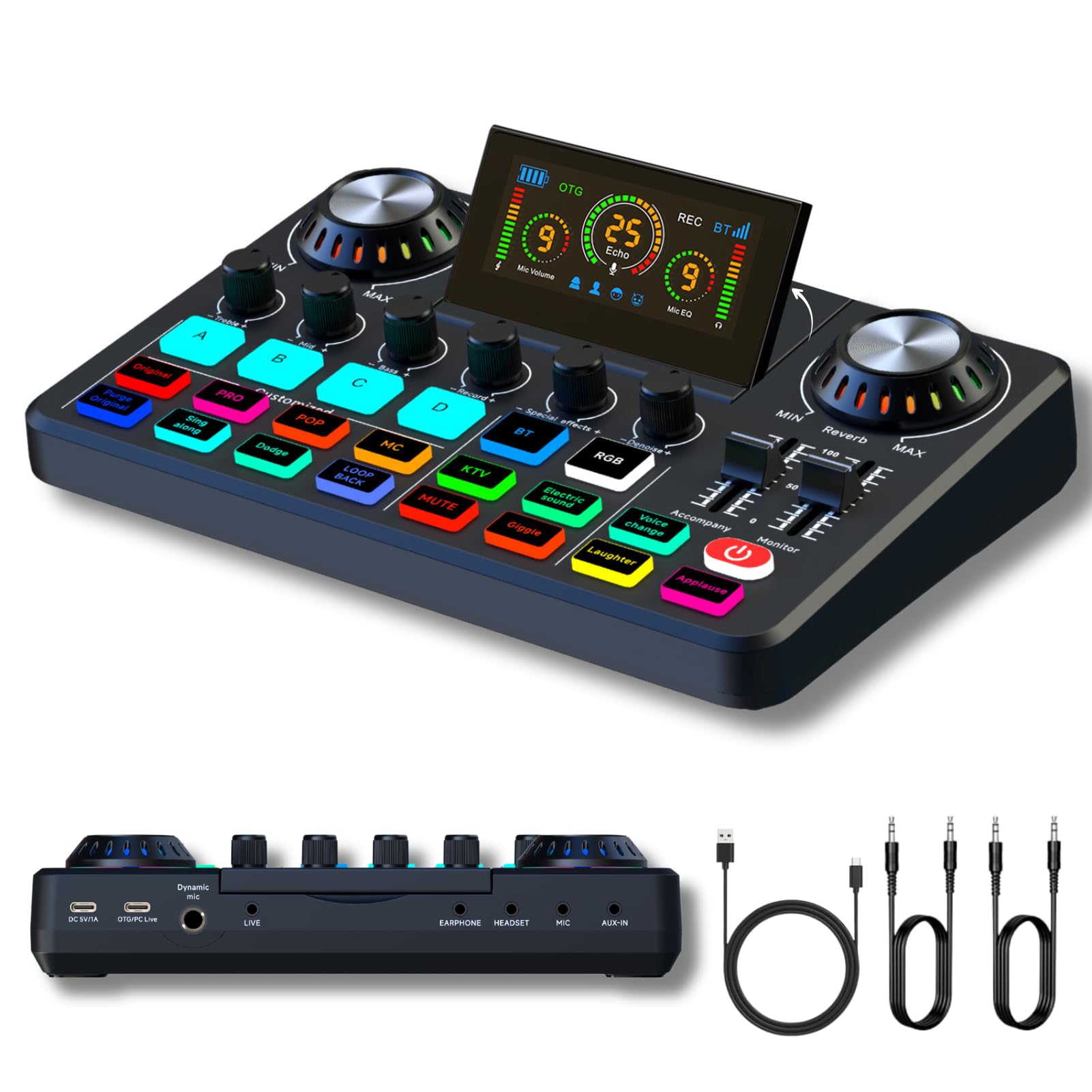
Image: The HOSONGIN Sound-Card-F668 Audio Mixer, a live sound card with DJ mixer effects, voice changer, denoise function, and RGB lighting, designed for streaming, podcasting, and gaming.
The HOSONGIN Sound-Card-F668 is a professional-grade audio mixer designed for live streaming, podcasting, gaming, and music recording. It features 48V phantom power, adjustable microphone gain, a 32-bit chipset for clear sound, and various sound customization options. This manual provides detailed instructions for optimal use of your device.
2. Package Contents
Verify that all items listed below are included in your package:
- 1x HOSONGIN Sound-Card-F668 Audio Mixer
- 1x USB-C Charging Cable
- 2x 3.5mm TRRS Audio Cables
- 1x User Manual (this document)
3. Key Features
- Professional Audio Quality: Equipped with 48V phantom power and adjustable microphone gain (up to 60dB noise-free gain for XLR microphones) and a 32-bit chipset.
- Sound Customization: Includes 4 customizable soundboards, 5 reverb modes, and 16 special effects. Adjustable tones (high, mid, low) for personalized audio.
- Versatile Instrument Support: Compatible with guitars, bass, and other 6.35mm jack instruments.
- Live Streaming & Recording: USB-C connectivity for fast setup with PCs and smartphones. Supports XLR microphones and AUX-IN for smartphone accompaniment.
- Bluetooth Connectivity: Automatic Bluetooth pairing for wireless music playback.
- Noise Reduction: Adjustable noise rejection feature to adapt to different environments.
- Voice Changer: Features 4 custom voice change modes.
- Voice Monitoring: Toggle voice monitoring on or off for real-time audio control.
- Long Battery Life: Built-in 2000mAh battery provides up to 8 hours of working time.
4. Setup Guide
4.1 Connecting to PC/Smartphone (OTG Lossless Transmission)
The Sound-Card-F668 supports OTG lossless transmission for high-definition audio quality when connected to a PC or smartphone. This ensures a more realistic and clearer audio experience compared to a standard 3.5mm interface.

Image: The HOSONGIN Sound-Card-F668 connected to both a PC and a smartphone, illustrating OTG lossless transmission for high-quality audio. Simply plug and play for universal compatibility.
- Connect the provided USB-C charging cable to the "OTG/PC Live" port on the audio mixer.
- Connect the other end of the USB-C cable to your computer or smartphone.
- The device should be recognized automatically. No additional drivers are typically required for basic functionality.
4.2 Microphone and Headset Connection
Connect your microphone and headset to the appropriate ports on the mixer.

Image: A visual guide to connecting various devices such as laptops, microphones, headphones, and smartphones to the HOSONGIN F668 audio mixer, highlighting its versatility for podcasting and live streaming.
- For XLR microphones, connect them to the designated XLR input. Ensure 48V phantom power is enabled if your microphone requires it.
- Connect your headset or headphones to the "HEADSET" or "EARPHONE" output ports for monitoring.
- Use the 3.5mm TRRS audio cables to connect external audio sources (e.g., a smartphone for accompaniment) to the "AUX-IN" port.
4.3 Device Compatibility
The HOSONGIN Sound-Card-F668 offers broad compatibility with various devices and software, ensuring stable and high-quality audio across different platforms.

Image: The HOSONGIN F668 audio mixer demonstrating seamless compatibility with laptops and smartphones, providing stable and high-quality audio on any platform.
It is compatible with laptops, microphones, personal computers, headphones, and smartphones. Supported operating systems include Windows and macOS. It works with popular software like Audacity, GarageBand, and other DAWs that support USB audio interfaces.
4.4 Multi-User Setup
The HOSONGIN Sound-Card-F668 supports multi-functionality, allowing for a great sound experience for two people simultaneously, ideal for interviews or collaborative content creation.

Image: The HOSONGIN F668 audio mixer configured for two users, ensuring a high-quality audio experience for collaborative sessions.
Connect two microphones to the available inputs and adjust their respective settings for a balanced audio mix.
5. Operating Instructions
5.1 Power On/Off and Charging
To power on the device, press and hold the power button. To power off, press and hold the power button again. The built-in 2000mAh battery provides up to 8 hours of operation. Connect the USB-C cable to the "DC 5V/1A" port for charging. You can stream and charge simultaneously.

Image: The HOSONGIN F668 audio mixer connected to a smartphone, illustrating simultaneous streaming and charging to ensure uninterrupted sessions.
5.2 Microphone Gain and Equalization
Adjust the microphone gain and equalization (treble, mid, bass) for optimal sound.

Image: A detailed view of the HOSONGIN F668 audio mixer's microphone gain and equalization controls, allowing for precise adjustment of treble, mid, and bass frequencies for a perfect sound experience.

Image: A visual representation of how adjusting treble, mid, and bass frequencies impacts sound, demonstrating that higher treble sharpens the voice and clearer bass beautifies it.
- Use the "Mic" knob to adjust the overall microphone gain.
- Utilize the "Treble", "Mid", and "Bass" knobs to fine-tune your vocal tone.
- The higher the treble, the sharper and louder the voice.
- The clearer the bass voice, the more it enhances your voice.
5.3 Sound Customization and Effects
The mixer offers various sound effects and customization options.

Image: The HOSONGIN F668 audio mixer showcasing its array of illuminated buttons for instant sound customization, including DJ mixer effects and voice changer functions.
- Custom Soundboards (A, B, C, D): Press these buttons to activate pre-set or customized sound effects.
- Reverb Modes: Use the "Reverb" knob to select from 5 different reverb modes.
- Special Effects: Access 16 special effects via dedicated buttons.
- Voice Changer: Utilize the "Voice Change" button to cycle through 4 different voice transformation modes (e.g., male, female, alien).
5.4 Bluetooth Pairing
Connect your smartphone or other Bluetooth-enabled devices wirelessly for music accompaniment.

Image: The HOSONGIN F668 audio mixer demonstrating automatic Bluetooth pairing with a smartphone for instant wireless music playback.
- Press the "BT" button on the mixer to activate Bluetooth pairing mode.
- On your device, search for "HOSONGIN F668" in the Bluetooth settings and connect.
- Once paired, you can play music from your device through the mixer.
5.5 Noise Reduction
Activate the noise reduction feature to minimize background noise.

Image: The HOSONGIN F668 audio mixer highlighting its noise rejection feature, which can be adjusted based on the environment to ensure clear audio.
Press the "Denoise" button to activate or deactivate the noise rejection function. The intensity of noise reduction can be adjusted to suit your environment.
5.6 Voice Monitoring
Monitor your audio in real-time through your connected headphones.

Image: The HOSONGIN F668 audio mixer connected to a laptop, demonstrating the ability to toggle voice monitoring on or off for ultimate flexibility during calls or recordings.
Use the dedicated monitoring controls to enable or disable real-time voice monitoring. This allows you to hear your own voice and the mixed audio as it is being broadcast or recorded.
5.7 Display and Real-time Control
The mixer features a 45° display for effortless sound repair and real-time monitoring of audio levels and settings.
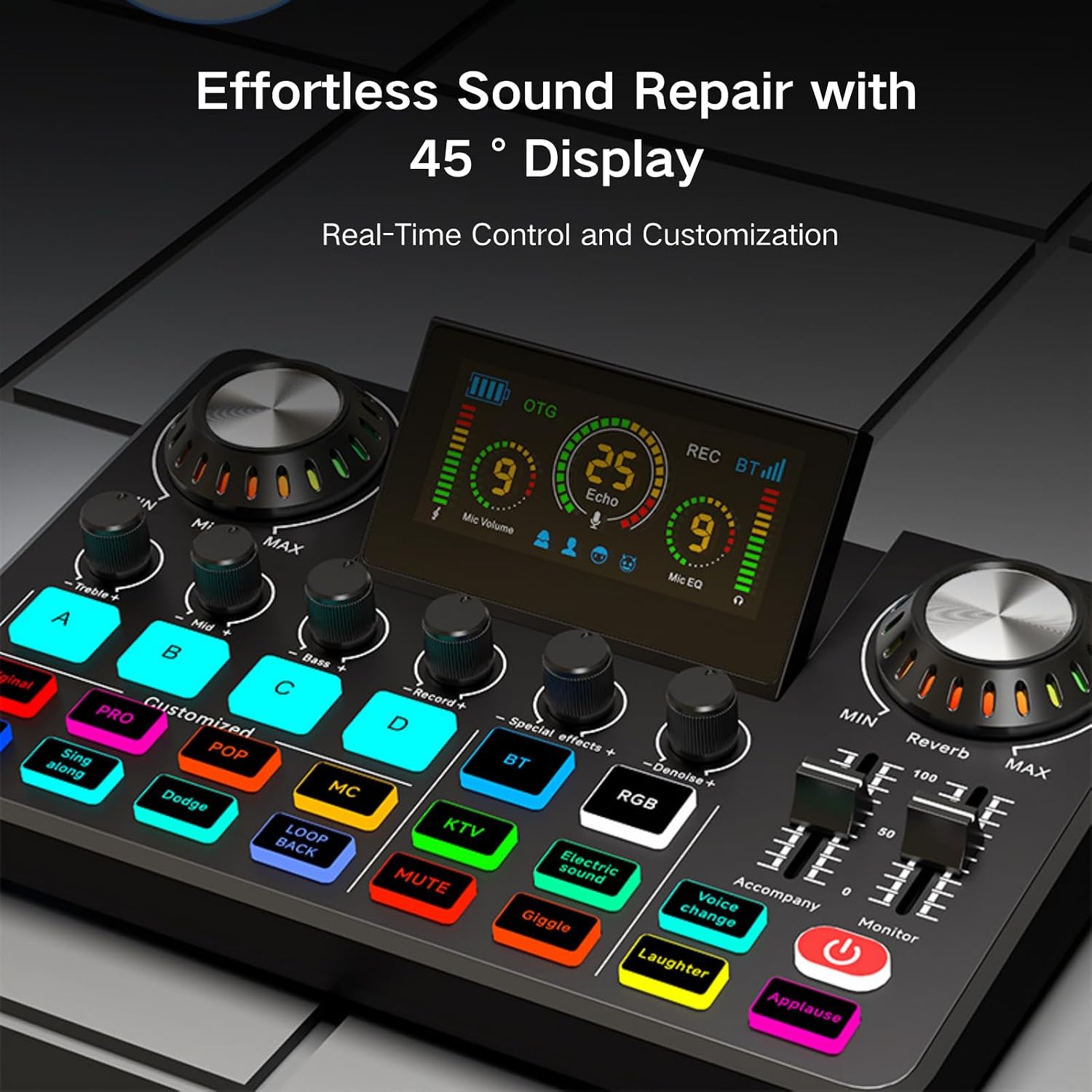
Image: The HOSONGIN F668 audio mixer's 45-degree display provides real-time control and customization, making sound adjustments effortless.
The integrated display provides visual feedback on microphone volume, echo levels, and microphone equalization, allowing for precise adjustments during your sessions.
5.8 Product Overview and Features Demonstration
Watch this video for a visual overview of the HOSONGIN Sound-Card-F668 Audio Mixer and a demonstration of its key features and functionalities.
Video: A comprehensive demonstration of the HOSONGIN Sound-Card-F668 Audio Mixer, showcasing its design, connectivity options, sound effects, and overall user experience for live streaming, podcasting, and music production.
6. Maintenance
- Keep the device clean and free from dust. Use a soft, dry cloth for cleaning.
- Avoid exposing the mixer to extreme temperatures, humidity, or direct sunlight.
- Do not attempt to disassemble the device. Refer to qualified service personnel for repairs.
- Store the mixer in a safe place when not in use to prevent damage.
7. Troubleshooting
7.1 No Sound Output
- Ensure all cables are securely connected.
- Check the volume levels on the mixer, your connected device (PC/smartphone), and your headphones/speakers.
- Verify that the correct input/output device is selected in your computer's sound settings or smartphone's audio settings.
- If using an XLR microphone, ensure 48V phantom power is activated if required by the microphone.
7.2 Microphone Not Picking Up Sound (or very low)
- Increase the "Mic" gain knob on the mixer.
- Check the microphone's connection and ensure it is fully inserted.
- Confirm the microphone is functioning correctly by testing it with another device if possible.
- If using an XLR microphone, ensure 48V phantom power is on if needed.
7.3 Bluetooth Connection Issues
- Ensure the mixer's "BT" button is active and blinking, indicating pairing mode.
- Make sure your device's Bluetooth is enabled and visible.
- Try unpairing and re-pairing the device.
- Ensure no other devices are actively connected to the mixer via Bluetooth.
7.4 Device Not Recognized by PC/Smartphone
- Ensure the USB-C cable is connected to the "OTG/PC Live" port on the mixer and securely to your computer/smartphone.
- Try a different USB-C cable or USB port on your computer.
- Restart your computer or smartphone.
- For some operating systems, you may need to manually select the "HOSONGIN F668" as the audio input/output device in sound settings.
8. Specifications
| Feature | Detail |
|---|---|
| Brand | HOSONGIN |
| Model Number | Sound-Card-F668 |
| Item Weight | 1.72 pounds (0.78 Kilograms) |
| Package Dimensions | 11.1 x 6.89 x 2.48 inches |
| Batteries | 1 Lithium Ion battery required (included) |
| Battery Type | Lithium |
| Compatible Devices | Laptop, Microphone, Personal Computer, Headphone, Smartphone |
| Supported Software | Audacity, GarageBand, and other DAWs supporting USB audio interfaces |
| Operating System | Windows, macOS |
| Number of Channels | 4 |
| Connectivity Technology | Bluetooth, USB, Type C |
| Audio Input | XLR, Auxiliary |
9. Warranty and Support
HOSONGIN products are covered by a standard manufacturer's warranty. For specific warranty details, please refer to the documentation included with your purchase or visit the official HOSONGIN website.
If you encounter any issues or have questions regarding your HOSONGIN Sound-Card-F668 Audio Mixer, please contact our customer support team for assistance. Contact information can typically be found on our website or in your product packaging.