
DOMANKI DAC-08CPD-C1
DOMANKI 12000 BTU Portable Air Conditioner
Model: DAC-08CPD-C1 / YAC-08CPD/PE1
Your complete guide to setup, operation, and maintenance.
1. Introduction
Thank you for choosing the DOMANKI 12000 BTU Portable Air Conditioner. This 3-in-1 unit is designed to provide efficient cooling, fanning, and dehumidifying for rooms up to 500 sq. ft. With its advanced features like a self-evaporative condensate design, intuitive LED display, remote control, and quiet operation, it offers a comfortable and hassle-free experience.

Figure 1: DOMANKI 12000 BTU Portable Air Conditioner and Remote Control
Key features include:
- Powerful Cooling: 12,000 BTU (ASHRAE) / 8,000 BTU (SACC) for effective cooling in minutes.
- Multi-function System: Offers cooling, fanning, dehumidifying, and auto modes.
- Self-Evaporative Condensate Design: Reduces the need for frequent manual drainage.
- Quiet Operation: Noise level as low as 48dB in sleep mode for undisturbed rest.
- User-Friendly Controls: Intuitive LED display and full-function remote control.
- Portability: Compact design with 360° wheels and built-in handle for easy mobility.
- Flexible Installation: Comes with a full window kit suitable for vertical and horizontal sliding windows (20.5in - 50in).

Figure 2: The 3-in-1 functionality of the portable air conditioner.
2. Safety Information
Please read all safety warnings and instructions carefully before using this appliance to prevent injury or damage. Keep this manual for future reference.
- Always plug the unit into a grounded 3-prong outlet. Do not remove the grounding prong.
- Do not operate the unit with a damaged cord or plug.
- Do not use extension cords or adapter plugs.
- Ensure the unit is placed on a flat, stable surface to prevent tipping.
- Keep the air intake and exhaust vents clear of obstructions.
- Do not insert fingers or objects into the air outlet.
- Unplug the unit before cleaning or performing any maintenance.
- Do not use the unit in wet areas like bathrooms or laundry rooms.
- This appliance is not intended for use by persons (including children) with reduced physical, sensory or mental capabilities, or lack of experience and knowledge, unless they have been given supervision or instruction concerning use of the appliance by a person responsible for their safety.
3. Setup Guide
Follow these steps for quick and easy installation of your portable air conditioner.
3.1 Unboxing and Component Check
Carefully open the packaging and remove all components. Verify that all parts listed in the manual are present. The installation kit includes the air exhaust hose, hose adapters, window kit, product manual, and full function remote control.

Figure 3: Included components for setup.
Video 1: Detailed installation steps for the DOMANKI portable air conditioner.
3.2 Window Kit Assembly
Assemble the window slider panels according to your window size. The kit is designed for vertical and horizontal sliding windows ranging from 20.5 inches to 50 inches.
- Insert screws into the holes of the window panel without tightening them initially.
- Align and insert the inner plate into the outer plate, then fix with screws.
- Apply the adhesive-backed foam seal to the window frame for better insulation.
- Place the assembled window kit into the window track and close it securely.
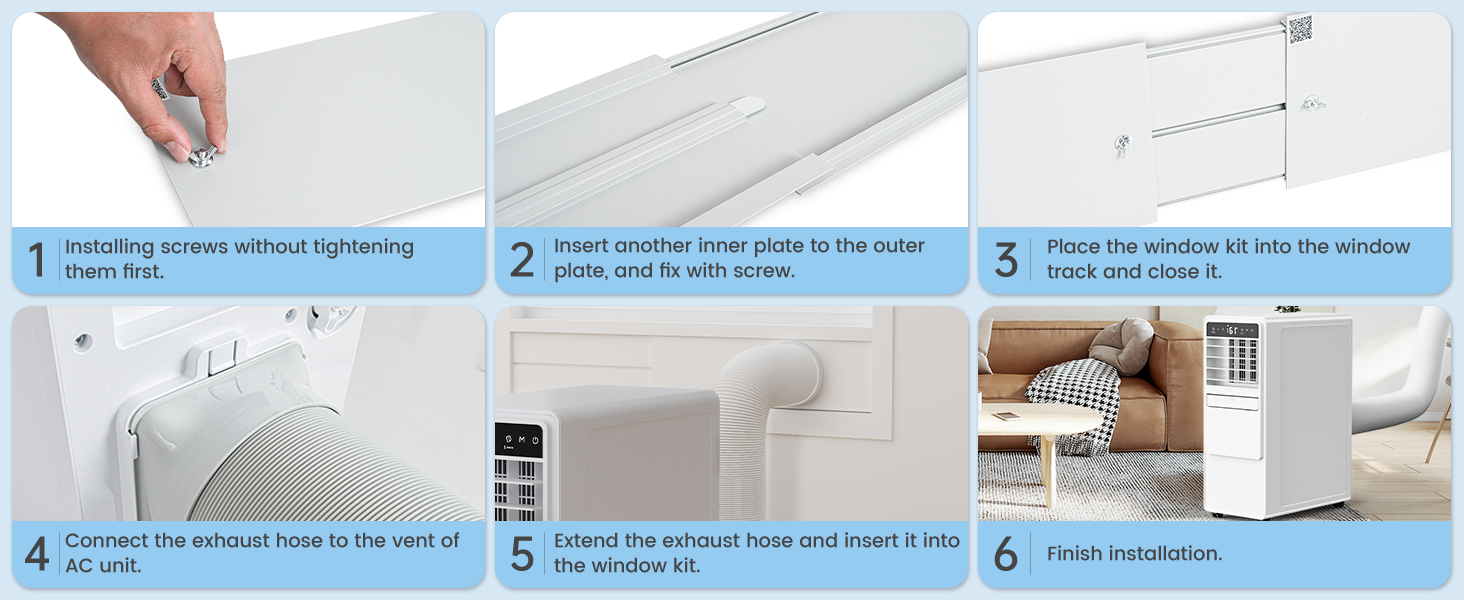
Figure 4: Visual guide for window kit installation.

Figure 5: Examples of compatible vertical and horizontal sliding windows.
3.3 Exhaust Hose Connection
Connect the exhaust hose to the AC unit and then to the window kit to vent hot air outside.
- Attach the hose connector to one end of the exhaust hose.
- Attach the other end of the exhaust hose to the vent on the back of the AC unit.
- Insert the hose into the opening of the window kit and use the snap fastener to secure it.
3.4 Unit Placement
Place the portable AC unit on a level surface near a window and a grounded electrical outlet. Ensure there is sufficient space around the unit for proper airflow.
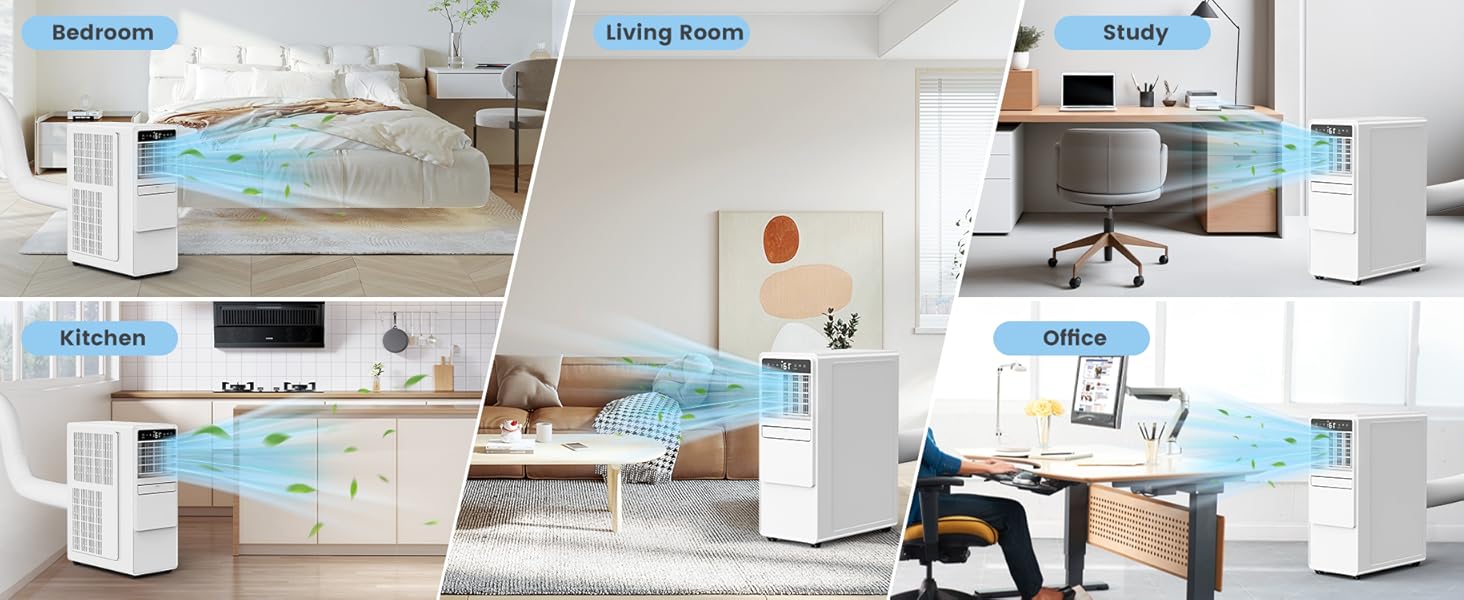
Figure 6: The portable AC unit can be used in various rooms for optimal comfort.
4. Operating Instructions
Your DOMANKI portable air conditioner offers multiple modes and settings for personalized comfort.
4.1 Control Panel and Remote Control
The unit features an intuitive LED display and touch controls on the top panel. A full-function remote control is also included for convenient operation from up to 25 feet away.
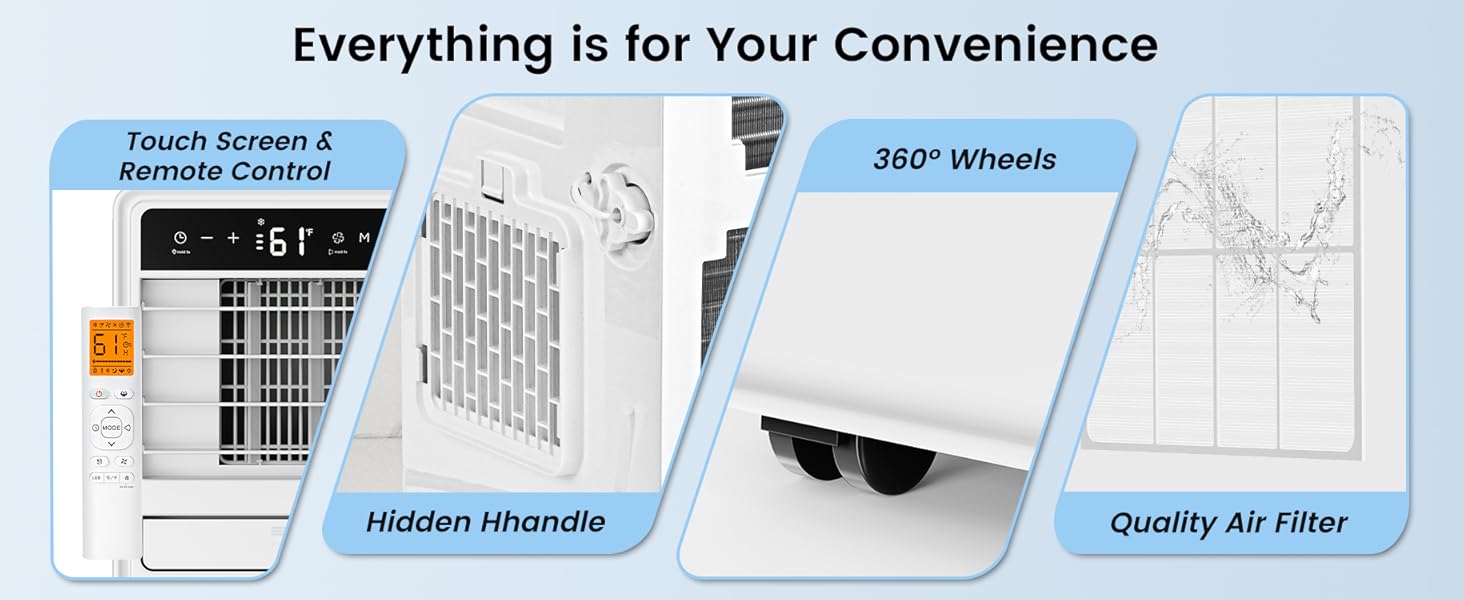
Figure 7: Touch screen control panel and remote control for easy operation.
Before initial use, manually pivot the air outlet blades to open them. The unit will not operate if the blades are closed.
4.2 Operating Modes
Press the "Mode" button on the control panel or remote to cycle through the available modes:
- Cool Mode: Provides powerful cooling to lower room temperature. Adjustable temperature range from 61°F to 86°F.
- Fan Mode: Circulates air without cooling, offering 4 fan speeds (Low, Medium, High, Auto).
- Dehumidifier Mode: Removes excess moisture from the air, ideal for humid environments.
- Auto Mode: Automatically selects the appropriate mode (Cool, Fan, or Dehumidifier) based on the ambient room temperature.

Figure 8: The four functional modes of the air conditioner.
Video 2: Overview of the DOMANKI 12000 BTU Portable Air Conditioner's features, including modes and controls.
4.3 Temperature and Fan Speed Adjustment
Use the "+" and "-" buttons on the control panel or remote to adjust the desired temperature in Cool mode. In Fan mode, use the fan speed button to select between Low, Medium, High, or Auto fan speeds.
4.4 Sleep Mode and Timer
The Sleep Mode automatically adjusts fan speed and temperature for quiet operation (as low as 48dB) and energy saving during nighttime. The 0.5-24 hour smart timer allows you to preset the unit to turn on or off at a specific time.

Figure 9: Sleep mode and 24-hour timer features for quiet and energy-efficient operation.
4.5 Auto Swing
The auto swing feature ensures even distribution of cool air throughout the room by automatically moving the air outlet louvers.
5. Maintenance
Regular maintenance ensures optimal performance and longevity of your air conditioner.
5.1 Air Filter Cleaning
The air filter should be cleaned regularly, especially if the unit is used frequently. A clean filter improves air quality and cooling efficiency.
- Turn off and unplug the air conditioner.
- Remove the air filter from the back of the unit.
- Rinse the air filter directly under running water.
- Allow the filter to air dry completely before reinserting it into the unit.
Figure 10: The quality air filter is washable for easy maintenance.
5.2 Drainage
The unit features a self-evaporative condensate design, which typically eliminates the need for daily manual drainage. However, in high humidity conditions, manual drainage may be necessary.
- Switch off the AC unit and remove the drain plug located at the bottom rear.
- Place a suitable container (e.g., a bowl) under the drain outlet to collect the water.
- For continuous drainage, connect the provided drain pipe to the center or bottom drain holes.
- Once drained, securely replace the drain plug.

Figure 11: The self-evaporation system reduces the need for frequent manual drainage.
6. Troubleshooting
If you experience issues with your portable air conditioner, refer to the following common problems and solutions:
| Problem | Possible Cause | Solution |
|---|---|---|
| Unit does not turn on. | No power, power cord unplugged, circuit breaker tripped, full water tank. | Check power connection, reset circuit breaker, empty water tank. |
| Unit does not cool effectively. | Dirty air filter, blocked air intake/exhaust, open windows/doors, room too large, temperature setting too high. | Clean air filter, clear obstructions, close windows/doors, ensure room size is within specifications, lower temperature setting. |
| Unit is noisy. | Unit not on a level surface, fan speed too high, internal components vibrating. | Place unit on a flat surface, reduce fan speed, ensure no loose parts. |
| Water leakage. | Drain plug not securely closed, unit tilted, excessive humidity. | Ensure drain plug is tight, place unit on a level surface, drain water if tank is full. |
If the problem persists after trying these solutions, please contact customer support.
7. Specifications
Detailed technical specifications for your DOMANKI Portable Air Conditioner.
| Feature | Detail |
|---|---|
| Brand | DOMANKI |
| Model Number | DAC-08CPD-C1 / YAC-08CPD/PE1 |
| Item Weight | 65 pounds |
| Product Dimensions (D x W x H) | 17 x 14 x 27 inches |
| Cooling Capacity (ASHRAE) | 12000 BTU |
| Cooling Capacity (SACC) | 8000 BTU |
| Moisture Removal Capacity | 1 Liters (Internal Tank) |
| Annual Energy Consumption | 1200 Watts |
| Noise Level | 48 dB |
| Installation Type | Freestanding |
| Special Features | Fan, High Density Filter, Sleep Mode, Fast Cooling, Dehumidifier |
| Color | White |
| Voltage | 115 Volts |
| Wattage | 1300 watts |
| Floor Area Coverage | 500 Square Feet |
| Filter Type | Washable |
| Power Source | Corded Electric |
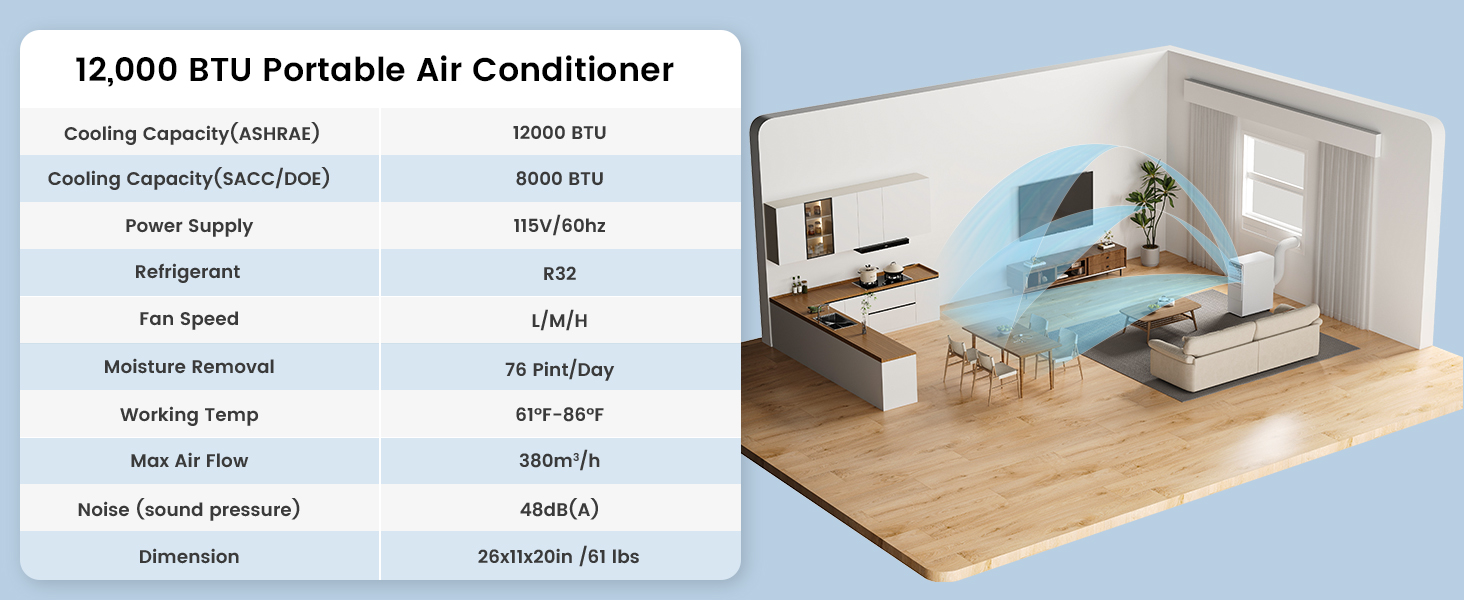
Figure 12: Key specifications of the portable air conditioner.
8. Warranty and Customer Support
Your DOMANKI Portable Air Conditioner comes with a product manual and is supported by customer service. For any warranty claims, technical assistance, or product inquiries, please refer to the contact information provided in your product manual or reach out to the seller's customer support channels.
Please retain your proof of purchase for any warranty-related services.
Related Documents - DAC-08CPD-C1
 |
HUMHOLD Portable Air Conditioner User Manual - YAC-08CPD/PE1 Comprehensive user manual for the HUMHOLD Portable Air Conditioner (Model YAC-08CPD/PE1). This guide provides detailed instructions for setup, operation, and maintenance of the 12000 BTU 3-in-1 unit, featuring cooling, fan, and dehumidifier modes, remote control, Smart/Sleep modes, 3 speeds, auto swing, and a 24-hour timer. |
 |
Homie Portable Air Conditioner Owner's Manual This owner's manual provides instructions for the Homie Portable Air Conditioner, including important safeguards, general instructions, installation, operation, and troubleshooting. |
 |
Finder 12.C1 Programmable Weekly Astro Timer with BLE - User Manual Detailed user manual for the Finder 12.C1 programmable weekly astro timer with Bluetooth Low Energy (BLE) connectivity. Includes technical specifications, wiring diagrams, LED status explanations, and setup instructions. |
 |
Finder 12.C1 Electronic Astronomical Time Switch - Specifications and Operation Comprehensive guide to the Finder 12.C1 electronic astronomical time switch. Covers technical specifications, wiring diagrams, LED status, pushbutton functions, GPS synchronization, and operating reserve. Features Bluetooth connectivity via the Finder Toolbox app. |
 |
Humhold Portable Air Conditioner Product Overview Technical specifications, handling instructions, and safety warnings for the Humhold Portable Air Conditioner (10,000 BTU / 14,000 BTU) featuring Inverter Technology. |
 |
Finder 12.C1 Bluetooth Weekly Astronomical Clock - Technical Specifications and User Guide Detailed technical specifications, connection diagrams, LED indicators, button functions, and GPS synchronization for the Finder 12.C1 Bluetooth Weekly Astronomical Clock. This device allows for precise time scheduling and automation via Bluetooth and app control. |
Ask a question about this manual
Ask about setup, troubleshooting, compatibility, parts, safety, or missing instructions. Manuals+ will review the question and use this page’s manual context to help answer it.