
Introduction
The Ttbesmi JM19AI Translator Earbuds are advanced wireless earphones designed to facilitate real-time language translation and provide high-quality audio. Featuring a smart touchscreen charging case, active noise cancellation, and Bluetooth 5.4 connectivity, these earbuds are engineered for seamless communication and immersive listening experiences across various scenarios.
What's in the Box
The product package typically includes:
- Ttbesmi JM19AI Translator Earbuds (Left and Right)
- Smart Touchscreen Charging Case
- USB Charging Cable
- User Manual
Note: Specific contents may vary.
Setup
1. Initial Charging
Before first use, fully charge the earbuds and the charging case. Place the earbuds into the charging case and connect the USB charging cable to a power source. The touchscreen on the case will indicate charging status.
2. Bluetooth Pairing
- Ensure the earbuds are in the charging case and the case has sufficient power.
- Open the charging case lid. The earbuds will automatically enter pairing mode.
- On your smartphone or device, navigate to the Bluetooth settings.
- Turn on Bluetooth.
- Select "JM19AI" or a similar name from the list of available devices to connect.
- Once connected, a "Bluetooth connection successful" notification will appear on your device, and the earbuds will be ready for use.
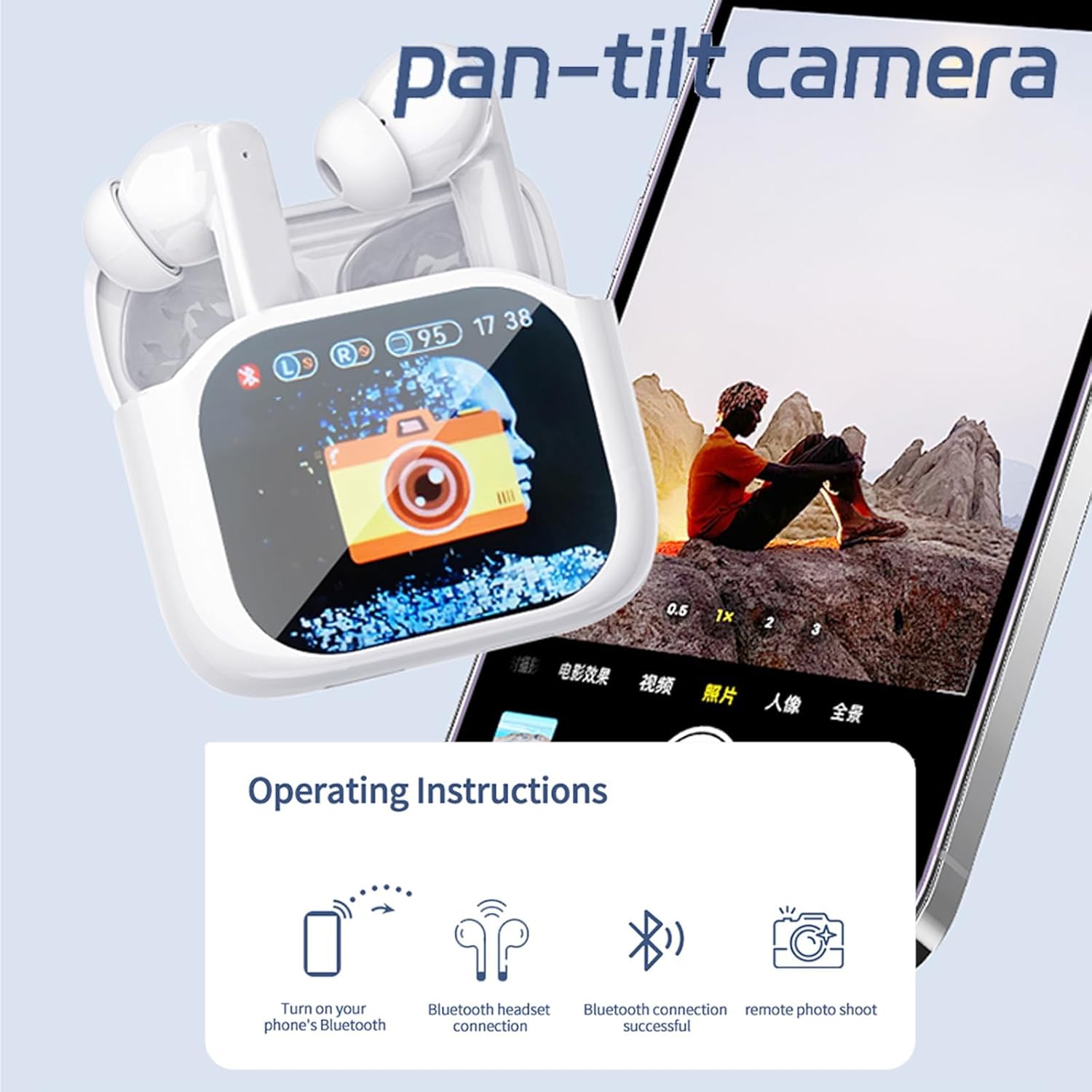
Image: The touchscreen charging case displaying various functions, including Bluetooth connection status and remote camera control. The steps for connecting Bluetooth and initiating a remote photo shoot are illustrated.
Operating Instructions
Touch Controls
The earbuds feature touch controls for various functions. Specific gestures (tap, long press) on the earbuds can control music playback, call management, and activate translation modes. Refer to the detailed instructions in the app or on the charging case screen for specific touch commands.
Image: The multi-function touch color screen of the charging case displaying various operational modes and settings, including battery status, call management, environmental sound control, and earbud search function.
Remote Photo Shoot
The smart touchscreen charging case allows you to remotely control your phone's camera to take photos. This feature is useful for group photos or selfies, eliminating the need to physically hold your phone.
- Ensure your earbuds are connected to your phone via Bluetooth.
- Access the remote camera function on the charging case's touchscreen.
- Position your phone and use the touchscreen on the charging case to trigger the camera shutter.
Active Noise Cancelling (ANC) and Transparency Mode
The earbuds offer intelligent active noise cancellation and a transparency mode to adapt to your environment.
- Active Noise Reduction: This mode uses advanced technology to detect and cancel out ambient noise, providing a quiet environment for focused work, study, or immersive audio listening. The depth of noise cancellation is fully upgraded for an ultra-wideband deep noise cancellation experience.
- Transparency Mode: This mode allows you to hear your surroundings clearly without removing the earbuds. It's ideal for situations where you need to be aware of environmental sounds, such as during commutes or conversations.
You can switch between these modes using the touch controls on the earbuds or via the charging case touchscreen.

Image: A visual representation of Active Noise Reduction, showing a person enjoying quiet in an airplane, and Transparency Mode, showing a person smiling while aware of their surroundings.
Real-Time AI Translation
The Ttbesmi JM19AI Translator Earbuds provide real-time AI translation in up to 150 languages, enabling smooth and efficient communication across various scenarios such as travel, study, work, and business meetings.
Translation Modes
The earbuds support multiple translation modes to suit different interaction styles:
- Silent Mode: Displays translation results only on the connected device's screen.
- Earphone Mode: Only the earbud wearer hears the translation.
- Speaker Mode: Press to speak, release to end recording. Translation is played through the phone's speaker.
- One Earphone Mode: Each person wears an earbud. Speak into your earbud, and the translation is played from the other earbud.
Important: An internet connection is required for real-time translation functionality.

Image: Examples of real-time translation phrases displayed on a screen, demonstrating the ability to communicate in various languages like English, Chinese, German, and French.

Image: Individuals using the translator earbuds during travel, with a phone screen displaying various translation settings such as Silent mode, Earphone mode, and Speaker mode.

Image: Two people engaging in conversation, with speech bubbles indicating translation. This illustrates the improved artificial intelligence supporting translation into 150 languages.
Charging and Battery Life
The earbuds and charging case are designed for extended use.
- Earbud Playtime: Up to 5 hours of listening on a single charge.
- Total Battery Life with Case: Up to 30 hours with the 200mAh charging case.
To charge, place the earbuds into the charging case. Connect the charging case to a USB power source using the provided cable. The touchscreen on the case will display the current battery levels.
Bluetooth Connectivity and Clear Calls
Equipped with a Bluetooth 5.4 chip, these wireless translator headphones offer a stable connection, faster transmission speed, and a stronger signal.
For clear calls, the earbuds feature two microphones with environmental noise reduction technology. These microphones work together to monitor and instantly reduce background noise, ensuring your voice is transmitted clearly, similar to face-to-face communication.
Maintenance
To ensure the longevity and optimal performance of your Ttbesmi JM19AI Translator Earbuds, follow these maintenance guidelines:
- Cleaning: Regularly wipe the earbuds and charging case with a soft, dry, lint-free cloth. Avoid using abrasive materials or harsh chemicals.
- Storage: When not in use, store the earbuds in their charging case to protect them from dust and damage.
- Charging: Use only the provided USB charging cable and a compatible power adapter. Avoid overcharging.
- Water Resistance: The earbuds are waterproof. However, avoid prolonged submersion in water and ensure they are dry before placing them back in the charging case.
Troubleshooting
If you encounter issues with your earbuds, try the following solutions:
- No Sound: Ensure the earbuds are properly paired and connected to your device. Check the volume levels on both the earbuds and your device.
- Pairing Issues: Turn off and then on your device's Bluetooth. Place the earbuds back in the case, close the lid, wait a few seconds, then open the lid to re-enter pairing mode.
- Charging Problems: Verify that the charging cable is securely connected to both the case and the power source. Check for any debris in the charging ports.
- Translation Not Working: Ensure you have a stable internet connection. Check the settings within the translation application or on the charging case screen.
- Unresponsive Touch Controls: Ensure the earbuds are clean and dry. Restart the earbuds by placing them in the case and taking them out again.
If problems persist, consult the manufacturer's support resources or contact customer service.
Specifications
| Feature | Specification |
|---|---|
| Model Name | JM19AI |
| Connectivity Technology | Wireless |
| Wireless Communication Technology | Bluetooth 5.4 |
| Material | Plastic |
| Water Resistance Level | Waterproof |
| Control Method | Touch |
| Special Features | Lightweight, Microphone Included, Sports & Exercise, Universal Phone Control, Water Resistant |
| Product Dimensions | 4.4 x 5.2 x 2 inches |
| Item Weight | 3.2 ounces |
| Batteries | 1 Lithium Ion battery (included) |
| Form Factor | In Ear |
| Impedance | 32 Ohms |
| Noise Control | Sound Isolation (Active Noise Cancelling) |
Warranty and Support
Specific warranty information for the Ttbesmi JM19AI Translator Earbuds is not provided in the available product details. Please refer to the product packaging, the manufacturer's official website, or your point of purchase for detailed warranty terms and conditions.
For technical support or customer service inquiries, please contact Ttbesmi customer support through their official channels.