
1. Introduction
This manual provides detailed instructions for the assembly, operation, and maintenance of your ERGOMAKER 35" Electric Standing Desk. Please read this manual thoroughly before use to ensure proper setup and safe operation. This adjustable height desk is designed to enhance your workspace by allowing seamless transitions between sitting and standing positions.
2. Safety Information
- Always ensure the desk is properly anchored to the floor if using the adjustable feet, or locked if using wheels, to prevent movement.
- Do not exceed the maximum weight capacity of 143 lbs (65 kg). Overloading can cause damage or injury.
- Be cautious when adjusting the height of the desk to prevent injury. Keep hands and objects clear of moving parts.
- Supervise children and pets around the desk, especially during height adjustments.
- Operate the desk on a level and stable surface.
- Ensure all cables are properly managed and have sufficient slack to avoid tension during height adjustments.
3. Package Contents
Verify that all components are present before beginning assembly. If any parts are missing or damaged, please contact customer support.
- Desktop Panels (2 sections)
- Desk Legs (2)
- Crossbar/Drive Rod
- Motor Assembly
- Control Panel with LED Display
- Side Wings/Brackets (2)
- Adjustable Feet (4) or Wheels (4)
- Power Adapter and Cable
- Assembly Hardware (screws, Allen wrench)
- Side Hooks (2)
4. Assembly Instructions
Follow these steps to assemble your ERGOMAKER Electric Standing Desk. An installation video is available for visual guidance.
4.1. Frame Assembly
- Connect the drive rod to the motor assembly and one of the desk legs. Ensure it is securely fastened with the provided screws.
- Slide the drive rod through the crossbar and connect it to the second desk leg.
- Attach the side wings/brackets to the top of each desk leg using the appropriate screws.
- Secure the adjustable feet or wheels to the bottom of each desk leg.
4.2. Desktop Attachment
- Place the two desktop panels face down on a soft, clean surface. Align the wooden pegs and connecting pieces to join the two panels.
- Carefully place the assembled desk frame onto the desktop panels, aligning the screw holes.
- Secure the desk frame to the desktop panels using the provided screws.
4.3. Electrical Connections & Accessories
- Mount the control panel to the underside of the desktop in your preferred location (left or right side).
- Connect the motor cable to the control panel.
- Connect the power adapter to the control panel and then plug it into a power outlet. Ensure sufficient slack in the power cable for height adjustments.
- Attach the two side hooks to the underside of the desktop as desired for hanging items like bags or headphones.
4.4. Assembly Video
Video: ERGOMAKER Electric Standing Desk Assembly Guide. This video demonstrates the step-by-step process of assembling the ERGOMAKER electric standing desk, including attaching the frame, desktop, and connecting electrical components.
5. Operating Instructions
Your ERGOMAKER Electric Standing Desk features an intuitive control panel for easy height adjustment and memory presets.
5.1. Control Panel Overview

Image: The control panel features a digital height display, two memory preset buttons (1, 2), and up/down arrow buttons for manual adjustment.
- Height Display: Shows the current desk height in inches.
- Up/Down Arrows: Press and hold to manually adjust the desk height.
- Memory Buttons (1, 2): Store and recall your preferred sitting and standing heights.
5.2. Adjusting Height
- Manual Adjustment: Press and hold the Up or Down arrow buttons until the desk reaches your desired height.
- Using Memory Presets: Press the corresponding memory button (1 or 2) to automatically move the desk to the saved height.
5.3. Setting Memory Presets
- Adjust the desk to your desired height using the Up/Down arrows.
- Press and hold one of the memory buttons (1 or 2) until the display flashes or you hear a beep, indicating the height has been saved.
6. Features
The ERGOMAKER Electric Standing Desk is designed with user comfort and functionality in mind.
6.1. Adjustable Height Range
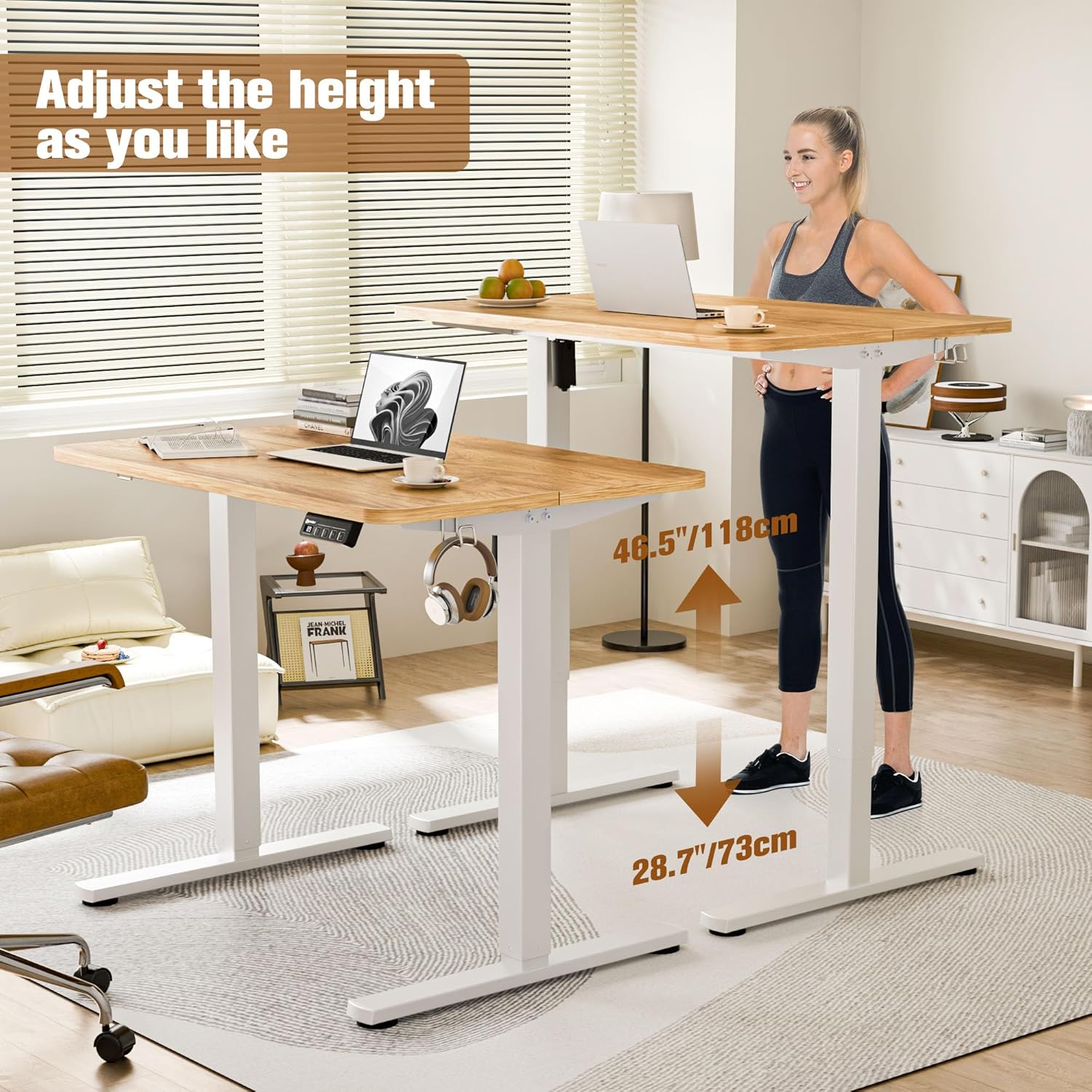
Image: The desk seamlessly adjusts between sitting and standing heights, offering a range from 28.7 inches to 46.5 inches.
The desk can be adjusted from a minimum height of 28.7 inches (73 cm) to a maximum height of 46.5 inches (118 cm), accommodating various user preferences and ergonomic needs.
6.2. Spacious Work Area
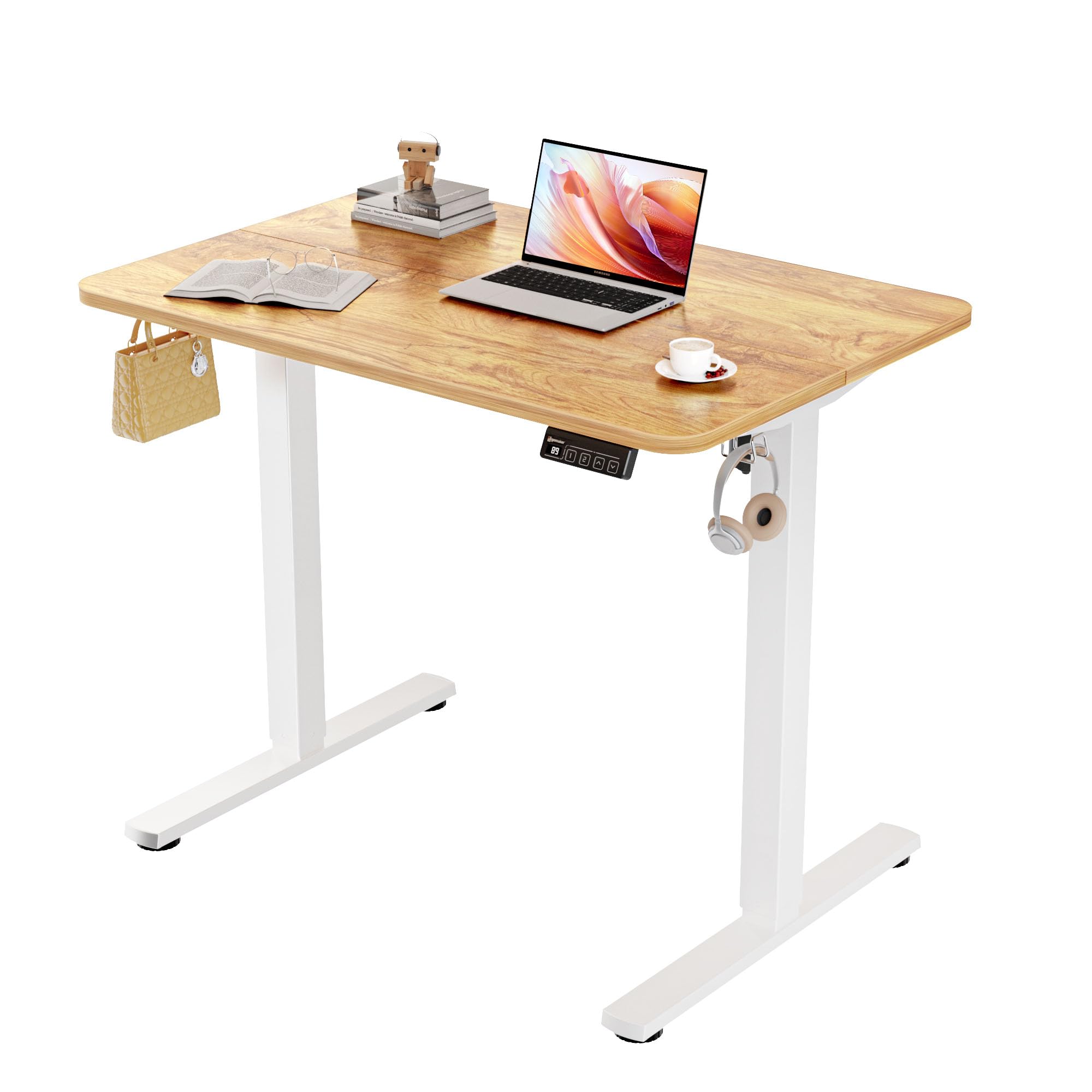
Image: A 35-inch ERGOMAKER electric standing desk providing ample space for a laptop, book, and other office essentials.
With a desktop size of 35.4 x 23.6 inches, this desk provides ample space for monitors, laptops, and other essential office supplies.
6.3. Convenient Side Hooks

Image: Two metal side hooks attached to the desk frame, useful for hanging headphones or bags, keeping the desktop clear.
Two integrated side hooks offer a practical solution for hanging headphones, bags, or other accessories, helping to keep your workspace organized.
6.4. Solid Construction & Stability
The desk is constructed from heavy-duty steel, ensuring stability even at higher settings. It supports a maximum weight of 143 lbs (65 kg).
6.5. Smooth & Quiet Operation

Image: A graphic illustrating the quiet operation of the ERGOMAKER desk at 50dB, comparable to a quiet conversation, ensuring minimal disruption.
The electric motor provides a smooth and quiet height adjustment at a speed of 0.6 inches per second, with noise levels below 50dB, ensuring minimal disruption in your environment.
6.6. Rounded Edges

Image: The desk features rounded edges, a thoughtful design element for safety and to prevent accidental bumps or injuries.
The desktop features rounded edges, providing an anti-crash design for enhanced safety.
7. Maintenance
- Clean the desk surface with a damp cloth. Avoid harsh chemicals that may damage the finish.
- Regularly check all screws and connections to ensure they are tight and secure.
- Keep the motor and electrical components free from dust and moisture.
8. Troubleshooting
If you encounter any issues with your desk, refer to the following common troubleshooting steps:
- Desk not moving: Check if the power cable is securely plugged into both the desk and the wall outlet. Ensure no objects are obstructing the desk's movement.
- Uneven height: Perform a reset procedure (refer to the full instruction manual for specific steps, often involves holding down certain buttons).
- Error Code E20: This typically indicates an overload. Remove all items from the desktop, power off the desk, then power back on. If the error persists, follow the reset instructions.
- Noise during operation: While the desk is designed for quiet operation, minor sounds are normal. If the noise is excessive, ensure all screws are tight and there are no obstructions.
9. Specifications
| Attribute | Detail |
|---|---|
| Brand | ERGOMAKER |
| Model Number | SM203-90-WFLRBD-AE |
| Product Dimensions | 35"D x 23.6"W x 28.7"H |
| Desktop Size | 35.4" x 23.6" |
| Height Adjustment Range | 28.7" - 46.5" (73 cm - 118 cm) |
| Maximum Weight Capacity | 143 lbs (65 kg) |
| Travel Speed | 0.6" per second |
| Noise Level | < 50dB |
| Base Material | Alloy Steel |
| Top Material Type | Wood |
| Color | Light Rustic Brown |
10. Warranty and Support
This ERGOMAKER product comes with a limited warranty. For detailed warranty information, product support, or to order replacement parts, please refer to the contact information provided with your purchase or visit the official ERGOMAKER website.