1. Introduction
This manual provides detailed instructions for the safe and proper installation, operation, and maintenance of your WHYFONE WF9465 48-inch Extra Long Arm Full Motion TV Wall Mount with Integrated Power Strip. This mount is designed to securely hold televisions ranging from 37 to 85 inches, with a maximum weight capacity of 110 lbs (50 kg) and VESA compatibility up to 600x400mm. Please read all instructions carefully before beginning installation.
2. Safety Information
WARNING: Failure to read and follow these instructions may result in serious personal injury, property damage, or voiding of your warranty.
- Ensure your TV (including accessories) weighs less than 110 lbs (50 kg). Exceeding this weight capacity can cause instability and potential failure.
- This mount is designed for installation on 16", 18", or 24" wood stud walls, solid concrete walls, or brick walls. DO NOT install on drywall alone.
- Verify the structural integrity of the mounting surface before installation.
- Small items included in this product can be a choking hazard if swallowed. Keep away from children.
- Always use a stud finder to locate wood studs accurately.
- Two people are recommended for installation due to the weight and size of the mount and TV.
3. Package Contents
Verify that all components are present and undamaged before installation. If any parts are missing or damaged, do not proceed with installation and contact customer support.
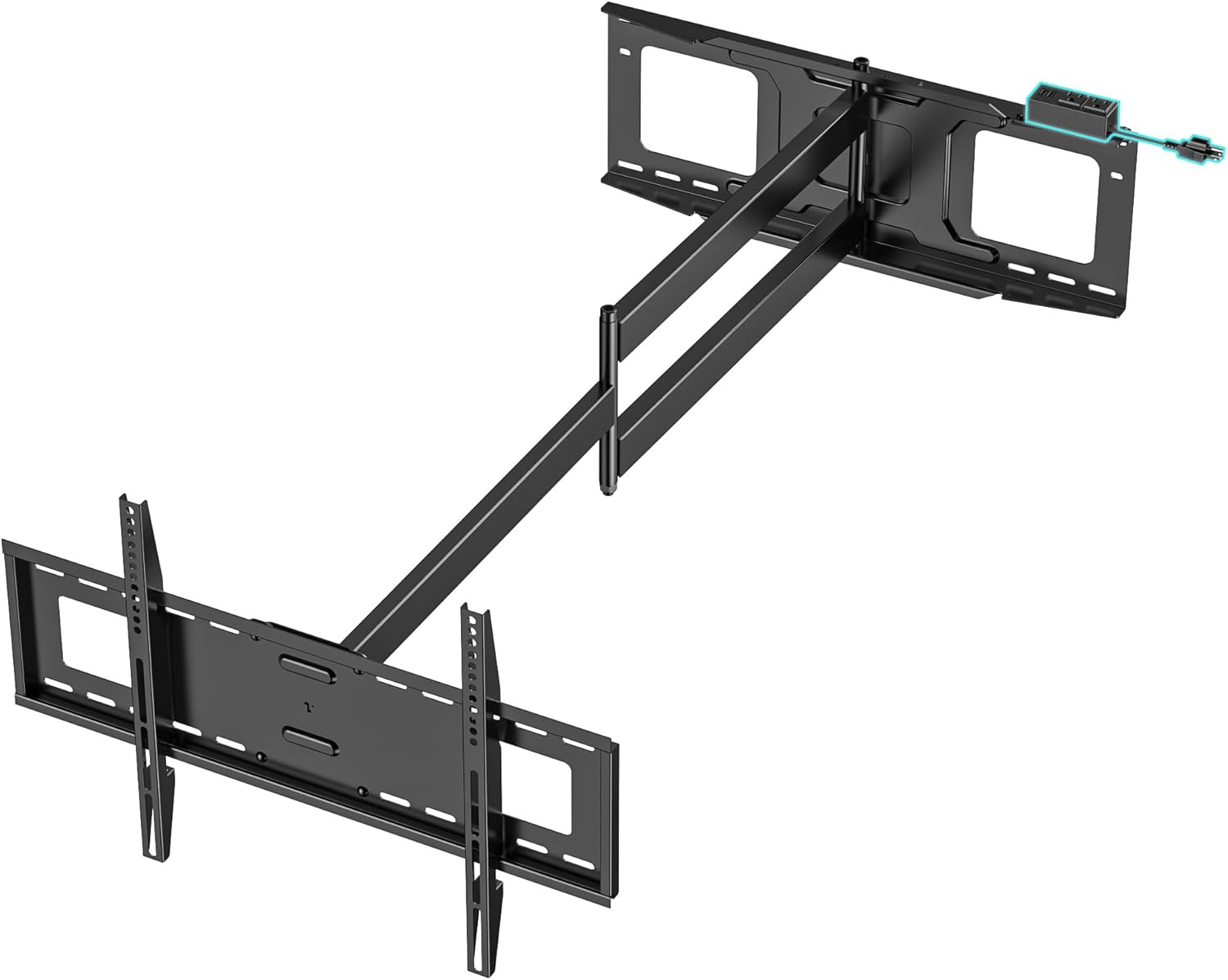
Image: All components of the WHYFONE WF9465 TV Wall Mount, including the main arm assembly, TV brackets, and various hardware, are laid out for inspection.
Included Hardware:
- Wall Plate Assembly with Extension Arms
- TV Brackets (2x)
- Integrated Power Strip with 6.23 ft power cord
- Various TV Screws (M6, M8) and Spacers
- Lag Bolts and Washers for wall mounting
- Concrete Anchors (for concrete/brick wall installation)
- Small Bubble Level
- Wrench
- Drilling Template
- Cable Storage Straps (4x)
- Instruction Manual
Unboxing and Overview Video:
Video: An overview of the WHYFONE WF9465 TV wall mount, showcasing its components and initial unboxing. This video provides a visual guide to the contents of the package.
4. Specifications
| Feature | Specification |
|---|---|
| Model Number | WF9465 |
| Compatible TV Sizes | 37" - 85" (flat or curved LCD LED OLED QLED TVs) |
| Maximum Load Capacity | 110 lbs (50 kg) |
| VESA Compatibility | Max 600x400mm (Min 100x100mm) |
| Extension from Wall | 5.47" (retracted) to 48" (extended) |
| Tilt Angle | 5° up, 12° down |
| Swivel Angle | 90° left, 90° right (180° total) |
| Level Adjustment | 3° left, 3° right |
| Material | Heavy-duty carbon steel |
| Integrated Power Strip | 2 AC outlets, 2 USB ports, 6.23 ft power cord |
| Product Dimensions | 48 x 25.79 x 10.5 inches |
| Item Weight | 26 pounds |

Image: The mount is shown supporting a person to illustrate its heavy-duty construction and tested load capacity of 330 lbs, ensuring stability for TVs up to 110 lbs.
5. Setup and Installation
5.1 Pre-Installation Checklist
- TV Compatibility: Ensure your TV size (37"-85"), weight (max 110 lbs), and VESA pattern (min 100x100mm, max 600x400mm) are compatible with this mount.
- Wall Type: This mount is suitable for 16", 18", or 24" wood stud walls, solid concrete walls, and brick walls. Do NOT mount on drywall alone.
- Tools Needed: You will need a stud finder, pencil, drill, screwdriver, and a socket wrench. A small level is included.

Image: Visual guide to compatible wall types for installation, including wood stud, concrete, and brick walls. Drywall-only installation is not permitted.
5.2 Step-by-Step Installation Guide
- Attach TV Brackets to TV:
Carefully place your TV face down on a soft, clean surface. Select the correct size screws and spacers from the hardware kit that fit your TV's VESA mounting holes. Attach the two vertical TV brackets to the back of your TV using these screws and spacers. Ensure the brackets are centered and securely fastened.

Image: The back of a television with the two vertical mounting brackets securely attached, ready for hanging on the wall plate.
- Mount Wall Plate to Wall:
a. Use a stud finder to locate the wood studs in your desired mounting location. Mark the center of the studs. For concrete/brick walls, mark your desired drill points.
b. Use the provided drilling template to mark the precise drilling locations on the wall. Ensure the template is level using the included bubble level.
c. Drill pilot holes at the marked locations. For wood studs, drill directly. For concrete/brick walls, insert the provided concrete anchors into the pilot holes.
d. Position the wall plate assembly over the drilled holes and secure it to the wall using the lag bolts and washers. Tighten all bolts firmly but do not overtighten.
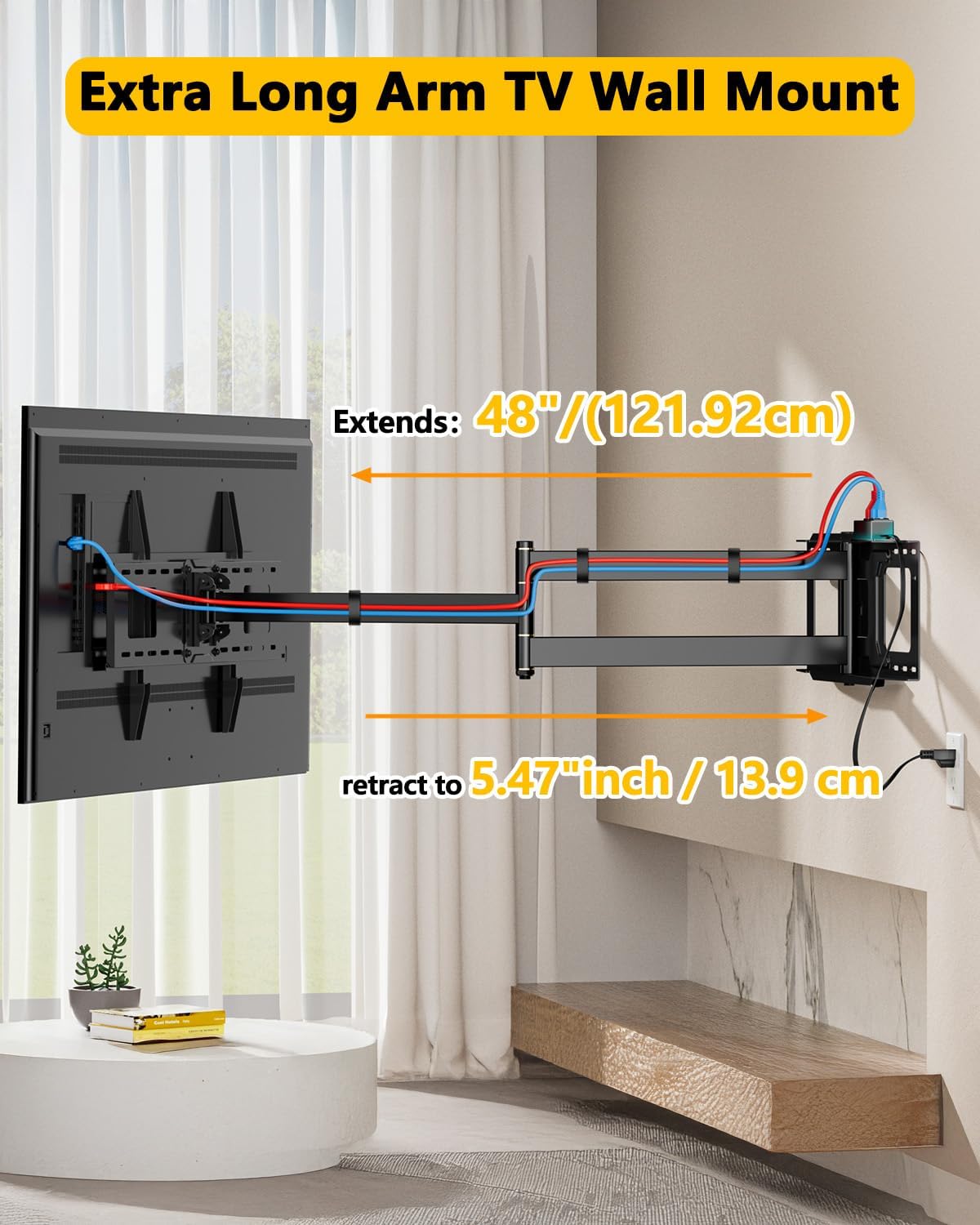
Image: The wall plate assembly is shown securely mounted to a wall, with a small level placed on top to ensure horizontal alignment.
- Hang TV onto Wall Plate:
With assistance, carefully lift the TV and hook the attached TV brackets onto the horizontal bars of the wall plate. Ensure the TV is seated securely. Engage the safety locks on the bottom of the TV brackets to prevent accidental dislodgement.
- Connect Integrated Power Strip:
The mount features an integrated power strip with 2 AC outlets and 2 USB ports. Once the TV is mounted, connect your TV's power cable and any streaming devices to the power strip. Use the provided 6.23 ft power cord to connect the power strip to a wall outlet. Utilize the cable storage straps to neatly organize all cables along the mount arms.

Image: A detailed view of the integrated power strip, highlighting its 2 AC outlets and 2 USB ports, along with its 120V/12A and 5V/2.4A specifications.
Installation Video:
Video: A step-by-step guide demonstrating the installation process of the 48-inch extra long arm full motion TV mount with power strip.
6. Operating Instructions
The WHYFONE WF9465 mount offers versatile positioning for optimal viewing from various angles.
- Extension and Retraction: The mount extends up to 48 inches (121.92 cm) from the wall and retracts to a compact 5.47 inches (13.9 cm). Gently pull or push the TV to adjust the distance.
- Tilt Adjustment: Adjust the TV tilt 5° upwards or 12° downwards to reduce glare and find your preferred viewing angle. The tilting mechanism has been upgraded for smoother operation.
- Swivel Functionality: The mount allows for a 90° swivel to the left and 90° to the right, providing a total of 180° rotation. This enables viewing from multiple rooms or different areas within a large space.
- Level Adjustment: Fine-tune the TV's horizontal position with a ±3° level adjustment to ensure a perfectly straight screen after installation.
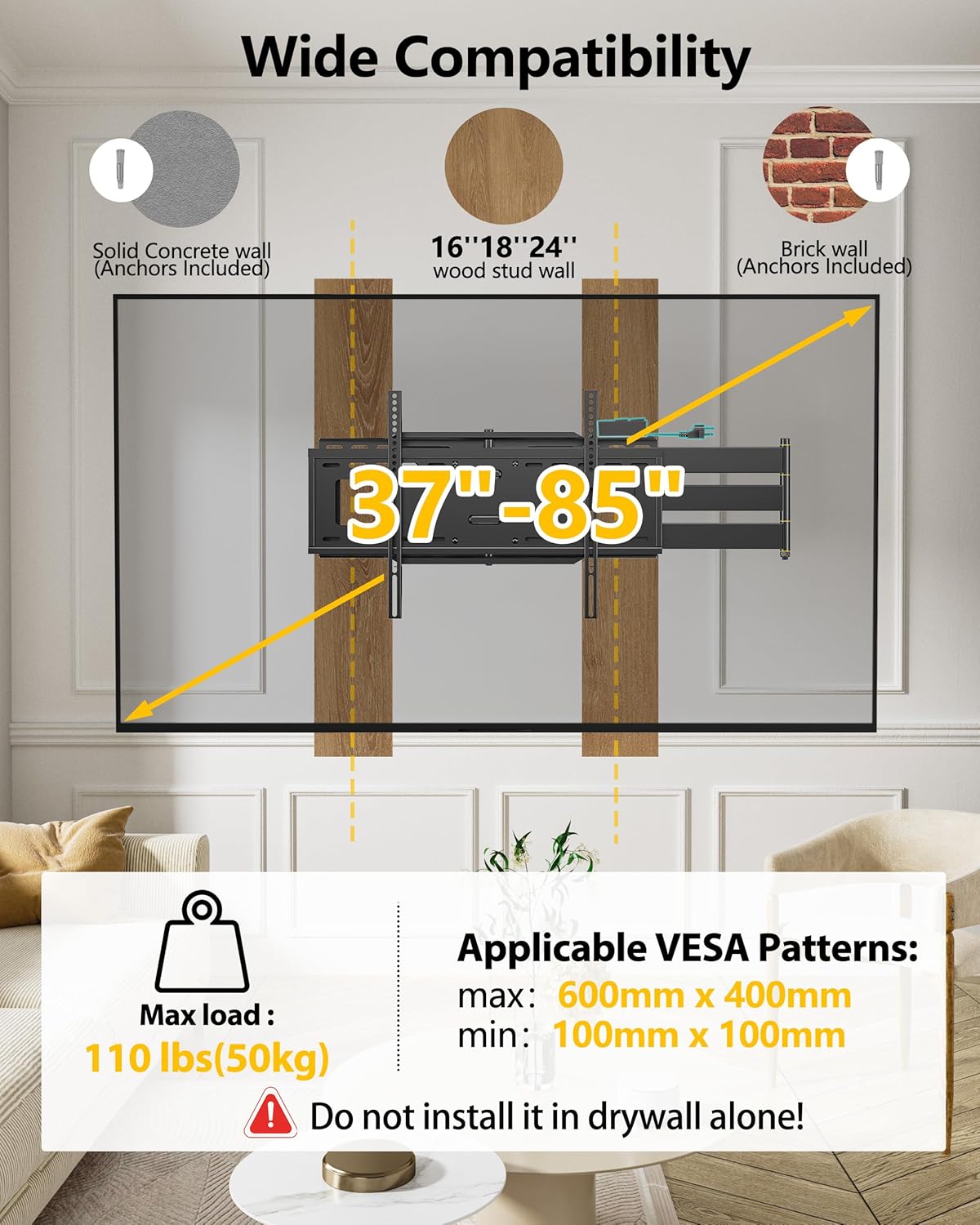
Image: This diagram illustrates the full motion capabilities of the TV mount, including its tilt (5° up, 12° down) and level adjustment (±3°).

Image: This diagram demonstrates the mount's 90-degree swivel capability to both the left and right, allowing for flexible viewing angles.
7. Maintenance
- Cleaning: Use a soft, dry cloth to clean the mount. Avoid abrasive cleaners or solvents.
- Periodic Checks: Periodically check all screws and connections to ensure they remain tight and secure. Re-tighten if necessary.
- Cable Management: Regularly inspect the cable storage straps and cables for any wear or damage. Replace if needed to prevent tangling and tripping hazards.
8. Troubleshooting
- TV is not level: Use the ±3° level adjustment feature on the mount to fine-tune the screen's horizontal position.
- Mount feels stiff or difficult to move: The mount's joints may be tightened. Loosen the nuts slightly on the articulating arms to increase the flow rate of rotation.
- TV wobbles or feels insecure: Recheck all wall mounting bolts and TV bracket screws to ensure they are securely tightened. Confirm your wall type and TV weight are within specifications.
- Power strip not working: Ensure the power cord is securely plugged into both the mount's power strip and a functional wall outlet. Check for any tripped circuit breakers.
9. Warranty and Support
WHYFONE products are designed for durability and long-lasting performance. If you encounter any problems or have questions regarding your WHYFONE WF9465 TV wall mount, please contact our customer support team for assistance. Refer to the product packaging or our official website for specific warranty details and contact information.
