Introduction
This manual provides detailed instructions for the safe and efficient use of your Generic LED Jellyfish Night Light. This versatile lamp features RGB color gradient, touch control, and a dual-purpose design for both hanging and tabletop use. Please read this manual thoroughly before operating the device and retain it for future reference.

Product Details: This image illustrates key design elements of the jellyfish night light, including the flexible biomimetic skirt edge, the dynamic swinging tentacles, and the stable reinforced metal base, showcasing its aesthetic and functional components.
1. Setup
1.1 Unboxing
Carefully remove all components from the packaging. Ensure that the LED Jellyfish Night Light and the USB charging cable are present.
1.2 Charging the Device
- Locate the Type-C charging port on the device.
- Connect the provided USB Type-C cable to the lamp and plug the other end into a compatible USB power adapter (not included) or a computer USB port.
- The indicator light will show the charging status. A full charge typically takes approximately 2-3 hours.
- Disconnect the charging cable once fully charged to preserve battery life.
1.3 Placement Options
- Tabletop Use: Place the lamp on a flat, stable surface such as a bedside table or desk.
- Hanging Use: The lamp features a hidden plastic cord for hanging. Carefully extend the cord and hang the lamp from a secure hook or fixture. Ensure the hanging point can support the lamp's weight.
2. Operating Instructions
2.1 Power On/Off and Light Control
The LED Jellyfish Night Light features a touch sensor for easy operation.

Control Methods: The lamp can be controlled by gently patting the top touch sensor or by using the physical switch located on the bottom of the unit.
- Touch Control: Gently pat the top surface of the jellyfish lamp to turn it on/off and cycle through different light modes and colors.
- Bottom Switch: Alternatively, use the switch located on the bottom of the unit for basic power control.
2.2 Changing Light Colors and Modes
The lamp offers an RGB color gradient feature. With each touch on the top sensor, the light will cycle through various colors and modes, including a warm light setting and a colorful gradient.
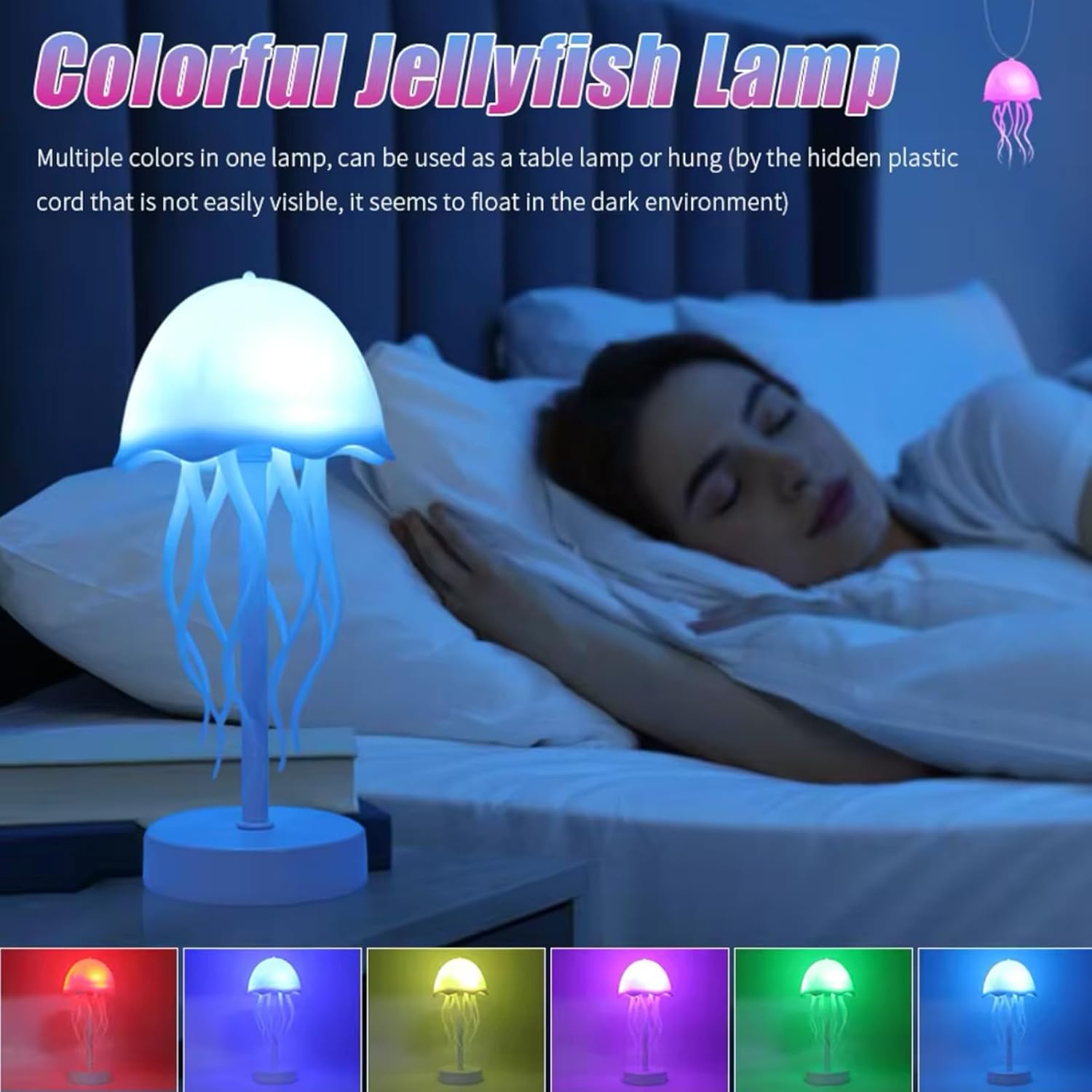
Color Options: This image demonstrates the lamp's ability to display multiple colors, functioning as both a table lamp and a hanging decoration, creating a vibrant ambiance.
2.3 Tentacle Rotation Feature
The lamp is designed with 9 tentacles that rotate automatically, mimicking the natural movement of a swimming jellyfish. This feature enhances the visual appeal and creates a dynamic effect.

Dynamic Tentacles: The image shows the lamp's 9 tentacles rotating automatically, creating a realistic jellyfish swimming effect, ideal for enhancing party atmospheres or room decor.
3. Maintenance
3.1 Cleaning
- Ensure the lamp is turned off and unplugged before cleaning.
- Wipe the surface with a soft, dry, or slightly damp cloth.
- Do not use abrasive cleaners, solvents, or harsh chemicals, as these may damage the finish.
3.2 Battery Care
- To prolong battery life, avoid fully discharging the battery frequently.
- Charge the lamp regularly, even if not in constant use.
- Store the lamp in a cool, dry place if it will not be used for an extended period.
4. Troubleshooting
| Problem | Possible Cause | Solution |
|---|---|---|
| Lamp does not turn on. | Battery is depleted. | Charge the lamp using the provided Type-C cable. |
| Lamp does not turn on. | Bottom switch is off. | Ensure the bottom switch is in the "ON" position. |
| Colors are not changing. | Touch sensor not responding. | Ensure you are gently patting the top surface. If issues persist, try turning the lamp off and on again. |
| Tentacles are not rotating. | Mechanism obstruction or power issue. | Check for any physical obstructions. Ensure the lamp is sufficiently charged. |
5. Specifications
| Feature | Detail |
|---|---|
| Model Name | LED Jellyfish Night Light |
| Model Number | E2509565 |
| Brand | Generic |
| Dimensions (D x W x H) | 4.09"D x 4.09"W x 8.46"H (10.4cm D x 10.4cm W x 21.5cm H) |
| Item Weight | 11.2 ounces (approx. 0.7 lbs) |
| Material | Acrylonitrile Butadiene Styrene |
| Power Source | Battery Powered (Rechargeable via Type-C USB) |
| Control Method | Touch |
| Wattage | 7 watts |
| Voltage | 5 Volts |
| Special Features | Adjustable Color Temperature, Color Changing, Energy Efficient |
| Indoor/Outdoor Usage | Indoor, Outdoor |

Product Dimensions: This diagram provides precise measurements of the jellyfish night light, indicating its height and width in both centimeters and inches for accurate reference.
6. Warranty Information
This product comes with a standard manufacturer's warranty against defects in materials and workmanship. Please retain your proof of purchase for warranty claims. For specific warranty terms and conditions, please refer to the documentation included with your purchase or contact customer support.
7. Customer Support
If you encounter any issues or have questions regarding your LED Jellyfish Night Light, please contact our customer support team. For the quickest assistance, please have your model number (E2509565) and purchase details ready.
Contact information for customer support can typically be found on the product packaging or the retailer's website where the product was purchased.