
1. Introduction
This manual provides essential information for the setup, operation, and maintenance of your Nord Piano 6 88-key Stage Piano. Please read this manual thoroughly before using the instrument to ensure proper functionality and to maximize your musical experience.
2. Product Overview
The Nord Piano 6 is an advanced 88-key stage piano and synthesizer, featuring Nord's acclaimed Triple Sensor keybed and Virtual Hammer Action technology for an authentic playing feel. It includes dual independent piano layers and dual independent sample synths, along with a comprehensive effects engine and an intuitive panel layout with LED faders.
Key Features:
- 88-key Triple Sensor Keybed with Nord Virtual Hammer Action technology
- Dual Piano and Dual Synth Layers
- 16 Banks with 36 Programs (576 Locations)
- Onboard Effects (Mod 1, Mod 2, Amp, EQ, Delay, Reverb, Compressor)
- OLED Display for clear navigation
- Split Point Crossfades for seamless transitions
- Support for Nord Sound Manager/Sample Editor software
Included Components:
- Nord Piano 6 Unit
- Power Cable
- Sustain Pedal
- Possibly a bench (check packaging for confirmation)
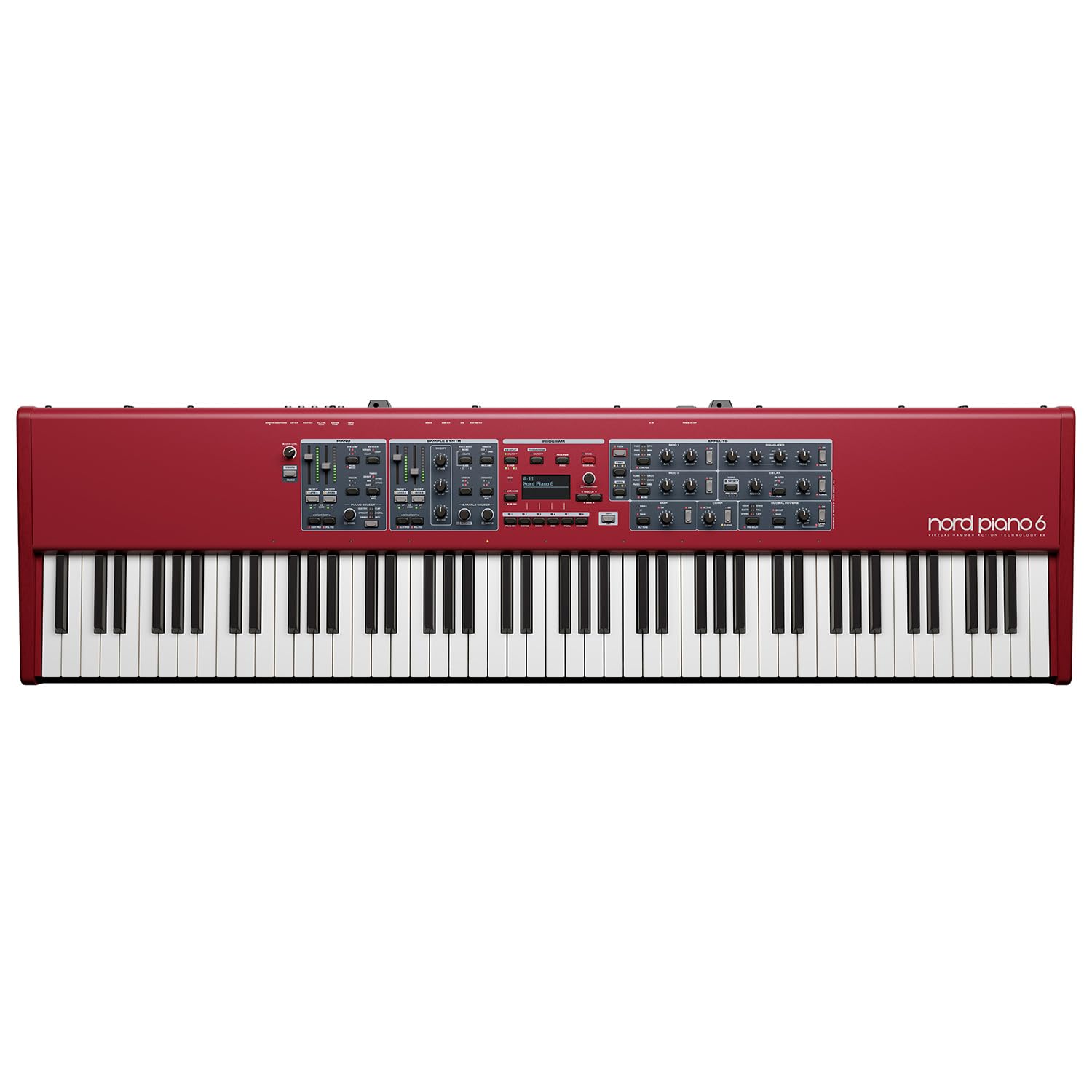
Figure 2.1: Front view of the Nord Piano 6, showcasing the red chassis, 88-key keyboard, and control panel with various knobs, buttons, and an OLED display.

Figure 2.2: Rear view of the Nord Piano 6, displaying the various input and output ports including power, audio outputs, pedal inputs, and USB connections.
3. Setup
3.1 Unpacking
Carefully remove the Nord Piano 6 from its packaging. Retain all packaging materials for future transport or storage. Ensure all included components are present.
3.2 Power Connection
- Connect the provided power cable to the AC IN port on the rear panel of the Nord Piano 6.
- Plug the other end of the power cable into a suitable power outlet.
3.3 Pedal Connection
Connect the sustain pedal to the FOOT SWITCH input on the rear panel. The Nord Piano 6 supports a triple pedal for enhanced expression.
3.4 Audio Connections
For audio output, use 1/4" TRS or TS cables to connect the MAIN OUT (L and R) ports on the rear panel to your amplifier, mixer, or audio interface. A 6.35mm headphone jack is also available for private monitoring.
3.5 USB Connection
Connect the USB Type B port on the Nord Piano 6 to your computer using a standard USB cable for MIDI communication and data transfer with the Nord Sound Manager/Sample Editor software.
4. Operating Instructions
4.1 Powering On/Off
To power on the instrument, press the POWER ON/OFF button located on the rear panel. To power off, press the button again. Always ensure volume is low before powering on or off to prevent sudden loud noises.
4.2 Navigating Programs
The Nord Piano 6 organizes sounds into 16 banks, each containing 36 programs, totaling 576 locations. Use the BANK and PROGRAM buttons on the control panel to select desired sounds. The OLED display will show the current program name.
4.3 Dual Piano and Synth Layers
The instrument features independent sections for Piano and Sample Synth. Each section can be activated or deactivated using its dedicated ON/OFF button. Adjust parameters for each layer using the respective controls, including volume faders, tone controls, and envelope settings.
4.4 Onboard Effects
The Nord Piano 6 includes a comprehensive effects section. Effects are divided into categories such as Modulation (Mod 1, Mod 2), Amp simulations, Equalizer, Delay, Reverb, and Compressor. Activate and adjust these effects using the dedicated knobs and buttons on the control panel to shape your sound.
4.5 Split Point Crossfades
Utilize the Split Point Crossfades feature to create seamless transitions between different sounds across the keyboard. This allows for complex layering and performance setups. Refer to the detailed user manual for advanced configuration of split points and crossfade curves.
4.6 Nord Sound Manager/Sample Editor
Connect your Nord Piano 6 to a computer via USB to use the Nord Sound Manager for organizing and transferring sounds, and the Nord Sample Editor for creating custom sample instruments. These software tools expand the sonic capabilities of your instrument.
5. Maintenance
5.1 Cleaning
Regularly clean the surface of your Nord Piano 6 with a soft, dry, lint-free cloth. For stubborn dirt, a slightly damp cloth can be used, followed immediately by a dry cloth. Avoid abrasive cleaners, solvents, or waxes, as these can damage the finish.
5.2 Storage
When not in use, store the instrument in a dry, temperature-stable environment, away from direct sunlight, extreme temperatures, and high humidity. If transporting, use appropriate protective cases.
5.3 General Care
Avoid placing heavy objects on the keyboard. Do not spill liquids on the instrument. Protect it from dust by using a dust cover when not in use. Handle all connections and cables with care to prevent damage.
6. Troubleshooting
6.1 No Sound Output
- Check if the instrument is powered on.
- Verify that the master volume knob is turned up.
- Ensure audio cables are securely connected to the MAIN OUT ports and to your amplifier/mixer.
- Check the volume levels on your amplifier/mixer.
- Confirm that the Piano and/or Synth layers are active (ON/OFF buttons illuminated).
6.2 Power Issues
- Ensure the power cable is firmly connected to both the instrument and the power outlet.
- Check if the power outlet is functional by plugging in another device.
6.3 Other Issues
For any other issues not covered here, or for advanced troubleshooting, please consult the comprehensive Nord Piano 6 User Manual available on the Nord website or contact Nord customer support.
7. Specifications
- Brand: Nord
- Model Name: NORDPIANO688
- Number of Keys: 88
- Keybed Type: Triple Sensor Keybed with Nord Virtual Hammer Action technology
- Color: Red
- Item Weight: 55.1 Pounds (approx. 25 kg)
- Item Dimensions (D x W x H): 4.7"D x 50.5"W x 13.7"H (approx. 11.9cm D x 128.3cm W x 34.8cm H)
- Connectivity Technology: 1/4" TRS, 1/4" TS
- Connector Types: 3.5mm Jack, 6.35mm Jack, USB Type B
- Power Source: Corded Electric
- Special Features: 16 Banks with 36 Programs - 576 Locations, Dual Piano and Dual Synth Layers, OLED Display, Split Point Crossfades
- Supported Software: Nord Sound Manager/Sample Editor
8. Warranty and Support
8.1 Warranty Information
The Nord Piano 6 comes with a 2-year warranty. Please retain your proof of purchase for warranty claims. The warranty covers manufacturing defects under normal use. For full terms and conditions, refer to the warranty documentation included with your product or visit the official Nord website.
8.2 Customer Support
For technical assistance, service, or further inquiries, please contact Nord customer support. Contact information can typically be found on the official Nord website or in the product packaging.


