
Keypal W3
Keypal Bluetooth Headset with Microphone (Model: W3)
User Instruction Manual
1. Introduction
Thank you for purchasing the Keypal Bluetooth Headset with Microphone, Model W3. This open-ear headset is designed for optimal comfort and clear communication, making it ideal for business professionals, teleworkers, and anyone requiring hands-free communication. Featuring advanced Bluetooth 5.4+EDR technology, ENC noise cancellation, and an ultra-lightweight design, it ensures a seamless audio experience while keeping you aware of your surroundings. Please read this manual carefully to ensure proper use and maintenance of your device.
2. Product Overview
2.1 Key Features
- Open-Ear Design: Allows you to hear your surroundings while enjoying audio, perfect for office or remote work environments.
- ENC Noise-Cancelling Microphone: Suppresses ambient noise for crystal-clear voice transmission during calls.
- Adjustable Microphone Boom: A 13cm long, 270° rotatable microphone ensures optimal voice pickup.
- Bluetooth 5.4+EDR: Provides stable, high-speed, and low-latency wireless connectivity.
- Extended Battery Life: Up to 20 hours of continuous playback or talk time on a single charge.
- Ultra-Lightweight: Weighing only 35g for comfortable, all-day wear.
- Automatic Pairing: Quick and easy connection to your devices.
- 14mm Large Driver: Delivers rich bass and clear treble for high-quality audio.
2.2 Package Contents
- Keypal Bluetooth Headset (Model W3)
- USB-C Charging Cable
- User Manual
2.3 Product Diagram

Figure 2.1: Front view of the Keypal Bluetooth Headset, showing the main body and microphone boom.
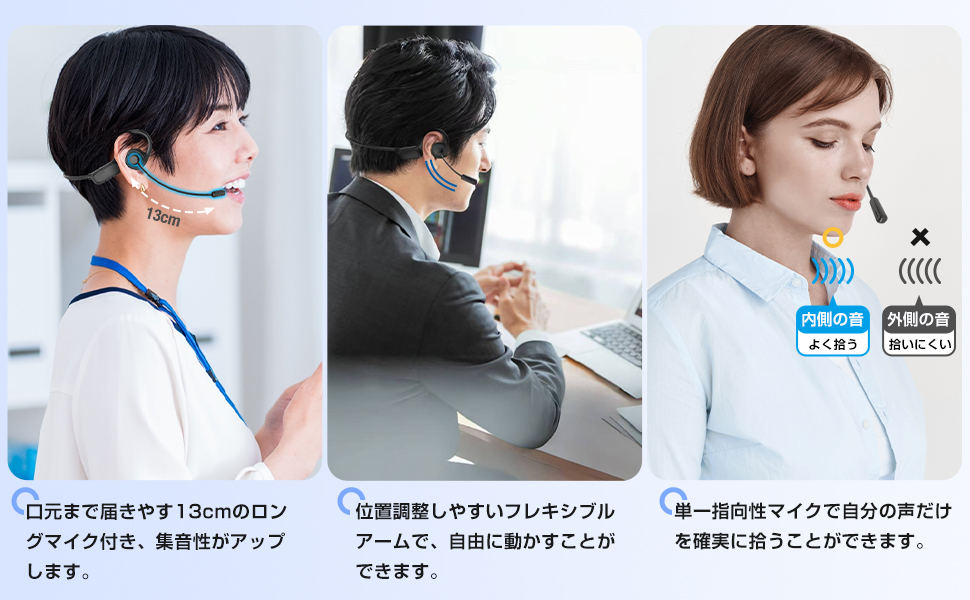
Figure 2.2: Detailed view of the microphone, highlighting its 13cm length, 270-degree flexible arm, and unidirectional pickup pattern for clear voice capture.

Figure 2.3: Illustration of the advanced Bluetooth 5.4 technology, emphasizing longer transmission distance, more stable connection, lower power consumption, and reduced latency.
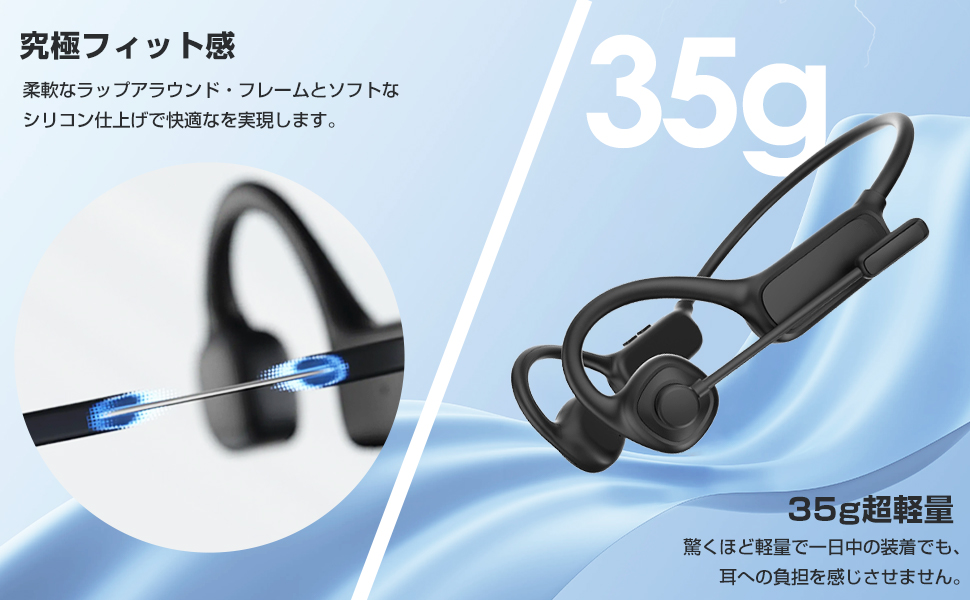
Figure 2.4: Visual representation of the headset's ultra-lightweight 35g design, highlighting its comfortable fit for extended wear.

Figure 2.5: A user wearing the headset, illustrating the comfortable open-ear design that allows for all-day wear and awareness of surroundings.
3. Setup
3.1 Charging the Headset
Before first use, fully charge the headset. Connect the provided USB-C charging cable to the charging port on the headset and the other end to a USB power adapter (not included) or a computer's USB port. The charging indicator light will show the charging status. A full charge takes approximately 2 hours and provides up to 20 hours of continuous playback or talk time.

Figure 3.1: Illustration of the headset being charged via its USB-C port, emphasizing the 20-hour battery life and 2-hour charging time.
3.2 Powering On/Off
- Power On: Press and hold the Power button for 3 seconds until the indicator light flashes blue.
- Power Off: Press and hold the Power button for 5 seconds until the indicator light flashes red and then turns off.
3.3 Bluetooth Pairing
The headset supports automatic pairing for convenience.
- Ensure the headset is powered off.
- Press and hold the Power button for 5-7 seconds until the indicator light flashes red and blue alternately, indicating it's in pairing mode.
- On your device (smartphone, computer, tablet), enable Bluetooth and search for available devices.
- Select "Keypal W3" from the list of found devices.
- Once connected, the indicator light will turn solid blue.
- The headset will automatically reconnect to the last paired device when powered on, if the device's Bluetooth is enabled and within range.
4. Operating Instructions
4.1 Call Management
- Answer/End Call: Press the Multi-function button once.
- Reject Call: Press and hold the Multi-function button for 2 seconds.
- Redial Last Number: Double-press the Multi-function button.
The ENC noise-cancelling microphone ensures your voice is clear to the other party by filtering out background noise. The open-ear design allows you to stay aware of your surroundings during calls, which is beneficial in office or home environments.

Figure 4.1: Visual representation of ENC noise cancellation technology, showing how background noise is filtered out for clearer communication.

Figure 4.2: A user wearing the open-ear headset in an office setting, demonstrating the ability to hear both audio and ambient sounds.

Figure 4.3: Various usage scenarios for the headset, including web conferencing, driving, delivery work, and online classes, highlighting its versatility.
4.2 Microphone Adjustment
The microphone boom can be rotated 270 degrees vertically. Adjust it to bring the microphone close to your mouth (approximately 13cm) for optimal voice pickup. When not in use, you can rotate the microphone boom upwards and backward to keep it out of the way.
4.3 Audio Playback
- Play/Pause: Press the Multi-function button once.
- Next Track: Press and hold the Volume Up button.
- Previous Track: Press and hold the Volume Down button.
- Volume Up: Short press the Volume Up button.
- Volume Down: Short press the Volume Down button.
The 14mm large drivers provide a rich and clear audio experience for music, podcasts, and other media.
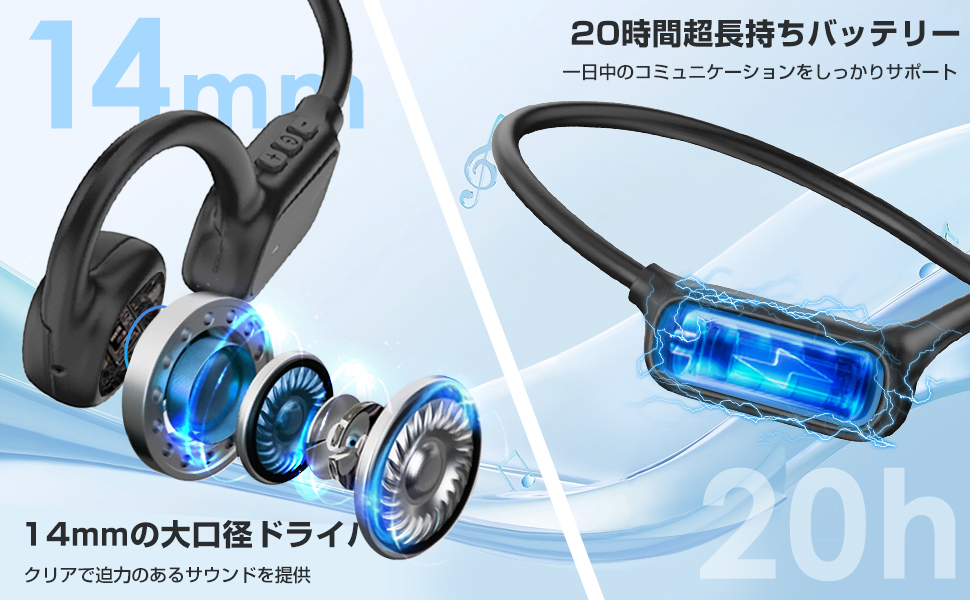
Figure 4.4: An exploded view of the 14mm driver, illustrating its components, alongside a visual of the 20-hour battery life.
5. Maintenance
5.1 Cleaning
- Wipe the headset with a soft, dry, lint-free cloth.
- Do not use abrasive cleaners, alcohol, or chemical solvents.
- Avoid getting moisture into any openings.
5.2 Storage
- Store the headset in a cool, dry place away from direct sunlight and extreme temperatures.
- Avoid storing in places with high humidity.
5.3 Water Resistance
The headset is designed with a waterproof rating, offering protection against splashes and sweat. However, it is not intended for submersion in water. Do not use it while swimming or showering.
6. Troubleshooting
| Problem | Possible Cause | Solution |
|---|---|---|
| Headset does not power on. | Low battery. | Charge the headset fully. |
| Cannot pair with device. | Headset not in pairing mode; Bluetooth off on device; device too far. | Ensure headset is in pairing mode (flashing red/blue); enable Bluetooth on device; bring devices closer. |
| No sound or low volume. | Volume too low; headset not connected; incorrect audio output selected. | Increase headset and device volume; ensure headset is connected; select "Keypal W3" as audio output. |
| Microphone not working. | Microphone muted; incorrect input device selected. | Check if microphone is muted; select "Keypal W3" as microphone input on your device. |
| Connection is unstable. | Interference; device too far; low battery. | Move closer to the device; avoid strong electromagnetic interference; charge headset. |
If the problem persists after trying these solutions, please contact customer support.
7. Specifications
| Feature | Detail |
|---|---|
| Brand | Keypal |
| Model Name | W3 |
| Connectivity Technology | Wireless |
| Wireless Communication Technology | Bluetooth 5.4+EDR |
| Headphone Style | Open-Ear |
| Noise Control | Active Noise Cancellation (ENC for microphone) |
| Microphone | Unidirectional, 13cm long, 270° rotatable |
| Driver Size | 14mm |
| Battery Life (Continuous Playback/Talk) | Up to 20 hours |
| Charging Time | Approx. 2 hours (USB-C) |
| Weight | 35g |
| Water Resistance Level | Waterproof (splash-resistant) |
| Product Use | Business, Professional |
| Color | Black |
| Package Dimensions | 16.3 x 13.8 x 2.9 cm |
8. Warranty and Support
8.1 Warranty Period
This product comes with a 1-year warranty period from the date of purchase. Please retain your proof of purchase for warranty claims.
8.2 Customer Support
If you encounter any issues or have questions regarding the use of your Keypal Bluetooth Headset, please do not hesitate to contact our customer support. We are committed to providing the best possible service.
How to Contact Support:
- Go to "Account Service" on your purchase platform.
- Navigate to "Order History".
- Find your order for the Keypal Bluetooth Headset.
- Click on "Seller" or "Contact Seller".
- Select "Ask a question" to send us a message.
We will do our best to assist you promptly.
Related Documents - W3
 |
Gorsun W3 Open Ear Wireless Headset User Manual and Specifications Comprehensive user manual for the Gorsun W3 Open Ear Wireless Headset, detailing features, operation, specifications, and safety precautions. Learn how to pair, wear, and use your wireless headset. |
 |
Sony ECM-W3 / ECM-W3S Wireless Microphone System User Guide Comprehensive user guide for the Sony ECM-W3 and ECM-W3S wireless microphone system, covering setup, operation, features, and troubleshooting for professional audio recording with cameras and other devices. |
 |
Portronics Cleansify Ear Microscope User Manual and Guide Comprehensive user manual for the Portronics Cleansify Ear Microscope, providing detailed instructions on setup, app connection, ear spoon replacement, troubleshooting, and product specifications. Learn how to use this advanced ear endoscope for clear visualization. |
 |
Ebern Designs 29021-W3 Wall Sconce Assembly and Installation Manual Detailed assembly and installation instructions for the Ebern Designs 29021-W3 wall sconce, including parts list, wiring diagram, and safety warnings. |
 |
Woneligo Fitness Tracker: Features, Specifications, and Functions Detailed overview of the Woneligo Fitness Tracker, including its mechanical structure, comprehensive list of functions, waterproof rating (IP68), screen specifications, battery life, and compatibility with iOS and Android devices. |
 |
Creative BT-W3 Getting Started Guide A concise guide to pairing and setting up the Creative BT-W3 Bluetooth audio transmitter for PS4, Nintendo Switch, PC, and Mac, including codec information and analog microphone setup. |
Ask a question about this manual
Ask about setup, troubleshooting, compatibility, parts, safety, or missing instructions. Manuals+ will review the question and use this page’s manual context to help answer it.