
1. Introduction
Thank you for choosing the JRD 1500W PTC Electric Space Heater. This manual provides essential information for the safe and efficient operation of your new appliance. Please read all instructions carefully before use and retain this manual for future reference.

Image 1: JRD 1500W PTC Electric Space Heater with remote control.
2. Important Safety Information
Your safety is paramount. This heater is designed with multiple safety features. Always follow basic safety precautions to reduce the risk of fire, electric shock, and injury.
- ETL-Certified Safety: The electric heater is ETL-Certified, ensuring it meets recognized safety standards.
- V-0 Flame Retardant Materials: Constructed from V-0 flame retardant materials to minimize fire hazards.
- Automatic Shut-off: The heater will automatically shut off if it reaches a limit of 122°F or if left unattended for 12 hours.
- Tip-Over Protection: Equipped with a safety switch that automatically turns off the heater if it is accidentally tipped over.
- Reinforced Plug: Features a reinforced plug to ensure safe operation at all times.
- Child Lock: A child lock function prevents unintended changes to settings, ideal for households with children and pets.
Always ensure the heater is placed on a stable, level surface and away from flammable materials. Do not cover the heater.
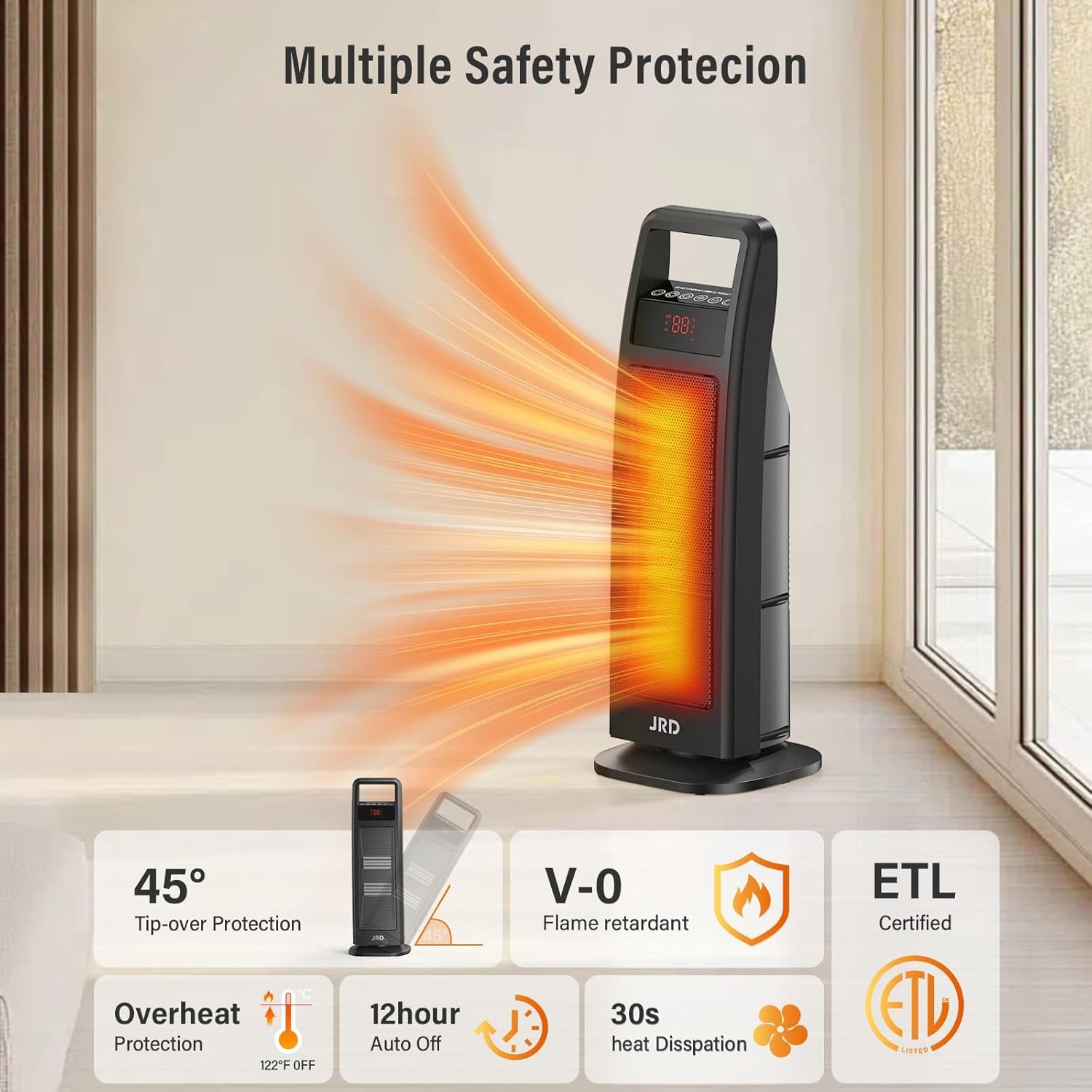
Image 2: Visual representation of the JRD heater's multiple safety features.
3. Product Overview
The JRD Space Heater is a compact and efficient heating solution. Familiarize yourself with its components:
- Heater Unit: The main body containing the PTC ceramic heating elements, fan, and control panel.
- Control Panel: Located on the top of the unit, featuring touch controls and an LED display for temperature and settings.
- Remote Control: Allows convenient operation from a distance.
- Base: Provides stability and houses the oscillation mechanism.
- Handle: Integrated at the top for easy portability.

Image 3: Key components and control methods of the JRD Space Heater.
4. Setup
The JRD Space Heater requires minimal assembly. Follow these steps to prepare your heater for use:
- Carefully remove all packaging materials from the heater and its components.
- Attach the base to the main heater unit. Ensure it clicks securely into place. This process typically takes less than one minute.
- Place the heater on a firm, level surface.
- Plug the reinforced power cord into a grounded 120V AC outlet.
Your heater is now ready for operation.
Video 1: Unboxing and quick assembly of the JRD 24-inch Portable Space Heater.
5. Operating Instructions
Operate your JRD Space Heater using either the touch control panel on the unit or the included remote control.
Power On/Off
- Press the Power button (
 ) on the control panel or remote to turn the heater on or off.
 - Upon turning off, the heater will initiate a 30-second countdown to dissipate residual heat before fully shutting down.
Mode Selection
Press the Mode button () to cycle through the following heating modes:
- High (1500W): Provides maximum heat output for rapid warming.
- Low (900W): Offers a moderate heat output.
- ECO Mode: Intelligently adjusts heat levels (between 900W and 1500W) based on ambient temperature to maintain a constant warmth and save energy.
- Fan Only: Circulates air without heat.
Temperature Adjustment
In High, Low, or ECO mode, use the + and - buttons on the control panel or remote to set your desired temperature between 41°F and 95°F.
Oscillation
Press the Oscillation button () to activate the 75° wide-angle oscillation feature, distributing heat evenly across the room.
Timer Function
Press the Timer button () to set an automatic shut-off timer from 1 to 8 hours.
Child Lock
To activate the child lock, press and hold the Lock button () on the remote control. This will disable all buttons on both the control panel and remote. Press and hold again to deactivate.
Night Light
Press the Light button () to turn on or off the soft ambient night light at the base of the heater.
Mute Function
Press the Mute button () on the remote to silence button beeps.
Video 2: Demonstration of JRD 24-inch 1500W Oscillating Heater features including remote control, night light, and safety functions.
6. Key Features
- Fast Heating: With 1500W high power and PTC ceramic heating technology, the heater provides rapid warmth, heating up quickly to meet your heating needs.
- ECO Constant Temperature Heating: The intelligent ECO mode ensures even heat distribution and energy efficiency by automatically adjusting power consumption.
- Wide-Angle Oscillation: The 75° oscillation ensures that warmth reaches every corner of your room, eliminating cold spots.
- Quiet Operation: Designed for minimal noise, operating at a low 36dB, ensuring uninterrupted sleep or work.
- Convenient Handle: Weighing only 5.3 lbs, the heater features a comfortable handle for effortless portability between rooms.

Image 4: JRD heater providing rapid warmth in a living space.

Image 5: JRD heater's quiet operation and night light feature for undisturbed sleep.
Video 3: Demonstrating the JRD heater's warming ability and quiet operation.
7. Maintenance
Proper maintenance ensures the longevity and safe operation of your heater.
- Always unplug the heater and allow it to cool completely before cleaning.
- Use a soft, damp cloth to wipe the exterior surfaces. Do not use abrasive cleaners or solvents.
- Ensure no water or liquids enter the interior of the heater.
- Store the heater in a cool, dry place when not in use.
8. Troubleshooting
If your JRD Space Heater is not operating as expected, refer to the following common issues and solutions:
- Heater does not turn on:
- Ensure the power cord is securely plugged into a grounded outlet.
- Check if the power outlet is functional by plugging in another appliance.
- Verify that the heater is upright and not tipped over, as the tip-over protection may have activated.
- Confirm that the child lock is not engaged.
- No heat output:
- Ensure a heating mode (High, Low, or ECO) is selected, not just Fan Only mode.
- Check the set temperature; it should be higher than the current room temperature.
- Heater shuts off unexpectedly:
- The overheat protection may have been triggered. Unplug the unit, allow it to cool for 30 minutes, and then restart.
- The tip-over protection may have been activated. Ensure the heater is on a stable surface.
- The 12-hour auto-off timer may have expired.
If the issue persists after trying these steps, please contact JRD customer support.
9. Specifications
| Feature | Detail |
|---|---|
| Brand | JRD |
| Model Number | HPP15H-E |
| Special Feature | Fast Heating |
| Color | Dark Brown |
| Form Factor | Tower |
| Indoor/Outdoor Usage | Indoor |
| Mounting Type | Floor Mount |
| Room Type | Bedroom, Living Room |
| Fuel Type | Electric |
| Package Dimensions | 24.57 x 9.2 x 7.6 inches |
| Item Weight | 6.76 pounds |
| ASIN | B0DRD4YTX3 |
| Date First Available | July 16, 2024 |
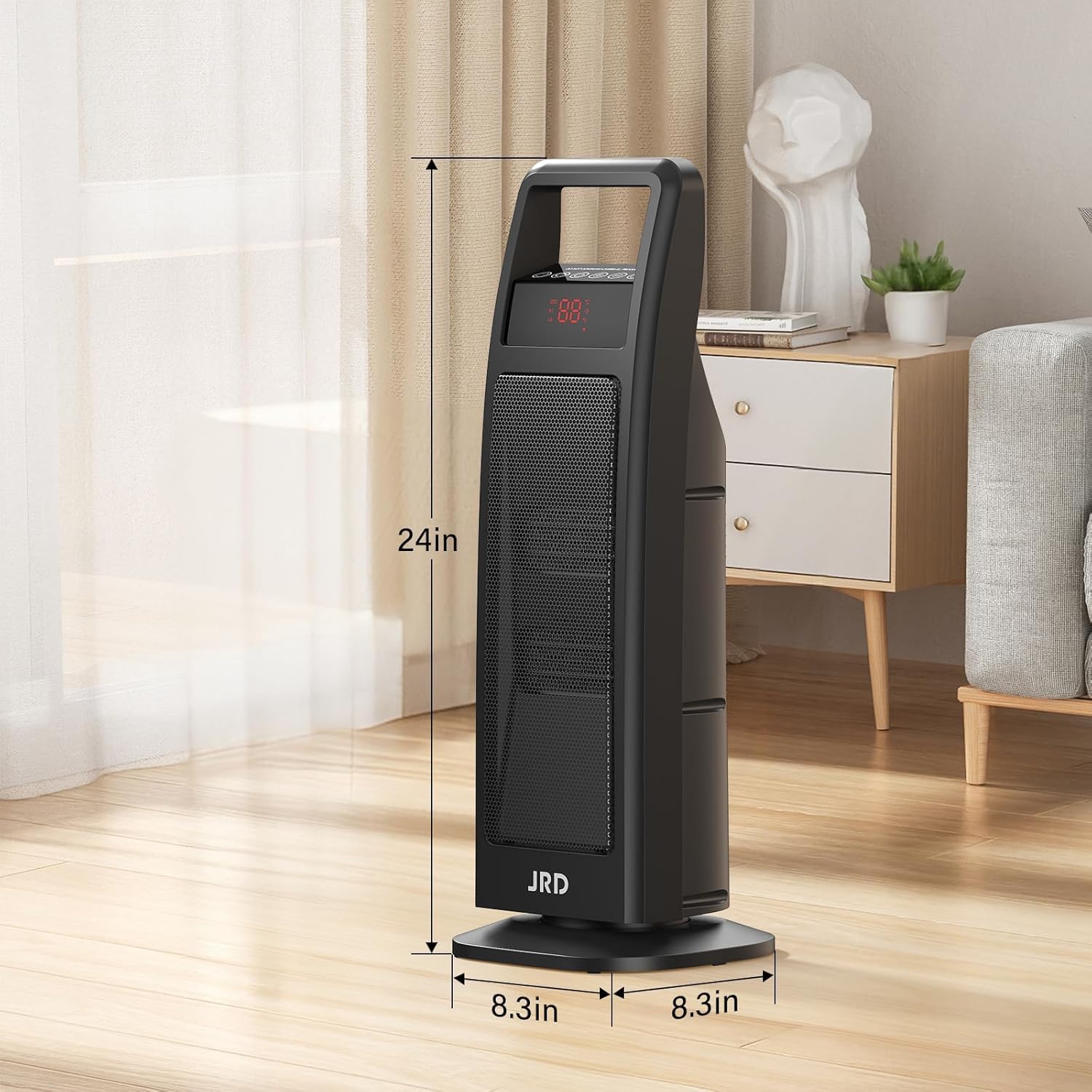
Image 6: Dimensions of the JRD Space Heater.
10. Warranty and Support
JRD stands behind the quality of its products.
- Warranty: This product comes with a 12-month money-back guarantee.
- After-Sales Support: Lifetime after-sales support is provided.
- Online Service: Round-the-clock online service is available for 12 hours every day.
For any inquiries or support, please refer to the contact information provided in your product packaging or visit the official JRD website.