
MCHOSE MCHOSE M7
MCHOSE M7 Ultra Wireless Gaming Mouse User Manual
Model: MCHOSE M7 Ultra
1. Introduction
The MCHOSE M7 Ultra Wireless Gaming Mouse is a high-performance peripheral designed for competitive gaming and everyday use. Featuring tri-mode connectivity (2.4GHz wireless, Bluetooth, and USB-C wired), an 8K polling rate, and a lightweight ergonomic design, it offers precision, speed, and comfort. This manual provides detailed instructions to help you get the most out of your M7 Ultra mouse.

Figure 1.1: MCHOSE M7 Ultra Wireless Gaming Mouse
2. Setup
2.1 Unboxing and Initial Setup
Upon receiving your MCHOSE M7 Ultra mouse, carefully unbox the contents. The package includes the mouse, a USB-C charging cable with a USB adapter, and a set of grip stickers. Remove all protective films from the mouse, especially from the bottom skates, to ensure smooth gliding.
Video 2.1: MCHOSE M7 mouse Unboxing and Close-up. This video demonstrates the unboxing process and highlights the components included with the mouse.

Figure 2.1: Overview of MCHOSE M7 Ultra buttons and components, including the USB dongle stored inside the mouse.
2.2 Connectivity Options
The M7 Ultra supports three modes of connection:
- 2.4GHz Wireless: For ultra-low latency gaming, use the included USB dongle. The dongle is conveniently stored in a compartment on the underside of the mouse.
- Bluetooth 5.0: Ideal for general use and connecting to multiple devices without a dongle.
- USB-C Wired: Connect directly via the USB-C cable for charging and a stable wired connection.

Figure 2.2: The M7 Ultra offers 2.4GHz Wireless, Bluetooth 5.0, and USB-C Wired connectivity options.
3. Operating the Mouse
3.1 Buttons and Controls
The M7 Ultra features 6 programmable buttons, including the left click, right click, middle button (scroll wheel click), mode switch button, forward button, and back button. The DPI switch button on the underside allows for on-the-fly sensitivity adjustments.
3.2 Polling Rate and Sensor
Equipped with a PAW3950 Optical Sensor, the M7 Ultra offers up to 42000 DPI sensitivity, 750 IPS tracking speed, and 50G acceleration for precise tracking. The mouse supports a dual 8K Polling Rate (wired 1K and wireless 8K), significantly reducing latency to 0.125ms for enhanced control in competitive scenarios.

Figure 3.1: The M7 Ultra boasts an 8K Hz Hyperpolling Rate for ultra-low-latency response.

Figure 3.2: The cutting-edge PAW 3950 Optical Sensor provides unmatched responsiveness and precision.
3.3 Ergonomics and Grip
The M7 Ultra's ergonomic design accommodates various grip styles, including palm, claw, and fingertip grips, ensuring comfort during extended gaming sessions. Its lightweight construction (approximately 53g) contributes to effortless movement.

Figure 3.3: The ergonomic design of the M7 Ultra is suitable for all grip modes: Palm, Finger, and Claw.
3.4 Customization Software
Utilize the MCHOSE Custom Driver software for advanced customization. This software allows you to edit up to five mouse buttons, adjust DPI settings, polling rate, activate Esports mode, and manage macros for a personalized gaming experience. Access the driver from the official MCHOSE website.
Video 3.4: How to Connect the MCHOSE Web driver and Desktop driver. This video guides you through connecting your mouse to the MCHOSE customization software.
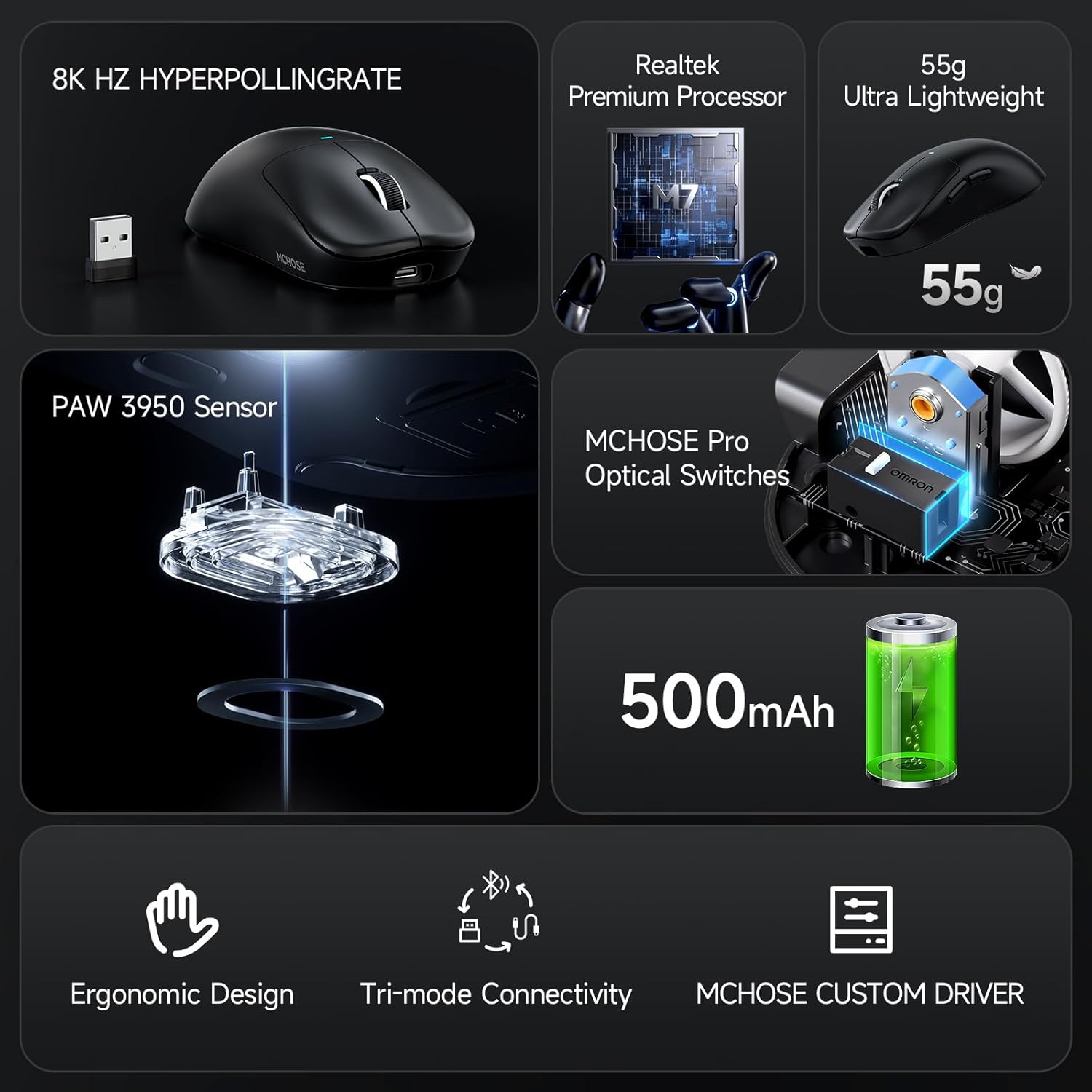
Figure 3.4: The MCHOSE Custom Driver provides a HUB software for comprehensive customization of your mouse settings.
4. Maintenance
4.1 Battery Life and Charging
The M7 Ultra is equipped with a 500mAh rechargeable internal battery, providing excellent battery life for extended usage. To charge the mouse, connect the supplied USB-C cable to the mouse and a power source. The indicator light will show charging status.

Figure 4.1: The M7 Ultra features a 500mAh battery for outstanding battery life, with estimated usage times for different polling rates and Bluetooth mode.
4.2 Cleaning and Care
To maintain optimal performance and appearance, regularly clean your M7 Ultra mouse. Use a soft, dry cloth to wipe the surface. For stubborn dirt, a slightly damp cloth can be used, ensuring no moisture enters the internal components. Avoid harsh chemicals or abrasive materials.
5. Troubleshooting
If you encounter any issues with your MCHOSE M7 Ultra mouse, please refer to the following common troubleshooting steps:
- Mouse not responding: Ensure the mouse is charged and the correct connectivity mode (2.4G, BT, or Wired) is selected. For wireless modes, check that the dongle is properly inserted or Bluetooth is paired.
- Lag or disconnections: Try moving closer to the receiver (for 2.4G wireless) or reducing interference from other wireless devices. Ensure drivers are up to date.
- Tracking issues: Clean the optical sensor on the bottom of the mouse. Ensure you are using the mouse on a suitable surface (a mouse pad is recommended).
- Buttons not working: Check the button assignments in the MCHOSE Custom Driver software.
If the problem persists after attempting these steps, please contact MCHOSE customer support.
6. Specifications
| Feature | Detail |
|---|---|
| Brand | MCHOSE |
| Model | MCHOSE M7 Ultra |
| Connectivity Technology | Bluetooth, Wi-Fi 2.4Ghz, USB |
| Movement Detection Technology | Optical (PAW3950 Sensor) |
| DPI | Up to 42000 DPI |
| IPS Tracking Speed | 750 IPS |
| Acceleration | 50G |
| Polling Rate | Wired 1K, Wireless 8K |
| Weight | 53g (approximate) |
| Battery Capacity | 500mAh |
| Product Dimensions | 5 x 2.5 x 0.1 inches |
| Item Weight | 11.3 ounces |
7. Warranty and Support
MCHOSE products are manufactured to high-quality standards. For specific warranty details and terms, please refer to the warranty information provided with your purchase or visit the official MCHOSE website.
For technical support, troubleshooting assistance, or any inquiries regarding your MCHOSE M7 Ultra Wireless Gaming Mouse, please contact MCHOSE Official customer support. You can often find support resources, FAQs, and contact information on the brand's official website or through the seller's contact channels on the platform where you purchased the product.
Visit the MCHOSE Store for more information and support resources.
Related Documents - MCHOSE M7
 |
MCHOSE L7 Series Gaming Mouse User Guide User guide for the MCHOSE L7 Series Gaming Mouse, detailing installation, connectivity (wired, 2.4G RF, Bluetooth), software features, DPI settings, and power indicators for optimal gaming performance. |
 |
MCHOSE G3 Series Wireless Mouse User Guide Comprehensive user guide for the MCHOSE G3 Series Wireless Mouse, detailing its features, installation steps for wired, 2.4G RF, and Bluetooth connections, software usage, DPI settings, and power indicator meanings. |
 |
MCHOSE G3 Wireless Mouse User Manual & Setup Guide Get detailed instructions for connecting, using, and troubleshooting your MCHOSE G3 Wireless Mouse. Learn about DPI settings, charging, and warranty information. |
 |
MCHOSE A5 Wireless Mouse User Manual User manual for the MCHOSE A5 Wireless Mouse, detailing dual-mode connection (2.4G and Bluetooth), wired connection, DPI settings, charging instructions, and specifications. |
 |
MCHOSE G3 Mouse Handy Guide: Setup and Connection A concise guide to setting up and connecting your MCHOSE G3 Mouse using wired, 2.4G wireless, and Bluetooth wireless modes. Learn about its features and indicators. |
 |
MCHOSE G3 V2 Wireless Mouse User Guide and Specifications Official user guide for the MCHOSE G3 V2 Wireless Mouse. Learn about product features, 2.4G and Bluetooth connection methods, driver installation, DPI settings, battery status, and charging instructions. |
Ask a question about this manual
Ask about setup, troubleshooting, compatibility, parts, safety, or missing instructions. Manuals+ will review the question and use this page’s manual context to help answer it.