
Introduction
Thank you for choosing the LinkTech SE41 Premium Metal In-Ear Bluetooth Earphones. This manual provides detailed instructions on how to set up, operate, and maintain your earphones to ensure optimal performance and longevity. Please read this manual carefully before using the product.
Package Contents
- LinkTech SE41 In-Ear Bluetooth Earphones (Left and Right)
- Metallic Charging Case
- USB Type-C Charging Cable
- User Manual
Product Overview
The LinkTech SE41 earphones feature a stylish zinc metal case, minimalist design, advanced touch controls, and IPX4 water resistance. They are designed to deliver premium sound quality for a versatile audio experience.
Key Features:
- Metallic charging case with 4-LED indicator for battery status.
- Type-C charging port for fast and convenient charging.
- Multi-function smart touch controls for easy operation.
- Earbud LED indicators for status updates.
- Dual microphones with Environmental Noise Cancellation (ENC) for clear calls.
- IPX4 water resistance, suitable for daily use and workouts.
- Ergonomic in-ear design for comfortable wear.
- Large 13mm dynamic drivers for rich and deep bass.
- Bluetooth V5.4 wireless technology with TWS (True Wireless Stereo) support.
- Supports voice assistants like Siri and Google Assistant.
- Automatic switching between music and calls.
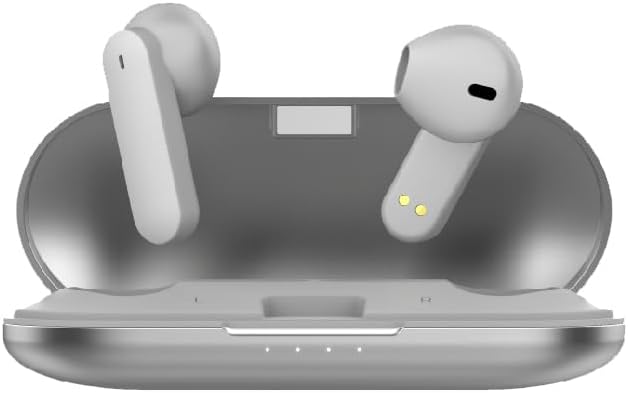
Image 1: LinkTech SE41 Earbuds placed inside their open metallic charging case, showing the charging contacts and internal design.

Image 2: LinkTech SE41 Earbuds positioned next to their closed metallic charging case, highlighting the sleek silver-grey finish.

Image 3: A close-up view of the LinkTech SE41 Earbuds, showing their ergonomic shape and charging contacts.
Setup
1. Charging the Earphones and Case:
- Insert the earphones into the charging case. Ensure the charging contacts align.
- Connect the USB Type-C charging cable to the charging port on the case and the other end to a 5V 1A power adapter (not included).
- The 4-LED indicator on the charging case will show the charging status. A full charge is indicated when all LEDs are solid.
- Allow approximately 2 hours for the charging case to fully charge and 1 hour for the earphones.
2. Pairing with a Bluetooth Device:
- Ensure the earphones are charged.
- Open the charging case. The earphones will automatically enter pairing mode, and their LED indicators will flash.
- On your device (smartphone, tablet, etc.), enable Bluetooth.
- Search for available Bluetooth devices and select "LinkTech SE41" from the list.
- Once connected, the earphone LED indicators will stop flashing, and you will hear a confirmation tone.
- The earphones support TWS, allowing connection to two devices simultaneously.
Operating Instructions
Smart Touch Controls:
The LinkTech SE41 earphones feature intuitive touch controls on each earbud.
- Play/Pause: Single tap on either earbud.
- Next Track: Double tap on the right earbud.
- Previous Track: Double tap on the left earbud.
- Volume Up: Triple tap on the right earbud.
- Volume Down: Triple tap on the left earbud.
- Answer/End Call: Single tap on either earbud during an incoming call.
- Reject Call: Press and hold either earbud for 2 seconds during an incoming call.
- Activate Voice Assistant (Siri/Google): Press and hold either earbud for 3 seconds.
The earphones will automatically switch between music playback and incoming/outgoing calls.
Maintenance
Cleaning:
- Regularly clean the earphones and charging case with a soft, dry, lint-free cloth.
- Do not use abrasive cleaners, alcohol, or chemical solvents.
- Gently clean the ear tips and charging contacts to ensure proper function.
Storage:
- When not in use, store the earphones in their charging case to protect them and keep them charged.
- Store in a cool, dry place away from extreme temperatures and direct sunlight.
Troubleshooting
- Earphones not pairing:
Ensure both earphones are charged. Place them back in the case, close it, then open it again to re-enter pairing mode. On your device, forget "LinkTech SE41" from your Bluetooth settings and try pairing again.
- No sound from one earbud:
Check if both earbuds are charged. Try placing both back in the case, closing it, and then taking them out again to re-establish the stereo connection.
- Poor sound quality or disconnections:
Ensure your device is within the 10-meter transmission range. Avoid obstacles between your device and the earphones. Check for interference from other wireless devices.
- Earphones not charging:
Verify the charging cable is securely connected to both the case and the power source. Ensure the charging contacts on the earphones and inside the case are clean and free of debris.
Specifications
| Audio Driver | Dynamic 13mm |
| Microphone Quantity | 2 Mics + 2 ENC |
| Waterproof Level | IPX4 |
| Bluetooth Version | V5.4 |
| Control Type | Smart Touch |
| Playback Time (with ENC) | Up to 5 Hours (at 70% volume) |
| Total Playback Time (with Charging Case) | Up to 12 Hours (at 100% volume) |
| Frequency Range | 20Hz ~ 20000Hz |
| Speaker Power | 3 ~ 5mW |
| Impedance | 32 Ohm |
| HD Audio Support | Hi-Fi Audio, SBC, AAC |
| Bluetooth Protocols | A2DP, AVRCP, HFP, HSP |
| Transmission Distance | Approximately 10 Meters |
| Noise Reduction | ENC (Environmental Noise Cancellation) |
| Charging Input | DC 5V 1A |
| Charging Case Charging Time | Approximately 2 Hours |
| Earbud Charging Time | Approximately 1 Hour |
| Charging Case Battery | Lithium Polymer battery |
Safety Information
- Do not disassemble, repair, or modify the product.
- Keep the product away from extreme temperatures, direct sunlight, and open flames.
- Avoid exposing the product to water or other liquids beyond its IPX4 rating.
- Do not use the earphones at high volume for extended periods to prevent hearing damage.
- Keep out of reach of children and pets.
- Dispose of the product responsibly according to local regulations.
Warranty and Support
LinkTech products are designed and manufactured to the highest quality standards. For warranty information, technical support, or service inquiries, please refer to the warranty card included with your purchase or visit the official LinkTech website.