
XWJNE 24IVA-4KW-24V-110
XWJNE 4000W Pure Sine Wave Power Inverter Instruction Manual
Model: 24IVA-4KW-24V-110 | Brand: XWJNE
1. Introduction
This manual provides essential information for the safe and efficient operation of your XWJNE 4000W Pure Sine Wave Power Inverter. This inverter converts 24V DC voltage to 120V AC voltage, providing a stable 4000W continuous power output with an 8000W peak. It is designed for various applications including off-grid solar systems, RVs, semi-trailer trucks, and home emergency backup. Please read this manual thoroughly before installation and use to ensure proper functionality and longevity of the device.
2. Safety Instructions
Always prioritize safety when installing and operating the inverter. Failure to follow these instructions may result in serious injury or damage to the equipment.
- Ventilation: Ensure adequate ventilation around the inverter to prevent overheating. Do not block the fan vents.
- Battery Connection: Connect the inverter only to a 24V DC battery system. Ensure correct polarity (positive to positive, negative to negative) to avoid damage. Power input should be a deep cycle battery of 80% discharge depth or above.
- Load Compatibility: This pure sine wave inverter is suitable for sensitive electronics like laptops, TVs, and refrigerators. Avoid exceeding the rated continuous power output of 4000W.
- Environment: Keep the inverter away from water, moisture, direct sunlight, and flammable materials. Operate in a dry, cool, and well-ventilated area.
- Maintenance: Do not attempt to open or service the inverter yourself. Refer all servicing to qualified personnel.
- Fuses: The inverter includes 7 x 40A 32V fuses for protection. Do not replace with fuses of different ratings.
3. Package Contents
Verify that all items are present in the package:
- 1 x XWJNE 4000W Pure Sine Wave Power Inverter
- 2 x 2.62ft 3AWG Positive and Negative Battery Cables
- 1 x 1.64ft Ground Wire
- 1 x Remote Controller with 16.4ft Cable
- 7 x 40A 32V Fuses (extra)
- 1 x Wrench
- 1 x Instruction Manual (this document)

Image: XWJNE 4000W Pure Sine Wave Power Inverter with included battery cables, remote controller, and wrench.
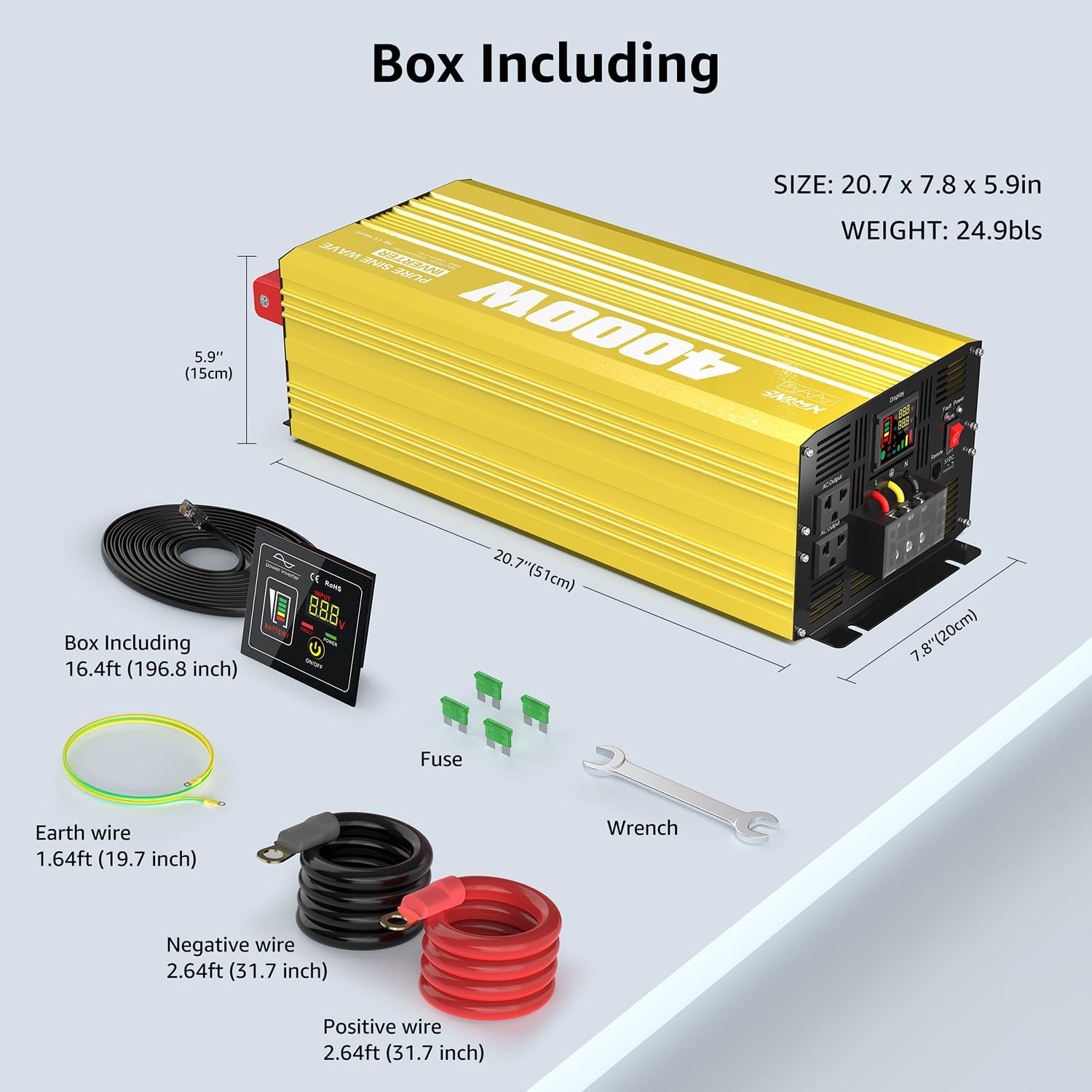
Image: Diagram showing the dimensions of the inverter and all included accessories: remote controller, fuses, earth wire, negative wire, positive wire, and wrench.
4. Setup and Installation
Follow these steps for proper setup of your inverter:
- Choose a Location: Select a dry, cool, and well-ventilated area for the inverter. Ensure it is away from direct sunlight, heat sources, and flammable materials.
- Connect Battery Cables:
- Connect the positive (red) battery cable to the positive (+) terminal on the inverter and the positive (+) terminal on your 24V DC battery.
- Connect the negative (black) battery cable to the negative (-) terminal on the inverter and the negative (-) terminal on your 24V DC battery.
- Ensure all connections are tight and secure to prevent arcing and ensure efficient power transfer.
- Connect Ground Wire: Attach the included ground wire to the grounding terminal on the inverter and to a suitable ground point (e.g., vehicle chassis or earth ground).
- Connect Remote Controller: Plug the remote controller cable into the "Remote" port on the inverter.

Image: Detailed diagram of the inverter's components, including power switch, fault indicator lamp, remote controller port, LED display, AC output ports, USB port, earth wire, AC terminal board, positive terminal, negative terminal, and intelligent cooling fan.

Image: The XWJNE 4000W Pure Sine Wave Power Inverter shown in an RV setting, demonstrating its adaptability to multiple battery inputs (LI, SLD, FLD, GEL, AGM) and various product outputs like laptops, microwaves, TVs, fridges, coffee makers, and lights.
5. Operating Instructions
Once the inverter is properly installed, follow these steps to operate it:
- Power On: Flip the main power switch on the inverter to the "ON" position. The LED display will illuminate.
- Monitor LED Display: The LED screen provides real-time information:
- Battery Level: Indicates the remaining charge of your connected battery.
- Input Voltage: Displays the DC voltage from the battery (e.g., 24.0V).
- Output Voltage: Shows the AC output voltage (e.g., 120V).
- Frequency: Displays the output frequency (e.g., 60Hz).
- Output Load Percent: Visualizes the percentage of the inverter's capacity currently being used.
- Inverter Normal Working: An indicator confirming the inverter is operating correctly.
- Connect Devices: Plug your 120V AC appliances into the two AC output ports or use the 5V 2.4A USB port for charging compatible devices.
- Remote Operation: Use the remote controller to turn the inverter on/off and monitor key parameters from a distance.
- Power Off: When finished, disconnect all appliances and then flip the main power switch to the "OFF" position.

Image: Explanation of the LED screen display, showing indicators for battery level, frequency, output load percent, battery & AC output voltage, power on status, and inverter normal working status.

Image: The remote operation switch, ideal for use in cramped spaces, showing its display and on/off button. The body is designed for embedding with screw fixation points.
6. Protection Mechanisms
The XWJNE 4000W Pure Sine Wave Power Inverter is equipped with six powerful protection functions to ensure safe and reliable operation:
- Undervoltage Protection: Automatically shuts down if the input DC voltage drops below a safe level to protect the battery from deep discharge.
- Overvoltage Protection: Protects the inverter and connected devices from damage due to excessively high input DC voltage.
- Overload Protection: Prevents damage when the connected load exceeds the inverter's rated capacity.
- Over-temperature Protection: Activates the smart cooling fan and/or shuts down the inverter if internal temperature becomes too high.
- Short Circuit Protection: Safeguards against damage from short circuits in the output.
- Reverse Connection Protection: Protects the inverter from damage if battery polarity is accidentally reversed.

Image: Visual representation of the six safety protection functions: low-voltage, output short circuit, overvoltage, overpower, load shock, and overtemperature protection.

Image: Comparison of pure sine wave and modified wave, highlighting the inverter's >90% conversion efficiency and 40% power consumption reduction, ensuring sensitive appliances can be used with confidence.
7. Maintenance
Regular maintenance ensures the longevity and optimal performance of your inverter:
- Cleaning: Keep the inverter clean and free from dust and debris. Use a dry, soft cloth for cleaning. Do not use liquid cleaners.
- Ventilation: Regularly check that the cooling fans and vents are clear and unobstructed. The smart fan will automatically activate when the internal temperature reaches 50 degrees Celsius or when the load reaches half capacity, operating at low decibel levels.
- Connections: Periodically inspect all electrical connections for tightness and corrosion. Loose connections can cause overheating and damage.
- Storage: If storing the inverter for an extended period, disconnect it from the battery and store it in a cool, dry place.
Image: Close-up of the inverter's intelligent cooling fan system, showing DC- and DC+ terminals. The fan activates automatically at 50 degrees Celsius or half load, ensuring quiet operation below 60dB when on and below 20dB when off.
8. Troubleshooting
The LED display provides fault codes to help diagnose issues:
| Code | Description | Possible Cause / Solution |
|---|---|---|
| F01 | Parameter Configuration Fault | Internal error. Contact customer service. |
| F02 | Sampling Circuit Fault | Internal error. Contact customer service. |
| F03 | DC Bus Voltage too Low | Input voltage is too low. Check battery charge and connections. |
| F04 | Other power source connected with the output cables | Ensure only the inverter is connected to the load. Disconnect other power sources. |
| F05 | Output Short Circuit | Check for short circuits in connected appliances or wiring. Disconnect faulty devices. |
| F06 | Output Overcurrent | Connected load draws too much current. Reduce load or use a higher capacity inverter. |
| F07 | Output Overload | Connected load exceeds inverter's power rating. Reduce load. |
| F08 | Over-temperature Protection | Inverter is overheating. Ensure proper ventilation and clear fan vents. Allow to cool. |
| F09 | Other power source connected with the output cables | Duplicate of F04. Ensure only the inverter is connected to the load. |
| F10 | Battery Overvoltage | Input voltage is too high. Check battery voltage and charging system. |
| F11 | DC Bus Overvoltage | Internal DC bus voltage is too high. Contact customer service. |
| F12 | Battery Undervoltage | Input voltage is too low. Recharge or replace battery. |
| F13 | Data Read Error | Internal data error. Contact customer service. |
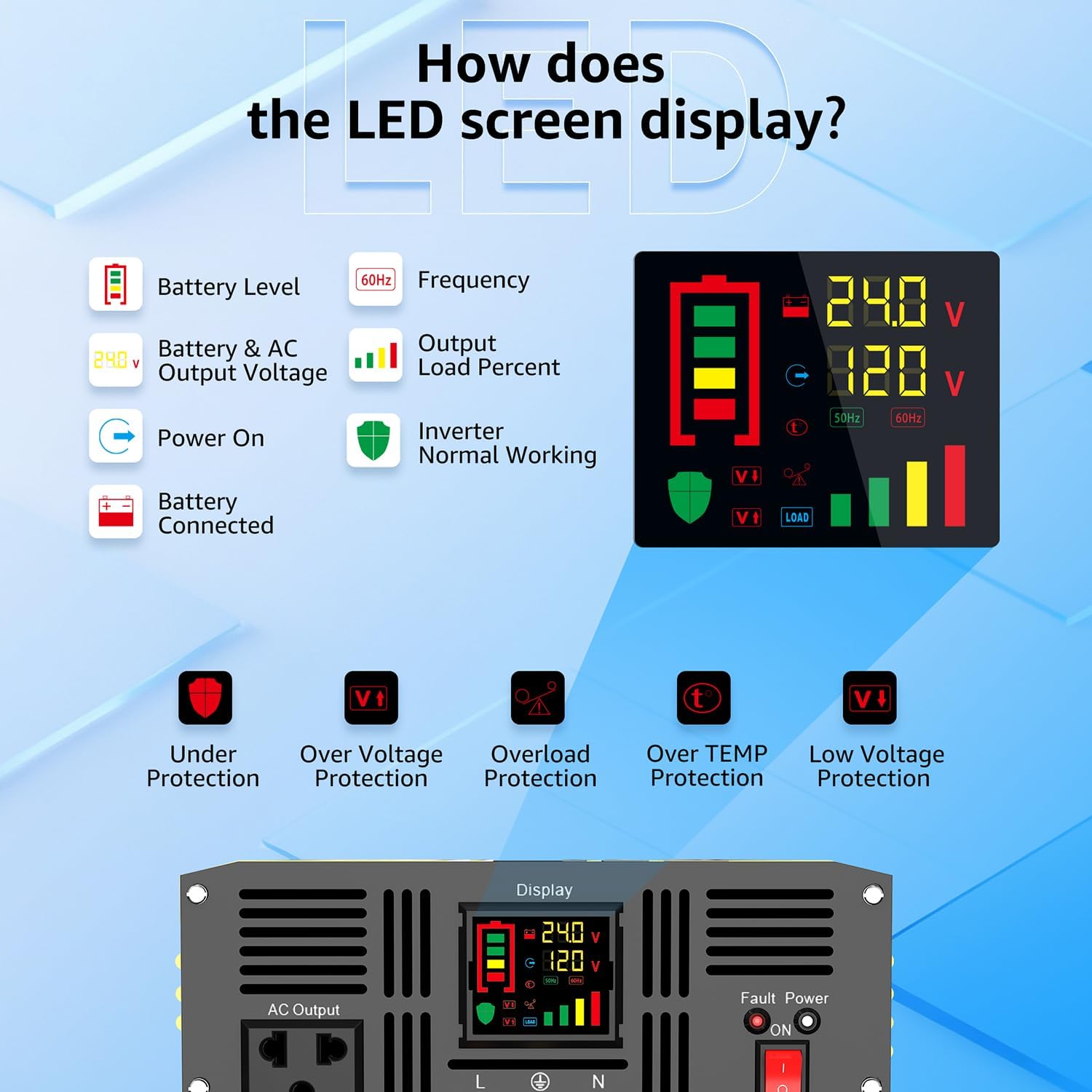
Image: Detailed view of the LED display and its fault codes (F01-F13) for quick problem identification and adjustment.
9. Specifications
| Feature | Specification |
|---|---|
| Model Number | 24IVA-4KW-24V-110 |
| Continuous Power | 4000W |
| Peak Power | 8000W |
| Input DC Voltage | 24V DC |
| Output AC Voltage | 120V AC |
| Output Waveform | Pure Sine Wave |
| Conversion Efficiency | >90% |
| Product Dimensions | 12.01 x 19.21 x 25 inches |
| Item Weight | 19.2 pounds |
| AC Output Ports | 2 x 120V AC outlets |
| USB Output | 1 x 5V 2.4A |
| Remote Controller Cable Length | 16.4 ft |
| Cooling | Smart Fan (auto-on at 50°C or half load) |
| Recommended Uses | Home, Off-Grid, RV, Truck, Vehicle |
10. Warranty and Support
XWJNE is committed to providing high-quality products and excellent customer service. For any questions, technical support, or warranty claims, please contact XWJNE customer service. Refer to your purchase documentation for specific warranty terms and contact information.
Over the past 10 years, XWJNE has continuously optimized and improved its inverters to meet diverse power demands. Our products are designed for reliable operation in off-grid solar energy systems, RV power supplies, home emergency standby systems, offshore power supply systems, and outdoor work.
Ask a question about this manual
Ask about setup, troubleshooting, compatibility, parts, safety, or missing instructions. Manuals+ will review the question and use this page’s manual context to help answer it.