
1. Introduction
Thank you for choosing the Ambimall LED Floor Lamp. This manual provides essential information for the safe and efficient use of your new lamp. Please read these instructions carefully before assembly and operation, and retain them for future reference.
This 65-inch LED floor lamp features adjustable brightness (5%-100%) and color temperature (3000K-6500K), controllable via a remote or foot switch. Its minimalist design is suitable for various indoor environments.
2. Safety Instructions
- Ensure the power source matches the lamp's requirements (120 Volts).
- Do not expose the lamp to water or moisture. This product is for indoor use only.
- Always unplug the lamp from the power outlet before cleaning or performing any maintenance.
- Keep small parts, such as AAA batteries (for the remote control), out of reach of children and pets to prevent accidental ingestion.
- Do not attempt to modify or repair the lamp yourself. Contact customer support for assistance.
- Place the lamp on a stable, flat surface to prevent tipping.
3. Package Contents
Verify that all components are present in the package:
- Lamp Base (x1)
- Remote Control (x1)
- AAA Batteries (x2)
- Floor Lamp (disassembled sections) (x1)
- Power Adapter (x1)
- User Manual (x1)
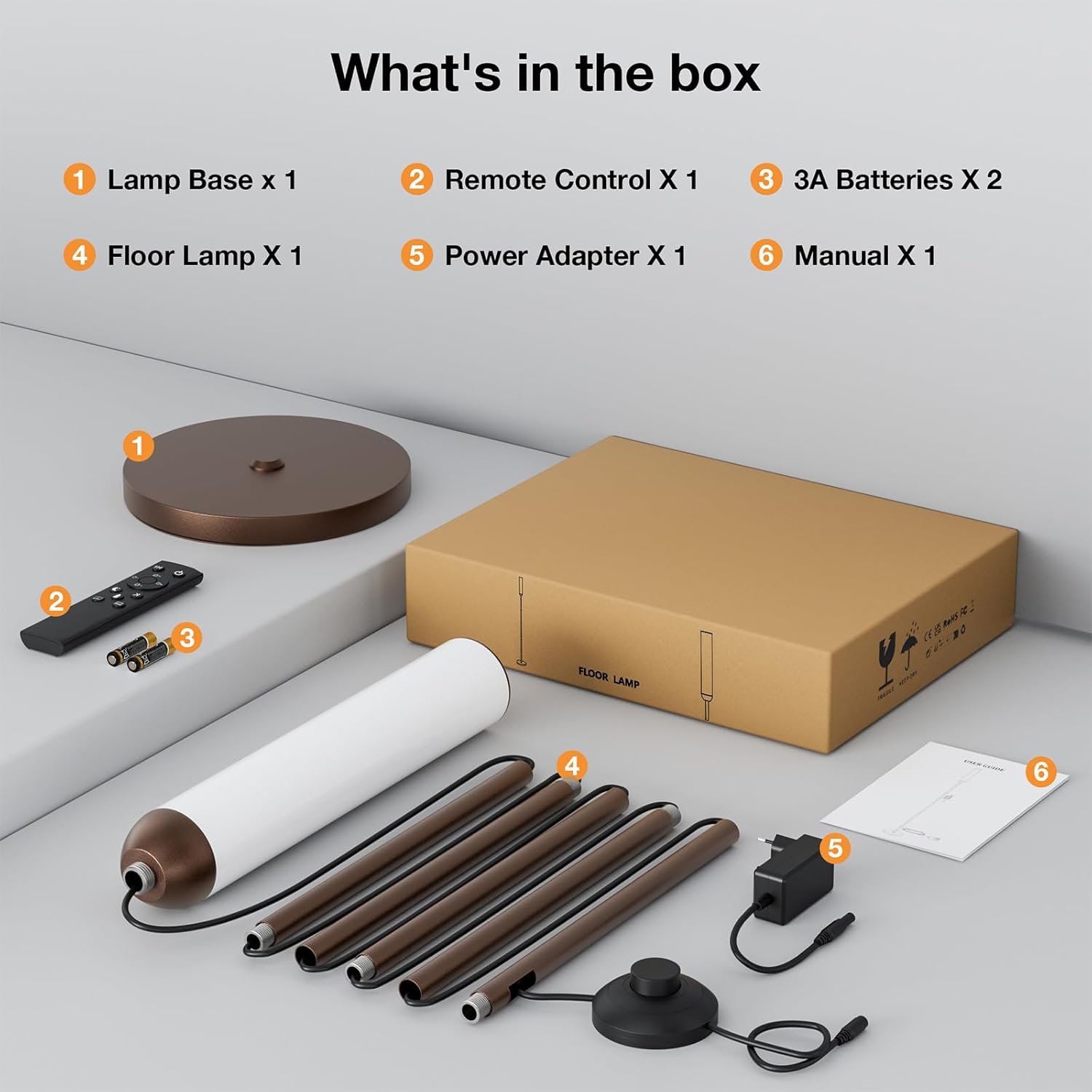
This image displays the lamp base, remote control, two AAA batteries, the disassembled floor lamp pole, a power adapter, and the instruction manual, all neatly arranged next to the product box.
4. Assembly Instructions
Assembly of the Ambimall LED Floor Lamp is straightforward and requires no tools.
- Carefully unpack all components from the box.
- Connect the metal lamp pole sections one by one by screwing them clockwise until secure. Ensure the electrical wire passes freely through the poles.
- Attach the assembled lamp pole to the lamp base by screwing it clockwise until firmly connected.
- Insert the power adapter into the lamp's power input, then plug the adapter into a standard wall outlet.
- Open the remote control battery compartment and insert the two AAA batteries, observing correct polarity.

This image shows the complete floor lamp, featuring its slender brown metallic pole and cylindrical light source, alongside its remote control, positioned in a modern living room.

This diagram provides precise measurements of the lamp, including its overall height, the height and diameter of the light cylinder, and the diameter of its circular base.
5. Operating Instructions
The Ambimall LED Floor Lamp offers versatile control options for illumination.
5.1. Foot Switch Operation
A convenient foot switch is located on the power cord for basic control:
- Press once to turn the lamp ON.
- Press again to turn the lamp OFF.
5.2. Remote Control Operation
The included remote control provides full functionality:
- Power Button: Turns the lamp ON or OFF.
- Brightness Adjustment: Use the '+' and '-' buttons to adjust brightness from 5% to 100%.
- Color Temperature Adjustment: Use the 'K+' and 'K-' buttons to cycle through color temperatures from 3000K (warm white) to 6500K (cool white).
- Preset Modes: Dedicated buttons may be available for specific lighting scenarios such as Reading Mode, Sleeping Mode, Working Mode, or Babyfeeding Mode. Refer to the remote's icons for specific functions.
- Timer Function: Some remotes include a timer button (e.g., 1-hour timer).

This image highlights the lamp's versatility, demonstrating its ability to provide different lighting environments suitable for reading, sleeping, working, and baby care, along with color temperature control.
6. Features
- High Brightness: Equipped with high-quality LED lamp beads, providing up to 1050 lumens of brightness.
- Energy Efficient: Consumes only 14.5W of power, offering significant energy savings.
- Adjustable Brightness: Stepless dimming from 5% to 100%.
- Adjustable Color Temperature: Stepless adjustment from 3000K (warm white) to 6500K (cool white).
- Dual Control: Operable via a magnetic remote control and a convenient foot switch.
- Long Lifespan: Designed for extended operational life compared to traditional lamps.
- Versatile Application: Ideal for bedrooms, living rooms, offices, and study rooms.
- Easy Assembly: Tool-free assembly with screw-together pole sections.
7. Specifications
| Attribute | Value |
|---|---|
| Brand | Ambimall |
| Model Number | RPT-ZGLED1-5 |
| Product Dimensions (Overall) | 7.87"D x 7.87"W x 64.96"H |
| Item Weight | 5.9 pounds |
| Lamp Type | Floor Lamp |
| Light Source Type | LED |
| Wattage | 14.5 watts |
| Brightness | 1050 Lumens |
| Color Temperature | 3000K-6500K (Adjustable) |
| Brightness Adjustment | 5%-100% (Stepless) |
| Power Source | Corded Electric |
| Voltage | 120 Volts |
| Material | Metal (Base), Plastic (Shade) |
| Finish Type | Painted |
| Switch Type | Push Button (Foot Switch), Remote Control |
| Indoor/Outdoor Usage | Indoor |
| Room Type | Bedroom, Classroom, Living Room, Office, Study Room |
| Included Components | Remote Control |
8. Troubleshooting
If you encounter issues with your Ambimall LED Floor Lamp, refer to the following common solutions:
- Lamp does not turn on:
- Ensure the power adapter is securely plugged into both the lamp and a working wall outlet.
- Check if the wall outlet is functional by plugging in another device.
- Verify that the remote control batteries are correctly inserted and not depleted. Replace if necessary.
- Remote control is not responding:
- Ensure there are no obstructions between the remote and the lamp's receiver.
- Replace the AAA batteries in the remote control.
- Try operating the lamp using the foot switch to confirm the lamp itself is functional.
- Light flickers or is inconsistent:
- Check all pole connections to ensure they are tightly screwed together. Loose connections can affect power flow.
- Ensure the lamp is not connected to a dimmer switch on the wall, as this can interfere with the lamp's built-in dimming functionality.
If problems persist, please contact Ambimall customer support for further assistance.
9. Maintenance
To ensure the longevity and optimal performance of your Ambimall LED Floor Lamp, follow these maintenance guidelines:
- Cleaning: Dust the lamp regularly with a soft, dry cloth. For more stubborn marks, lightly dampen the cloth with water and wipe gently, then dry immediately. Do not use abrasive cleaners or solvents.
- Bulb Replacement: The LED light source is integrated and not user-replaceable. If the LED fails, contact customer support.
- Storage: If storing the lamp for an extended period, disassemble it and store it in its original packaging in a dry, cool place. Remove batteries from the remote control before storage.
10. Warranty and Support
Ambimall is committed to providing high-quality products and excellent customer service. This product comes with a manufacturer's warranty against defects in materials and workmanship.
For warranty claims, technical support, or any questions regarding your Ambimall LED Floor Lamp, please contact our customer service team. We offer professional and free after-sales consultations and solutions to product problems.
Contact information can typically be found on the product packaging or the official Ambimall website.