
Pohaytipe S05GB1X1
Pohaytipe Smart Door Lock S05GB1X1 User Manual
Model: S05GB1X1
Introduction
This manual provides detailed instructions for the installation, operation, and maintenance of your Pohaytipe Smart Door Lock S05GB1X1. Please read this manual thoroughly before using the product to ensure proper function and safety. This smart lock integrates advanced security features and multiple access methods for enhanced home security.

This image displays the complete Pohaytipe Smart Door Lock system, including the exterior and interior lock panels, multiple IC cards, the mortise lock mechanism, and a smartphone screen showing the Tuya app interface for lock control.
Product Features
- Smart Cat Eye with Real-time Visual Intercom: The built-in cat eye camera connects to the Wi-Fi App, allowing real-time monitoring and visual intercom with visitors, enhancing home security.
- Multiple Unlocking Modes: Offers various access methods including Palmprint, 3D Face Recognition, IC Card, Passcode, Fingerprint, Mechanical Keys, and Remote access.
- Emergency Power and Access: Equipped with a 5000mAh battery supporting extended use (6-10 months for a family of five). Features an emergency charging port and mechanical keyhole for backup access.
- Durable Construction: Features a double-sided aluminum alloy electroplated panel, thickened galvanized sheet lining board, 6068 all-steel mortise, and a Class C lock cylinder for robust security.
- Tuya Wifi APP Control: Seamless integration with the Tuya app for remote management and monitoring.

An illustration showcasing the primary features of the Pohaytipe Smart Door Lock, such as the independent cat's eye, palm vein recognition, 3D face recognition, a low battery indicator, the 5000mAh battery capacity, and Tuya app integration for remote monitoring.
Setup
1. Installation
The Pohaytipe Smart Door Lock is compatible with most standard SA and UAE deadbolt spacings. Professional installation is recommended to ensure correct alignment and functionality.
- Prepare the Door: Ensure the door frame and door are properly prepared for the mortise lock and main unit. Refer to the provided template for drilling holes if necessary.
- Install Mortise Lock: Insert the 6068 all-steel mortise into the door edge.
- Install Exterior Panel: Mount the exterior panel, ensuring all cables are routed correctly.
- Install Interior Panel: Connect the cables from the exterior panel to the interior panel and secure the interior panel to the door.
- Test Functionality: After installation, test all mechanical functions, including the handle and lock knob, before proceeding with electronic setup.
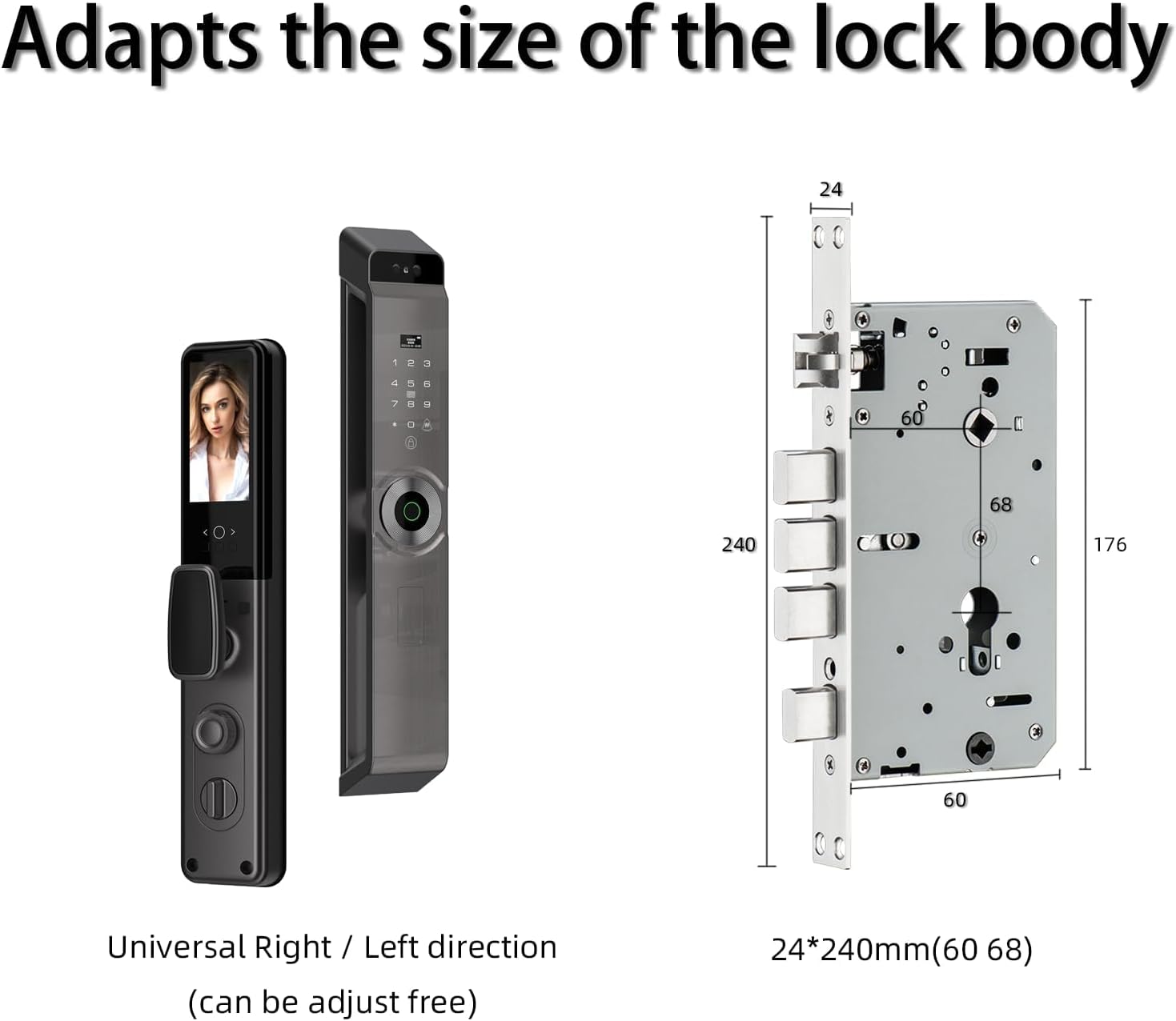
A technical diagram detailing the dimensions of the mortise lock body (24*240mm, 60 68) and the main lock unit. It also indicates the universal right/left direction adjustability for installation.
2. Battery Installation and Charging
The lock requires 1 Lithium Ion battery (5000mAh) for operation. Ensure the battery is fully charged before initial use.
- Locate the battery compartment on the interior panel.
- Insert the 5000mAh Lithium Ion battery, ensuring correct polarity.
- Close the battery compartment cover securely.
- For charging, use the emergency charging port located on the exterior panel.
3. Tuya Wifi APP Setup
The Tuya app enables remote control and monitoring of your smart lock.
- Download the Tuya Smart app from your device's app store.
- Register or log in to your Tuya account.
- Follow the in-app instructions to add your Pohaytipe Smart Door Lock. This typically involves putting the lock into pairing mode and connecting it to your home Wi-Fi network.
- Once connected, you can manage users, view access logs, and control the lock remotely.
Operating Instructions
1. Unlocking Methods
The lock supports multiple secure unlocking methods:
- Fingerprint Unlock: Place your registered finger on the semiconductor fingerprint reader. The lock will unlock upon successful recognition.

This diagram details the internal components of the semiconductor fingerprint reader, explaining how a single touch enables quick and secure access to the Pohaytipe Smart Door Lock.
- 3D Face Recognition: Stand in front of the lock's camera. The 3D face recognition technology will scan your face for authorization. Ensure your face is clearly visible.

An image illustrating the 3D face recognition capability of the smart lock, showing a facial scan with a grid overlay. This technology captures detailed facial data to ensure accurate identification and security.

This visual compares the effectiveness of infrared 3D recognition technology. It highlights the system's ability to quickly identify distinct facial features for authorized access while rejecting attempts with obscured faces, such as those wearing masks.
- Palmprint Unlock: Present your registered palm to the palm print sensor. The lock will verify your palm print for access.

An illustration demonstrating the palm print unlock feature. A robotic hand is shown interacting with the lock's sensor, symbolizing quick, secure, and convenient access through palm print recognition.
- IC Card: Tap your registered IC card on the designated card reader area.
- Passcode: Enter your registered passcode on the keypad, followed by the '#' key.
- Mechanical Keys: In case of emergency or power failure, use the provided mechanical keys to unlock the door.
- Remote Access: Use the Tuya app to remotely unlock or lock the door.
2. Smart Cat Eye and Intercom
The integrated smart cat eye provides real-time visual monitoring and two-way audio communication with visitors.
- When a visitor presses the doorbell, you will receive a notification on your Tuya app.
- Open the app to view the live video feed from the cat eye camera.
- Use the intercom function within the app to speak with the visitor.
- You can then choose to unlock the door remotely or decline access.

A smartphone screen demonstrating the Tuya app's real-time visitor interaction feature. The app shows a live feed of a person at the door, allowing the user to communicate and grant or deny access remotely.
Maintenance
1. Battery Management
- The lock features a low battery indicator. When the battery is low, charge it promptly using the emergency charging port.
- Regularly check the battery level via the Tuya app.
- If the battery is completely depleted, use the mechanical keys for access and then charge the lock.
2. Cleaning
- Wipe the lock's exterior surfaces with a soft, dry cloth.
- Avoid using abrasive cleaners, solvents, or harsh chemicals, as these can damage the finish and electronic components.
- Keep the fingerprint sensor, camera lens, and keypad clean for optimal performance.
Troubleshooting
If you encounter issues with your Pohaytipe Smart Door Lock, consider the following common solutions:
- Lock Not Responding: Check the battery level. If low, charge the lock. If unresponsive, use the mechanical key.
- Fingerprint/Face Recognition Failure: Ensure the sensor/camera is clean and your registered biometric data is correctly enrolled. Try re-registering your fingerprint or face.
- App Connectivity Issues: Verify your home Wi-Fi network is active and the lock is within range. Restart the Tuya app or re-pair the lock if necessary.
- Passcode Not Working: Double-check the entered passcode. Ensure no numbers are skipped or repeated incorrectly.
- Mechanical Key Not Working: Ensure the key is fully inserted and turned correctly. Do not force the key.
For persistent issues, refer to the support section for contact information.
Specifications
| Feature | Specification |
|---|---|
| Brand | Pohaytipe |
| Model Number | S05GB1X1 |
| Item Weight | 4.32 Kilograms |
| Product Dimensions | 38 x 10 x 8 cm |
| Batteries | 1 Lithium Ion battery required (5000mAh) |
| Material | Aluminum |
| Color | Grey |
| Special Features | New Palmprint, 3D face recognition, IC card, Passcode, Fingerprint, Mechanical keys, Remote |
| Lock Type | Biometric, Combination Lock, Keypad, Mortise Lock |
| Control Method | App (Tuya Wifi) |
| Mortise Type | 6068 All steel mortise |
| Lock Cylinder | Class C |
Warranty and Support
The Pohaytipe Smart Door Lock S05GB1X1 includes a 12-month protection period from the date of purchase. This warranty covers manufacturing defects and ensures product reliability.
For technical assistance, troubleshooting, or warranty claims, please contact Pohaytipe customer service. Support is available 24/7 via email or live chat. Refer to your purchase documentation for specific contact details.
Ask a question about this manual
Ask about setup, troubleshooting, compatibility, parts, safety, or missing instructions. Manuals+ will review the question and use this page’s manual context to help answer it.