
1. Introduction
Thank you for choosing the Weture Oversized 3-Seater Recliner Sofa. This manual provides essential information for the safe assembly, operation, and maintenance of your new sofa. Please read these instructions thoroughly before use and retain them for future reference.
2. Safety Information
- Ensure all components are securely fastened before use.
- Keep children and pets away from moving parts during reclining operation.
- Do not stand on the footrest or armrests.
- Avoid placing heavy objects on the reclined footrest.
- The USB port is designed for low-power devices only. Do not attempt to charge high-power electronics.
- Disconnect power before cleaning or performing maintenance.
- Each seat has a maximum load-bearing capacity of 330 lbs. Do not exceed this limit.
3. Package Contents
The Weture 3-seater recliner sofa is shipped in multiple boxes. Please ensure all packages have arrived before beginning assembly. Verify all parts are present and undamaged according to the packing list.

Figure 3.1: Product dimensions and weight capacity. The sofa measures 37"D x 84.6"W x 43"H, with a seat depth of 21.3 inches and a seat height of 18.9 inches. Each seat supports up to 330 lbs.
4. Setup and Assembly Instructions
Assembly typically takes approximately 30 minutes. All necessary assembly tools are included. Follow the steps carefully.
Video 4.1: Official assembly guide for the Weture Recliner Sofa. This video demonstrates the step-by-step process of unboxing, connecting the base components, attaching the seatbacks, and connecting the electrical components for the heat and massage functions.
4.1 Unpacking
- Carefully open all boxes. Avoid using sharp objects that could damage the fabric.
- Remove all components and protective packaging.
- Identify all parts against the packing list provided.
4.2 Base Assembly
- Connect the base sections of the sofa. Ensure they align correctly and lock into place.
- Secure any connecting brackets or screws as indicated in the assembly instructions.
4.3 Attaching Seatbacks
- Align the metal brackets on the seatbacks with the corresponding slots on the base.
- Slide the seatbacks down firmly until they click into position.
4.4 Electrical Connections
- Locate the power cables for the heat and massage functions.
- Connect the cables from each reclining seat to the main power adapter.
- Plug the power adapter into a standard electrical outlet.
5. Operating Instructions
5.1 Reclining Function
To extend the footrest, pull the side pull buckle located on the side of the seat. To recline further, lean back using your body weight. To return to the upright position, push down on the footrest with your legs until it locks into place. Some resistance may be felt when closing the footrest, requiring a quick and firm push.

Figure 5.1: Reclining positions and footrest operation. The sofa offers multiple recline angles for various activities.
5.2 Massage and Heating Functions
Each outer seat is equipped with 8 vibrating nodes and 2 lumbar heating points. Use the remote control to select from five massage modes and two vibration intensities. The heat function can be activated independently or in conjunction with massage modes.

Figure 5.2: Massage and heating controls. The remote allows customization of massage modes, intensity, and heat application.
5.3 Convenient Features
- USB Port: A USB port is integrated for charging low-power devices.
- Cup Holders: Two cup holders are located in the armrests for beverages.
- Side Pockets: Side pockets are available for storing small items like remote controls or magazines.
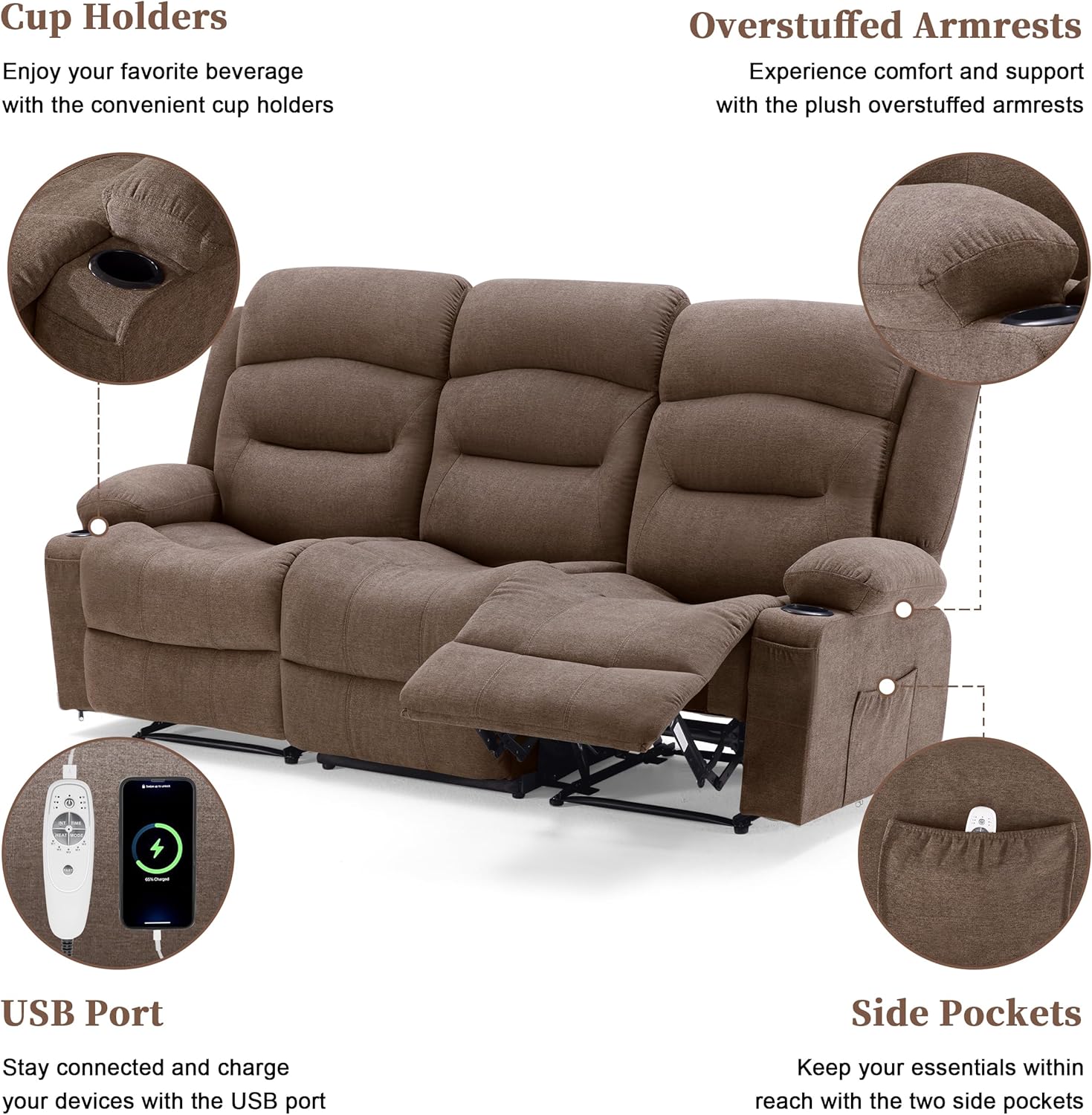
Figure 5.3: Integrated features including cup holders, USB port, and side pockets for enhanced convenience.
6. Maintenance
Regular maintenance helps prolong the life of your sofa.
- Cleaning: The fabric is designed to be skin-friendly and non-pilling. For general cleaning, use a soft brush or vacuum cleaner to remove dust and debris. For spills, blot immediately with a clean, dry cloth. Avoid harsh chemicals.
- Frame: The metal frame features an anti-tipping design and is SGS tested. Periodically check all bolts and connections to ensure they are tight.
- Cushions: The seat cushions have removable covers for easier cleaning.

Figure 6.1: Fabric characteristics for easy maintenance.
7. Troubleshooting
- Reclining mechanism is stiff: Ensure no obstructions are blocking the mechanism. Apply firm, consistent pressure when closing the footrest.
- Heat or massage not working: Check all electrical connections to ensure they are securely plugged in. Verify the power adapter is connected to a working outlet.
- Sofa feels unstable: Recheck all assembly connections, especially the metal frame components, to ensure they are tightened correctly.
8. Specifications
| Brand | Weture |
| Model | B0FBW87DLQ |
| Color | Brown |
| Material | Metal, Fabric (Polyester Blend) |
| Product Dimensions | 37"D x 84.6"W x 43"H |
| Item Weight | 100 Pounds |
| Weight Capacity (per seat) | 330 lbs |
| Seating Capacity | 3 |
| Seat Depth | 21.3 inches |
| Seat Height | 18.9 Inches |
| Reclining Positions | 2 |
| Special Features | Heat, Massage, Wall-Hugger, Cup Holders, USB Port |
9. Warranty and Support
For warranty information or technical support, please refer to the documentation included with your purchase or contact Weture customer service directly. Keep your purchase receipt for warranty claims.