
1. Important Safety Information
Please read all instructions carefully before assembly and use. Keep this manual for future reference.
- Always use the chair on a stable, flat surface.
- Do not use the chair if you have any balance or mobility issues that could lead to falls.
- Keep the chair away from direct heat sources to prevent damage to the material.
- Always follow the assembly instructions carefully to ensure stability and safety.
- Do not exceed the maximum weight recommendation of 250 pounds.
2. Product Components
Before assembly, ensure all components are present and undamaged. Refer to the diagram below for component identification.

Image: Detailed product dimensions and components.
- Seat Cushion
- Backrest
- Footrest Cushion
- Gas Lift Cylinder
- Chair Base with Casters
- Mounting Hardware (screws, washers, Allen wrench)
3. Assembly Instructions
Assembly is designed to be straightforward. All necessary tools are included. It is recommended to assemble the chair on a soft, clean surface to prevent scratches.
- Attach Casters to Base: Insert the five swivel casters into the holes at the end of each leg of the chair base. Push firmly until they click into place.
- Insert Gas Lift: Place the gas lift cylinder into the center hole of the chair base.
- Assemble Seat Mechanism: Attach the seat mechanism to the underside of the main seat cushion using the provided screws. Ensure the front of the mechanism aligns with the front of the seat.
- Attach Backrest: Secure the backrest support to the back of the main seat cushion using the designated screws.
- Attach Footrest: Connect the footrest assembly to the underside of the main seat cushion, ensuring it can rotate freely.
- Connect Seat to Gas Lift: Carefully place the assembled seat onto the gas lift cylinder, aligning the center hole of the seat mechanism with the top of the gas lift. Press down firmly to secure.

Image: The fully assembled Primy Criss Cross Office Chair.
4. Operating Instructions
The Primy Criss Cross Office Chair is designed for flexible seating positions to enhance comfort and support during various activities.
4.1. Height Adjustment
- To raise the chair: While standing, pull the lever located under the seat upwards. The chair will rise automatically. Release the lever at the desired height.
- To lower the chair: While seated, pull the lever located under the seat upwards. The chair will lower. Release the lever at the desired height.

Image: Illustration of height adjustment mechanism and smooth-rolling casters.
4.2. Footrest Operation
The chair features a 360° rotating and scalable footrest for versatile use.
- The footrest can be rotated 360 degrees to accommodate various sitting postures.
- Adjust the footrest position by gently pushing or pulling it to extend or retract, finding the most comfortable support for your legs and feet.

Image: Demonstrating the innovative footrest design with 360° rotation.
4.3. Versatile Sitting Positions
This chair supports various sitting styles, including cross-legged, squatting, and kneeling, promoting dynamic sitting.
- Cross-legged: Utilize the wide seat and rotating footrest to comfortably sit with your legs crossed.
- Kneeling: Position your knees on the footrest for an ergonomic kneeling posture, distributing weight and promoting an upright spine.
- Traditional: Sit with both feet on the floor, using the backrest for lumbar support.
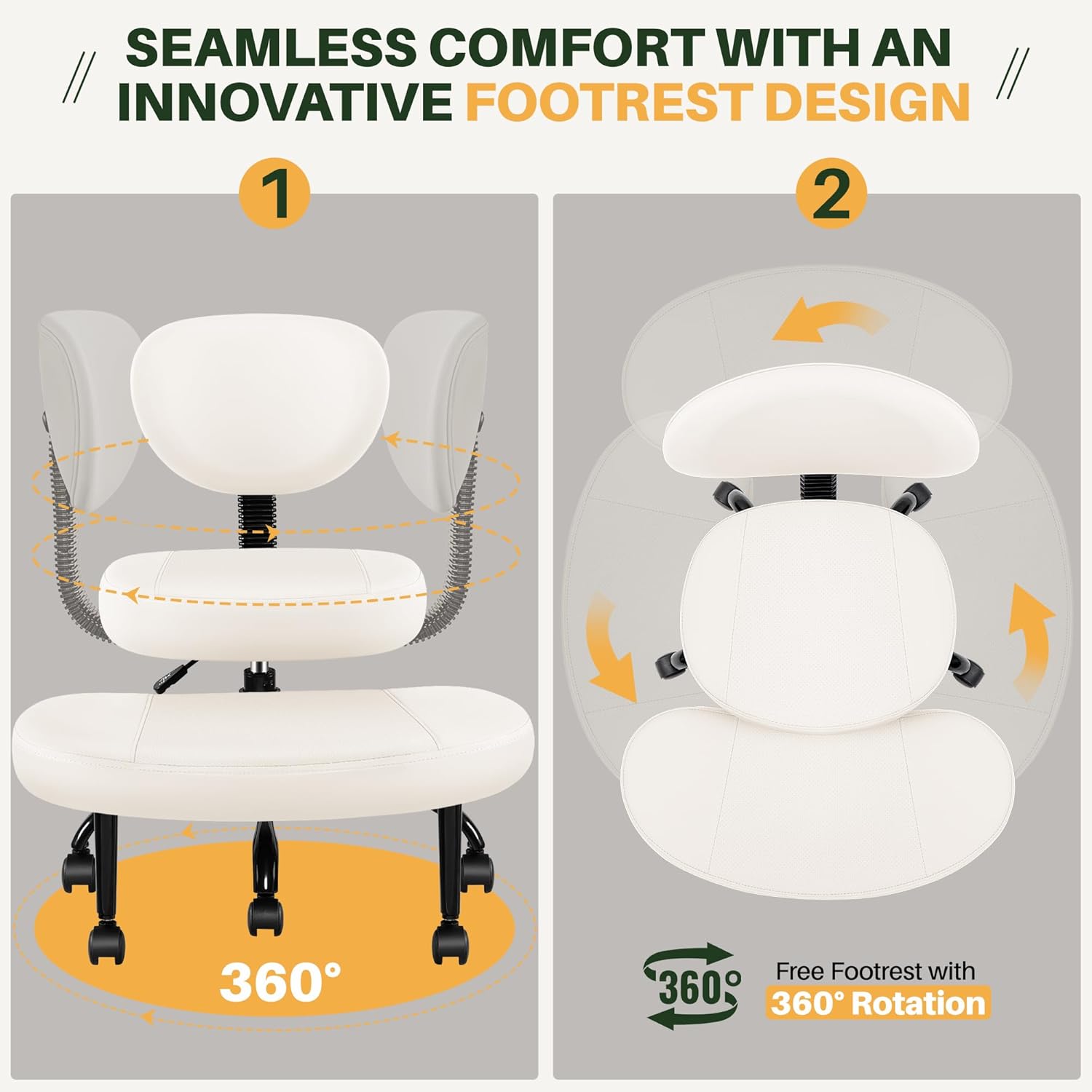
Image: Examples of different sitting positions on the chair.
5. Maintenance
Proper care will extend the life and appearance of your Primy Criss Cross Office Chair.
5.1. Cleaning
- The chair's PU leather surface is easy to clean. Wipe with a soft, damp cloth and mild soap if necessary.
- Avoid harsh chemicals or abrasive cleaners, as these can damage the material.
- For spills, blot immediately with a clean, dry cloth.

Image: Demonstrating the easy-to-clean nature of the PU leather.
5.2. General Care
- Periodically check all screws and bolts to ensure they are tight. Retighten as needed.
- Keep casters clean from hair and debris to ensure smooth rolling.
- Avoid exposing the chair to prolonged direct sunlight to prevent fading or material degradation.
6. Troubleshooting
If you encounter any issues with your chair, refer to the following common problems and solutions.
6.1. Chair Does Not Adjust Height
- Check Gas Lift: Ensure the gas lift cylinder is correctly inserted into both the base and the seat mechanism.
- Lever Engagement: Verify that the height adjustment lever is fully engaged and not stuck.
6.2. Chair Feels Unstable or Wobbly
- Tighten Screws: Recheck all assembly screws and ensure they are securely tightened.
- Level Surface: Ensure the chair is on a flat, level surface.
- Caster Installation: Confirm all casters are fully inserted into the base.
6.3. Footrest Causes Discomfort
- Adjust Position: Experiment with the 360° rotation and scalable adjustment of the footrest to find a position that suits your body and sitting style.
- Sitting Posture: Adjust your sitting posture on the main seat to better align with the footrest.
6.4. Casters Not Rolling Smoothly
- Clean Casters: Remove any hair, dust, or debris that may be caught in the caster wheels.
- Surface Type: Ensure the chair is being used on an appropriate surface. While designed for smooth movement, very thick carpets may impede rolling.
7. Specifications
| Feature | Detail |
|---|---|
| Brand | Primy |
| Model Number | SF20251013B0F9DYW9Q3 |
| Color | Beige White |
| Material | PU Leather, High-Density Foam, Metal Frame |
| Product Dimensions (D x W x H) | 15.51" x 25.51" x 33" |
| Seat Height Adjustment Range | 17.3" - 21.3" |
| Weight Capacity | 250 Pounds |
| Footrest Rotation | 360 Degrees |
| Assembly Required | Yes |
8. Warranty and Support
Primy is committed to providing high-quality products and excellent customer service.
8.1. Warranty Information
This product comes with a Lifetime Best-in-Class Warranty, ensuring peace of mind regarding manufacturing defects and quality.
8.2. Returns and Exchanges
We offer 30-Day Free Returns and Exchanges for your convenience. Please refer to your purchase platform's return policy for detailed instructions.
8.3. Contact Support
For any questions, assistance, or support, please contact us:
- Email: cs@primyhome.com
- Phone: +1 (775) 320-9681
- Support: 24/7 Text Support available.
You can also reach us through your Amazon account:
- Login to your Amazon Account.
- Go to 'Your Orders'.
- Find your order for the Primy Criss Cross Office Chair.
- Click 'Contact Seller'.

Image: Primy customer support contact details.