
1. Introduction
This manual provides essential information for the safe and efficient operation, maintenance, and troubleshooting of your PowerSmart 4400W Portable Inverter Generator. Please read this manual thoroughly before operating the generator and keep it for future reference. Proper understanding and adherence to these instructions will ensure optimal performance and longevity of your unit.

Image 1.1: The PowerSmart 4400W Portable Inverter Generator, showcasing its compact design and control panel.
2. Safety Information
Operating a generator can be hazardous if proper safety precautions are not followed. Always prioritize safety to prevent injury or property damage.
2.1 Carbon Monoxide Hazard
- Generators produce carbon monoxide (CO), an odorless, colorless, and poisonous gas.
- NEVER operate the generator indoors, in a garage, or in any enclosed space.
- Always operate the generator outdoors in a well-ventilated area, far away from windows, doors, and vents.
- Install battery-operated carbon monoxide alarms in your home or RV.

Image 2.1: The COPROTECT logo, indicating the generator's carbon monoxide shutdown feature for enhanced safety.
2.2 Electrical Safety
- Do not operate the generator in wet conditions. Keep it dry.
- Ensure all electrical connections are secure and free from damage.
- Use only approved extension cords that are rated for outdoor use and the power requirements of your appliances.
- Never overload the generator. Refer to the wattage ratings.
2.3 Fuel Safety
- Gasoline is highly flammable. Store fuel in approved containers in a well-ventilated area.
- Never refuel the generator while it is running or hot. Allow it to cool down completely.
- Avoid spilling fuel. If spilled, wipe it up immediately and ensure fumes dissipate before starting the generator.
2.4 Hot Surfaces
- The generator's engine and muffler become very hot during operation and remain hot for some time after shutdown.
- Avoid touching hot surfaces to prevent burns.
- Keep children and pets away from the operating generator.
3. Product Features
The PowerSmart 4400W Portable Inverter Generator is designed with several key features for reliable and safe power generation.
- Powerful Engine: Equipped with a 223 cc 4-stroke, OHV engine, this generator delivers up to 4400W peak wattage and 3600W running wattage, suitable for various power needs.
- Inverter Technology: Produces clean power with less than 3% Total Harmonic Distortion (THD), making it safe for sensitive electronics such as smartphones, tablets, and laptops.
- Comprehensive Control Panel: Features 2x 120V 20A AC outlets, 1x 30A AC outlet, and 1x 12V DC outlet, providing versatile power options.
- Parallel Ready: Allows for connecting two generators together to double the power output, achieving up to 7200W. A parallel kit is sold separately.
- Extended Runtime: Enjoy up to 5.1 hours of continuous power at 50% load, thanks to its 1.6-gallon fuel tank capacity.
- COPROTECT Carbon Monoxide Shutdown: An integrated safety feature that automatically shuts down the generator if carbon monoxide levels become dangerously high.

Image 3.1: The generator highlighting its 5.1-hour runtime at 50% load and the COPROTECT carbon monoxide shutdown system.
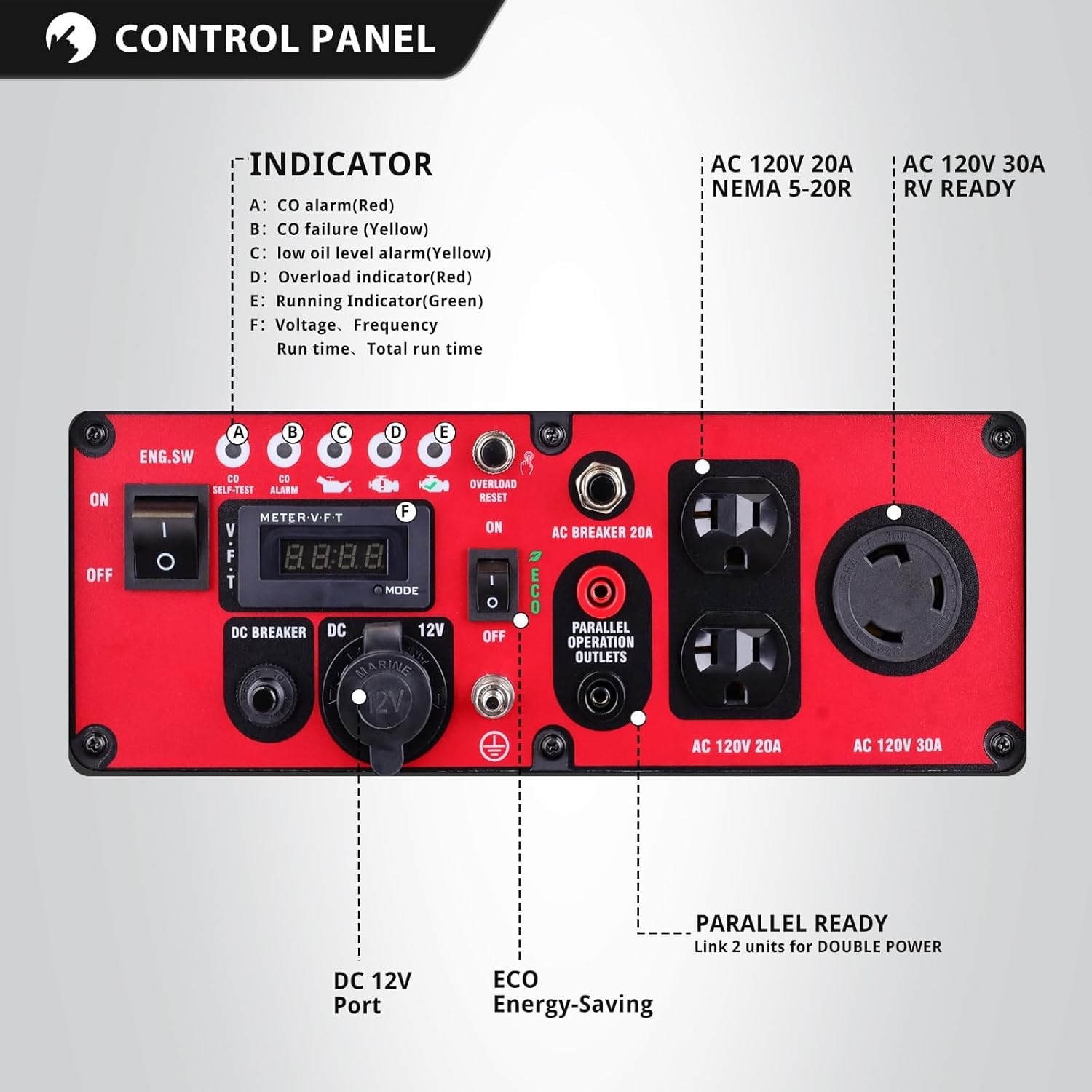
Image 3.2: A detailed diagram of the generator's control panel, showing indicators, outlets, and switches including the ECO mode and parallel operation outlets.
4. Setup
Before first use, the generator requires some initial setup steps.
4.1 Unpacking
- Carefully remove the generator from its packaging.
- Inspect for any shipping damage. Contact customer support if damage is found.
- Ensure all included components, such as the wrench, are present.
4.2 Adding Engine Oil
The generator is shipped without engine oil. It is crucial to add the correct type and amount of oil before starting.
- Place the generator on a level surface.
- Locate the oil fill cap/dipstick.
- Using a funnel, slowly add 10W-30 4-stroke engine oil until it reaches the upper mark on the dipstick. Do not overfill.
- Securely replace the oil fill cap/dipstick.

Image 4.1: An icon representing the need for oil, reminding users to add engine oil during setup.
4.3 Adding Fuel
Use fresh, unleaded gasoline with an octane rating of 87 or higher.
- Ensure the generator is turned OFF and has cooled down.
- Open the fuel tank cap.
- Carefully pour gasoline into the fuel tank, avoiding overfilling. Leave some space for fuel expansion.
- Securely close the fuel tank cap.
5. Operating Instructions
Follow these steps for safe and effective operation of your generator.
5.1 Starting the Generator
- Ensure the generator is on a level surface and in a well-ventilated outdoor area.
- Check oil and fuel levels.
- Turn the engine switch to the 'ON' position.
- Move the choke lever to the 'CHOKE' position (if the engine is cold).
- Pull the recoil starter handle firmly and smoothly until the engine starts.
- Once the engine starts, slowly move the choke lever to the 'RUN' position.
5.2 Connecting Electrical Devices
- Allow the generator to run for a few minutes to stabilize.
- Plug in your appliances to the appropriate AC or DC outlets.
- Do not exceed the generator's running wattage (3600W) or the individual outlet's rating.

Image 5.1: The generator providing power to essential devices in an outdoor setting, demonstrating its multi-purpose utility.
5.3 ECO Mode Operation
- The ECO mode switch, located on the control panel, allows the engine speed to automatically adjust to the load.
- Turn ECO mode 'ON' for improved fuel efficiency and quieter operation when running lighter loads.
- Turn ECO mode 'OFF' when connecting high-demand appliances or when stable power is critical.

Image 5.2: The generator operating in a quiet mode during a camping trip, illustrating its low noise output.
5.4 Parallel Operation
To connect two PowerSmart inverter generators for increased power output:
- Ensure both generators are turned OFF and cooled.
- Connect the parallel kit (sold separately) according to its instructions.
- Start both generators as described in Section 5.1.
- Once both are running stably, you can connect higher wattage appliances to the parallel outlets.

Image 5.3: Two PowerSmart generators connected via a parallel kit, demonstrating how to achieve higher power output for demanding applications.
5.5 Stopping the Generator
- Disconnect all electrical loads from the generator.
- Allow the generator to run for a few minutes without load to cool down.
- Turn the engine switch to the 'OFF' position.
- Turn the fuel valve to the 'OFF' position (if applicable).
6. Maintenance
Regular maintenance is essential for the safe and efficient operation of your generator.
6.1 Maintenance Schedule
| Item | First 20 Hours | Every 50 Hours / Annually |
|---|---|---|
| Engine Oil | Change | Change |
| Air Filter | Check | Clean / Replace |
| Spark Plug | Check | Clean / Replace |
| Fuel Filter | Check | Clean / Replace |
6.2 Engine Oil Change
- Run the engine for a few minutes to warm the oil, then shut it off.
- Place a drain pan under the oil drain plug.
- Remove the oil drain plug and oil fill cap/dipstick to allow oil to drain completely.
- Replace the drain plug and refill with the recommended amount of 10W-30 4-stroke engine oil.
6.3 Air Filter Maintenance
- Remove the air filter cover and element.
- Clean the foam element with warm, soapy water, rinse thoroughly, and allow to air dry.
- Lightly oil the foam element with engine oil and squeeze out excess.
- Reinstall the air filter element and cover.
7. Troubleshooting
This section addresses common issues you might encounter with your generator.
7.1 Engine Will Not Start
- No Fuel: Check fuel level and add fresh gasoline if necessary.
- No Oil: Check engine oil level. The low oil shutdown system will prevent starting if oil is insufficient.
- Choke Position: Ensure the choke is in the correct position for starting (CHOKE for cold engine, RUN for warm engine).
- Engine Switch: Verify the engine switch is in the 'ON' position.
- Spark Plug: Inspect the spark plug for fouling or damage. Clean or replace if needed.
7.2 No Power Output
- Overload: If the overload indicator is lit, disconnect appliances and press the overload reset button. Reduce the load before reconnecting.
- Circuit Breaker: Check if any AC circuit breakers have tripped. Reset them if necessary.
- ECO Mode: Ensure ECO mode is off if running high-demand appliances.
7.3 Engine Runs Poorly
- Stale Fuel: Drain old fuel and refill with fresh gasoline.
- Dirty Air Filter: Clean or replace the air filter.
- Spark Plug: Check and clean or replace the spark plug.
8. Specifications
Technical details for the PowerSmart 4400W Portable Inverter Generator.
| Specification | Detail |
|---|---|
| Model Number | DL5040 |
| Peak Wattage | 4400W |
| Running Wattage | 3600W |
| Engine Type | 223 cc 4-stroke, OHV |
| Fuel Type | Gasoline |
| Fuel Tank Capacity | 1.6 Gallons |
| Runtime (50% Load) | Up to 5.1 hours |
| Voltage | 120 Volts |
| AC Outlets | 2x 120V 20A, 1x 30A |
| DC Outlets | 1x 12V |
| Dimensions (L x W x H) | 53.85 x 44.96 x 53 cm |
| Item Weight | 27.3 kg (60 lbs) |
| Special Features | Portable, Inverter Technology, COPROTECT |
| Included Components | Wrench |
| Manufacturer | Amerisun lnc. |
| Country of Origin | China |

Image 8.1: Visual representation of the generator's dimensions and weight (60 lbs).
9. Warranty & Support
9.1 Warranty Information
The PowerSmart 4400W Portable Inverter Generator comes with a 2-Year Warranty. This warranty covers defects in materials and workmanship under normal use. Please retain your proof of purchase for warranty claims.

Image 9.1: The PowerSmart 2-Year Warranty emblem, signifying product assurance.
9.2 Customer Support
For technical assistance, warranty claims, or general inquiries, please contact PowerSmart customer support:
- Email: support@powersmartusa.com
- Please have your model number (DL5040) and purchase date ready when contacting support.


