
LOBKIN X25
LOBKIN X25 Bone Conduction Headphones User Manual
Model: X25 | Brand: LOBKIN
Introduction
Thank you for choosing the LOBKIN X25 Bone Conduction Headphones. These open-ear wireless earphones are designed to provide a comfortable and safe listening experience, allowing you to enjoy audio while remaining aware of your surroundings. This manual provides detailed instructions on how to use, maintain, and troubleshoot your headphones.
Product Overview
Key Features
- Open Ear Design: Transmits sound vibrations directly to your cochlea, allowing you to perceive ambient sounds while listening to music, enhancing safety.
- Comfortable to Wear: Lightweight (29 grams) with an elastic headband and memory metal structure for a perfect fit, even with glasses or a helmet.
- Bluetooth 5.4 Technology: Utilizes the latest chip for stable data transmission, lower latency, and broad compatibility with smartphones, smartwatches, laptops, and tablets.
- Long Battery Life: Provides 10 hours of continuous calls and music playback on a 2-hour charge.
- IPX5 Waterproof & Sweatproof: Resistant to water and sweat with an anti-corrosion coating. Note: Not suitable for swimming or prolonged submersion.
Package Contents
- LOBKIN X25 Bone Conduction Headphones
- Charging Cable (USB-C)
- User Manual
- Earplugs (optional for enhanced sound in noisy environments)
Setup
Charging the Headphones
Before first use, fully charge your LOBKIN X25 headphones.
- Connect the provided USB-C charging cable to the charging port on the headphones.
- Connect the other end of the cable to a USB power adapter (not included) or a computer's USB port.
- The LED indicator will show charging status (e.g., red for charging, blue for fully charged).
- A full charge takes approximately 2 hours.

Image: The LOBKIN X25 headphones illustrating their strong battery life and charging capabilities.
Pairing with a Device
- Ensure the headphones are turned off.
- Press and hold the Power/Multi-function button for approximately 4 seconds until the LED indicator flashes blue and red alternately, indicating pairing mode.
- On your device (smartphone, tablet, laptop), enable Bluetooth and search for available devices.
- Select "LOBKIN X25" from the list of found devices.
- Once connected, the LED indicator will flash blue slowly, and you will hear a confirmation tone.
Operating Instructions
Controls
| Button/Action | Function |
|---|---|
| Press and hold Power button (4s) | Power On/Off |
| Click '+' button once | Volume Up |
| Press and hold '+' button (2s) | Next Track |
| Click '-' button once | Volume Down |
| Press and hold '-' button (2s) | Previous Track |
| Click Power button once | Play/Pause, Answer/End Call |
| Press and hold Power button (1s) during call | Reject Call |
| Press and hold Power button (2s) | Activate Voice Assistant |
| Click Power button 4 times | Switch Music/Game Mode |
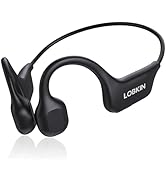
Image: Easy-to-use controls diagram for the LOBKIN X25 headphones.
Wearing the Headphones
Place the headphones with the transducers resting on your cheekbones, just in front of your ears. The band should wrap around the back of your head. Adjust for a comfortable and secure fit.

Image: A user wearing the LOBKIN X25 headphones, highlighting the open-ear design for comfort during exercise.

Image: The LOBKIN X25 headphones demonstrating their lightweight and comfortable design for active use.
Usage Scenarios
The LOBKIN X25 headphones are ideal for various activities where situational awareness is important:
- Outdoor Sports: Running, cycling, hiking, skateboarding, snowboarding. The open-ear design allows you to hear traffic and other environmental sounds.
- Fitness: Gym workouts, exercise routines. The secure fit and sweatproof design ensure durability during intense sessions.
- Daily Use: Commuting, working from home, or any activity where you need to stay connected to your surroundings.

Image: Cyclists using LOBKIN X25 headphones, highlighting the safety and awareness benefits of the open-ear design.
Maintenance
Proper maintenance will extend the lifespan of your headphones.
- Cleaning: Wipe the headphones with a soft, damp cloth after each use, especially after workouts, to remove sweat and dirt. Do not use harsh chemicals or abrasive cleaners.
- Storage: Store the headphones in a cool, dry place away from direct sunlight and extreme temperatures.
- Charging: Avoid overcharging. Disconnect the charging cable once the headphones are fully charged.
- Water Exposure: While IPX5 water-resistant, avoid prolonged submersion in water or exposure to strong jets of water. Dry thoroughly if they get wet.

Image: The LOBKIN X25 headphones are IPX5 waterproof, designed to withstand sweat and rain during workouts.
Troubleshooting
| Problem | Solution |
|---|---|
| Headphones do not power on. | Ensure the headphones are charged. Connect to a power source and try again. |
| Cannot pair with device. |
|
| No sound or low volume. |
|
| Sound distortion or crackling. |
|
Specifications
| Feature | Detail |
|---|---|
| Model Number | X25 |
| Brand | LOBKIN |
| Connectivity Technology | Wireless (Bluetooth 5.4) |
| Ear Placement | Open Ear (Bone Conduction) |
| Water Resistance | IPX5 |
| Battery Composition | Lithium Polymer |
| Charging Time | Approx. 2 hours |
| Play Time | Approx. 10 hours |
| Standby Time | Approx. 168 hours |
| Weight | 29 grams |
| Frequency Range | 20 Hz - 20 kHz |
| Impedance | 8 ohms |
| Sensitivity | 90 dB |
| Material | Acrylonitrile Butadiene Styrene (ABS) |
| Compatible Devices | Smartphone, Smartwatch, Laptop, Tablet |
| Control Type | Button Control |
| Color | Black |
Safety Information
- Do not use the headphones at excessively high volumes for prolonged periods to prevent hearing damage.
- Maintain awareness of your surroundings, especially when using the headphones in traffic or other potentially hazardous environments.
- Keep the headphones away from extreme temperatures, direct sunlight, and open flames.
- Do not attempt to disassemble or modify the headphones. This will void the warranty and may cause damage.
- Dispose of the battery and electronic components responsibly according to local regulations.
Warranty and Support
The LOBKIN X25 Bone Conduction Headphones come with a 1-year manufacturer's warranty from the date of purchase. This warranty covers defects in materials and workmanship under normal use. It does not cover damage caused by misuse, accidents, unauthorized modifications, or normal wear and tear.
For warranty claims, technical support, or any questions regarding your product, please contact LOBKIN customer service through the retailer where you purchased the product or visit the official LOBKIN website for contact information. Please have your purchase receipt and product model number (X25) ready when contacting support.
Related Documents - X25
 |
LOBKIN X7 Bone Conduction Headphones - Product Overview and User Guide Detailed overview of the LOBKIN X7 bone conduction headphones, covering package contents, features, benefits, potential drawbacks, common user feedback and solutions, and version updates. Learn about its waterproof capabilities, comfort, and how to troubleshoot common issues. |
 |
LOBKIN X7 Bone Conduction Headphones User Manual User manual for the LOBKIN X7 Bone Conduction Headphones, detailing features, instructions, pairing, charging, and safety information. |
 |
LOBKIN S16 Wireless Bluetooth Headphones for Kids - Instruction Manual User manual and instructions for the LOBKIN S16 wireless Bluetooth headphones designed for children. Learn about features, pairing, charging, and specifications. |
 |
LOBKIN 4Go Portable Bluetooth Speaker Quick Start Guide Get started quickly with your LOBKIN 4Go portable Bluetooth speaker. This guide provides essential setup, operation, and safety information in English, covering button controls, TWS pairing, and important safety warnings. |
Ask a question about this manual
Ask about setup, troubleshooting, compatibility, parts, safety, or missing instructions. Manuals+ will review the question and use this page’s manual context to help answer it.