
1. Introduction
This manual provides essential information for the safe and effective use of your PowerHOOD UL Listed 6ft AC Power Cord. This power cord is designed to replace worn or missing power cables for specific YOSUDA Under Desk Elliptical models, including YSD-ME, YSD-ME-01, and YSD-SE01. Please read these instructions carefully before use and retain them for future reference.
2. Safety Information
Your safety is paramount. This power cord is UL Listed, ensuring it meets recognized safety standards. Observe the following safety guidelines:
- UL Listed Certification: This product has been tested, approved, and certified by UL, indicating compliance with safety standards.
- Protection Features: The power cord incorporates short circuit protection, over-temperature protection, and over-voltage protection to safeguard your device and electrical system.
- Fireproofing Materials: The PCB and cover are manufactured with fireproofing materials. Insulation paper isolates electrodes, and fire protection glue paper and silica gel are used for enhanced safety.
- Proper Use: Only use this power cord with compatible devices as specified in this manual. Do not attempt to modify the cord or use it for purposes other than its intended design.
- Environmental Conditions: Avoid exposing the power cord to extreme temperatures, direct sunlight, or moisture. Do not use if the cord appears damaged.
- Unplugging: Always grasp the plug, not the cord, when disconnecting from an outlet or device.
3. Compatibility
This PowerHOOD AC Power Cord is specifically designed for compatibility with the following YOSUDA Under Desk Elliptical models:
- YOSUDA YSD-ME
- YOSUDA YSD-ME-01
- YOSUDA YSD-SE01
Ensure your device matches one of these models for proper and safe operation.

Image: The PowerHOOD AC Power Cord shown alongside two compatible YOSUDA Under Desk Elliptical models, YSD-SE01 and YSD-ME-01, illustrating the intended use and compatibility.
4. Setup and Connection
Follow these steps to connect your PowerHOOD AC Power Cord:
- Inspect the Cord: Before connecting, visually inspect the power cord for any signs of damage, such as cuts, frayed wires, or bent prongs. Do not use a damaged cord.
- Identify Connectors: The power cord features a 2-slot non-polarized female connector (C7 type) and a standard 2-prong male plug (NEMA 1-15P type).
- Connect to Device: Locate the power input port on your YOSUDA Under Desk Elliptical. Carefully align the 2-slot female connector of the power cord with the device's input port and push firmly until it is securely seated.
- Connect to Power Outlet: Plug the 2-prong male plug into a standard 125V AC wall outlet. Ensure the outlet is easily accessible and not overloaded.
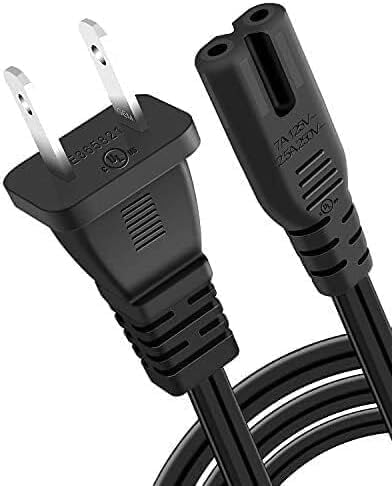
Image: A detailed view of the 2-prong male plug (NEMA 1-15P) of the power cord, showing its construction and UL listing mark.
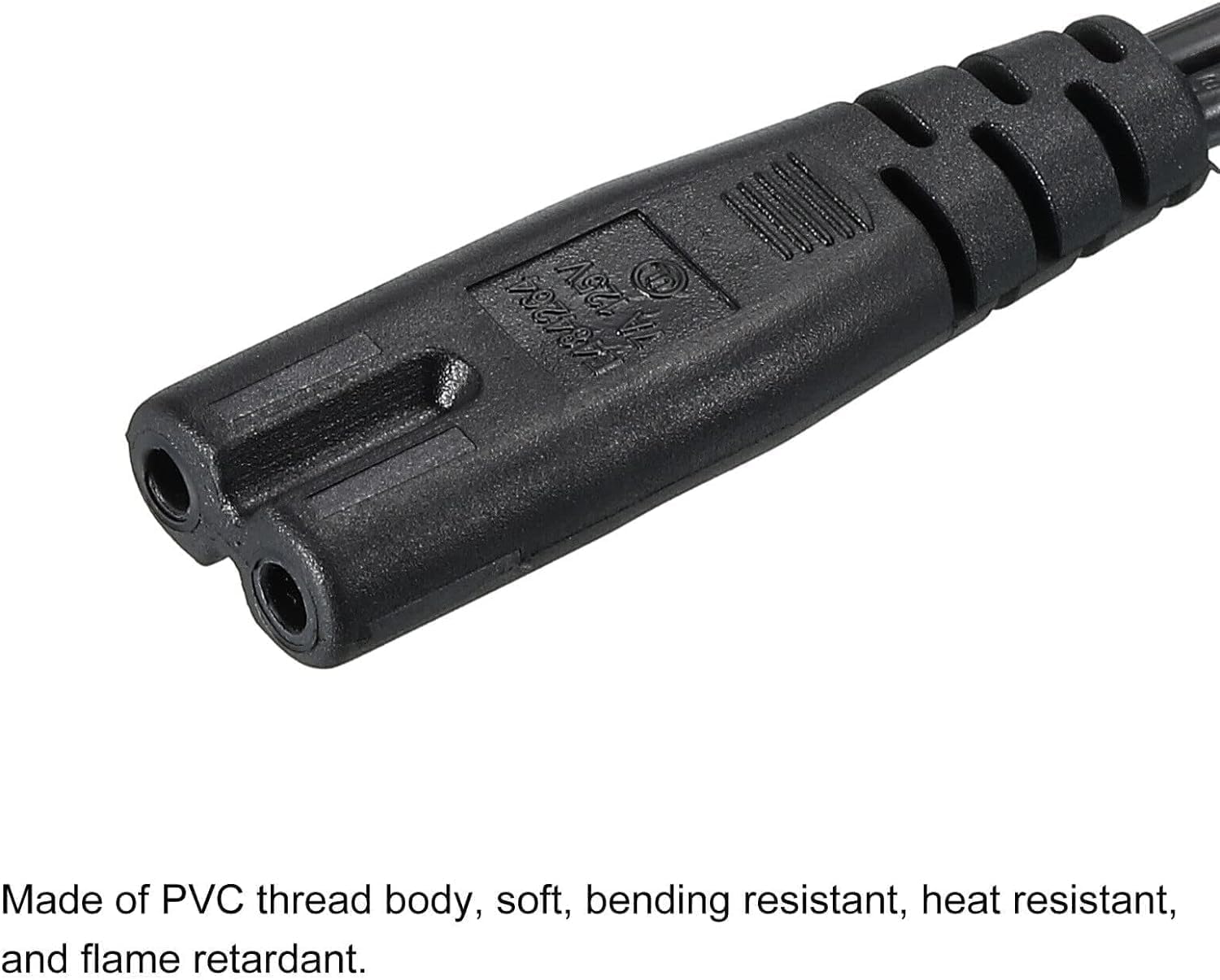
Image: A detailed view of the 2-slot non-polarized female connector (C7 type) of the power cord, designed to connect to the device.

Image: A visual guide illustrating the correct orientation for connecting a 2-slot power cord, emphasizing proper alignment for a secure connection.
5. Operating Instructions
Once the PowerHOOD AC Power Cord is securely connected to both your YOSUDA elliptical and a power outlet, your device is ready for use. The power cord facilitates the electrical connection required for the elliptical to function.
- Ensure all connections are firm before powering on your elliptical.
- The cord is designed for continuous power supply to your device.
- If your elliptical has a power switch, turn it on after connecting the power cord.
6. Maintenance and Care
Proper care extends the life of your power cord and ensures continued safe operation:
- Cleaning: Disconnect the power cord from the wall outlet and the device before cleaning. Wipe the cord with a dry, soft cloth. Do not use liquid cleaners or immerse the cord in water.
- Storage: When not in use, store the power cord in a cool, dry place, away from direct sunlight and heat sources. Avoid tightly coiling or bending the cord sharply, which can damage internal wires.
- Inspection: Periodically inspect the cord for any signs of wear, such as cracks, fraying, or discoloration. If damage is observed, discontinue use immediately and replace the cord.
- Handling: Do not pull, twist, or stretch the power cord excessively. Avoid placing heavy objects on the cord.
7. Troubleshooting
If your YOSUDA elliptical is not receiving power after connecting the PowerHOOD AC Power Cord, consider the following:
- No Power:
- Ensure both ends of the power cord are securely plugged into the elliptical and the wall outlet.
- Verify that the wall outlet is functional by testing it with another device.
- Check your home's circuit breaker or fuse box to ensure power is supplied to the outlet.
- Confirm that your elliptical's power switch (if applicable) is in the "ON" position.
- Loose Connection: If the connection feels loose, unplug and re-plug both ends of the cord firmly.
- Damaged Cord: If the power cord shows any signs of damage (e.g., cuts, exposed wires, bent prongs), discontinue use immediately and replace it with a new, compatible cord.
If troubleshooting steps do not resolve the issue, contact customer support for further assistance.
8. Specifications
| Feature | Specification |
|---|---|
| Brand | PowerHOOD |
| Certification | UL Listed |
| Connector Type | 2-Slot Non-polarized (C7 Female to NEMA 1-15P Male) |
| Wire Gauge | 18 AWG x 2C |
| Voltage Rating | 125 Volts |
| Current Rating | 10 Amps |
| Length | 6 Feet |
| Item Weight | 8 Ounces |
| Material | PVC thread body, soft, bending resistant, heat resistant, and flame retardant. |
9. Warranty and Support
PowerHOOD stands behind the quality of its products.
- Warranty: This product comes with a 14-day money-back guarantee and a 30-day exchange service from the date of purchase.
- Customer Support: For any questions, concerns, or warranty claims, please contact PowerHOOD customer service through the retailer where the product was purchased.