
S190
User Manual for S10 Bone Conduction Wireless Sports Headphones
Model: S190
1. Product Overview
This manual provides detailed instructions for the New S10 Bone Conduction Swimming in-Ear Bluetooth 5.4 Wireless Sports Headphones. Designed for active lifestyles, these headphones feature advanced bone conduction technology, a digital display, and a high waterproof rating, making them suitable for various sports and water activities.
Key Features:
- Wireless Connectivity: Equipped with Bluetooth 5.4 technology for seamless and stable wireless connectivity.
- Bone Conduction Design: Innovative bone conduction technology transmits sound waves through the cheekbones directly to the inner ear, allowing you to enjoy music without blocking your ears.
- Water-Resistant: With an IPX8 waterproof rating, these headphones can withstand water immersion up to 3.28 feet (1 meter), making them perfect for swimming and other water activities.
- Digital Display: Features a digital display that shows battery life, Bluetooth connectivity status, and other useful information.
- Noise Reduction: Utilizes two-way sound wave noise reduction technology to minimize external noise interference, ensuring clear audio quality.

Figure 1.1: Overview of the S10 Bone Conduction Headphones. These headphones feature an ergonomic design with a flexible neckband and ear hooks, suitable for sports activities.
2. Getting Started
2.1 What's in the Box
- Earbuds (S10 Bone Conduction Headphones)
- Charging Cable (Magnetic Charger)
- User Manual (this document)
2.2 Initial Charging
Before first use, fully charge the headphones. Connect the magnetic charging cable to the charging port on the headphones and plug the other end into a USB power source. The digital display will indicate the charging status. A full charge takes approximately 2 hours.
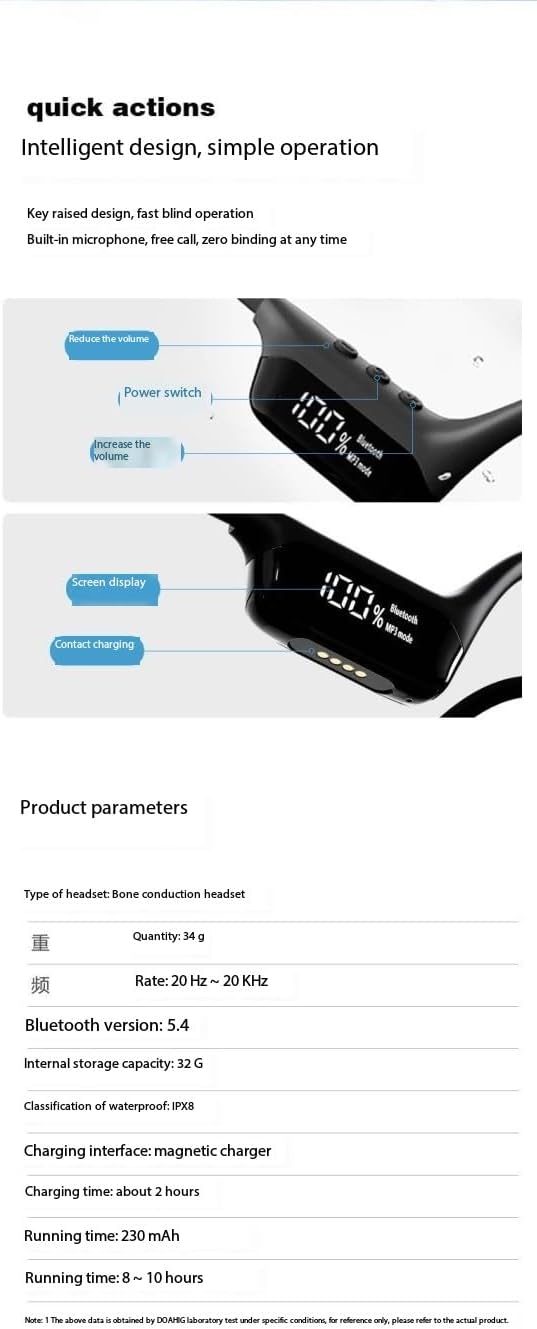
Figure 2.1: Detail of the headphone's digital display and magnetic charging contact points. The display shows battery percentage and mode, along with power and volume controls.
2.3 Powering On/Off
- Power On: Press and hold the Power button (refer to Figure 2.1 for location) for approximately 3 seconds until the digital display illuminates.
- Power Off: Press and hold the Power button for approximately 5 seconds until the digital display turns off.
2.4 Bluetooth Pairing
- Ensure the headphones are powered off.
- Press and hold the Power button for about 5-7 seconds until the digital display shows "Bluetooth" and the indicator light flashes, indicating pairing mode.
- On your device (smartphone, tablet, laptop), enable Bluetooth and search for available devices.
- Select "S10 Headphones" (or similar name) from the list of found devices.
- Once connected, the digital display will show a stable Bluetooth icon.
3. Operating Instructions
3.1 Volume Control
The headphones feature dedicated volume buttons. Refer to Figure 2.1 for button locations.
- Increase Volume: Press the '+' button.
- Decrease Volume: Press the '-' button.
3.2 Playback Modes (Bluetooth / MP3)
The S10 headphones support both Bluetooth streaming and local MP3 playback via built-in 32GB memory.
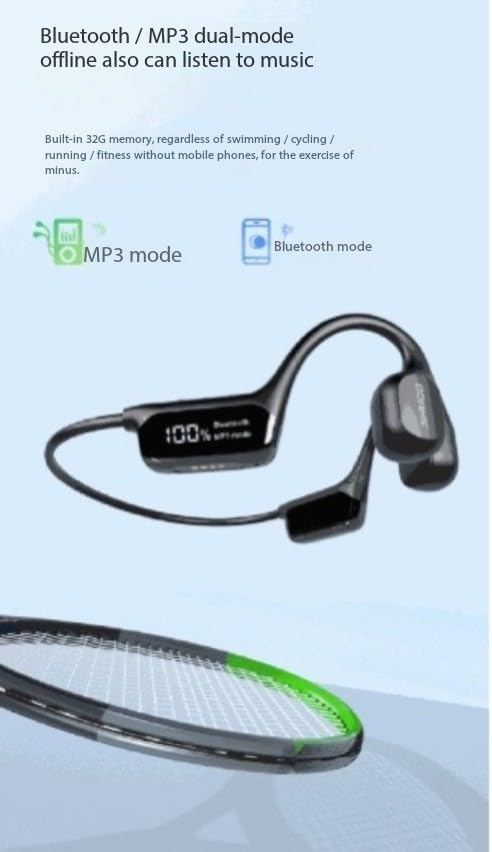
Figure 3.1: The digital display indicating the active playback mode, either MP3 or Bluetooth. The headphones have 32GB of internal storage for offline music.
- Switching Modes: Use the dedicated mode button (refer to Figure 2.1) to toggle between Bluetooth mode and MP3 mode.
- MP3 Playback: When in MP3 mode, the headphones will play music stored on their internal 32GB memory. This is ideal for activities like swimming where a phone might not be present.
- Bluetooth Playback: When in Bluetooth mode, the headphones will stream audio from your paired device.
3.3 Noise Reduction Technology
The headphones incorporate two-way sound wave noise reduction technology to minimize ambient noise, providing clearer audio. This feature operates automatically to enhance your listening experience.

Figure 3.2: Visual representation of the bidirectional acoustic wave technology used for noise reduction, improving communication clarity.
3.4 Water Resistance (IPX8)
With an IPX8 waterproof rating, these headphones are designed for use in water. They can withstand immersion up to 1 meter (3.28 feet) for extended periods, making them suitable for swimming, surfing, and other water sports.

Figure 3.3: The headphones shown in water, highlighting their IPX8 waterproof capability, allowing for use during swimming and other water activities.
For optimal performance and longevity, ensure the charging port is dry before connecting the charging cable after water exposure.
3.5 Usage Scenarios
The S10 headphones are versatile and suitable for a wide range of activities:
- Running & Walking: Lightweight and secure fit for outdoor exercise.
- Hiking & Climbing: Durable design for rugged environments.
- Swimming & Diving: IPX8 waterproof rating allows for underwater use.
- Other Sports: Ideal for tennis, badminton, and general outdoor sports.
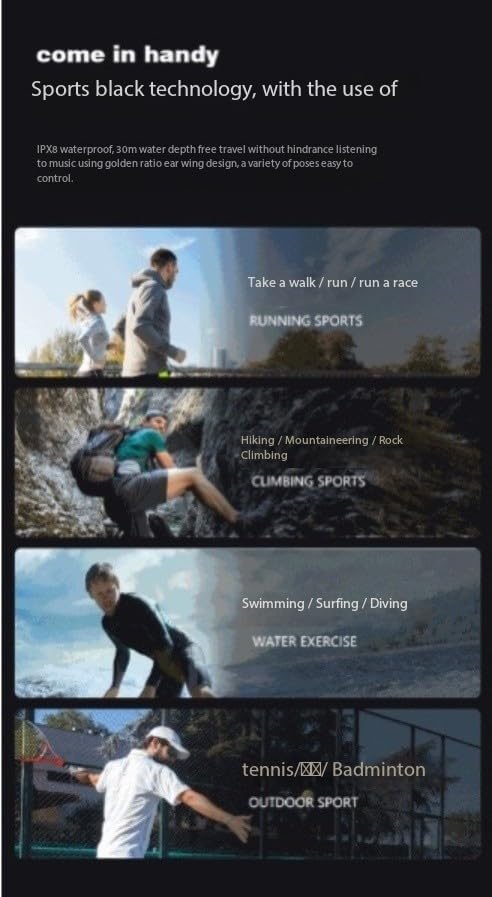
Figure 3.4: Examples of sports activities where the S10 headphones can be used, including running, climbing, swimming, and racket sports.
4. Maintenance and Care
- Cleaning: Wipe the headphones with a soft, damp cloth. Do not use harsh chemicals or abrasive cleaners. Ensure the headphones are dry before charging.
- Storage: Store the headphones in a cool, dry place away from direct sunlight and extreme temperatures.
- Battery Care: To prolong battery life, avoid fully discharging the battery frequently. Charge the headphones regularly, even if not in use for extended periods.
- Water Exposure: After using in water, rinse with fresh water and allow to air dry completely before charging or storing.
5. Troubleshooting
| Problem | Possible Cause | Solution |
|---|---|---|
| Headphones do not power on. | Low battery. | Charge the headphones fully. |
| Cannot pair with device. | Headphones not in pairing mode; Bluetooth off on device; device too far. | Ensure headphones are in pairing mode. Turn Bluetooth on/off on device. Move device closer to headphones. |
| No sound. | Volume too low; wrong mode selected; not connected. | Increase volume. Switch to correct playback mode (Bluetooth/MP3). Reconnect headphones. |
| Charging not working. | Cable not connected properly; charging port wet; faulty cable/adapter. | Ensure cable is securely connected. Dry charging port completely. Try a different USB port or adapter. |
6. Specifications
| Feature | Detail |
|---|---|
| Model Name | S190 |
| Brand | Generic |
| Connectivity Technology | Bluetooth 5.4 |
| Water Resistance Level | IPX8 (Waterproof) |
| Internal Storage | 32GB (for MP3 mode) |
| Noise Control | Active Noise Cancellation / Two-Way Sound Wave Noise Reduction |
| Charging Time | Approximately 2 Hours |
| Running Time | 8-10 Hours |
| Material | Plastic |
| Control Type | Touch Control |
| Weight | 34g |
| Frequency Rate | 20 Hz ~ 20 KHz |
Note: Specifications are subject to change without notice.
7. Warranty and Support
Specific warranty information for this product is not provided in the available documentation. For details regarding warranty coverage, returns, or technical support, please contact the manufacturer or your point of purchase directly.
Manufacturer: Guangzhou Changhong Huixin Technology Co., Ltd.
Related documentsS190


Ask a question about this manual
Ask about setup, troubleshooting, compatibility, parts, safety, or missing instructions. Manuals+ will review the question and use this page’s manual context to help answer it.