
Aulaborer DL-B1
Aulaborer Fingerprint Door Lock Deadbolt with Handle Set User Manual
Model: DL-B1
Smart Keyless Entry Lock with 5-in-1 Unlock, Keypad Lock with AutoLock, App Control
Introduction
This user manual provides comprehensive instructions for the installation, operation, and maintenance of your Aulaborer Fingerprint Door Lock Deadbolt with Handle Set. This smart lock offers advanced security and convenience with multiple unlocking methods, designed for modern homes and rental properties.
Key Features
- High-Precision Fingerprint Sensor: Unlocks in 0.3 seconds with 99.99% accuracy, supporting up to 50 unique fingerprints.
- 5-in-1 Keyless Entry: Offers unlocking via Fingerprint, App Control, Keypad Code (up to 50 codes), One-Time Temporary Code, and Physical Key.
- Smart Auto Lock: Customizable auto-lock timer (10-30 seconds) for enhanced security.
- One-Touch Security: Instantly secure your home with a single press of a button.
- Low Power Consumption: Operates for over a year on 4 AA batteries with a low-battery indicator.
- Anti-Peeping Password: Allows entry of random digits before or after the correct password to prevent code exposure.
- Backlit Keypad: Ensures easy operation in low light or darkness.
- Emergency Battery Backup: Features a USB-C port for temporary power in case of battery depletion.
- Durable and Weather Resistant: IP65 waterproof rating, designed for reliability in various weather conditions.

Figure 1: Overview of Multiple Functions for Convenience and Safety.
Package Contents
Please verify that all components are present before beginning installation:
- Fingerprint Door Lock (Exterior Unit)
- Door Handle Set (Interior and Exterior Handles)
- Mounting Plate
- Deadbolt for Smart Lock
- Latch Bolt for Handle Lock
- User Manual
- Installation Template
- Screws and Fasteners (various sizes)
- Physical Keys (2 included)

Figure 2: Product Components.
Setup and Installation
The Aulaborer Smart Door Lock is designed for easy DIY installation, typically taking less than 15 minutes with just a screwdriver. No professional tools or locksmith are needed.
1. Compatibility Check
Before installation, ensure your door is compatible with the lock's dimensions. Refer to the provided installation template and the following diagram for measurements. The lock is compatible with both left- and right-hand doors.

Figure 3: Door Compatibility Measurements.
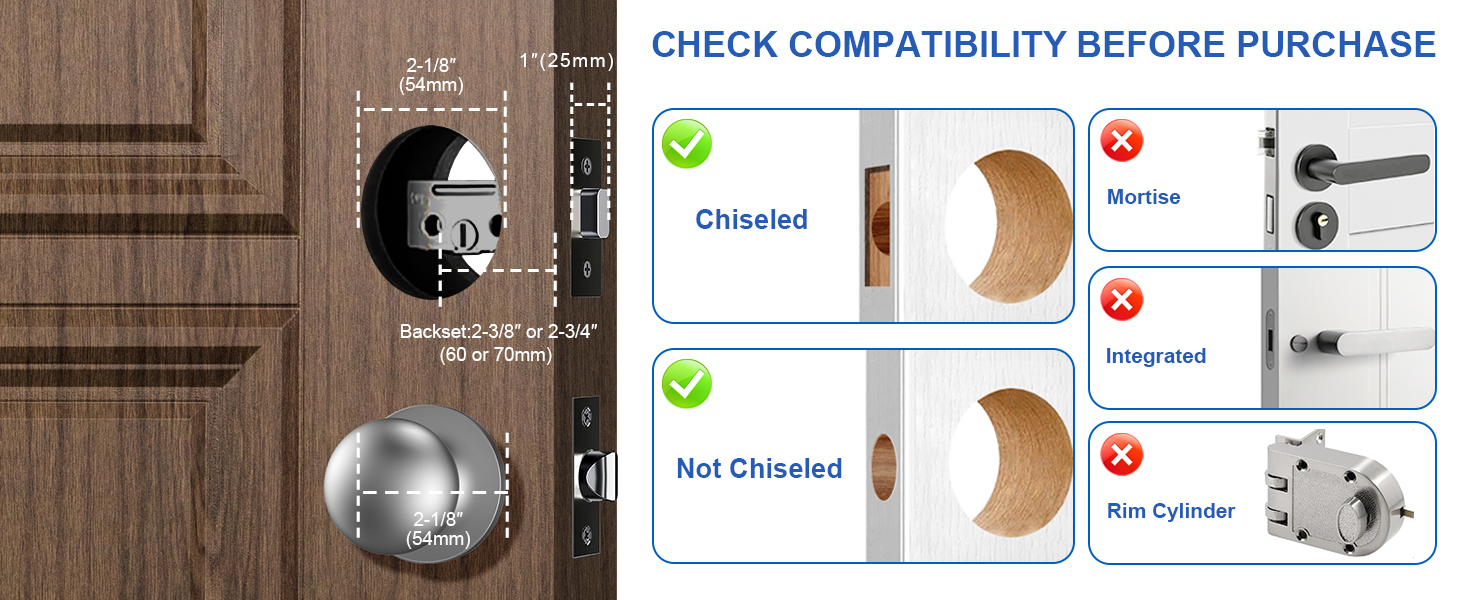
Figure 4: Door Type Compatibility.
2. Installation Steps
- Prepare the door according to the installation template.
- Install the deadbolt and latch bolt into the door edge.
- Mount the exterior keypad unit and interior handle, ensuring proper cable connection.
- Secure all components with the provided screws.
- Insert 4 AA batteries (not included) into the interior unit.
- Test the lock's functionality with a physical key and initial code.

Figure 5: Easy and Fast Installation Process.

Figure 6: Universal Compatibility for Left and Right Doors.
Operating Instructions
Unlocking Methods
The Aulaborer Smart Door Lock offers five convenient ways to unlock:
- Fingerprint: Place your registered finger on the sensor for instant access. Supports up to 50 unique fingerprints.
- Keypad Code: Enter your programmed 4-8 digit code on the backlit keypad. Supports up to 50 user codes.
- App Control: Use the dedicated mobile application (Bluetooth connectivity required) to unlock the door remotely.
- One-Time Temporary Code: Generate temporary codes via the app for guests or service providers. These codes can be set to expire after a single use or a specific time period.
- Physical Key: Use the provided physical keys as a traditional backup method.

Figure 7: Multiple Unlocking Ways for Different Situations.

Figure 8: Backlit Keypad Design.

Figure 9: One-Time PIN Code Functionality.
Security Features
- Smart Auto-Lock: The lock can be configured to automatically lock after a set period (10-30 seconds) once the door is closed. This ensures your home is always secure, even if you forget to manually lock it.
- Anti-Peeping Password: When entering your code, you can input random numbers before or after your actual password. This feature prevents others from guessing your code by observing your finger movements.

Figure 10: Smart Auto-Lock Feature.

Figure 11: Anti-Peeping Password Function.
Maintenance
To ensure optimal performance and longevity of your Aulaborer Smart Door Lock, follow these maintenance guidelines:
- Battery Replacement: The lock operates on 4 AA batteries. When the battery level drops below 20%, an LED indicator will alert you. Replace all four batteries simultaneously with new, high-quality alkaline batteries.
- Emergency Power: In case of complete battery depletion, connect a power bank via the USB-C port located on the exterior unit to temporarily power the lock and gain entry.
- Cleaning: Wipe the lock's surface with a soft, dry cloth. Avoid using abrasive cleaners or solvents, which can damage the finish or electronic components.
- Environmental Conditions: While the lock has an IP65 waterproof rating, extreme temperatures or prolonged exposure to harsh weather conditions should be minimized where possible.

Figure 12: Emergency Battery Backup via USB-C.

Figure 13: Safe and Reliable in Any Weather.
Troubleshooting
If you encounter issues with your Aulaborer Smart Door Lock, please refer to the following common troubleshooting steps:
| Problem | Possible Cause | Solution |
|---|---|---|
| Lock not responding / No power | Low or dead batteries; Incorrect battery installation. | Replace all 4 AA batteries. Ensure batteries are inserted with correct polarity. Use the USB-C emergency power port if batteries are completely dead. |
| Fingerprint not recognized | Finger is wet, dirty, or improperly placed; Unregistered fingerprint; Sensor dirty. | Ensure finger is clean and dry, and covers the entire sensor. Re-register fingerprint if necessary. Clean the fingerprint sensor with a soft cloth. |
| Keypad not responding | Low batteries; Keypad malfunction. | Replace batteries. If the issue persists, contact customer support. |
| Auto-lock not working | Auto-lock feature is disabled or incorrectly configured in the app. | Check the auto-lock settings in the mobile application and ensure it is enabled with the desired delay. |
| Difficulty with physical key | Keyway obstructed; Lock mechanism issue. | Ensure the key is fully inserted and turned correctly. Do not force the key. If resistance is felt, check for obstructions. |
For issues not listed above or if solutions do not resolve the problem, please contact Aulaborer customer support.
Specifications
| Specification | Detail |
|---|---|
| Brand | Aulaborer |
| Model Name | DL-B1 |
| Lock Type | Biometric, Digital Door Lock with Handle Set, Electronic Deadbolt, Keypad |
| Unlocking Methods | Fingerprint, App Control, Keypad Code, One-Time Temporary Code, Physical Key |
| Fingerprint Capacity | Up to 50 fingerprints |
| Code Capacity | Up to 50 user codes |
| Material | Metal, Plastic |
| Color | Metal Black |
| Item Dimensions (L x W x H) | 6 x 3.5 x 8 inches |
| Item Weight | 2.3 Pounds |
| Power Source | 4 AA Batteries (not included) |
| Connectivity Protocol | Bluetooth |
| Weather Resistance | IP65 Waterproof Grade |
| Operating Temperature | -4°F to 122°F |
| Cycle Life | 250,000 cycles |
Warranty and Support
Aulaborer is committed to providing high-quality products and customer satisfaction. For warranty information, technical support, or any inquiries regarding your smart door lock, please refer to the contact details provided on the product packaging or the official Aulaborer website.
Please retain your purchase receipt for warranty claims.
Ask a question about this manual
Ask about setup, troubleshooting, compatibility, parts, safety, or missing instructions. Manuals+ will review the question and use this page’s manual context to help answer it.