
1. Introduction
This manual provides essential information for the proper use and maintenance of your new Plastic Back Case for OPPO F11. This protective phone case features a durable and elegant design, offering strong protection for your device. It is made from high-quality plastic materials designed to protect your mobile from shocks and scratches. The case is designed for comfortable use, allowing easy access to all phone ports and control buttons. It adds an aesthetic touch to your phone while maintaining its elegant appearance.
The case is shock-absorbing and protects your mobile from stains and dirt, making cleaning and maintenance easy. It provides complete protection without affecting your phone's functions or performance.
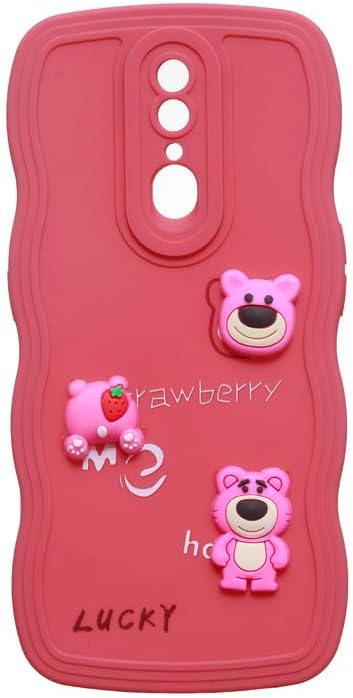
Figure 1.1: Front view of the Plastic Back Case for OPPO F11.
2. Setup and Installation
Follow these simple steps to install the protective case on your OPPO F11 device:
- Clean Your Device: Before installation, ensure your OPPO F11 is clean and free of dust, dirt, or fingerprints. Use a soft, lint-free cloth to wipe down the back and sides of your phone.
- Align the Case: Hold the case with the camera cutout aligned with your phone's camera module. Carefully align the charging port and speaker cutouts with their respective openings on your phone.
- Insert the Phone: Gently push your phone into the case, starting from one side (e.g., the top or bottom). Apply even pressure around the edges until the phone is fully seated within the case. Ensure all corners are securely covered.
- Check Fit: Once installed, gently press around the edges of the case to ensure it is snug and secure. Verify that all buttons (power, volume) are accessible and functional, and that all ports (charging, headphone jack) are unobstructed.
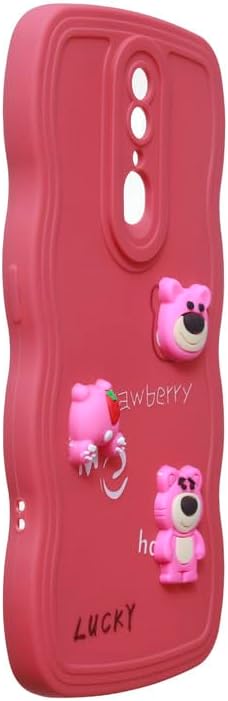
Figure 2.1: Angled view demonstrating the case's fit and access to side buttons.
3. Operating Your Device with the Case
The Plastic Back Case is designed to provide protection without hindering the normal operation of your OPPO F11. You should be able to:
- Access all physical buttons (power, volume) easily through the case's precise cutouts.
- Connect charging cables and headphones without removing the case, thanks to accurately sized port openings.
- Utilize the camera and flash without obstruction from the case.
- Maintain a comfortable grip on your device due to the case's ergonomic design.
4. Maintenance and Care
To ensure the longevity and appearance of your case, follow these maintenance guidelines:
- Regular Cleaning: Wipe the case regularly with a soft, damp cloth to remove dust and smudges. For stubborn dirt, a small amount of mild soap can be used.
- Avoid Harsh Chemicals: Do not use abrasive cleaners, solvents, or harsh chemicals, as these can damage the plastic material and its finish.
- Prevent Discoloration: While the case is designed to resist discoloration, prolonged exposure to direct sunlight or extreme temperatures may affect its color over time.
- Handle with Care: Although the case is durable and shock-absorbing, avoid unnecessary drops or impacts to maximize its protective lifespan.
5. Troubleshooting
Here are some common issues and their solutions:
| Issue | Possible Cause | Solution |
|---|---|---|
| Case does not fit properly. | Incorrect phone model or improper installation. | Ensure you have the correct case for OPPO F11. Re-install the case, ensuring the phone is fully seated and aligned. |
| Buttons are stiff or unresponsive. | Case not fully seated or manufacturing defect. | Remove and re-install the case, ensuring proper alignment. If the issue persists, contact customer support. |
| Case appears dirty or stained. | Accumulation of dust, dirt, or oils. | Clean the case with a soft, damp cloth and mild soap. Avoid abrasive materials. |
6. Specifications
Detailed specifications for your Plastic Back Case:
| Feature | Detail |
|---|---|
| Product Dimensions | 17 x 7 x 1 cm |
| Item Weight | 100 grams |
| Manufacturer | Generic |
| ASIN | B0DR94XWR8 |
| Item Model Number | ABC-CBA238 |
| Compatible Phone Models | OPPO F11 |
| Color | Watermelon Red |
| Material | Plastic |
| Style | Single Color |
| Special Features | Shock Absorbing |
| Age Range Description | Adult |
| Model Name | Back Cover |
| Form Factor | Basic Case |
| First Available Date | December 23, 2024 |
7. Warranty and Support
This product is a protective accessory. Specific warranty information is not provided with this manual. For any support inquiries or issues not covered in this manual, please refer to the retailer's return policy or contact the seller directly through the platform where the product was purchased.