
1. Important Safety Information
Please read all instructions carefully before beginning installation and retain this manual for future reference. Improper installation or use can lead to electric shock, fire, or personal injury.
- Electrical Safety: All electrical wiring must be performed by a qualified electrician and conform to all local and national electrical codes. Disconnect power at the circuit breaker before installation or servicing.
- Mounting: Ensure the mounting structure can support the weight of the fan (approximately 12 pounds) and its operational forces.
- Blade Clearance: Maintain a minimum clearance of 7 feet from the floor to the bottom of the fan blades. Ensure blades are clear of any obstructions.
- Outdoor Use: This fan is designed for indoor use and covered outdoor areas like patios and porches. It is not waterproof and should not be installed in open-air or directly exposed to water.
- Light Source: Do not attempt to replace the integrated LED light source. Contact customer service if the light requires servicing.
2. Package Contents
Verify that all components are present before beginning installation. If any parts are missing or damaged, contact Realmate customer service.

Image: Overview of the Realmate 52 Inch Ceiling Fan, showing the main fan unit, the remote control, and a sample of the dual-sided blades (one black, one wood grain).
- Ceiling Fan Motor Housing with Integrated LED Light
- 5 Reversible Blades (Black / Wood Grain)
- Remote Control
- Remote Control Wall Mount Bracket
- Mounting Hardware Kit
- Instruction Manual
- 2 AAA Batteries (for remote control)
3. Specifications
| Feature | Detail |
|---|---|
| Brand | Realmate |
| Model Name | DY1135X-5B/52 |
| Size | 52 Inch |
| Color | Black |
| Style | Modern, Flush Mount |
| Number of Blades | 5 (Dual-Sided) |
| Motor Type | DC Motor (Reversible) |
| Fan Speeds | 6 Levels |
| Air Flow Capacity | Up to 4900 CFM |
| Noise Level | As low as 32 dB |
| Light Type | Integrated Dimmable LED |
| Color Temperatures | 3000K (Warm White), 4200K (Natural White), 6500K (Cool White) |
| Brightness Adjustment | 20% - 100% Stepless |
| Timer Functions | 1, 3, 6 Hours |
| Control Method | Remote Control |
| Power Source | DC, 120 Volts |
| Wattage | 24 watts |
| Item Weight | 12 Pounds |
| Certifications | ETL Verified, DoE Listed |

Image: Key specifications and features of the 52-inch ceiling fan, including dimensions (52-inch diameter, 10.8-inch height, 7.6-inch blade to ceiling), maximum airflow (4900 CFM), recommended room size (150-300 sq ft), remote control, and ETL/DoE certifications.
4. Setup and Installation
This section provides general guidance for installing your Realmate ceiling fan. For detailed, step-by-step instructions, please refer to the dedicated installation video and the graphical instructions included in your package.
Pre-Installation Checklist:
- Ensure power is disconnected at the circuit breaker.
- Confirm you have all necessary tools (screwdriver, wire strippers, ladder, etc.).
- Verify the electrical box is securely mounted and rated for ceiling fan support.
Installation Steps Overview:
- Mounting Bracket Installation: Secure the mounting bracket to the ceiling electrical box.
- Wiring Connections: Connect the fan's electrical wires to the household wiring according to local codes. Ensure all connections are secure.
- Fan Assembly: Attach the fan motor housing to the mounting bracket.
- Blade Attachment: Install the five reversible blades onto the fan motor. Choose either the black or wood grain side to face downwards.
- Light Kit Installation: Connect and secure the integrated LED light kit.
- Remote Control Setup: Insert the included AAA batteries into the remote control. The remote is pre-paired; no additional pairing steps are typically required.
- Wall Mount Bracket: The remote control includes a bracket for convenient wall mounting, allowing it to function as a wall switch.
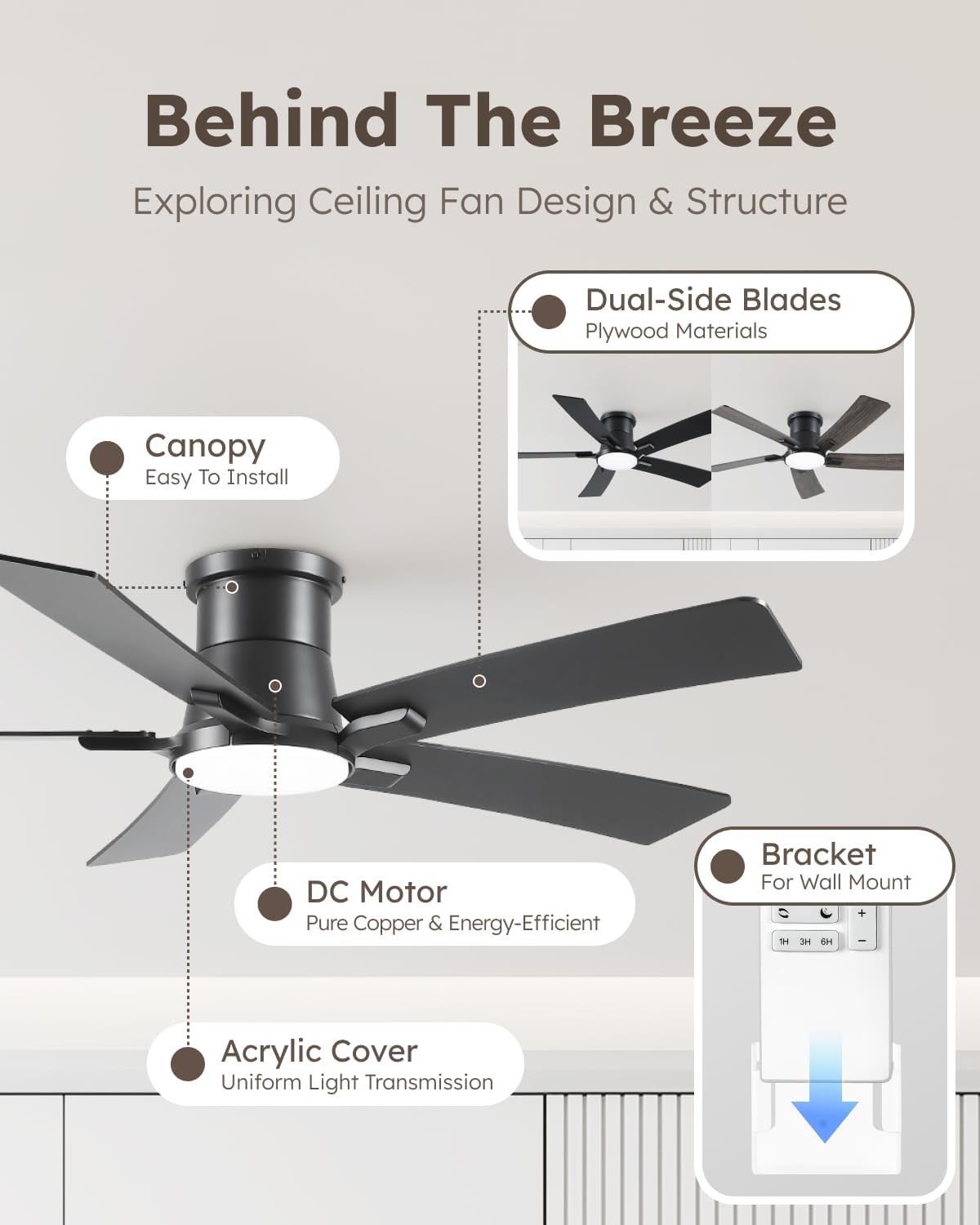
Image: Exploded view illustrating key components such as the canopy for easy installation, the energy-efficient DC motor, the acrylic cover for uniform light, the dual-sided blades made of plywood materials, and the remote control bracket for wall mounting.
Note: An installation video is available to guide you through the setup process. Please refer to this resource for visual assistance.
5. Operating Instructions
Your Realmate ceiling fan is controlled via the included remote. Ensure the remote has fresh batteries (2x AAA) for optimal performance.
Remote Control Functions:
- Power On/Off: Press the power button to turn the fan and light on or off.
- Fan Speed Control: Select from 6 fan speeds:
- Levels 1-2: Soft airflow
- Levels 3-4: Natural airflow
- Levels 5-6: Strong airflow
- Light Color Temperature (CCT) Adjustment: Cycle through 3 color temperatures:
- 3000K: Warm White
- 4200K: Natural White
- 6500K: Cool White
- Light Brightness Adjustment: Adjust the LED brightness steplessly from 20% (180 Lumens) to 100% (2200 Lumens).
- Timer Function: Set the fan to automatically turn off after 1, 3, or 6 hours.
- Reverse Function (Summer/Winter Mode): Activate the reverse function to change the direction of blade rotation.

Image: Detailed view of the quiet DC motor and the 6-speed control system, indicating soft (1-2), natural (3-4), and cool (5-6) speed ranges for all-season comfort.
Memory Function:
The fan features a memory function. If the fan is powered off for more than 10 seconds and then restarted, it will automatically restore the previous settings for color temperature, brightness, and fan speed. This ensures your preferred comfort settings are maintained. Note: The memory function does not activate during quick restarts within 10 seconds.
Summer and Winter Modes:

Image: Visual representation of the fan's reversible DC motor function, showing downward airflow for cooling in summer and upward airflow for circulating warm air in winter.
- Summer Mode (Downward Airflow): Blades rotate counter-clockwise, pushing air downwards to create a cooling breeze.
- Winter Mode (Upward Airflow): Blades rotate clockwise, drawing air upwards to circulate warm air trapped near the ceiling, helping to warm the room.
6. Maintenance
Regular maintenance ensures optimal performance and longevity of your ceiling fan.
- Cleaning: Use a soft, damp cloth to clean the fan blades and motor housing. Do not use abrasive cleaners or solvents, as these can damage the finish.
- Blade Inspection: Periodically check that all blade screws are tight. Loose blades can cause wobbling and noise.
- Light Cover: The acrylic light cover can be gently wiped clean with a soft cloth.
- No Lubrication Required: The DC motor is permanently lubricated and does not require additional oiling.
7. Troubleshooting
If you encounter issues with your fan, refer to the following common problems and solutions. If the problem persists, contact Realmate customer service.
| Problem | Possible Cause | Solution |
|---|---|---|
| Fan does not start | No power, loose wiring, remote battery dead, remote not paired. | Check circuit breaker. Ensure all wiring connections are secure. Replace remote batteries. (Remote is usually pre-paired, but check manual for re-pairing steps if needed). |
| Light does not work | Loose wiring, remote battery dead, integrated LED failure. | Check wiring connections. Replace remote batteries. If integrated LED fails, contact customer service. |
| Fan wobbles | Loose blades, uneven blade installation, loose mounting bracket. | Ensure all blade screws are tight. Verify blades are installed correctly. Check mounting bracket for secure attachment. |
| Fan is noisy | Loose screws, motor issue, blades hitting obstruction. | Check all screws on blades and housing. Ensure no obstructions are near the blades. If motor noise persists, contact customer service. |
| Remote not responding | Dead batteries, remote out of range, interference. | Replace remote batteries. Ensure you are within effective range. Minimize potential interference from other electronic devices. |
8. Warranty and Support
Realmate is committed to providing quality products and excellent customer service.
- Warranty: All Realmate products come with a 1-year warranty from the date of purchase. This warranty covers manufacturing defects and malfunctions under normal use.
- Customer Service: Our dedicated 7x24 customer service and technical support team is available to assist you. We guarantee responses within 24 hours for any inquiries or issues you may have.
- Contact: For support, warranty claims, or technical assistance, please refer to the contact information provided on your purchase receipt or the Realmate official website.


