
1. Introduction
Thank you for choosing the LIBODD YS-528L Precision Digital Stopwatch. This device is designed for accurate timekeeping in various activities, featuring a durable metal construction, 0.01-second precision, and multiple functions including a clock, calendar, alarm, and countdown timer. This manual will guide you through its features and operation.

Image 1.1: The LIBODD YS-528L Precision Digital Stopwatch, showcasing its metallic finish and digital display.
2. Key Features
- Precision Stopwatch: Measures with 0.01-second accuracy, up to 39 hours, 59 minutes, and 59 seconds.
- Clock and Calendar: Displays time in 24-hour format, including year, month, day, and week.
- Alarm Clock: Customizable daily alarm function with on/off control.
- Hourly Timekeeping: Optional chime to indicate the top of each hour.
- Countdown and Cycle Timing: Countdown timer up to 39 hours, 59 minutes, and 59 seconds with a customizable reminder.
- Luminous Display: Backlight activates for 4 seconds with a single press for visibility in low light.
- Mute Function: Option to turn button sounds on or off.
- Durable Construction: Made from metal for enhanced longevity.
- Water Resistant: Designed to withstand splashes, but not suitable for immersion.
3. Package Contents
Upon unpacking, please ensure all items are present:
- 1 x LIBODD YS-528L Precision Digital Stopwatch (with pre-installed battery)
- 1 x Lanyard

Image 3.1: The stopwatch accompanied by its white lanyard, ready for use.
4. Setup
4.1 Initial Power On
The stopwatch comes with a pre-installed battery. It should power on automatically. If the display is blank, gently press any button to activate it.
4.2 Setting Time and Date
To set the current time and date:
- Press the MODE button repeatedly until the time display (hours, minutes, seconds) is shown.
- Press and hold the LAP/RESET button until the digits begin to flash.
- Use the START/STOP button to adjust the flashing digit (e.g., hours).
- Press LAP/RESET to move to the next digit (e.g., minutes, then seconds, then year, month, day, week).
- Repeat steps 3 and 4 until all time and date settings are correct.
- Press MODE to exit the setting mode.
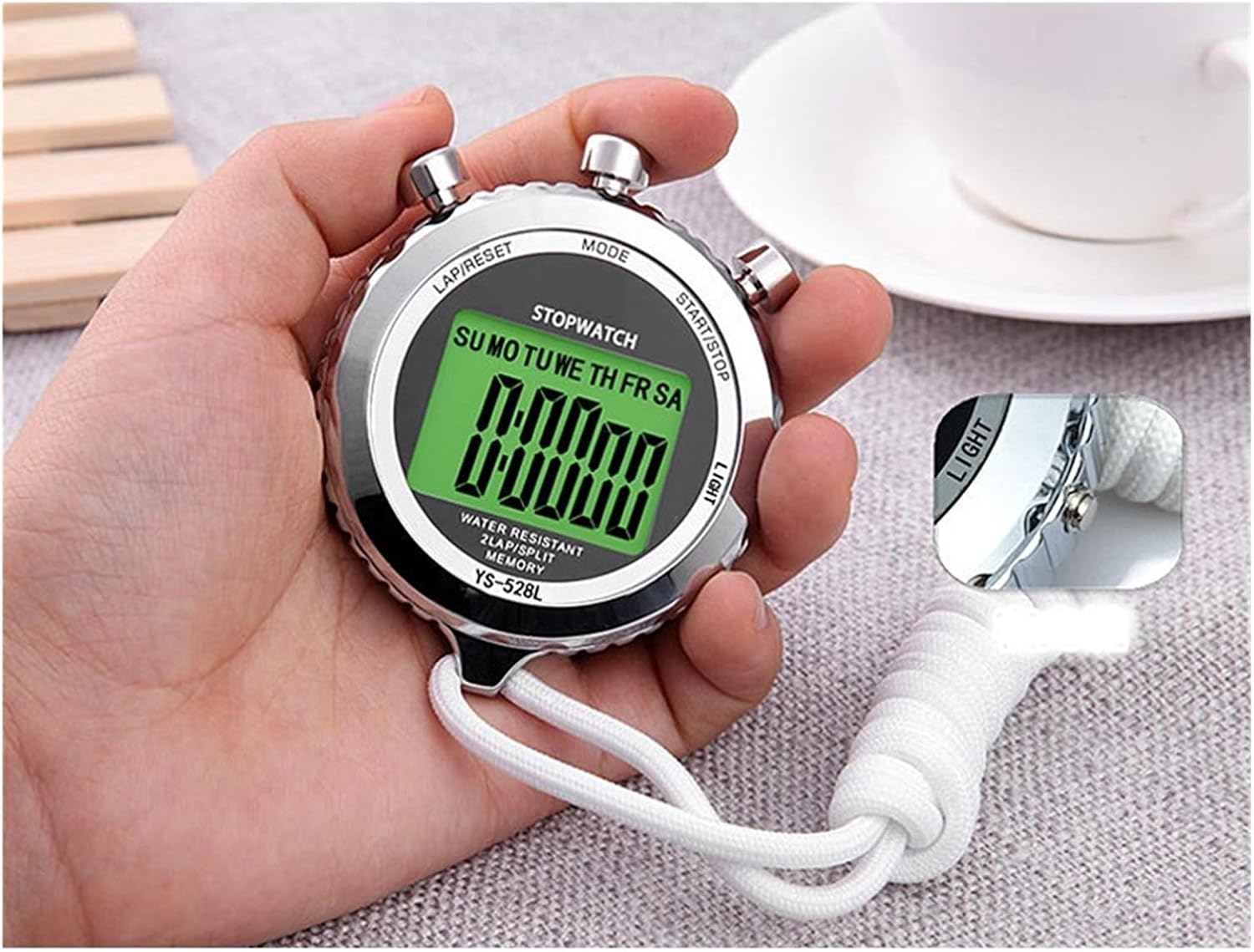
Image 4.1: The stopwatch held in hand, illustrating the positions of the MODE, LAP/RESET, START/STOP, and LIGHT buttons.
5. Operating Modes
The LIBODD YS-528L stopwatch features several operating modes, accessible via the MODE button.
5.1 Stopwatch Mode
This is the primary function for timing events.
- Press MODE until "STOPWATCH" is displayed.
- Press START/STOP to begin timing.
- Press START/STOP again to pause the timer.
- To record a lap or split time while the stopwatch is running, press LAP/RESET. The display will momentarily show the lap/split time before returning to the running total.
- To reset the stopwatch to zero, ensure it is paused, then press LAP/RESET.
5.2 Clock and Calendar Mode
Displays the current time, date, and day of the week.
- Press MODE until the current time and date are displayed.
- Refer to Section 4.2 for instructions on setting the time and date.
5.3 Alarm Mode
Set a daily alarm to sound at a specific time.
- Press MODE until the alarm icon or "ALARM" is displayed.
- Press and hold LAP/RESET until the alarm time digits flash.
- Use START/STOP to adjust the hours, then LAP/RESET to move to minutes.
- Once the desired alarm time is set, press MODE to exit.
- To activate or deactivate the alarm, press START/STOP while in Alarm Mode. An alarm icon will appear/disappear to indicate its status.
5.4 Hourly Chime Mode
Activate an audible signal at the top of every hour.
- While in Clock Mode, press START/STOP to toggle the hourly chime on or off. A small icon (often a bell or speaker) will indicate if it's active.
5.5 Countdown Timer Mode
Set a specific duration for the timer to count down from.
- Press MODE until "COUNTDOWN" or a similar indicator is shown.
- Press and hold LAP/RESET until the digits flash.
- Use START/STOP to adjust the hours, then LAP/RESET to move to minutes, then seconds.
- Press MODE to confirm the countdown duration.
- Press START/STOP to begin the countdown.
- Press START/STOP again to pause/resume.
- When the countdown reaches zero, an alarm will sound. Press any button to stop the alarm.
5.6 Luminous Display
For visibility in low-light conditions.
- Press the LIGHT button (typically on the side) once to activate the backlight. It will remain illuminated for approximately 4 seconds.
5.7 Mute Function
To silence button press sounds.
- While in Clock Mode, press and hold START/STOP and LAP/RESET simultaneously for a few seconds to toggle the button sound on or off. A mute icon may appear on the display when activated.
6. Maintenance
6.1 Cleaning
- Wipe the stopwatch with a soft, dry cloth. For stubborn dirt, a slightly damp cloth can be used, but ensure no water enters the device.
- Avoid using harsh chemicals, abrasive cleaners, or solvents, as these can damage the finish or internal components.
6.2 Storage
- Store the stopwatch in a cool, dry place away from direct sunlight and extreme temperatures.
- If storing for an extended period, consider removing the battery to prevent leakage, although the battery is typically long-lasting.
6.3 Battery Replacement
The YS-528L uses a standard button cell battery. When the display dims or functions become erratic, it may be time to replace the battery.
- Locate the battery compartment on the back of the stopwatch.
- Carefully open the compartment using a small screwdriver or coin, as appropriate for the battery cover type.
- Remove the old battery and insert a new one of the same type, ensuring correct polarity (+/-).
- Securely close the battery compartment.
7. Troubleshooting
| Problem | Possible Cause | Solution |
|---|---|---|
| Display is blank or dim. | Low battery. | Replace the battery (refer to Section 6.3). |
| Buttons are unresponsive. | Temporary software glitch; low battery. | Try pressing the RESET button (if available, or remove/reinsert battery). Replace battery if needed. |
| Time/Date is incorrect. | Not set correctly; battery removed. | Re-set the time and date (refer to Section 4.2). |
| Stopwatch does not start/stop. | Incorrect mode; button malfunction. | Ensure you are in Stopwatch Mode. If issue persists, contact support. |
8. Specifications
| Feature | Detail |
|---|---|
| Model | YS-528L |
| Material | Metal |
| Dimensions | 74mm (Height) x 60mm (Width) x 15mm (Thickness) |
| Weight | 50 g |
| Timing Accuracy | 0.01 seconds |
| Max Stopwatch Time | 39 hours, 59 minutes, 59 seconds |
| Max Countdown Time | 39 hours, 59 minutes, 59 seconds |
| Display | Digital with Luminous Backlight |
| Water Resistance | Water resistant (not for immersion) |

Image 8.1: Diagram illustrating the dimensions of the LIBODD YS-528L stopwatch.
9. Safety Precautions
- This product is water resistant, but it cannot be immersed in water. Avoid swimming or showering with the stopwatch.
- The product contains precision components. Do not drop, smash, or throw the device.
- Non-professionals should not attempt to disassemble the stopwatch privately, as this may void any warranty and cause damage.
- Keep out of reach of small children due to small parts (e.g., battery, lanyard).
10. Warranty and Support
LIBODD products are manufactured to high-quality standards. For specific warranty information, please refer to the purchase documentation or contact your retailer. If you encounter any issues or require technical assistance, please reach out to the seller or manufacturer's customer support channel through your purchase platform.
Please have your model number (YS-528L) and purchase date ready when contacting support.