
1. Product Overview and Compatibility
The KEEPBATT 7.4V 3500mAh replacement battery is designed to provide power for compatible portable audio devices. This battery is specifically compatible with the Tribit Stormbox Bluetooth Speaker and the Tribit XSound Plus 2 Bluetooth Speaker. It ensures continued efficient operation of these devices.
The battery features a XH2.54 3P connector, which is crucial for proper installation. Please verify your device's connector type before installation.

Image 1: KEEPBATT 7.4V 3500mAh Replacement Battery. This image displays the battery unit with its attached XH2.54 3P connector and wiring.
2. Safety Information
This battery incorporates multiple protection mechanisms to ensure safe operation and extend its lifespan. These include:
- Overcharge Protection: Prevents the battery from being charged beyond its safe voltage limit.
- Over-discharge Protection: Protects the battery from being discharged below its safe voltage limit.
- Short-Circuit Protection: Automatically cuts off power in case of a short circuit.
- Current Protection: Manages current flow to prevent damage.
- Temperature Protection: Monitors and regulates battery temperature.
Always handle the battery with care. Do not puncture, disassemble, or expose the battery to extreme temperatures or liquids. Dispose of used batteries according to local regulations.

Image 2: Multiple Protection Features. This diagram visually represents the various safety protections integrated into the battery, including overcharge, current, over-discharge, temperature, and short-circuit protection.
3. Package Contents
The product package includes the following items:
- One (1) KEEPBATT 7.4V 3500mAh Replacement Battery (with XH2.54 3P connector)
- One (1) Set of Installation Tools
4. Installation Instructions
Replacing the battery requires careful attention to detail, especially regarding connector polarity. A tool kit is provided for convenience.
4.1 Polarity Reversal (if necessary)
The battery's connector design supports polarity reversal. This step is only necessary if the default polarity of the new battery's connector does not match your device's existing wiring. Always check the voltage and polarity of your original battery and the new battery before proceeding. Incorrect polarity can damage your equipment.
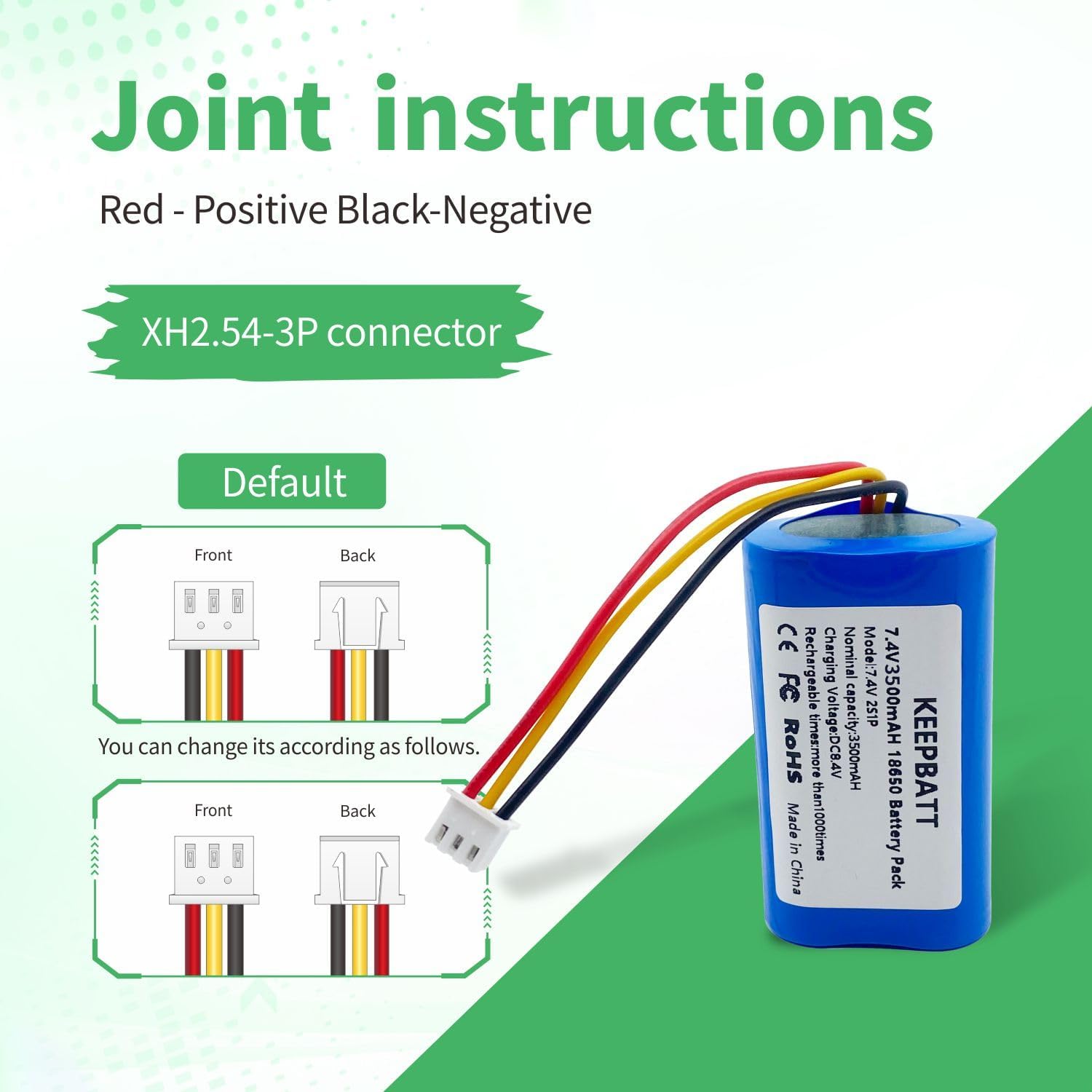
Image 3: XH2.54-3P Connector Polarity. This image illustrates the default wiring of the XH2.54-3P connector (Red-Positive, Black-Negative) and how it can be reversed if required by the device.
To reverse the polarity, follow these steps:
- Check Consistency: Before any modification, verify that the voltage, positive, and negative poles of the new battery's connector are consistent with your device's requirements.
- Pull Out Wires: Gently pull out the two wire cores from the connector.
- Press Down Barbs: Use a toothpick, card pin, or fine tweezers to press down the barbs of the two interfaces.
- Gently Push Up Barbs: After removing the wires, gently push up the barbs of the two interfaces to restore their original appearance.
- Insert Wires: Successfully insert the two wire cores into the connector in the desired polarity configuration.

Image 4: Switching Positive and Negative Steps. This multi-panel image provides a visual, step-by-step guide on how to safely reverse the polarity of the connector wires using a small tool.
4.2 Battery Replacement
Once the connector polarity is confirmed or adjusted:
- Power Off Device: Ensure your Tribit speaker is completely powered off and disconnected from any power source.
- Access Battery Compartment: Carefully open the battery compartment of your speaker. Refer to your speaker's original manual for specific instructions on accessing the battery.
- Disconnect Old Battery: Gently disconnect the old battery's connector from the speaker's port.
- Remove Old Battery: Remove the old battery from the compartment.
- Connect New Battery: Connect the new KEEPBATT battery's XH2.54 3P connector to the speaker's port, ensuring a secure fit and correct polarity.
- Secure New Battery: Place the new battery securely within the compartment.
- Close Compartment: Close the battery compartment.
- Test Device: Power on your speaker to confirm proper operation.
5. Operation
This is a rechargeable lithium battery designed for consistent power delivery. After installation, the battery will power your compatible device. For optimal performance, ensure the battery is fully charged before initial use.
5.1 Charging
Charge the battery using the charging method provided with your Tribit speaker. The battery is designed to be recharged multiple times, contributing to energy saving and reducing waste.
5.2 Stable Power Output
Featuring a 2S battery configuration and 25.9Wh design, this battery delivers stable and continuous power output. This ensures your speaker performs consistently, even under high power demands, providing clear and powerful sound quality.
6. Maintenance
To maximize the lifespan and performance of your KEEPBATT replacement battery:
- Regular Charging: Recharge the battery regularly, avoiding complete discharge whenever possible.
- Storage: If storing the device or battery for an extended period, store it in a cool, dry place at approximately 50% charge.
- Avoid Extremes: Do not expose the battery to extreme heat or cold, as this can degrade performance and lifespan.
- Cleaning: Keep the battery and its contacts clean and dry.
7. Troubleshooting
If your device does not power on or charge after battery replacement:
- Check Connections: Ensure the battery connector is securely and correctly plugged into the device's port.
- Verify Polarity: Double-check that the polarity of the battery's connector matches your device's requirements. Refer to Section 4.1.
- Charge Battery: Ensure the new battery has sufficient charge. Connect the device to its charger and observe if the charging indicator activates.
- Inspect for Damage: Visually inspect the battery and connector for any signs of physical damage.
If issues persist, consult the original device's user manual or contact customer support.
8. Specifications

Image 5: Battery Specifications. This image provides a visual summary of the battery's key specifications, including model, rate voltage, capacity, watt-hour, weight, and physical dimensions.
| Feature | Specification |
|---|---|
| Model | Connector: XH2.54 3P |
| Battery Type | Lithium Ion |
| Voltage | 7.4V |
| Capacity | 3500mAh (3.5 Amp Hours) |
| Watt-hour | 25.9Wh |
| Configuration | 2S (2 cells in series) |
| Product Dimensions | 2.6 x 1.46 x 0.75 inches (66mm x 37mm x 19mm) |
| Item Weight | 3.53 ounces (approx. 100g) |
| Recommended Uses | Bluetooth Speaker, Camera, Radio |
9. Warranty and Support
For warranty information or technical support regarding your KEEPBATT replacement battery, please refer to the seller's specific warranty policy or contact the point of purchase. Keep your purchase receipt as proof of purchase.