
1. Safety Information
Please read all safety instructions before assembling and using your SIHOO M102C Ergonomic Office Chair.
- Maximum Weight Limit: Do not exceed 350 lbs (159 kg). Exceeding this limit may cause damage to the chair and potential injury.
- Ensure all screws and bolts are securely tightened before use. Periodically check and re-tighten as necessary.
- Keep children and pets away during assembly.
- Use the chair on a flat, stable surface.
2. Product Overview
The SIHOO M102C Ergonomic Office Chair is designed to provide optimal comfort and support for extended periods of sitting. Key features include:
- Dynamic Lumbar Support: An adaptive lumbar pillow that flexes with your movements, maintaining spinal alignment and lower back support.
- Adjustable 2D Headrest: Height and angle adjustable to cradle your head and neck.
- W-shaped Seat Cushion: Designed to distribute weight evenly, reducing pressure on hips and thighs.
- Breathable Mesh: Used for the backrest and headrest to ensure airflow and comfort.
- Adjustable Armrests: Soft armrests that can be adjusted for personalized comfort.
- Dual-Tilt Mechanism: Allows you to lock in your preferred sitting angle for focus or rest.

Figure 2.1: SIHOO M102C Ergonomic Office Chair

Figure 2.2: Key Features of the SIHOO M102C Chair
3. Setup and Assembly
The SIHOO M102C chair is designed for straightforward assembly. An assembly guide with detailed visual instructions is included in the product packaging. All necessary tools and pre-Loctited bolts are provided for convenience.
- Unpack all components and verify against the parts list in the included manual.
- Follow the step-by-step instructions carefully to ensure correct and secure assembly.
- Typically, assembly can be completed within 15-30 minutes.
4. Operating Instructions
4.1 Adjusting Lumbar Support
The chair features an adjustable lumbar support system. To adjust the firmness of the lumbar support, locate the knob at the back of the chair. Turning the knob left will make the support stiffer, while turning it right will loosen it.
4.2 Adjusting Headrest
The headrest can be adjusted for both height and angle to provide optimal neck and head support.
- Height Adjustment: Gently pull the headrest up or push it down to your desired height. It will click into place.
- Angle Adjustment: Tilt the headrest forward or backward to find the most comfortable angle for your head.
4.3 Adjusting Armrests
The armrests are designed for forward and backward movement to suit your preference.
- To adjust, push or pull the armrest pads horizontally to your desired position.
4.4 Adjusting Seat Height
To adjust the seat height, locate the lever under the seat on the right side.
- To raise the seat, lift the lever while taking your weight off the seat.
- To lower the seat, lift the lever while remaining seated.
4.5 Tilt Function
The chair features a dual-tilt mechanism allowing you to recline and lock the backrest at various angles.
- To recline, pull the lever on the left side of the seat outwards. Lean back to your desired angle.
- To lock the recline, push the lever inwards.
- To return to an upright position, pull the lever outwards again and lean forward.
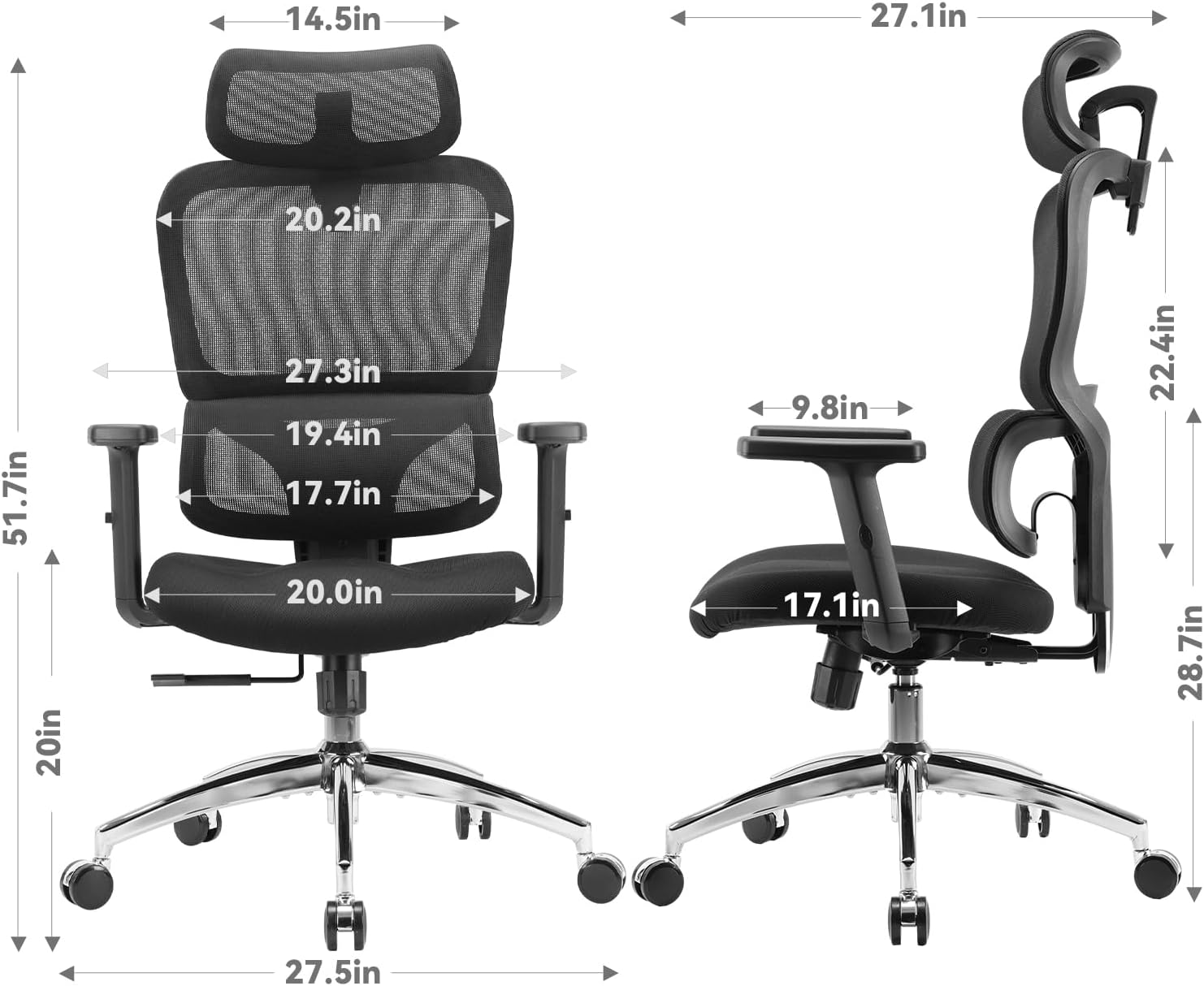
Figure 4.1: Chair Dimensions
5. Maintenance
Proper maintenance will extend the life and performance of your SIHOO M102C chair.
- Cleaning: Use a soft, damp cloth to wipe down the mesh and frame. Avoid harsh chemicals or abrasive cleaners.
- Mesh Care: For deeper cleaning of the mesh, a mild soap solution can be used. Allow to air dry completely.
- Caster Wheels: Periodically clean hair and debris from the caster wheels to ensure smooth movement.
- Fasteners: Regularly check all screws and bolts for tightness and re-tighten if necessary to maintain stability.
6. Troubleshooting
If you encounter any issues with your SIHOO M102C chair, please refer to the following common solutions:
- Squeaking Noises: Check all connections and tighten any loose bolts. A small amount of silicone lubricant can be applied to moving parts if necessary.
- Difficulty Adjusting Height: Ensure the gas lift lever is fully engaged or disengaged. If the issue persists, the gas lift cylinder may need replacement.
- Unstable Chair: Verify that all base legs are properly attached and all screws are tightened. Ensure the chair is on a level surface.
- Armrest Movement Issues: Check for any obstructions or loose connections within the armrest mechanism.
For issues not covered here, please contact customer support.
7. Specifications
| Brand | SIHOO |
| Model Name | M102C-M105 |
| Model Number | M102C |
| Color | Black |
| Material | Memory foam (seat), Mesh (backrest), Metal (frame) |
| Product Dimensions (D x W x H) | 17.1"D x 20"W x 40"H |
| Item Weight | 42 Pounds |
| Maximum Weight Capacity | 350 lbs (159 kg) |
| Additional Features | Adjustable Headrest, Adjustable Height, Back Support, Ergonomic, Dynamic Lumbar Support, Tilt Function |
8. Warranty and Support
SIHOO is committed to your satisfaction and the quality of its products.
- Warranty: Enjoy peace of mind with a 3-year warranty covering manufacturing defects.
- Returns: We offer 30-day easy returns for your convenience.
- Customer Service: If you require assistance, our customer service team responds within 24 hours.
How to Reach Us:
- Login to your Amazon Account.
- Navigate to 'Your Orders'.
- Find your SIHOO M102C order.
- Click 'Contact Seller'.
Alternatively, you can email us directly at: service@sihoooffice.com

Figure 8.1: SIHOO Customer Support Information