
1. Introduction
Thank you for choosing the SOZT Commercial Ice Maker Machine. This manual provides essential information for the safe and efficient operation, installation, and maintenance of your ice maker. Please read these instructions thoroughly before use and retain them for future reference.
This ice maker is designed for both home and commercial applications, capable of producing up to 100 lbs of ice daily with a 20 lbs storage bin. It features an intuitive LCD control panel, dual water inlet options, and an automatic self-cleaning function.
2. Safety Instructions
- Ensure the ice maker is placed on a stable, level surface.
- Do not operate the appliance with a damaged power cord or plug.
- Keep the appliance away from heat sources and direct sunlight.
- Ensure proper ventilation around the unit. Do not block air vents.
- Only use potable water for ice production.
- Unplug the unit before cleaning or performing any maintenance.
- Do not allow children to operate the ice maker without supervision.
- This appliance is intended for indoor use only.
3. Package Contents
Verify that all components are present upon unpacking:
- SOZT Commercial Ice Maker Machine
- Water Inlet Hose
- Drain Hose
- Quick Connector
- Premium Water Filter
- Ice Shovel
- User Manual (this document)

Figure 3.1: SOZT Commercial Ice Maker Machine with included accessories.
4. Product Overview
The SOZT Commercial Ice Maker is designed for efficient ice production with user-friendly features. Key components include:
- Ice Making Tray: Produces 36 ice cubes per cycle.
- Ice Storage Bin: Holds up to 20 lbs of ice.
- LCD Control Panel: For operation, settings, and status display.
- Water Inlet: Supports both bottled water and faucet connections.
- Water Drain: For automated draining.
- Front Air Vent: Allows for flexible installation.

Figure 4.1: SOZT Ice Maker installed in a kitchen environment.

Figure 4.2: Installation flexibility: Undercounter and Freestanding options.
5. Setup and Installation
The SOZT Ice Maker offers simple setup with automated water filling and draining. Follow these steps for proper installation:
5.1 Water Connection
Your ice maker supports two water inlet modes: bottled water or direct faucet connection.

Figure 5.1: Dual water inlet modes.
- Bottled Water Mode: Place a standard gallon water bottle (not included) onto the top water inlet port. Ensure it is securely seated.
- Faucet Water Mode: Connect the provided water inlet hose to your faucet and to the designated inlet port on the back of the ice maker. Use the quick connector and premium water filter as instructed.
5.2 Drain Connection
Connect the provided drain hose to the water outlet port on the back of the ice maker. Route the drain hose to a suitable drainage point, such as a floor drain or a bucket, ensuring proper gravity drainage.
5.3 Power Supply
Once water connections are secure, plug the ice maker into a grounded 115V electrical outlet.
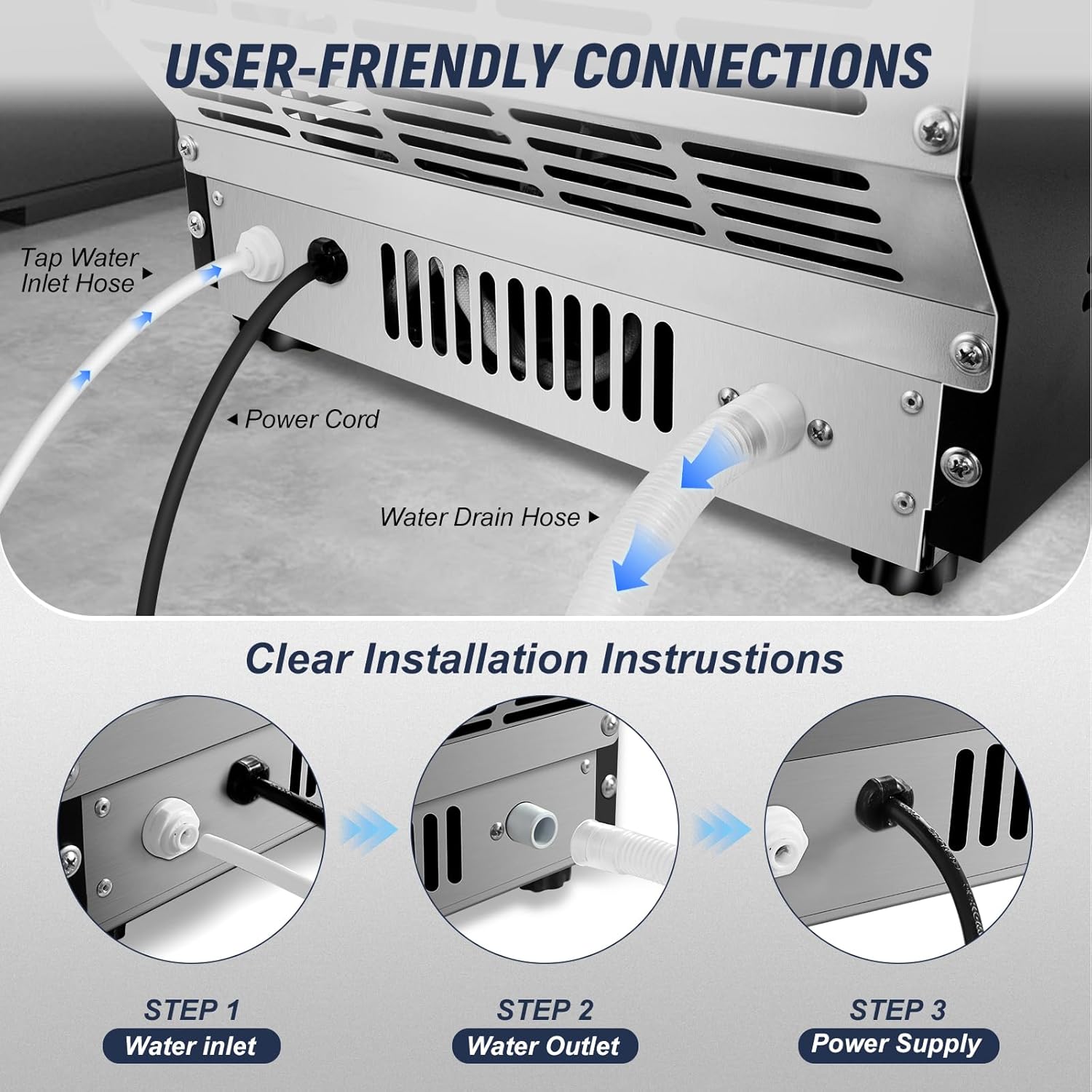
Figure 5.2: User-friendly connections at the rear of the unit.

Figure 5.3: Clear installation instructions for water inlet, outlet, and power.
6. Operating Instructions
The ice maker features an intuitive LCD control panel for easy operation.

Figure 6.1: Intuitive LCD Control Panel.
6.1 Power On/Off and Ice Making
- Press the ON/OFF button to start or stop the ice making process.
- The unit will automatically begin an ice-making cycle, producing 36 ice cubes in approximately 6-15 minutes.
- The ice maker will stop automatically when the ice bin is full or when water levels are low.
6.2 Adjusting Ice Thickness
You can adjust the ice cube thickness to suit your preference:
- Use the + and - buttons on the control panel to select the desired ice thickness.
- Thin Ice (approx. 6 minutes): Ideal for food preservation.
- Medium Ice (approx. 10 minutes): Suitable for soft drinks.
- Thick Ice (approx. 15 minutes): Recommended for beer and whiskey.

Figure 6.2: Ice thickness adjustment options.
6.3 24-Hour Reservation Timer
The ice maker includes a 24-hour timer for scheduled ice production:
- Press the Reservation button to activate the timer function.
- Use the + and - buttons to set the desired delay time for ice production.

Figure 6.3: Setting the 24-hour reservation timer.
6.4 Built-in Blue Light
Click the Light button on the control panel to turn the internal blue light on or off, illuminating the ice bin.
6.5 Ice Deicing Mode
The ice maker features an ice deicing mode with an ice solenoid valve for fast ice release from the tray.
Video 6.1: This video provides a visual guide to the SOZT Commercial Ice Maker, showcasing its operation, dual water inlet system, and the process of ice production.
7. Maintenance
Regular maintenance ensures optimal performance and longevity of your ice maker.
7.1 Automatic Self-Cleaning
The ice maker is equipped with an automatic self-cleaning function:
- Long press the Clean button for 3 seconds to initiate the automatic cleaning cycle.
- The unit will perform a cleaning process, flushing the internal water lines.
- Ensure the drain hose is properly positioned to collect the flushed water.
7.2 General Cleaning
- Regularly wipe down the exterior of the unit with a soft, damp cloth.
- Clean the ice storage bin periodically with a mild detergent and rinse thoroughly.
- Ensure all water contact surfaces are dry before resuming operation.
8. Troubleshooting
Refer to the following table for common issues and their solutions:
| Problem | Possible Cause | Solution |
|---|---|---|
| Ice maker not producing ice | No water supply; power off; low ambient temperature; clogged water filter. | Check water connection/bottle; ensure unit is powered on; ensure room temperature is within operating range; replace water filter. |
| Ice cubes are too small or soft | Water temperature too high; ambient temperature too high; incorrect thickness setting. | Use colder water; ensure proper ventilation; adjust ice thickness setting to 'Thick'. |
| Water leakage | Loose hose connections; clogged drain hose. | Tighten all water inlet and drain hose connections; clear any obstructions in the drain hose. |
| Unit is noisy | Normal operation sounds; unit not level. | Some operational noise is normal. Ensure the unit is on a level surface. |
| Error code on display | Specific internal fault. | Refer to the specific error code in the full manual (if available) or contact customer support. Try power cycling the unit. |
9. Specifications
| Feature | Detail |
|---|---|
| Model Name | 100LBS/24H |
| Brand | SOZT |
| Ice Production Capacity | 100 lbs / 24 hours |
| Ice Storage Capacity | 20 lbs |
| Product Dimensions | 13.5 x 13.2 x 26.4 inches |
| Product Weight | 40 Pounds |
| Voltage | 115 Volts |
| Ice Cube Cycle Time | 6-15 minutes (depending on thickness) |
| Ice Cube Quantity per Cycle | 36 pieces |
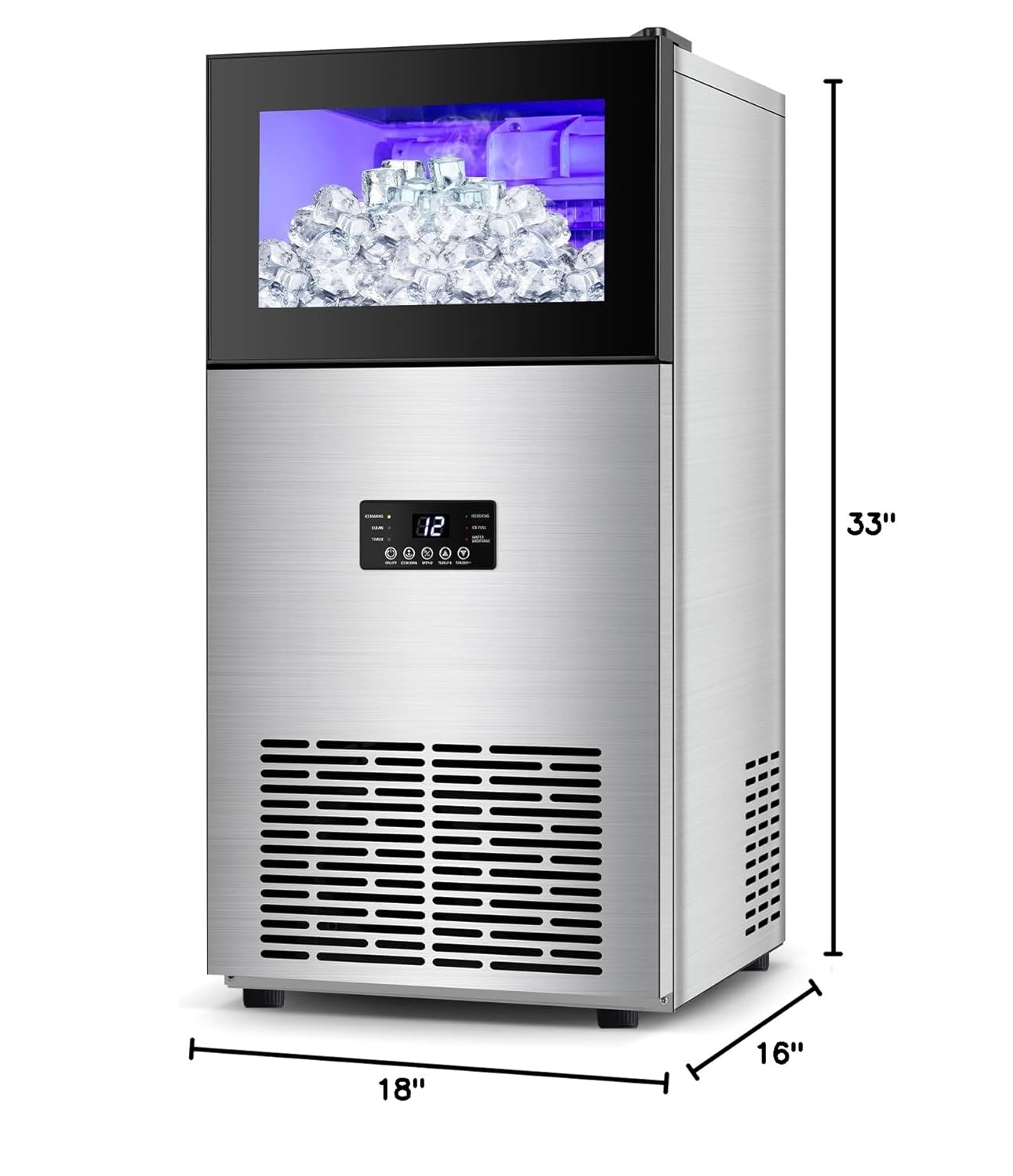
Figure 9.1: Product dimensions.
10. Warranty and Support
For warranty information and customer support, please refer to the warranty card included with your product or contact SOZT customer service directly. Keep your purchase receipt as proof of purchase for any warranty claims.