
1. Important Safety Instructions
Please read all instructions carefully before using your Texciting Electric Blanket. Retain this manual for future reference.
- Overheat Protection: This electric blanket is equipped with an advanced safety system that continuously monitors the blanket's temperature. If an unsafe temperature is detected, the system will automatically shut off the blanket to prevent overheating.
- Automatic Shut-off: The blanket features a 10-hour automatic shut-off timer, providing peace of mind and energy efficiency.
- Power Disconnection: Always disconnect the power cord from the wall outlet before cleaning or when the blanket is not in use.
- Controller Care: Ensure the digital controller is kept dry. Do not immerse it in water or other liquids.
- Children and Pets: Do not use this blanket with infants, incapacitated persons, or persons insensitive to heat. Keep pets away from the blanket to prevent damage.
- Damage Inspection: Regularly inspect the blanket and power cord for any signs of wear or damage. Do not use if damaged.
2. Product Overview
The Texciting Electric Blanket is designed to provide warmth and comfort. It features a soft polyester material and a user-friendly digital controller.

Image: The Texciting Electric Blanket, folded neatly, showcasing its soft texture and the attached digital controller with a display showing '6'.
Key features include:
- Ultra-soft polyester material for maximum comfort.
- 9 adjustable heat settings for personalized warmth.
- Digital controller with easy-to-read display.
- Automatic shut-off timer (up to 10 hours).
- Machine washable for easy care.

Image: A close-up view of the blanket's ultra-soft, textured material, highlighting its comfortable and skin-friendly properties.
3. Setup
Follow these steps to set up your electric blanket:
- Unpack the electric blanket and controller from its packaging.
- Lay the blanket flat on your bed or desired surface, ensuring it is not folded or bunched up.
- Connect the controller cable securely to the blanket's connector port. Ensure it clicks into place.
- Plug the power cord of the controller into a standard electrical outlet.
The blanket is now ready for use.
4. Operating Instructions
The digital controller allows for easy adjustment of heat and timer settings.
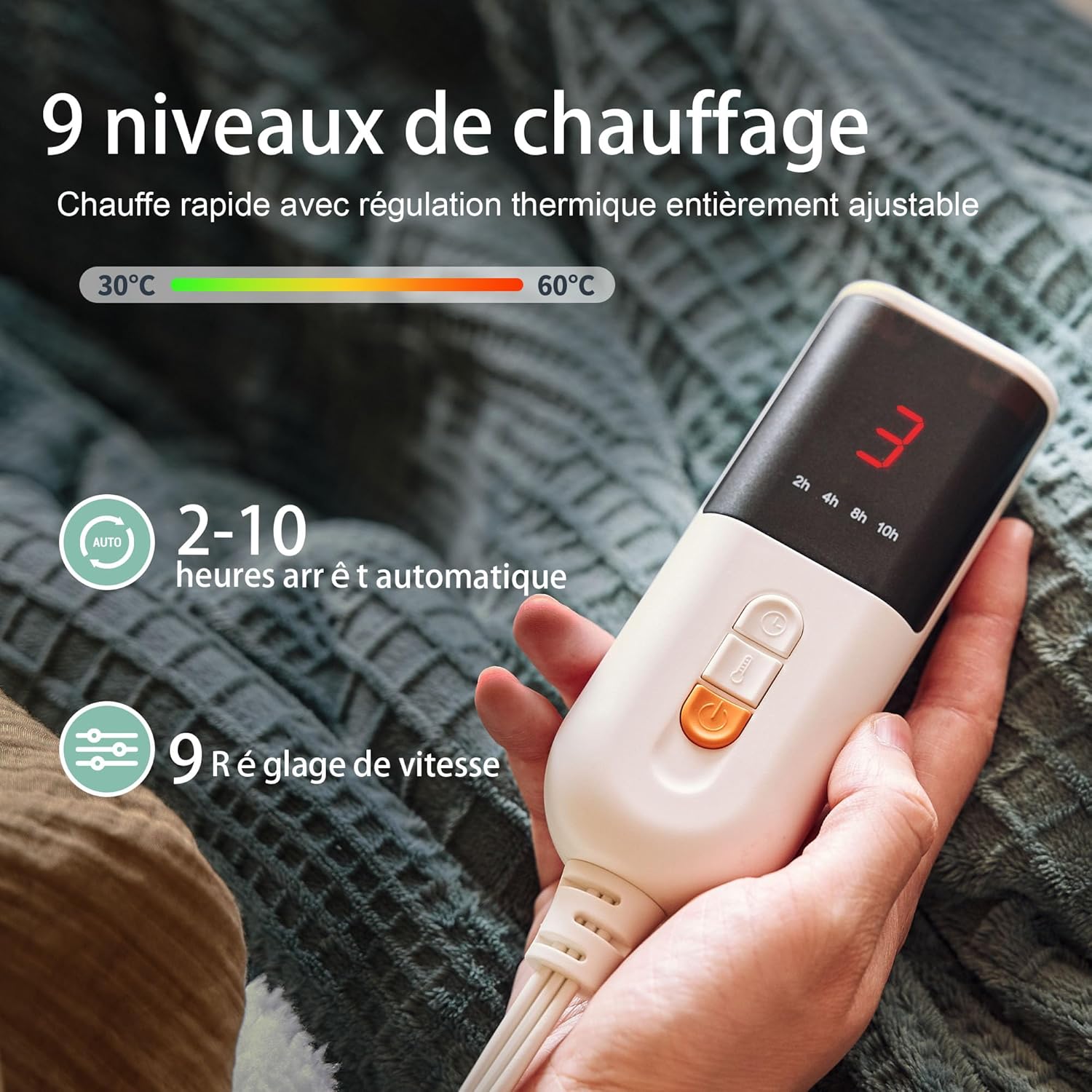
Image: A detailed view of the digital controller, showing the display for heat levels (e.g., '3') and buttons for power, heat adjustment, and timer settings (2h, 4h, 8h, 10h).
Power On/Off
- To turn on: Press the power button (O/I symbol) on the controller. The display will light up, showing the current heat setting.
- To turn off: Press the power button again. The display will turn off.
Adjusting Heat Settings
- The blanket has 9 heat settings (1 being the lowest, 9 being the highest).
- Press the heat adjustment button (usually marked with up/down arrows or a temperature symbol) to cycle through the heat levels. The selected level will be shown on the digital display.
Setting the Timer
- The blanket features an automatic shut-off timer with options for 2, 4, 8, or 10 hours.
- Press the timer button (usually marked with a clock symbol or 'Timer') to select the desired duration. The corresponding indicator light or display segment will illuminate.
- Once the set time expires, the blanket will automatically turn off.
5. Maintenance and Care
Proper care ensures the longevity and performance of your electric blanket.

Image: The electric blanket draped over a wicker basket, accompanied by a graphic indicating it is machine washable, with a reminder to unplug before washing.
Washing Instructions
- Disconnect: Always unplug the power cord from the wall outlet and detach the controller from the blanket before washing.
- Pre-soak (Optional): For heavily soiled blankets, you may pre-soak in cold water for 15 minutes.
- Machine Wash: Machine wash on a gentle cycle with cold water. Use a mild detergent.
- Rinse: Rinse thoroughly.
- Tumble Dry: Tumble dry on a low heat setting. Ensure the blanket is completely dry before reattaching the controller or storing.
Important:
- DO NOT iron the blanket.
- DO NOT bleach the blanket.
- DO NOT dry clean the blanket.
- Ensure the controller is completely cool and dry before cleaning or storing.
Storage
When not in use, store the blanket in a cool, dry place. Avoid placing heavy objects on top of the blanket, as this can damage the internal heating elements.
6. Troubleshooting
If your Texciting Electric Blanket is not functioning as expected, please refer to the following common issues and solutions:
- Blanket not heating:
- Ensure the power cord is securely plugged into a working electrical outlet.
- Verify that the controller cable is firmly connected to the blanket.
- Check if the power button on the controller has been pressed to turn the blanket on.
- If the blanket has been on for an extended period, the automatic shut-off timer may have activated. Turn the blanket off and then on again.
- Controller display not working:
- Ensure the blanket is plugged in and powered on.
- Try unplugging and re-plugging the blanket from the wall outlet.
- Blanket feels too hot or not hot enough:
- Adjust the heat setting using the controller. There are 9 levels to choose from.
- Ensure the blanket is not folded or bunched up, as this can concentrate heat in one area.
If the issue persists after trying these steps, please contact customer support.
7. Specifications
| Feature | Detail |
|---|---|
| Brand | Texciting |
| Model Number | JSEU1 |
| Dimensions | 180L x 130W centimeters (130 x 180 cm) |
| Material | Polyester |
| Color | Green (as per current variant) |
| Heat Settings | 9 levels |
| Automatic Shut-off | Up to 10 hours |
| Special Feature | Lightweight |
| Care Instructions | Machine Washable |
| Weight | 1.6 Kilograms |
| Country of Origin | China |
8. Warranty and Support
For warranty information or technical support, please refer to the documentation included with your purchase or contact the seller directly. Keep your proof of purchase for any warranty claims.
Manufacturer: Texciting