1. Introduction
1.1 Product Overview
The Generic RM-L1675 is a universal remote control designed for seamless operation with a wide range of Soni Smart TVs. This remote offers a straightforward, plug-and-play experience without the need for complex programming or setup. It features dedicated hotkeys for popular streaming services, enhancing your entertainment access.
1.2 Key Features
- Wide Compatibility: Works with Soni Smart TVs, including LCD, LED, OLED, QLED, UHD, and 4K Android models (2019-2023).
- Dedicated Hotkeys: Instant access to Netflix, Google Play, and YouTube.
- Plug-and-Play Operation: No programming required; simply insert batteries.
- Ergonomic Design: Comfortable to hold with tactile and responsive buttons.
- User-Friendly: Intuitive button layout for ease of use, without voice control.
1.3 Compatibility
This remote control is compatible with various Soni Smart TV models, including:
- LCD Televisions
- LED Televisions
- OLED Televisions
- QLED Televisions
- UHD Televisions
- 4K Android Televisions
It supports models released between 2019 and 2023. For specific model compatibility, refer to your TV's documentation or the product listing.
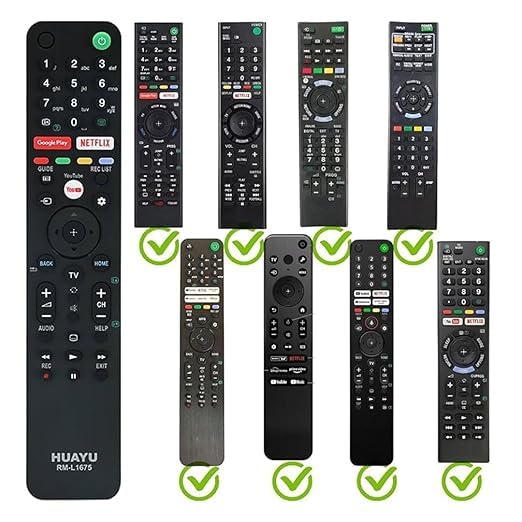
Image 1: The RM-L1675 remote control demonstrating its compatibility with various Soni TV remote designs.
2. Setup
2.1 Battery Installation
The RM-L1675 remote control requires two AAA batteries (not included) for operation.
- Locate the battery compartment cover on the back of the remote control.
- Slide the cover downwards or press the latch to open the compartment.
- Insert two AAA batteries, ensuring the positive (+) and negative (-) terminals align correctly with the markings inside the compartment.
- Close the battery compartment cover by sliding it back into place until it clicks securely.
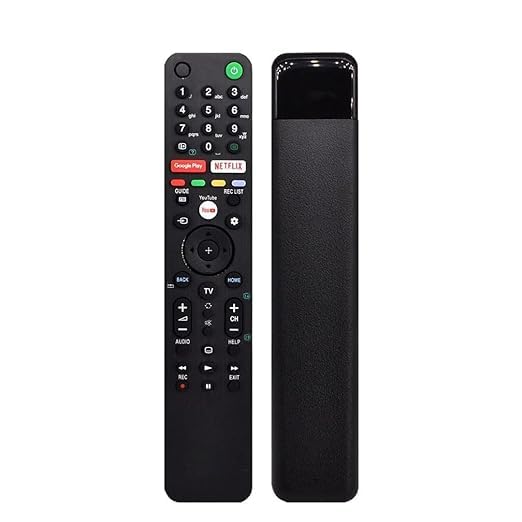
Image 2: Front and side profile of the RM-L1675 remote control.
2.2 First Use
The RM-L1675 remote control is designed for plug-and-play functionality. Once batteries are correctly installed, it should be ready to operate your compatible Soni Smart TV immediately without any additional pairing or programming steps.
- Point the remote control towards your Soni Smart TV.
- Press the Power button to turn on your TV.
- Test other functions like volume, channel, and navigation buttons to ensure full functionality.
3. Operating Instructions
3.1 Button Functions
The remote control features a standard layout for easy navigation and control of your Soni Smart TV.
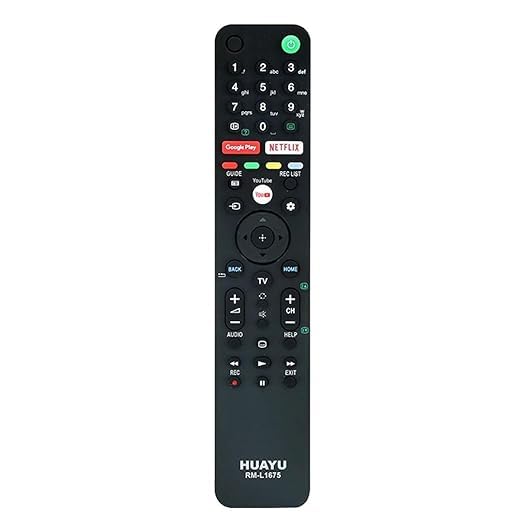
Image 3: Detailed view of the RM-L1675 remote control's button layout.
- Power Button: Turns the TV on or off.
- Number Pad (0-9): For direct channel input.
- Navigation Pad (Up, Down, Left, Right, Enter): For menu navigation and selection.
- Volume Up/Down (+/-): Adjusts the TV volume.
- Channel Up/Down (+/-): Changes TV channels.
- Back: Returns to the previous screen or menu.
- Home: Accesses the TV's main home screen or smart hub.
- TV: Switches to TV input.
- Audio: Adjusts audio settings or modes.
- Help: Accesses the TV's help menu.
- REC: Initiates recording (if supported by TV and external device).
- Play/Pause/Stop/Fast Forward/Rewind: Media playback controls.
- Exit: Exits current menu or application.
3.2 Dedicated Hotkeys
The remote includes specific buttons for quick access to popular streaming applications:
- Netflix: Launches the Netflix application directly.
- Google Play: Opens the Google Play Store or Google Play Movies & TV.
- YouTube: Launches the YouTube application directly.
4. Maintenance
4.1 Cleaning the Remote
To maintain the remote control's appearance and functionality:
- Wipe the remote with a soft, dry cloth.
- For stubborn dirt, slightly dampen the cloth with water or a mild, non-abrasive cleaner.
- Do not use harsh chemicals, solvents, or abrasive cleaning pads, as these can damage the remote's surface or internal components.
- Ensure no liquid enters the remote control.
4.2 Battery Replacement
Replace the batteries when the remote control's response becomes sluggish or it stops functioning. Always replace both batteries at the same time with new AAA batteries. Do not mix old and new batteries, or different types of batteries.
5. Troubleshooting
If you encounter issues with your RM-L1675 remote control, try the following solutions:
- Remote not responding:
- Check if the batteries are inserted correctly with the correct polarity (+/-).
- Replace the batteries with fresh AAA batteries.
- Ensure there are no obstructions between the remote control and the TV's infrared receiver.
- Point the remote directly at the TV.
- Limited range:
- Ensure the batteries are not low.
- Reduce the distance between the remote and the TV.
- Remove any potential interference sources (e.g., bright lights, other electronic devices).
- Specific buttons not working:
- This remote is designed for Soni Smart TVs. Ensure your TV is a compatible Soni model.
- Some advanced functions or TV-specific features may not be supported by a universal remote.
6. Specifications
| Feature | Detail |
|---|---|
| Brand | Generic |
| Model | RM-L1675 |
| Compatible Devices | Soni Smart Televisions (LCD, LED, OLED, QLED, UHD, 4K Android) |
| Special Features | Backlit, Ergonomic, Dedicated Hotkeys (Netflix, Google Play, YouTube) |
| Connector Type | Infrared (IR) |
| Power Source | 2 x AAA Batteries (not included) |
| Color | Black |
| Item Weight | 250 g |
| Package Dimensions | 21 x 14 x 8 cm |
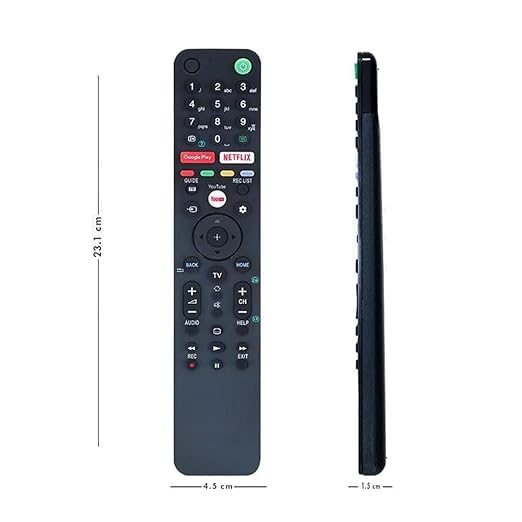
Image 4: Dimensions of the RM-L1675 remote control.
7. Warranty and Support
For information regarding warranty, returns, or technical support, please refer to the product's purchase documentation or contact the retailer directly. Keep your proof of purchase for any warranty claims.


