Introduction
This manual provides comprehensive instructions for the safe and effective operation, maintenance, and troubleshooting of your KINGBOLEN Ediag Elite OBD2 Scanner and ECT200 Automotive Electrical Circuit Tester Bundle. Please read this manual thoroughly before using the devices to ensure proper functionality and to prevent damage.
Product Overview
The KINGBOLEN Ediag Elite OBD2 Scanner and ECT200 Automotive Electrical Circuit Tester Bundle is designed to provide advanced diagnostic and testing capabilities for 12V and 24V vehicle electrical systems. This bundle empowers users with professional-grade tools for vehicle health monitoring and electrical troubleshooting.

Figure 1: The KINGBOLEN Ediag Elite OBD2 Scanner and ECT200 Electrical Circuit Tester Bundle, including the scanner, tester, and carrying case.
Ediag Elite OBD2 Scanner Features:
- Bi-Directional Control: Allows sending commands from your smartphone to the vehicle's ECU for active testing of components like air conditioning clutches, windows, doors, and sunroofs. This aids in quickly identifying and narrowing down problems.
- 15+ Maintenance Resets: Includes essential functions such as Oil Reset, Headlight Matching, Bleed Reset, BMS Reset, BOX Reset, EGR Learning, Throttle Learning, Inject Reset, and SAS Reset. Additional functions are progressively introduced through updates.
- Wide Compatibility: Compatible with a broad range of vehicle brands including GM, Ford, Toyota, Chrysler, Honda, Mazda, Nissan, Mitsubishi, Hyundai, and KIA.
- Lifetime Updates: All version updates are provided free of charge without any subscription fees.
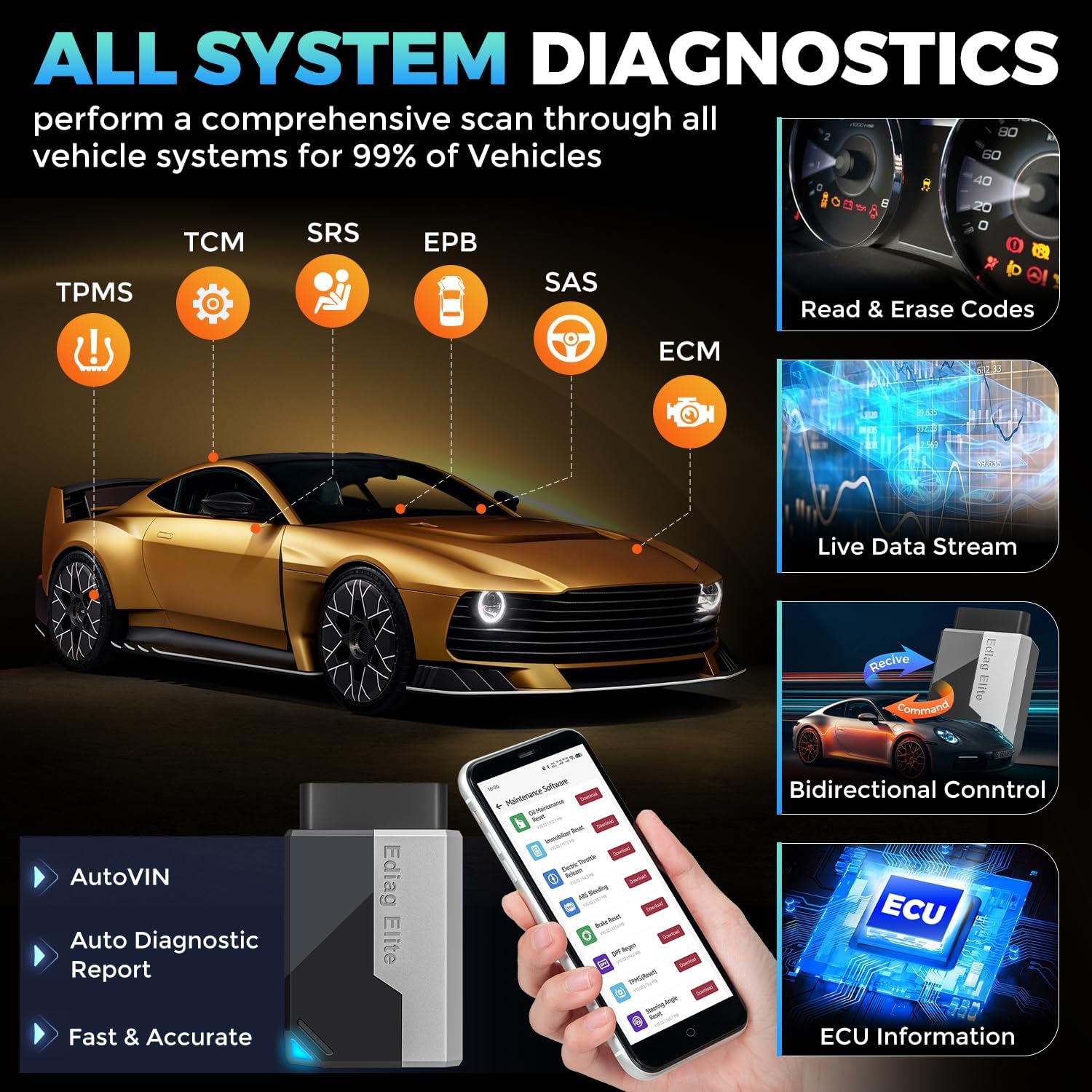
Figure 2: Ediag Elite performing all system diagnostics, including reading and erasing codes, live data stream, and bidirectional control.

Figure 3: Illustration of Ediag Elite's bi-directional control feature, showing active testing of components like wipers, headlights, and doors.

Figure 4: Examples of the 15+ maintenance services offered by the Ediag Elite, such as Oil Reset, Brake Reset, and TPMS Reset.
ECT200 Automotive Electrical Circuit Tester Features:
- Multi-functional Testing: Capable of Voltage Testing, Component Activation (e.g., headlights, fans), Continuity Testing, Ground detection, tracking Short Circuits, Positive and Negative pole detection, and Diode detection.
- Easy to Use: Features a digital display, backlit LED screen, and buzzer for clear and quick results. Red light indicates positive pole, while a green LED indicates a negative pole.
- Wide Voltage Compatibility: Effectively tests both 12V and 24V vehicles.
- Long Cable: Equipped with a 16.5 FT cable for convenient long-distance use.

Figure 5: The KINGBOLEN ECT200 Automotive Circuit Probe Tester, highlighting its various testing capabilities.

Figure 6: Close-up of the ECT200's dual LED light design, providing bright illumination for testing.

Figure 7: The ECT200's compatibility with various 12V and 24V vehicles, including cars, light trucks, SUVs, and boats.

Figure 8: The ECT200 features reverse protection and clear red/green LED indicators for positive and negative poles.

Figure 9: The ECT200's 16.5-foot cable allows for extended reach and convenient use around the vehicle.
Setup
Ediag Elite OBD2 Scanner Setup:
- Download the Ediag App: Scan the QR code provided in the Quick Start Manual or search for "Ediag" in your device's App Store (Google Play or Apple App Store) to download and install the application.
- Register and Activate: Open the Ediag App and register an account. Follow the prompts to activate your device using the serial number and 8-digit activation code found in the Quick Start Manual.
- Connect to Vehicle: Locate your vehicle's OBD-II port, typically found under the dashboard on the driver's side. Plug the Ediag Elite device firmly into the OBD-II port. A green light on the device indicates it is powered on.
- Establish Bluetooth Connection: Ensure Bluetooth is enabled on your smartphone. The Ediag App will automatically search for and connect to the Ediag Elite device. Do not attempt to pair the device directly through your phone's Bluetooth settings.
- Download Diagnostic Software: Within the app, download the specific diagnostic software for your vehicle's make and model. This may require an internet connection.
ECT200 Automotive Electrical Circuit Tester Setup:
- Connect to Power: Connect the red clamp of the ECT200 to the vehicle's positive battery terminal and the black clamp to the negative battery terminal. The device will power on automatically.
- Familiarize with Indicators: Observe the digital display and LED indicators. A red LED indicates a positive pole, while a green LED indicates a negative pole.
Operating Instructions
Operating the Ediag Elite OBD2 Scanner:
- Initiate Diagnosis: From the Ediag App's main interface, select "All Systems Diagnostics" to perform a comprehensive scan of your vehicle's systems.
- Read and Clear Codes: View diagnostic trouble codes (DTCs) and their descriptions. The app allows you to clear these codes after repairs are made.
- Live Data Stream: Access real-time data from various vehicle sensors and modules. This includes parameters like oxygen sensor voltage, fuel trim, engine RPM, vehicle speed, and temperatures. This data is crucial for advanced diagnostics.
- Bi-Directional Control (Active Test): Navigate to the "Maintenance Functions" or "OBD Functions" section and select the active test feature. This allows you to command specific components to turn on or off, verifying their functionality. Examples include activating wipers, controlling headlights, or opening/closing doors.
- Maintenance Functions: Utilize the 15+ special functions for routine maintenance, such as resetting oil life, performing brake resets, or calibrating steering angle sensors.
- VIN Scan: Use the VIN scan feature to automatically decode vehicle information based on the NHTSA database.
- Generate Reports: The app can generate diagnostic reports, which can be saved or shared for record-keeping or professional consultation.
Operating the ECT200 Automotive Electrical Circuit Tester:
- Voltage Testing: Touch the probe tip to the circuit or component you wish to test. The digital display will show the voltage reading. The red/green LEDs indicate polarity.
- Component Activation: To activate a component, connect the probe tip to its power input. Use the switch on the tester to apply positive or negative voltage. This is useful for testing motors, lights, and relays directly.
- Continuity Testing: Connect the probe tip to one end of the circuit and the ground clip to the other. The device will indicate continuity with an audible tone and/or visual indicator.
- Short Circuit Finding: Use the probe to trace circuits. The device will indicate a short circuit by changing its display or tone.
- Diode Test: Test diodes by applying voltage with the probe and observing the current flow.
- Tracking and Ground Detection: The ECT200 can assist in tracking wires and identifying proper ground connections within the vehicle's electrical system.
Maintenance
- Keep both devices clean and free from dust, dirt, and moisture. Use a soft, dry cloth for cleaning.
- Store the devices in their provided carrying case when not in use to protect them from physical damage.
- Avoid exposing the devices to extreme temperatures or direct sunlight for prolonged periods.
- Ensure the cables and connectors are not kinked or damaged. Inspect them regularly for wear and tear.
- For the Ediag Elite, regularly check for and install app updates to ensure access to the latest vehicle compatibility and features.
Troubleshooting
| Problem | Possible Cause | Solution |
|---|---|---|
| Ediag Elite not powering on. | Loose connection to OBD-II port; vehicle's OBD-II port issue. | Ensure the device is firmly plugged into the OBD-II port. Check vehicle's fuse for the OBD-II port. |
| Ediag Elite not connecting via Bluetooth. | Bluetooth not enabled on phone; app not recognizing device. | Ensure Bluetooth is on. Restart the app and try again. Do not pair manually through phone settings. |
| ECT200 not powering on. | Incorrect battery connection; vehicle battery dead. | Verify red clamp is on positive and black on negative. Ensure vehicle battery has sufficient charge. |
| Inaccurate readings from either device. | Poor connection; damaged probe/cable; software outdated. | Ensure all connections are secure. Inspect cables and probes for damage. Update Ediag App to the latest version. |
| App freezing or crashing. | Insufficient phone memory; app bug; outdated operating system. | Close other apps. Restart phone. Check for app updates. Ensure phone's OS is up to date. |
For persistent issues not covered here, please refer to the "Support" section of this manual or contact KINGBOLEN customer service.
Specifications
- Brand: KINGBOLEN
- Model: Ediag Elite OBD2 Scanner & ECT200 Automotive Electrical Circuit Tester
- ASIN: B0DR8CX99F
- First Available: December 23, 2024
- Ediag Elite Connectivity: Bluetooth, OBD-II
- ECT200 Voltage Range: 12V - 24V DC
- ECT200 Cable Length: 16.5 FT
Warranty and Support
KINGBOLEN provides ongoing support for its products. The Ediag Elite OBD2 Scanner includes lifetime free updates for its software, ensuring continued compatibility and feature enhancements.
For technical assistance, warranty claims, or any product-related inquiries, please contact KINGBOLEN customer support through their official website or the contact information provided in your product packaging. Please have your product model and serial number ready when contacting support.
For more information, visit the KINGBOLEN Store on Amazon.


