
Introduction
This manual provides essential instructions for the safe and effective installation, operation, and maintenance of your WWEIFUS Control Board, compatible with Donper refrigerators. Please read this manual thoroughly before installation and retain it for future reference. Proper installation and adherence to safety guidelines are crucial for the longevity and correct functioning of the product.
Safety Instructions
Your safety and the safety of others are paramount. Observe all safety precautions.
- Always disconnect power to the refrigerator by unplugging it or turning off the circuit breaker before attempting any installation or maintenance.
- Installation should only be performed by qualified personnel or individuals with experience in appliance repair.
- Wear appropriate personal protective equipment (PPE), such as insulated gloves and safety glasses, to prevent injury.
- Avoid touching live terminals. Wait at least 30 seconds after unplugging the system before touching terminals to allow capacitors to discharge.
- Ensure all connections are secure and correctly oriented before restoring power to prevent electrical hazards or component damage.
- Do not attempt to modify the control board. Unauthorized modifications can lead to malfunction, fire, or electric shock.
Product Overview
The WWEIFUS Control Board is a replacement circuit PCB (Printed Circuit Board) designed to manage the functions of compatible Donper refrigerators. It integrates various electronic components to regulate temperature, defrost cycles, and other operational parameters, ensuring optimal performance of your appliance.
Key components typically found on the board include:
- Microcontroller (main processing unit)
- Power supply components (transformers, capacitors, voltage regulators)
- Relays (for switching power to various refrigerator components like the compressor, fan, and defrost heater)
- Connectors (for wiring harnesses from sensors, display, and other components)

Image Description: A close-up view of the WWEIFUS Refrigerator Control Board, showing various electronic components such as integrated circuits, capacitors, resistors, and wire connectors. The board is green with copper traces and several attached wires.
Compatibility
This control board is specifically designed for use with Donper Refrigerator models:
- 148-01-Y13-A
- 17-D-G640
Verify your refrigerator's model number and the part number of your existing control board to ensure compatibility before installation. Incorrect part installation can lead to damage or improper operation.

Image Description: The WWEIFUS Refrigerator Control Board with a label displaying the model numbers "148-01-Y13-A" and "17-D-G640". The label also shows input specifications: 220-240V~, 50/60Hz, 1.7A, 1PH. A QR code is also visible on the label.
Installation Instructions
Replacing the Control Board
Follow these steps carefully to replace the control board. Always prioritize safety.
- Disconnect Power: Locate the refrigerator's power cord and unplug it from the wall outlet. If the refrigerator is hardwired, turn off the corresponding circuit breaker at your home's electrical panel.
- Access the Control Board: Depending on your Donper refrigerator model, the control board may be located in the back, top, or inside a control panel. Carefully remove any covers or panels to expose the existing control board. Refer to your refrigerator's service manual if unsure.
- Document Connections: Before disconnecting any wires, take clear photos or draw a detailed diagram of all wire connections to the old control board. Note the color and position of each wire and connector. This step is critical for correct reassembly.
- Disconnect Wires: Carefully disconnect all wiring harnesses and individual wires from the old control board. Use appropriate tools if connectors are stiff, but be gentle to avoid damaging the connectors or wires.
- Remove Old Board: Unscrew or unclip the old control board from its mounting points. Keep any screws or fasteners organized.
- Install New Board: Position the new WWEIFUS Control Board in the same location as the old one. Secure it with the original screws or clips, ensuring it is firmly mounted.
- Reconnect Wires: Using your photos or diagram, carefully reconnect all wiring harnesses and individual wires to the new control board. Ensure each connection is firm and correctly seated. Double-check that no wires are pinched or loose.
- Verify Connections: Double-check all connections for accuracy and security. Ensure there are no loose wires or incorrect placements.
- Replace Covers: Reattach any covers or panels that were removed, ensuring they are securely fastened.
- Restore Power: Plug the refrigerator back into the wall outlet or turn on the circuit breaker.
- Test Operation: Monitor the refrigerator's operation for a period to ensure it is functioning correctly, cooling properly, and that no error codes appear.

Image Description: A detailed view of the WWEIFUS Refrigerator Control Board, highlighting the various connection points for wiring harnesses. The board is mounted within a black plastic housing, and a label with model numbers and input specifications is partially visible.

Image Description: An overhead view of the WWEIFUS Refrigerator Control Board, showing the layout of components and the main power input and output connections. The board is green, with a large capacitor and a copper coil transformer visible.
Operation
Functional Overview
Once correctly installed, the WWEIFUS Control Board will automatically manage the refrigerator's functions based on its internal programming and sensor inputs. There are no user-adjustable settings directly on the board itself. The refrigerator's external controls (e.g., thermostat, display panel, temperature settings) will interact with this board to regulate temperature, defrost cycles, and other features as designed by the appliance manufacturer.
Maintenance
Care and Longevity
To ensure the longevity and reliable performance of your control board, consider the following maintenance tips:
- Cleaning: Keep the area around the control board free from excessive dust and debris. If cleaning is necessary, ensure the power is disconnected and use a soft, dry brush or compressed air. Do not use liquid cleaners or solvents, as they can damage electronic components.
- Environmental Conditions: Ensure the refrigerator operates within its specified environmental conditions (temperature, humidity) to prevent undue stress on electronic components.
- Regular Checks: Periodically (e.g., during other appliance maintenance) inspect wiring connections for any signs of looseness, corrosion, or damage. Address any issues promptly.
Troubleshooting
Common Issues and Solutions
This section provides general guidance for common issues that might be related to the control board. For complex problems or if you are unsure, consult a qualified appliance technician.
| Symptom | Possible Cause | Solution |
|---|---|---|
| Refrigerator not cooling | Faulty control board, sensor issue, compressor problem, fan malfunction | Verify power supply to the refrigerator. Check sensor connections. Ensure condenser and evaporator fans are operating. If other components are functional, consider control board replacement. |
| Refrigerator running constantly | Faulty control board, thermostat issue, door seal problem, excessive frost | Check door seals for leaks. Test the thermostat for proper operation. If issues persist and other components are ruled out, the control board may be faulty. |
| No power to refrigerator | Power outage, tripped circuit breaker, faulty power cord, control board failure | Check household power and reset the circuit breaker. Inspect the power cord for damage. If power is present to the board but no output to other components, the board may be faulty. |
| Error codes on display | Specific component failure, control board malfunction, communication error | Refer to your Donper refrigerator's main user manual for specific error code definitions and troubleshooting steps. If the code points to the control board, replacement may be necessary. |
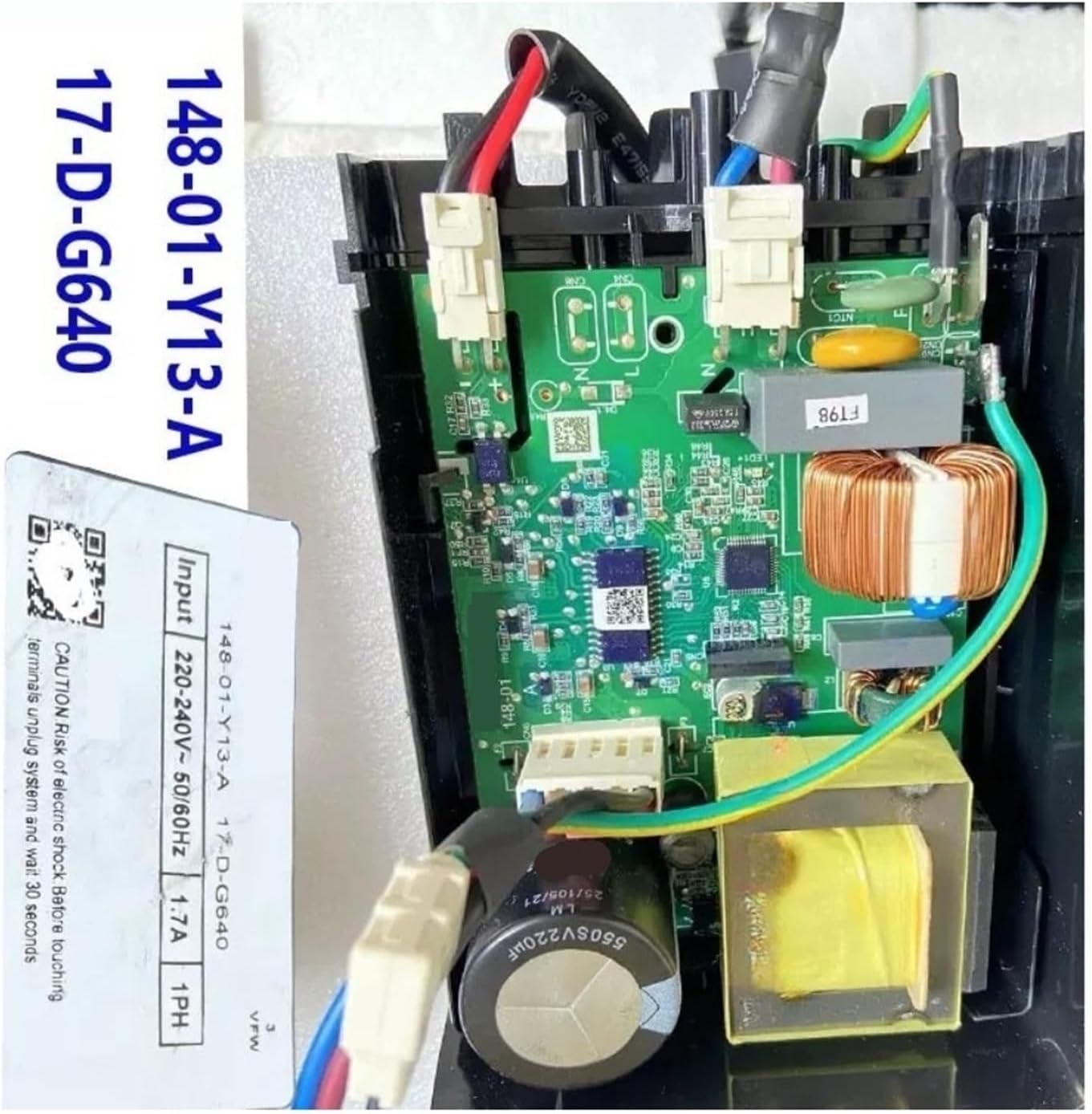
Image Description: The WWEIFUS Refrigerator Control Board, showing the input specifications label clearly. The label indicates "148-01-Y13-A 17-D-G640" and "Input 220-240V~ 50/60Hz 1.7A 1PH". A warning about electric shock is also visible.
Specifications
Technical Data
- Part Numbers: 148-01-Y13-A, 17-D-G640
- Input Voltage: 220-240V~
- Frequency: 50/60Hz
- Current: 1.7A
- Phase: 1PH
- Package Dimensions: 1.18 x 0.79 x 0.39 inches
- Item Weight: 1.76 ounces
- Manufacturer: hsujd
- Assembly Required: No (for the board itself)
- Number of Pieces: 1
Warranty and Support
Product Support
For warranty information or technical assistance regarding this WWEIFUS Control Board, please contact the retailer or manufacturer directly. Keep your purchase receipt as proof of purchase.
For further details regarding your Donper refrigerator's overall operation, features, or specific error codes not covered here, please refer to its original user manual provided by the appliance manufacturer.